
Hey guys!
In this article, I will demonstrate how to use auditing to map a user's real necessary permissions, identifying everything that user actually did in the database during the observed time, to generate a script granting only the permissions that he really needs, thus eliminating the need to have integration users and other users, other than the main one of the application, with permissions on all objects in the database, such as db_owner, db_datareader and/or db_datawriter, for example.
During customer service, it is very common to see situations where users of integrations between systems or processes are created in the database exclusively for this process (good practice), but even though they need to access/change a few tables, they end up receiving permissions on all objects in that database. Even more so in integration users, which are not always developed by the internal team and in many cases, the system of these integration users is not even under the responsibility of the local IT team and can be accessed via the internet, for example, a breach in this external system could end up being catastrophic for your company.
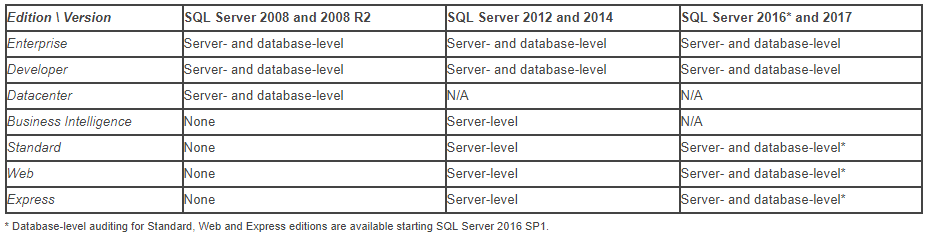
In order to mitigate this problem, I will demonstrate to you how to log everything these users do in the database and allow you to apply only the necessary permissions. For this need, I will use the Server Audit feature, available since SQL Server 2008 in the Enterprise version and since SQL Server 2012 in the Standard version. I will also use the Database Audit feature, available in the Standard version only from SQL Server 2016 SP1 onwards.
In summary, to be able to run the scripts in this article, you will need to meet one of the conditions below:
- SQL Server 2012 or above, Enterprise, Datacenter (2008) or Developer edition
- SQL Server 2016 SP1 or above (any edition, up to Express)
Creating the table to store access history
After the introduction above, let's now start monitoring table access. First of all, I will create the table that will store the history of accesses collected by the audit.
CREATE TABLE [dbo].[Auditoria_Acesso]
(
    [Id_Auditoria] [bigint] NOT NULL IDENTITY(1, 1),
    [Dt_Auditoria] [datetime] NOT NULL,
    [Cd_Acao] [varchar] (60) COLLATE SQL_Latin1_General_CP1_CI_AI NOT NULL,
    [Ds_Maquina] [varchar] (128) COLLATE SQL_Latin1_General_CP1_CI_AI NOT NULL,
    [Ds_Usuario] [varchar] (128) COLLATE SQL_Latin1_General_CP1_CI_AI NOT NULL,
    [Ds_Database] [varchar] (128) COLLATE SQL_Latin1_General_CP1_CI_AI NOT NULL,
    [Ds_Schema] [varchar] (128) COLLATE SQL_Latin1_General_CP1_CI_AI NOT NULL,
    [Ds_Objeto] [varchar] (128) COLLATE SQL_Latin1_General_CP1_CI_AI NOT NULL,
    [Ds_Query] [varchar] (max) COLLATE SQL_Latin1_General_CP1_CI_AI NULL,
    [Fl_Sucesso] [bit] NOT NULL,
    [Ds_IP] [varchar] (128) COLLATE SQL_Latin1_General_CP1_CI_AI NOT NULL,
    [Ds_Programa] [varchar] (128) COLLATE SQL_Latin1_General_CP1_CI_AI NOT NULL,
    [Qt_Duracao] [bigint] NOT NULL,
    [Qt_Linhas_Retornadas] [bigint] NOT NULL,
    [Qt_Linhas_Alteradas] [bigint] NOT NULL
) ON [PRIMARY] TEXTIMAGE_ON [PRIMARY]
WITH
(
DATA_COMPRESSION = PAGE
)
GO
ALTER TABLE [dbo].[Auditoria_Acesso] ADD CONSTRAINT [PK__Auditori__E9F1DAD4EE3743FE] PRIMARY KEY CLUSTERED ([Id_Auditoria]) WITH (DATA_COMPRESSION = PAGE) ON [PRIMARY]
GO
Creating the Server Audit by filtering users
The second step to be able to audit the accesses made by certain users, we will create a server audit on the instance that will be used in the next topic to capture these events. It is worth remembering that the Server Audit feature has been available since SQL Server 2008 in the Enterprise version and since SQL Server 2012 in the Standard version. Furthermore, it is only possible to use filters in Server Audit starting with SQL Server 2012.
In the example below, I am defining that the audit will create up to 16 files of 10 MB each. As the files are filled, new files with the collected data will be created until the established limit is reached (16 files). When all files have been created and are fully populated, the oldest files begin to be overwritten with the new information. For this reason, it is important to have a routine to collect data from files and store them in tables.
Furthermore, starting with SQL Server 2012, we can apply several filters to refine our searches, such as capturing data from users that end with '%User' or that begin with LS_% and also ignoring Intellisense from SSMS and RedGate tools, in addition to not collecting data from users who are in the “MEUDOMINIO” domain and also not collecting data from the user “usrDirceuResende”.
At this stage we can filter the usernames, software, IPs or Hostnames that will be used to refine the searches to return only the desired data.
USE [master]
GO

IF ((SELECT COUNT(*) FROM sys.server_audits WHERE [name] = 'Auditoria_Acessos') > 0)
BEGIN
    ALTER SERVER AUDIT [Auditoria_Acessos] WITH (STATE = OFF);
    DROP SERVER AUDIT [Auditoria_Acessos]
END


CREATE SERVER AUDIT [Auditoria_Acessos]
TO FILE
(
    FILEPATH = N'C:\Audit\',
    MAXSIZE = 10 MB,
    MAX_ROLLOVER_FILES = 16,
    RESERVE_DISK_SPACE = OFF
)
WITH
(
    QUEUE_DELAY = 1000,
    ON_FAILURE = CONTINUE,
    AUDIT_GUID = '0b5ad307-ee47-43db-a169-9af67cb661f9'
)
WHERE (([server_principal_name] LIKE '%User' OR [server_principal_name] LIKE 'LS_%') AND [application_name]<>'Microsoft SQL Server Management Studio - Transact-SQL IntelliSense' AND NOT [application_name] LIKE 'Red Gate Software%')
GO


ALTER SERVER AUDIT [Auditoria_Acessos] WITH (STATE = ON)
GO
Creating the Database Audit capturing access
In the third step to set up our monitoring, we will now create a database audit for each database for which you want to monitor permissions. In the example below, I will monitor the INSERT/DELETE/UPDATE/SELECT/EXECUTE events performed by any database user (public).
It is worth remembering that, although Database Audit appears to capture events from all users, in Server Audit we already limit the users that must be returned and this filter is also respected in Database Audit.
The code below will go through all databases that are not in the exception list (master, tempdb, msdb and model) and will create the database audit.
DECLARE @Query VARCHAR(MAX)
SET @Query = '

IF (''?'' NOT IN (''master'', ''tempdb'', ''model'', ''msdb''))
BEGIN

    USE [?];

    IF ((SELECT COUNT(*) FROM sys.database_audit_specifications WHERE [name] = ''Auditoria_Acessos'') > 0)
    BEGIN

        ALTER DATABASE AUDIT SPECIFICATION [Auditoria_Acessos] WITH (STATE = OFF);
        DROP DATABASE AUDIT SPECIFICATION [Auditoria_Acessos];

    END

    CREATE DATABASE AUDIT SPECIFICATION [Auditoria_Acessos]
    FOR SERVER AUDIT [Auditoria_Acessos]
    ADD (DELETE ON DATABASE::[?] BY [public]),
    ADD (EXECUTE ON DATABASE::[?] BY [public]),
    ADD (INSERT ON DATABASE::[?] BY [public]),
    ADD (SELECT ON DATABASE::[?] BY [public]),
    ADD (UPDATE ON DATABASE::[?] BY [public])
    WITH (STATE = ON);

END'


EXEC sys.sp_MSforeachdb @Query
Creating the Stored Procedure to store the collected data
In the 4th step of the routine, we will create the Stored Procedure responsible for reading data from the audit files and writing the data to the table created in step 1. Remember to create a job in SQL Agent to execute the procedure below every X minutes.
IF (OBJECT_ID('dbo.stpAuditoria_Acessos_Carrega_Dados') IS NULL) EXEC('CREATE PROCEDURE dbo.stpAuditoria_Acessos_Carrega_Dados AS SELECT 1')
GO

ALTER PROCEDURE dbo.stpAuditoria_Acessos_Carrega_Dados
AS
BEGIN

    DECLARE @TimeZone INT = DATEDIFF(HOUR, GETUTCDATE(), GETDATE())
    DECLARE @Dt_Max DATETIME = DATEADD(SECOND, 1, ISNULL((SELECT MAX(Dt_Auditoria) FROM dirceuresende..Auditoria_Acesso), '1900-01-01'))

    INSERT INTO dirceuresende.dbo.Auditoria_Acesso
    (
        Dt_Auditoria,
        Cd_Acao,
        Ds_Maquina,
        Ds_Usuario,
        Ds_Database,
        Ds_Schema,
        Ds_Objeto,
        Ds_Query
        Fl_Sucesso,
        Ds_IP,
        Ds_Programa,
        Qt_Duracao,
        Qt_Linhas_Retornadas,
        Qt_Linhas_Alteradas
    )
    SELECT DISTINCT
        DATEADD(HOUR, @TimeZone, event_time) AS event_time,
        action_id,
        server_instance_name,
        server_principal_name,
        [database_name],
        [schema_name],
        [object_name],
        [statement],
        succeeded,
        client_ip,
        application_name,
        duration_milliseconds,
        response_rows,
        affected_rows
    FROM
        sys.fn_get_audit_file('C:\Audit\*.sqlaudit', DEFAULT, DEFAULT)
    WHERE
        DATEADD(HOUR, @TimeZone, event_time) >= @Dt_Max

END
Querying the collected data
And finally, in the 5th step of this routine, we will read the data collected and stored in the dirceuresende.dbo.Auditoria_Acesso table and identify the accesses made by each user in each database. This will help you identify what these users are currently accessing in the database. The excuse for all users to be db_owner of databases is over.
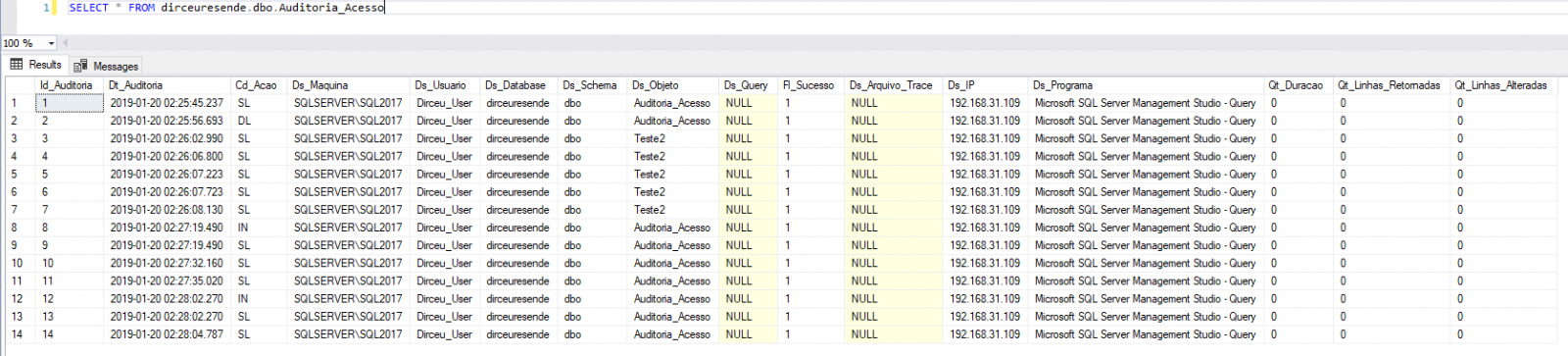
If you also want to generate scripts to grant current permissions, you can use this script:
SELECT DISTINCT
    Ds_Usuario,
    Ds_Database,
    Cd_Acao,
    Ds_Objeto,
    'USE [' + Ds_Database + ']; GRANT ' + (CASE Cd_Acao
        WHEN 'UP' THEN 'UPDATE'
        WHEN 'IN' THEN 'INSERT'
        WHEN 'DL' THEN 'DELETE'
        WHEN 'SL' THEN 'SELECT'
        WHEN 'EX' THEN 'EXECUTE'
    END) + ' ON [' + Ds_Schema + '].[' + Ds_Objeto + '] TO [' + Ds_Usuario + '];' AS Comando
FROM
    dirceuresende..Auditoria_Acesso
WHERE
    Cd_Acao <> 'UNDO'
ORDER BY
    Ds_Usuario,
    Ds_Database,
    Ds_Objeto
Result:

Ready! Access audit routine implemented. The next step now is to use the collected data to grant the permissions that users actually used during the time Audit was enabled and remove elevated permissions from these users, such as sysadmin and db_owner.
Observation: A very important point that must be analyzed is the number of records that this table will hold. In environments that have many simultaneous users, this collection of access data can end up generating a very large volume of data and consuming a lot of disk space. Because of this, it is always important to monitor the volume of data and create a routine to clean the table, keeping only X days of history.
Furthermore, I don't even need to say that I recommend that you TEST a lot before applying it to production, right? Depending on the number of transactions per second, this may even generate a performance impact when activating this feature (although I have already tested it in very critical environments and have not noticed any changes).
Well guys, I hope this helped you find a way to validate all objects accessed by certain users, helping you to map out the necessary permissions.
A big hug and see you later!

Comments (0)
Loading comments...