
Hey guys!
A common need for DBA's is to avoid improper or mistaken access and operations, which even the DBA itself can end up being careless and carrying out a wrong operation. My idea in this post is to demonstrate some solutions using triggers.
Creation of the test table
IF (OBJECT_ID('dbo.Teste_Trigger') IS NOT NULL) DROP TABLE dbo.Teste_Trigger
CREATE TABLE dbo.Teste_Trigger (
    Id INT IDENTITY(1, 1) NOT NULL,
    Nome VARCHAR(100) NOT NULL
)

INSERT INTO dbo.Teste_Trigger
VALUES ( 'Dirceu Resende' ), ( 'Teste' ), ( 'Teste 2')

SELECT * FROM dbo.Teste_Trigger
Avoid DML commands on table (Read-only table)
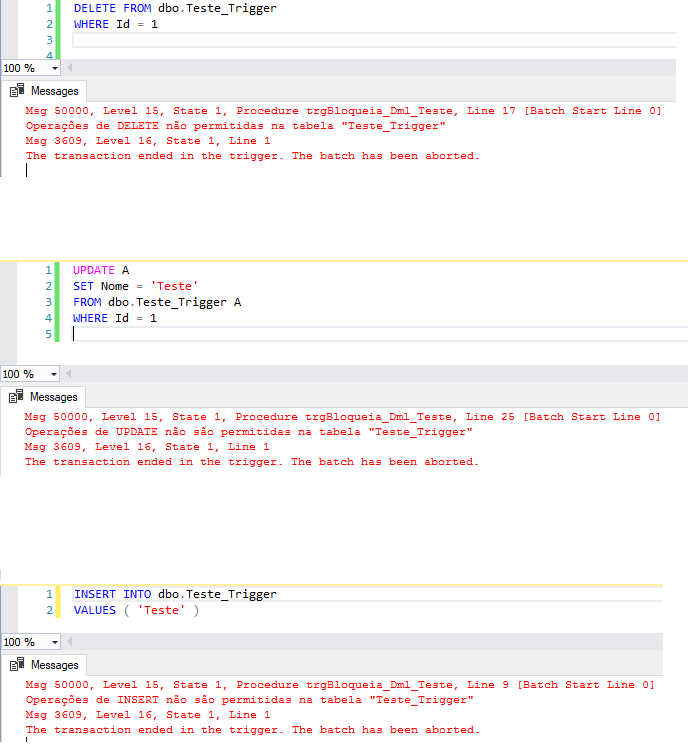
If you do not want to allow DML operations (INSERT, UPDATE and DELETE) on your table, thus transforming it into a read-only table, simply create the trigger below:
IF (OBJECT_ID('[dbo].[trgBloqueia_Dml_Teste]') IS NOT NULL) DROP TRIGGER [dbo].[trgBloqueia_Dml_Teste]
GO

CREATE TRIGGER [dbo].[trgBloqueia_Dml_Teste] ON [dbo].[Teste_Trigger]
FOR INSERT, UPDATE, DELETE AS
BEGIN

    IF EXISTS (SELECT * FROM inserted) AND NOT EXISTS (SELECT * FROM deleted)
    BEGIN
        ROLLBACK TRANSACTION;
        RAISERROR ('Operações de INSERT não são permitidas na tabela "Teste_Trigger"', 15, 1);
        RETURN;
    END


    IF EXISTS (SELECT * FROM deleted) AND NOT EXISTS (SELECT * FROM inserted)
    BEGIN
        ROLLBACK TRANSACTION;
        RAISERROR ('Operações de DELETE não são permitidas na tabela "Teste_Trigger"', 15, 1);
        RETURN;
    END


    IF EXISTS (SELECT * FROM inserted) AND EXISTS (SELECT * FROM deleted)
    BEGIN
        ROLLBACK TRANSACTION;
        RAISERROR ('Operações de UPDATE não são permitidas na tabela "Teste_Trigger"', 15, 1);
        RETURN;
    END

END;
GO
Result:
Avoid DELETE or UPDATE without where
A very common error in a DBA's daily life is when an analyst or developer sends an UPDATE or DELETE script for the DBA to execute and they forget to put the WHERE clause. Imagine the damage this could cause to the database. One way to avoid this is by using plugins and add-ons, such as Redgate SQL Prompt and ApexSQL Complete, which alert the DBA when this will occur.
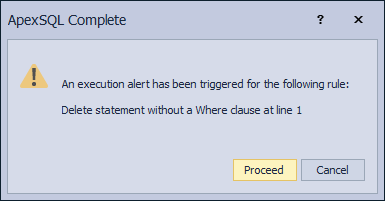
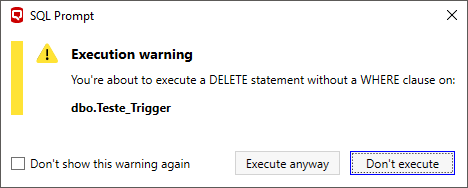
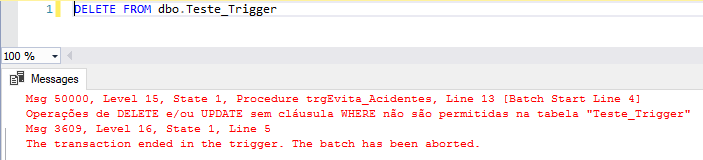
Another (and more reliable) way is to create a trigger for this:
IF (OBJECT_ID('[dbo].[trgEvita_Acidentes]') IS NOT NULL) DROP TRIGGER [dbo].[trgEvita_Acidentes]
GO

CREATE TRIGGER [dbo].[trgEvita_Acidentes] ON [dbo].[Teste_Trigger]
FOR UPDATE, DELETE AS
BEGIN

    DECLARE
        @Linhas_Alteradas INT = @@ROWCOUNT,
        @Linhas_Tabela INT = (SELECT SUM(row_count) FROM sys.dm_db_partition_stats WHERE [object_id] = OBJECT_ID('Teste_Trigger') AND (index_id <= 1))

    IF (@Linhas_Alteradas >= @Linhas_Tabela)
    BEGIN
        ROLLBACK TRANSACTION;
        RAISERROR ('Operações de DELETE e/ou UPDATE sem cláusula WHERE não são permitidas na tabela "Teste_Trigger"', 15, 1);
        RETURN;
    END


END;
GO
Result:
Only allow 1 changed record at a time in the table
Another need that may occur in some tables is to require that only 1 record in the table be changed at a time through a DELETE/UPDATE operation:
IF (OBJECT_ID('[dbo].[trgEvita_Dml_Muitos_Registros]') IS NOT NULL) DROP TRIGGER [dbo].[trgEvita_Dml_Muitos_Registros]
GO

CREATE TRIGGER [dbo].[trgEvita_Dml_Muitos_Registros] ON [dbo].[Teste_Trigger]
FOR UPDATE, DELETE AS
BEGIN

    DECLARE
        @Linhas_Alteradas INT = @@ROWCOUNT,
        @MsgErro VARCHAR(MAX)

    IF (@Linhas_Alteradas > 1)
    BEGIN
        ROLLBACK TRANSACTION;
        SET @MsgErro = 'Operações de DELETE e/ou UPDATE só podem atualizar 1 registro por vez na tabela "Teste_Trigger", e você tentou atualizar ' + CAST(@Linhas_Alteradas AS VARCHAR(50))
        RAISERROR (@MsgErro, 15, 1);
        RETURN;
    END


END;
GO
When trying to update more than one record, the trigger will block the operation:

Having presented the solutions above, I hope I have answered your questions about DML restriction in SQL Server using Triggers. This is a very old feature of the DBMS, hated by some, loved by others and which is useful when well applied and its use is justified.
I hope you liked this post and if you have any questions, leave them here in the comments.
A hug and see you in the next post!

Comments (0)
Loading comments...