
Hey guys!
In this post, I would like to bring you a solution on how to know the date of a user's last login to SQL Server, which is information that I often see someone wanting to know how to obtain, especially to identify users who access the environment or not, to make data mappings and/or exclude users who are no longer accessing the database.
I will demonstrate some solutions that can meet this need, but none of them are something native to SQL Server created specifically for this purpose, like a simple last_login column in a view like sys.server_principals, for example.
Solution #1 – Accdate column in sys.syslogins (DOES NOT resolve)
select name, accdate
from sys.syslogins
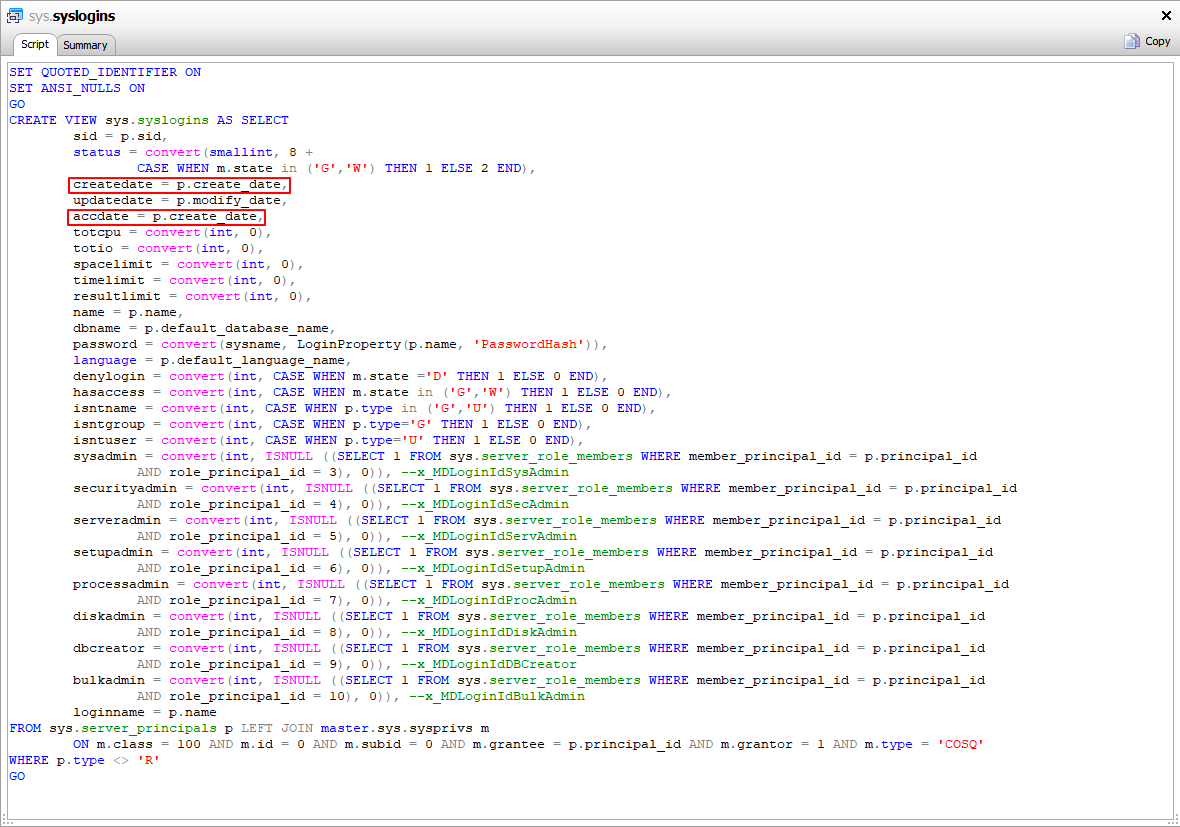
A very common “solution” to find on blogs and forums to solve this type of problem, this query NO returns the date of a user's last logon, as many people believe. The sys.syslogins catalog view has been marked as “deprecated” since SQL Server 2005 and since SQL 2008, at least, we can identify in the source code of this view that the “accdate” column always has the same value as the “createdate” column
Solution #2 – MAX(login_time) in sys.dm_exec_sessions (DOES NOT resolve)
SELECT
    login_name AS [Login],
    MAX(login_time) AS [Last Login Time]
FROM
    sys.dm_exec_sessions
GROUP BY
    login_name
Another totally wrong “solution” that I see on many websites, blogs and forums, using the DMV sys.dm_exec_sessions could NEVER be used to find out the date of a user's last login, as this DMV only shows information about the instance's active sessions.
If the instance is restarted or the session finishes running, for example, this information will already be lost. If your last login data collection routine is executed and there are no more active sessions for that user, you will not have this information available either.
For these reasons, I do not consider this query to be a solution to this problem.
Solution #3 – Using Login Auditing
Starting now with solutions that actually work, this solution that I am going to present consists of activating the audit of successful logins as well (the default is to audit only failures) and using the errorlog to identify the users' login dates.
The negative point of this solution is the number of new records that will appear in the errorlog. In addition to consuming more space, it can make troubleshooting problems using the errorlog more difficult, due to the very high number of lines, depending on the number of logins to the instance.
How to enable this option using SSMS:
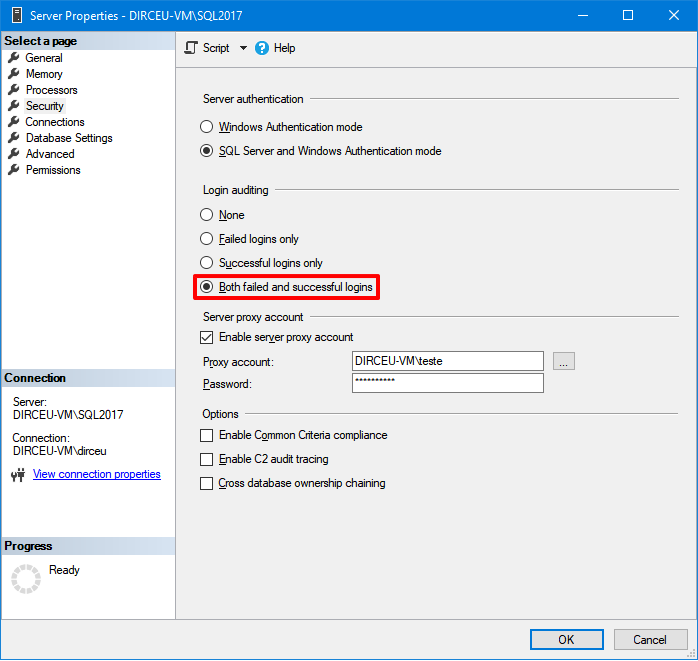
How to enable this option using T-SQL:
EXEC sys.xp_instance_regwrite
    @rootkey = 'HKEY_LOCAL_MACHINE',
    @key = 'SOFTWARE\Microsoft\MSSQLServer\MSSQLServer',
    @value_name = 'AuditLevel',
    @type = 'REG_DWORD',
    @value = 3 -- 0 = Nenhum / 1 = Apenas sucesso / 2 = Apenas falha / 3 = Sucesso e Falha
Script used to monitor data collection:
IF (OBJECT_ID('tempdb..#Arquivos_Log') IS NOT NULL) DROP TABLE #Arquivos_Log
CREATE TABLE #Arquivos_Log (
    [idLog] INT,
    [dtLog] NVARCHAR(30) COLLATE SQL_Latin1_General_CP1_CI_AI,
    [tamanhoLog] INT
)

IF (OBJECT_ID('tempdb..#Dados') IS NOT NULL) DROP TABLE #Dados
CREATE TABLE #Dados (
    [LogDate] DATETIME,
    [ProcessInfo] NVARCHAR(50) COLLATE SQL_Latin1_General_CP1_CI_AI,
    [Text] NVARCHAR(MAX) COLLATE SQL_Latin1_General_CP1_CI_AI,
    [User] AS (SUBSTRING(REPLACE([Text], 'Login succeeded for user ''', ''), 1, CHARINDEX('''', REPLACE([Text], 'Login succeeded for user ''', '')) - 1))
)


INSERT INTO #Arquivos_Log
EXEC sys.sp_enumerrorlogs


DECLARE
    @Contador INT = 0,
    @Total INT = (SELECT COUNT(*) FROM #Arquivos_Log)


WHILE(@Contador < @Total)
BEGIN

    INSERT INTO #Dados (LogDate, ProcessInfo, [Text])
    EXEC master.dbo.xp_readerrorlog @Contador, 1, N'Login succeeded for user', NULL, NULL, NULL

    SET @Contador += 1

END


IF (OBJECT_ID('tempdb..#UltimoLogin') IS NOT NULL) DROP TABLE #UltimoLogin
CREATE TABLE #UltimoLogin (
    [User] VARCHAR(128) COLLATE SQL_Latin1_General_CP1_CI_AI NOT NULL,
    LogDate DATETIME NOT NULL
)

INSERT INTO #UltimoLogin
SELECT
    [User],
    MAX(LogDate) AS LogDate
FROM
    #Dados
GROUP BY
    [User]


-- Cria a tabela, se não existir
IF (OBJECT_ID('dbo.LastLogin') IS NULL)
BEGIN

    -- DROP TABLE dbo.LastLogin
    CREATE TABLE dbo.LastLogin (
        Username VARCHAR(128) COLLATE SQL_Latin1_General_CP1_CI_AI NOT NULL,
        CreateDate DATETIME,
        LastLogin DATETIME NULL,
        DaysSinceLastLogin AS (DATEDIFF(DAY, ISNULL(LastLogin, CreateDate), CONVERT(DATE, GETDATE())))
    )

END


-- Insere os logins criados na instância
INSERT INTO dbo.LastLogin (Username, CreateDate)
SELECT
    [name],
    create_date
FROM
    sys.server_principals A
    LEFT JOIN dbo.LastLogin B ON A.[name] COLLATE SQL_Latin1_General_CP1_CI_AI = B.Username
WHERE
    is_fixed_role = 0
    AND [name] NOT LIKE 'NT %'
    AND [name] NOT LIKE '##%'
    AND B.Username IS NULL
    AND A.[type] IN ('S', 'U')


-- Atualiza a tabela de histórico com os dados atuais
UPDATE A
SET
    A.LastLogin = B.LogDate
FROM
    dbo.LastLogin A
    JOIN #UltimoLogin B ON A.Username = B.[User]
WHERE
    ISNULL(A.LastLogin, '1900-01-01') <> B.LogDate


SELECT *
FROM dbo.LastLogin
Result:
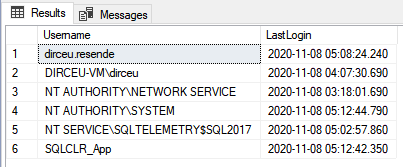
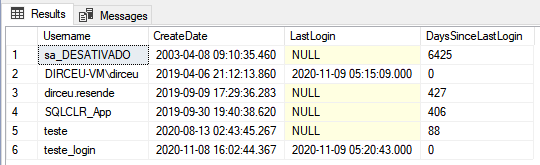
With this script above, you simply create a job to run it periodically and collect the necessary data. The dbo.LastLogin table will have the most current data about each user's last login.
Solution #4 – Using a logon trigger
Another way you can create this login history is by using logon triggers for this. This is a solution where you have more control than using the Login Auditing feature, but at the same time, it takes a little more work to create.
The negative point of this solution is that, like every logon trigger, if you create something wrong in the development of the trigger or the user who is going to log in does not have permission in the history table, this will PREVENT him from being able to log in to the database. So be very careful with this, and test a lot before applying it to production.
Creating history tables
IF (OBJECT_ID('dbo.LoginHistory') IS NULL)
BEGIN

    -- DROP TABLE dbo.LoginHistory
    CREATE TABLE dbo.LoginHistory (
        Username VARCHAR(128) COLLATE SQL_Latin1_General_CP1_CI_AI NOT NULL,
        LoginTime DATETIME NOT NULL,
        ProgramName VARCHAR(255)
    )

END


IF (OBJECT_ID('dbo.LastLogin') IS NULL)
BEGIN

    -- DROP TABLE dbo.LastLogin
    CREATE TABLE dbo.LastLogin (
        Username VARCHAR(128) COLLATE SQL_Latin1_General_CP1_CI_AI NOT NULL,
        CreateDate DATETIME,
        LastLogin DATETIME NULL,
        DaysSinceLastLogin AS (DATEDIFF(DAY, ISNULL(LastLogin, CreateDate), CONVERT(DATE, GETDATE())))
    )

END
Creation of Trigger
IF ((SELECT COUNT(*) FROM sys.server_triggers WHERE name = 'trgAudit_LoginHistory') > 0) DROP TRIGGER [trgAudit_LoginHistory] ON ALL SERVER
GO

CREATE TRIGGER [trgAudit_LoginHistory] ON ALL SERVER
-- Para evitar problemas de permissão no insert na tabela
WITH EXECUTE AS 'sa'
FOR LOGON
AS
BEGIN


    SET NOCOUNT ON


    -- Não loga conexões de usuários de sistema
    IF (ORIGINAL_LOGIN() LIKE 'NT %' OR ORIGINAL_LOGIN() LIKE '##%' OR ORIGINAL_LOGIN() LIKE '%SQLServerAgent')
        RETURN


    -- Não loga conexões de softwares que ficam se conectando constantemente
    IF (PROGRAM_NAME() LIKE 'Red Gate%' OR PROGRAM_NAME() LIKE '%IntelliSense%' OR PROGRAM_NAME() LIKE 'SQLAgent %' OR PROGRAM_NAME() IN ('Microsoft SQL Server', 'RSPowerBI', 'RSManagement', 'TransactionManager', 'DWDiagnostics', 'Report Server'))
        RETURN


    INSERT INTO dbo.LoginHistory (Username, LoginTime, ProgramName)
    SELECT
        ORIGINAL_LOGIN(),
        GETDATE(),
        PROGRAM_NAME()


END
GO

ENABLE TRIGGER [trgAudit_LoginHistory] ON ALL SERVER
GO
Generates analysis of each user's last login
IF (OBJECT_ID('tempdb..#UltimoLogin') IS NOT NULL) DROP TABLE #UltimoLogin
CREATE TABLE #UltimoLogin (
    [User] VARCHAR(128) COLLATE SQL_Latin1_General_CP1_CI_AI NOT NULL,
    LogDate DATETIME NOT NULL
)

INSERT INTO #UltimoLogin
SELECT
    Username,
    MAX(LoginTime) AS LogDate
FROM
    dbo.LoginHistory
GROUP BY
    Username


-- Insere os logins criados na instância
INSERT INTO dbo.LastLogin (Username, CreateDate)
SELECT
    [name],
    create_date
FROM
    sys.server_principals A
    LEFT JOIN dbo.LastLogin B ON A.[name] COLLATE SQL_Latin1_General_CP1_CI_AI = B.Username
WHERE
    is_fixed_role = 0
    AND [name] NOT LIKE 'NT %'
    AND [name] NOT LIKE '##%'
    AND B.Username IS NULL
    AND A.[type] IN ('S', 'U')


-- Atualiza a tabela de histórico com os dados atuais
UPDATE A
SET
    A.LastLogin = B.LogDate
FROM
    dbo.LastLogin A
    JOIN #UltimoLogin B ON A.Username = B.[User]
WHERE
    ISNULL(A.LastLogin, '1900-01-01') <> B.LogDate


SELECT *
FROM dbo.LastLogin
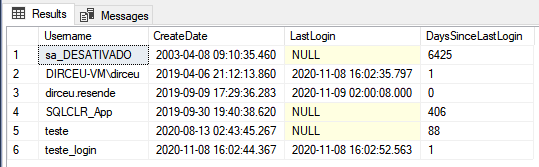
Result:
Solution #5 – Using Server Audit
Another possible solution is to use the Server Audit feature of SQL Server, which I have already demonstrated here on the blog how to use it in the article Audit in SQL Server (Server Audit).
In this solution, which is very light from the point of view of resource consumption, I will create a server audit and a server audit specification, and monitor the occurrences of the SUCCESSFUL_LOGIN_GROUP event. I will insert the returned data into the history table and then analyze the results obtained.
Creating history tables
IF (OBJECT_ID('dbo.LoginHistory') IS NULL)
BEGIN

    -- DROP TABLE dbo.LoginHistory
    CREATE TABLE dbo.LoginHistory (
        Username VARCHAR(128) COLLATE SQL_Latin1_General_CP1_CI_AI NOT NULL,
        LoginTime DATETIME NOT NULL,
        ProgramName VARCHAR(255)
    )

END


IF (OBJECT_ID('dbo.LastLogin') IS NULL)
BEGIN

    -- DROP TABLE dbo.LastLogin
    CREATE TABLE dbo.LastLogin (
        Username VARCHAR(128) COLLATE SQL_Latin1_General_CP1_CI_AI NOT NULL,
        CreateDate DATETIME,
        LastLogin DATETIME NULL,
        DaysSinceLastLogin AS (DATEDIFF(DAY, ISNULL(LastLogin, CreateDate), CONVERT(DATE, GETDATE())))
    )

END
Creation of Server Audit
USE [master]
GO

IF ((SELECT COUNT(*) FROM sys.server_audits WHERE [name] = 'Auditoria_Arquivo') > 0)
BEGIN

    ALTER SERVER AUDIT [Auditoria_Arquivo] WITH (STATE = OFF)

    DROP SERVER AUDIT [Auditoria_Arquivo]

END


CREATE SERVER AUDIT [Auditoria_Arquivo]
TO FILE
(
    FILEPATH = N'C:\Auditoria\', -- Preste atenção no caminho do arquivo
    MAXSIZE = 20 MB,
    MAX_ROLLOVER_FILES = 4,
    RESERVE_DISK_SPACE = OFF
)
WITH
(
    QUEUE_DELAY = 1000,
    ON_FAILURE = CONTINUE,
    AUDIT_GUID = 'd5d61d0a-2173-4e97-8036-90586f79c6fc'
)
ALTER SERVER AUDIT [Auditoria_Arquivo] WITH (STATE = ON)
GO
Creation of the Server Audit Specification
USE [master]
GO

IF ((SELECT COUNT(*) FROM sys.server_audit_specifications WHERE [name] = 'LoginAudit') > 0)
BEGIN

    ALTER SERVER AUDIT SPECIFICATION [LoginAudit] WITH(STATE = OFF)

    DROP SERVER AUDIT SPECIFICATION [LoginAudit]

END


CREATE SERVER AUDIT SPECIFICATION [LoginAudit]
FOR SERVER AUDIT [Auditoria_Arquivo]
ADD (SUCCESSFUL_LOGIN_GROUP)
WITH (STATE = ON)
GO
Generates analysis of each user's last login
USE [master]
GO

DECLARE @UltimoRegistro DATETIME = DATEADD(SECOND, 1, ISNULL((SELECT MAX(LoginTime) FROM dbo.LoginHistory), '1900-01-01'))

INSERT INTO dbo.LoginHistory ( Username, LoginTime, ProgramName )
SELECT DISTINCT
    server_principal_name,
    FORMAT(event_time, 'yyyy-MM-dd HH:mm:ss') AS LoginTime,
    application_name
FROM
    sys.fn_get_audit_file('C:\Auditoria\*.sqlaudit',default,default)
WHERE
    action_id = 'LGIS'
    AND event_time > @UltimoRegistro
    AND server_principal_name NOT LIKE 'NT %'
    AND server_principal_name NOT LIKE '##%'
    AND application_name NOT IN ('Microsoft SQL Server', 'RSPowerBI', 'RSManagement', 'TransactionManager', 'DWDiagnostics', 'Report Server')
    AND application_name NOT LIKE 'SQLAgent %'
    AND application_name NOT LIKE 'Red Gate%'
    AND application_name NOT LIKE '%IntelliS%'


-- Executa a query para retornar as informações do último login
IF (OBJECT_ID('tempdb..#UltimoLogin') IS NOT NULL) DROP TABLE #UltimoLogin
CREATE TABLE #UltimoLogin (
    [User] VARCHAR(128) COLLATE SQL_Latin1_General_CP1_CI_AI NOT NULL,
    LogDate DATETIME NOT NULL
)

INSERT INTO #UltimoLogin
SELECT
    Username,
    MAX(LoginTime) AS LogDate
FROM
    dbo.LoginHistory
GROUP BY
    Username


-- Insere os logins criados na instância
INSERT INTO dbo.LastLogin (Username, CreateDate)
SELECT
    [name],
    create_date
FROM
    sys.server_principals A
    LEFT JOIN dbo.LastLogin B ON A.[name] COLLATE SQL_Latin1_General_CP1_CI_AI = B.Username
WHERE
    is_fixed_role = 0
    AND [name] NOT LIKE 'NT %'
    AND [name] NOT LIKE '##%'
    AND B.Username IS NULL
    AND A.[type] IN ('S', 'U')


-- Atualiza a tabela de histórico com os dados atuais
UPDATE A
SET
    A.LastLogin = B.LogDate
FROM
    dbo.LastLogin A
    JOIN #UltimoLogin B ON A.Username = B.[User]
WHERE
    ISNULL(A.LastLogin, '1900-01-01') <> B.LogDate


SELECT *
FROM dbo.LastLogin
Result:
Well folks, that's it! I hope you liked the solutions I proposed in this article and that they can help you in your daily life.
Are there other ways to monitor this? Leave it here in the comments
A big hug and see you later!

Comments (0)
Loading comments...