In this post I will demonstrate how to create server audits (Server Audit) in SQL Server. This feature is very interesting for auditing DDL and/or DML (Database Audit Specification) actions performed by a user or application or even the instance itself (Server Audit Specification).
Creating an audit via interface (GUI)
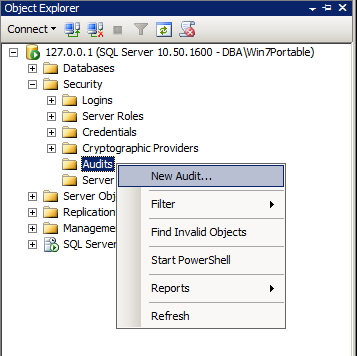
Open SQL Server Management Studio, select the Security category > Audits > Right click > Select the “New Audit…” option
SQL Server - Server Audit 2
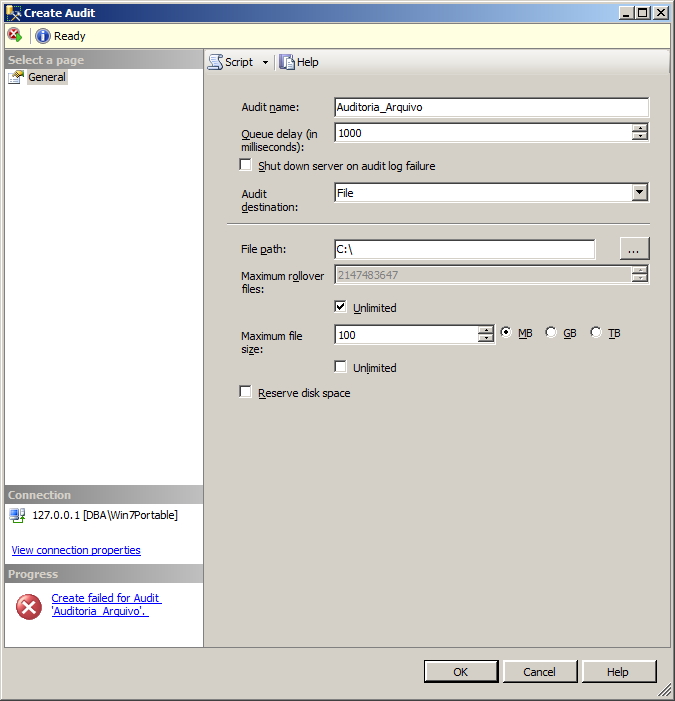
When you set up the audit, the recorded data can be saved in 3 ways:
File: A physical file is generated on the disk containing the data collected by the audit
Security Log: The data collected by the audit is stored in the server's security log
Application Log: The data collected by the audit is stored in the server's application log
In this post, I will choose to write to physical file on disk. By selecting this option, you can also specify the name of the file where it will be saved, the maximum size and choose whether you want to pre-reserve this maximum space on the disk (that is, if you choose the maximum size of 10 GB, SQL Server will already create this file with the 10 GB of space allocated)
SQL Server - Create Audit
After creating the Audit, you must enable it by right-clicking on it in the Object Explorer and then selecting the “Enable Audit” option
SQL Server - Enable Audit
SQL Server - Enable Audit 2
Creating a server-level audit (Server Audit Specification)
Now that the audit object has been created, we can create the audit definition object (Server Audit Specification).
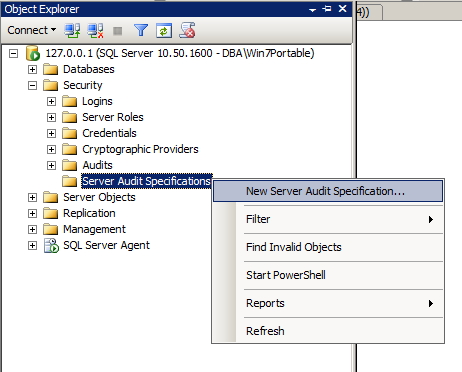
Select the instance and select the Security category > Server Audit Specification > Right click > Select the “New Server Audit Specification” option
SQL Server - Server Audit
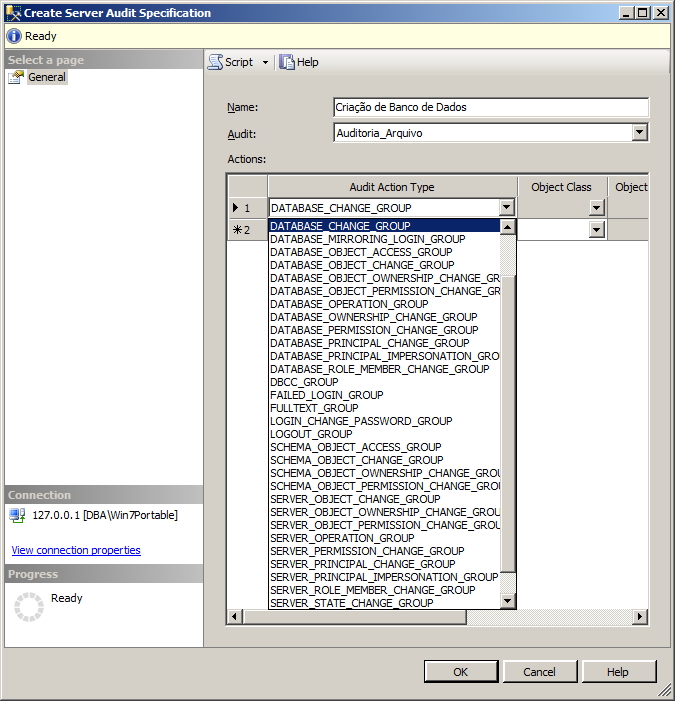
On this screen, you can define what you want to monitor, as shown in the screenshot below:
This event is generated whenever an audit is created, modified, or deleted. This event is generated whenever any audit specification is created, modified, or deleted. Any change to an audit is audited in that audit. Equivalent to Audit Change Audit event class.
This event is raised to report audit messages related to Service Broker transport security. Equivalent to Audit Broker Login Event Class.
DATABASE_CHANGE_GROUP
This event is generated when a database is created, changed, or dropped. This event is generated whenever a database is created, changed, or dropped. Equivalent to Audit Database Management event class.
This event is raised when a CREATE, ALTER, or DROP statement is executed on database objects such as schemas. It is generated whenever a database object is created, changed, or dropped.
Observation
This could generate very large volumes of audit logs.
This event is raised when there is an owner change for objects within the scope of the database. It is generated for any object property change in any database on the server. Equivalent to Audit Database Object Take Ownership event class.
DATABASE_OBJECT_PERMISSION_CHANGE_GROUP
This event is raised when GRANT, REVOKE, or DENY is issued for database objects such as assemblies and schemas. It is generated for any object permission change on any database on the server. Equivalent to Audit Database Object GDR event class.
DATABASE_OPERATION_GROUP
This event is raised when operations occur on a database, such as a checkpoint or subscription query notification. This event is raised on any database operation on any database. Equivalent to Audit Database Operation event class.
DATABASE_OWNERSHIP_CHANGE_GROUP
This event is raised when the ALTER AUTHORIZATION statement is used to change the owner of a database and the permissions required to do so are checked. It is generated for any database ownership change on any database on the server. Equivalent to Audit Change Database Owner event class.
DATABASE_PERMISSION_CHANGE_GROUP
This event is raised whenever GRANT, REVOKE, or DENY is issued for a statement permission by any entity in SQL Server (This applies to database-only events, such as granting permissions on a database, for example.).
This event is generated for any GDR (database permission change) of any database on the server. Equivalent to Audit Database Scope GDR Event Class.
DATABASE_PRINCIPAL_CHANGE_GROUP
This event is raised when entities, such as users, are created, changed, or dropped from a database. Equivalent to Audit Database Principal Management event class. (Also equivalent to the Audit Add DB Principal event class, which occurs in the deprecated sp_grantdbaccess, sp_revokedbaccess, sp_addPrincipal, and sp_dropPrincipal stored procedures.)
This event is raised whenever a database role is added or removed through the sp_addrole and sp_droprole stored procedures. This event is generated whenever any database entity is created, changed or dropped from any database. Equivalent to Audit Add Role event class.
DATABASE_PRINCIPAL_IMPERSONATION_GROUP
This event is raised when there is a database-scoped impersonation operation, such as EXECUTE AS or SETPRINCIPAL. It is generated for representations made in any database. Equivalent to Audit Database Principal Impersonation event class.
DATABASE_ROLE_MEMBER_CHANGE_GROUP
This event is raised whenever a login is added to or removed from a database role. This event class is raised for the sp_addrolemember, sp_changegroup, and sp_droprolemember stored procedures. This event is raised on any change to the Database role member in any database. Equivalent to Audit Add Member to DB Role event class.
DBCC_GROUP
This event is generated whenever an entity issues a DBCC command. Equivalent to Audit DBCC event class.
FAILED_LOGIN_GROUP
Indicates that an entity attempted to log on to SQL Server and failed. Events in this class are generated by new connections or by reused connections from a connection pool. Equivalent to Audit Login Failed event class.
This event is raised whenever a login's password is changed by the ALTER LOGIN statement or the sp_password stored procedure. Equivalent to Event Class Audit Login Change Password.
LOGOUT_GROUP
Indicates that an entity has logged off SQL Server. Events in this class are generated by new connections or by reused connections from a connection pool. Equivalent to Audit Logout event class.
This event is raised when permissions to change the owner of the schema object (such as a table, procedure, or function) are checked. This occurs when the ALTER AUTHORIZATION statement is used to assign an owner to an object. This event is raised for any schema property change in any database on the server. Equivalent to Audit Schema Object Take Ownership event class.
SCHEMA_OBJECT_PERMISSION_CHANGE_GROUP
This event is raised whenever a grant, deny, or revoke is performed against a schema object. Equivalent to Audit Schema Object GDR Event Class.
This event is raised when GRANT, REVOKE, or DENY is issued for a server object permission on any entity in SQL Server. Equivalent to Audit Server Object GDR Event Class.
SERVER_OPERATION_GROUP
This event is generated when security audit operations are used, such as changing settings, resources, external access, or authorization. Equivalent to Audit Server Operation event class.
SERVER_PERMISSION_CHANGE_GROUP
This event is raised when GRANT, REVOKE, or DENY is issued for server-scoped permissions, such as creating a login. Equivalent to Audit Server Scope GDR Event Class.
This event is raised when an entity issues the sp_defaultdb or sp_defaultlanguage stored procedures or ALTER LOGIN statements. Equivalent to Audit Addlogin event class.
This event is raised whenever a login is added to or removed from a fixed server role. This event is raised for the sp_addsrvrolemember and sp_dropsrvrolemember stored procedures. Equivalent to Audit Add Login to Server Role event class.
Indicates that the entity has successfully logged on to SQL Server. Events in this class are generated by new connections or by reused connections from a connection pool. Equivalent to Audit Login event class.
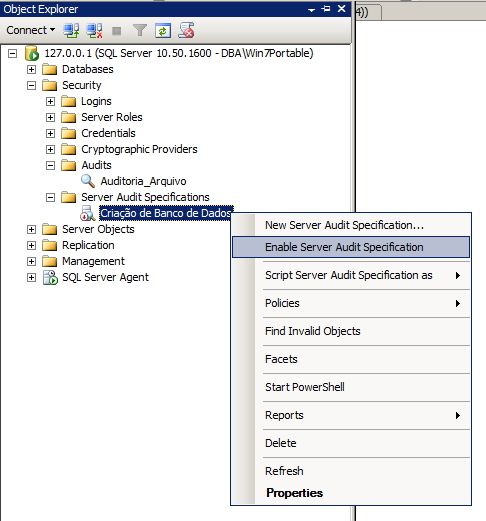
After choosing the audit types (in this example, I want to audit the creation/deletion of databases), click OK and enable the audit specification:
SQL Server - Server Audit Specification Enable
Creating a database-level audit (Database Audit Specification)
A very cool feature that can, on several occasions, replace the use of triggers, is the creation of audit routines at the database level. In this example, I will create an audit to record changes made to a specific table.
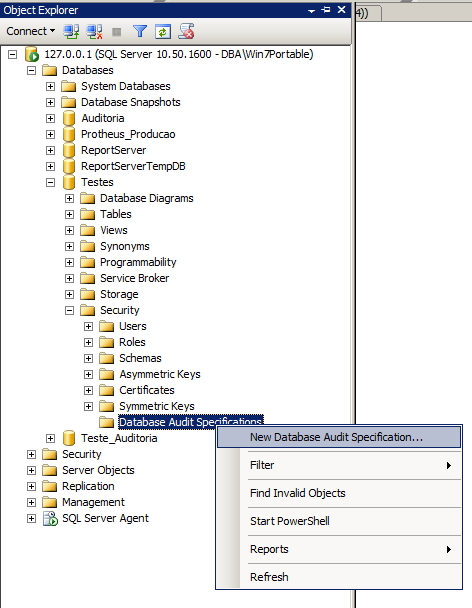
To create an audit at the database level, select the instance and then the database that will be audited, expand the Security category, select the Database Audit Specifications sub-category, right-click and select the “New Database Audit Specification” option
SQL Server - Database Audit
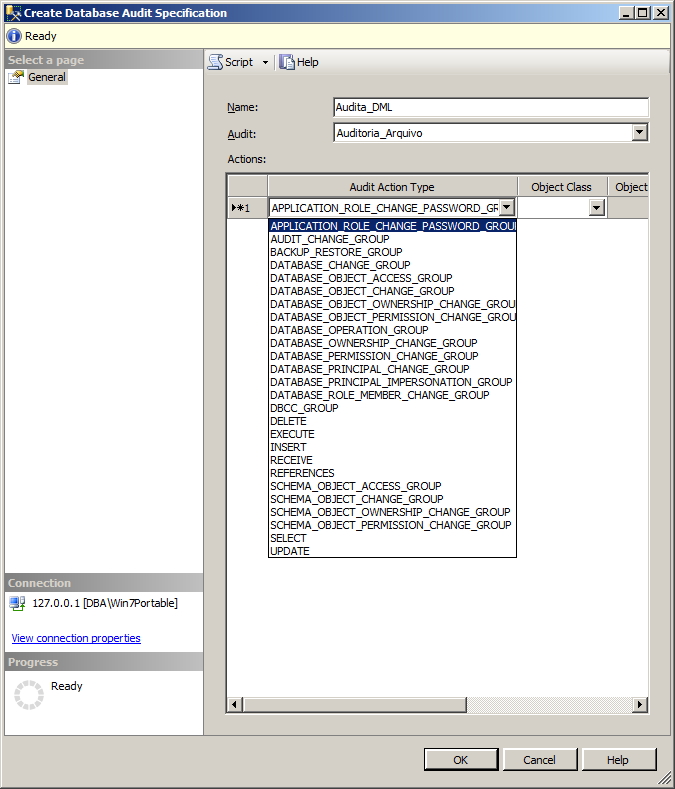
On this screen we can define what we want to audit in this database.
SQL Server - Database New Audit
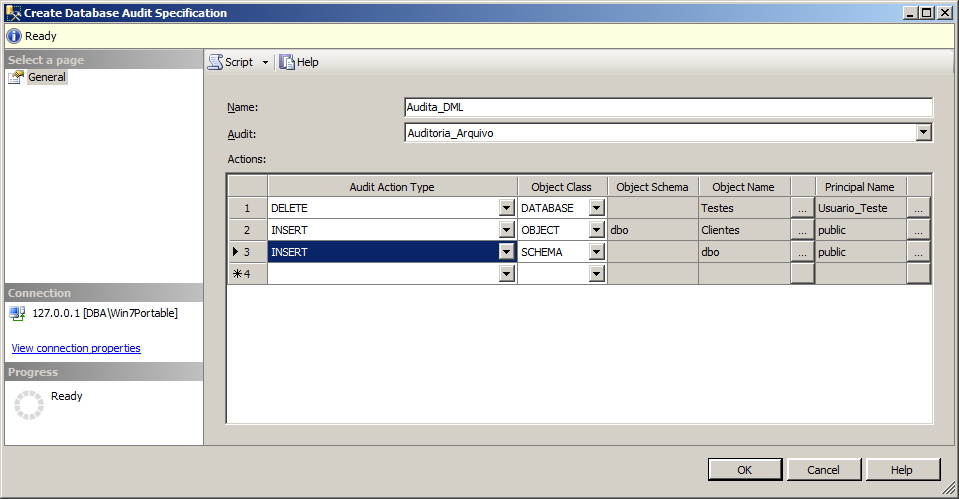
SQL Server - Database Audit Specification
In the above configuration, I have set it to audit the following operations:
– DELETEs performed in the Tests database by the user “Usuario_Teste”
– INSERTs made in the Customers table made by any user.
– INSERTs into any dbo schema object, made by any user.
After completing the configuration, remember to activate the audit by right-clicking on it and selecting the option “Enable Database Audit Specification” and your audit is activated!
Viewing the collected data
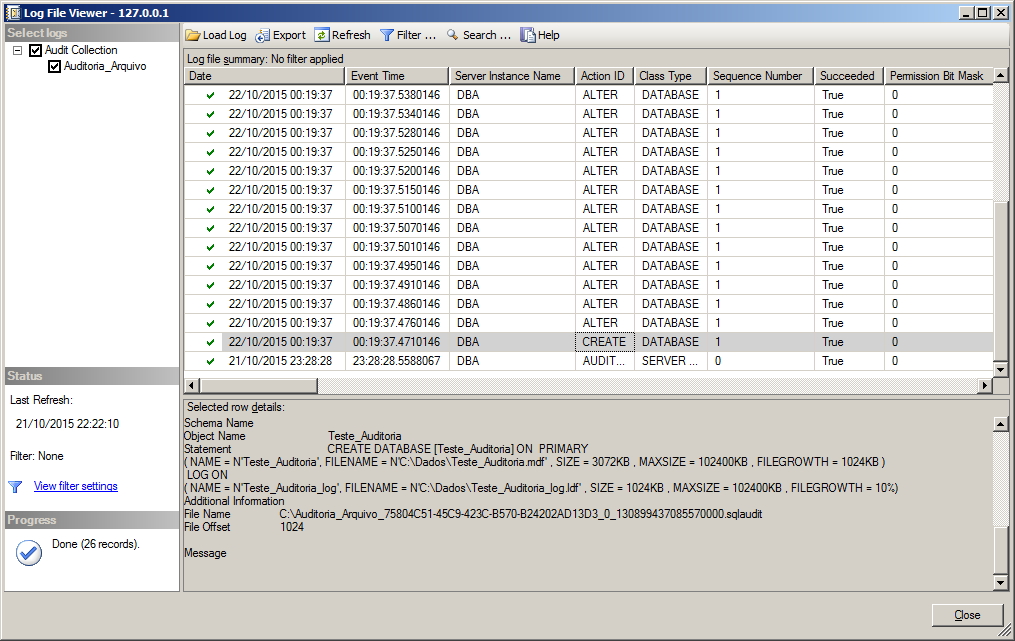
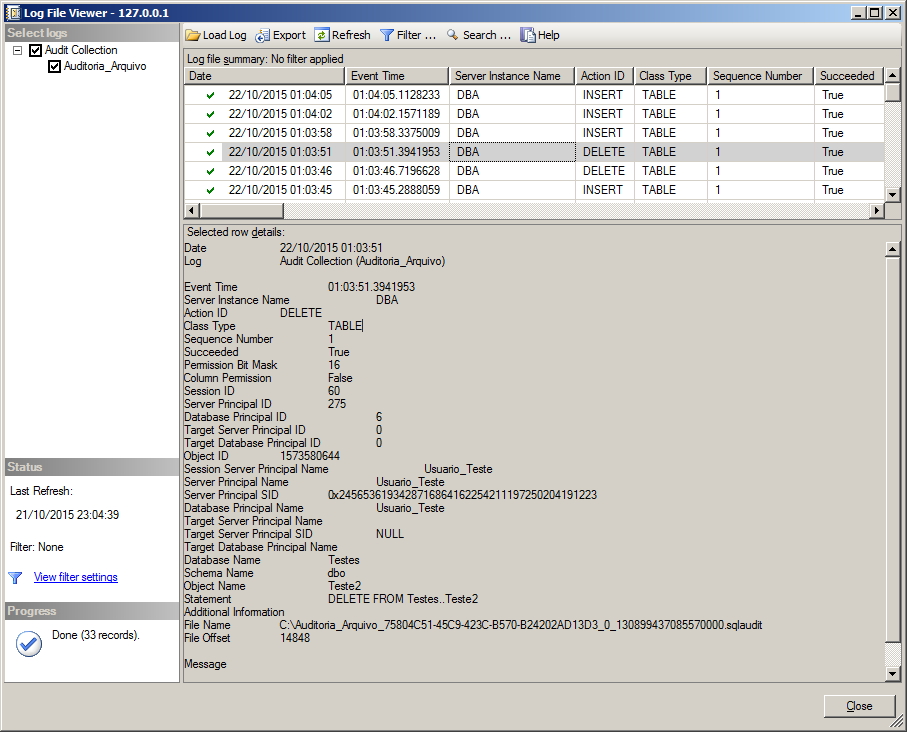
To view the data collected by the Audit, simply right-click on the Audit (not the Specification) and select the option “View Audit Logs”
SQL Server - View Audit Logs
SQL Server - Database Audit Specification View Log
Creating an audit via command line
After this entire post explaining how to create database and server audits using the SQL Server Management Studio screens, I will quickly explain how to create these same audits via the command line, which is a much more practical way to replicate across multiple servers and enhances the DBA's knowledge.
With the commands below, I already create the audit (and activate it), the audit at the server and database level (both already activated too).
USE [master]
GO

CREATE SERVER AUDIT [Auditoria_Arquivo]
TO FILE
(	FILEPATH = N'C:\'
	,MAXSIZE = 100 MB
	,MAX_ROLLOVER_FILES = 2147483647
	,RESERVE_DISK_SPACE = OFF
)
WITH
(	QUEUE_DELAY = 1000
	,ON_FAILURE = CONTINUE
)
GO

ALTER SERVER AUDIT Auditoria_Arquivo WITH (STATE = ON)


CREATE SERVER AUDIT SPECIFICATION [Criação de Banco de Dados]
FOR SERVER AUDIT [Auditoria_Arquivo]
ADD (DATABASE_CHANGE_GROUP)
WITH (STATE = ON)
GO


USE [Testes]
GO

CREATE DATABASE AUDIT SPECIFICATION [Audita_DML]
FOR SERVER AUDIT [Auditoria_Arquivo]
ADD (DELETE ON DATABASE::[Testes] BY [Usuario_Teste]),
ADD (INSERT ON SCHEMA::[dbo] BY [public]),
ADD (INSERT ON OBJECT::[dbo].[Clientes] BY [public])
WITH (STATE = ON)
GO
Viewing the logs
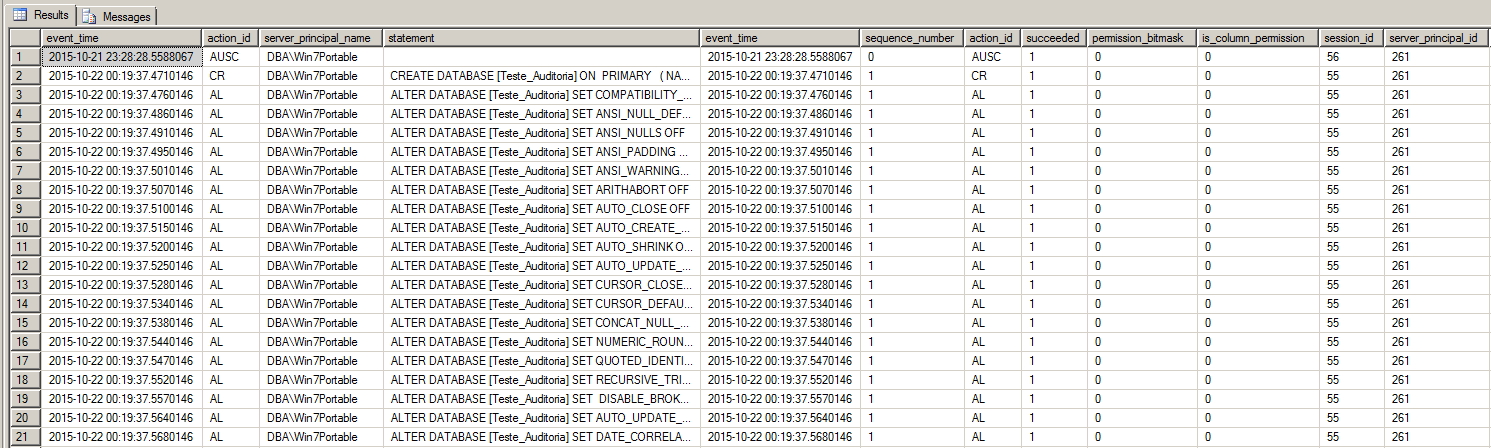
Using simple queries, we can easily read the monitored data and work with this information:
-- Retorna as informações de um arquivo específico
SELECT *
FROM Sys.fn_get_audit_file('C:\Auditoria_Arquivo_75804C51-45C9-423C-B570-B24202AD13D3_0_130899437085570000.sqlaudit',default,default)

-- Retorna as informações de todos os arquivos
SELECT event_time,action_id,server_principal_name,statement,*
FROM Sys.fn_get_audit_file('C:\*.sqlaudit',default,default)
And the displayed data looks like this: SQL Server - View audit logs SQL Query




Comments (0)
Loading comments...