
Hey guys,
Good morning!
In this post I will show you how to find dependencies between objects at various levels of hierarchy in SQL Server using Transact-SQL queries, simulating behavior similar to what is presented in the Management Studio interface.
Using SQL Server Management Studio
This is the easiest way to carry out this mapping, as it does not require any technical knowledge, just use the Management Studio interface. One drawback of this implementation is that you cannot work with the returned data to create some survey or mass mapping, for example, or define a hierarchy level for the search. Furthermore, this screen does not show cross-database dependencies, that is, dependencies between objects from different databases.
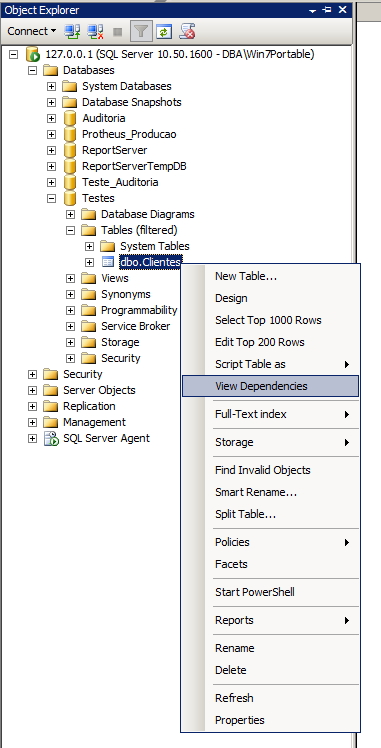
To view the dependencies, simply open the Object Explorer, select the object you want to view the dependencies (in the example, I chose the Customers table), right-click and select the “View Dependencies” option.
Once the screen opens, you can choose to view:
– Objects that depend on [Clientes])
– Other objects that the object in question has dependencies on (Objects on which [Clientes] depends)
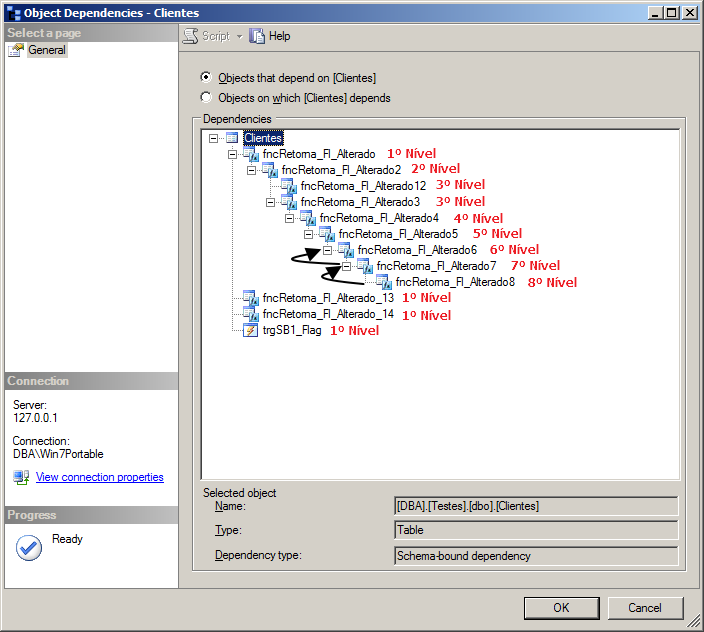
This screen lists both direct dependencies (level 1), when one object directly depends on another, and indirect dependencies (when an object depends on another object and that other object has the dependency). When more levels appear between the starting and ending objects, the higher their hierarchy becomes.
Using Transact-SQL
In the examples below, I will demonstrate how to list objects and their dependencies using T-SQL queries, making use of DMV’s sys.dm_sql_referenced_entities and sys.dm_sql_referencing_entities and the catalog view sys.sql_expression_dependencies.
Using sp_depends
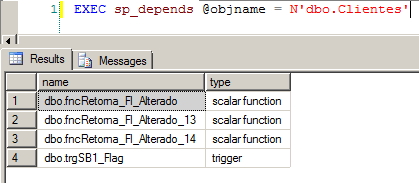
Using this system SP, you can quickly list the dependencies of an object (only 1st level and not cross-database)
EXEC sp_depends @objname = N'dbo.Clientes'
Example:
Using sp_MSdependencies
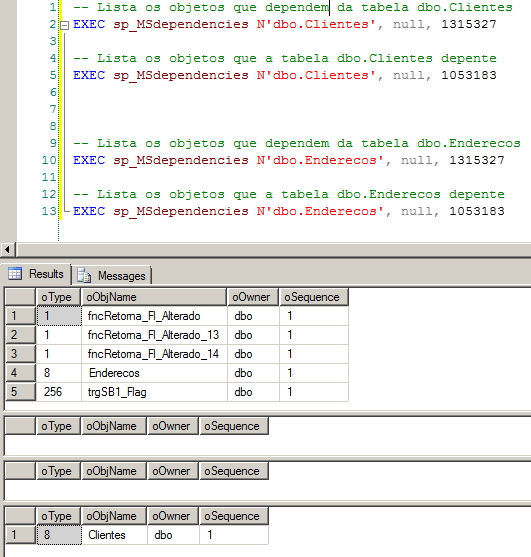
Uma outra SP de sistema que pode ajudar nessa situação, é a sp_MSdependencies. Although it is not cross-database, it allows you to view objects that depend on object X (Flag 1315327) and those that object X depends on (Flag 1053183).
-- Lista os objetos que dependem da tabela dbo.Clientes
EXEC sp_MSdependencies N'dbo.Clientes', null, 1315327

-- Lista os objetos que a tabela dbo.Clientes depente
EXEC sp_MSdependencies N'dbo.Clientes', null, 1053183
Examples:
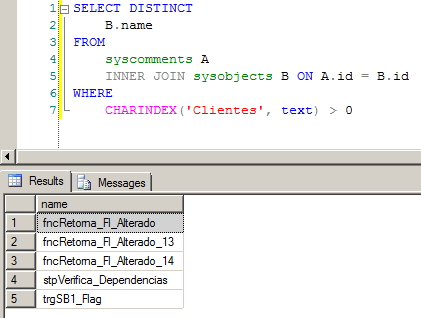
Using the syscomments catalog view
Using this catalog view, you can easily perform a textual search (it's a text search, not by object) between objects to try to enter a specific string in objects such as views, functions, procedures, triggers, etc. This feature is not cross-database and only returns 1st level dependencies.
SELECT DISTINCT
    B.name
FROM
    syscomments A
    INNER JOIN sysobjects B ON A.id = B.id
WHERE
    CHARINDEX('Clientes', text) > 0
Example:
Using the INFORMATION_SCHEMA.ROUTINES catalog view
With the query below, we can perform a textual search in procedures and functions that have a string in their name, such as the name of the object we are looking for dependencies on. This solution is not cross-database and is a textual search.
SELECT
    ROUTINE_CATALOG,
    ROUTINE_SCHEMA,
    ROUTINE_NAME,
    ROUTINE_TYPE,
    ROUTINE_DEFINITION
FROM
    INFORMATION_SCHEMA.ROUTINES
WHERE
    ROUTINE_DEFINITION LIKE '%Clientes%'
Cross Database Dependencies
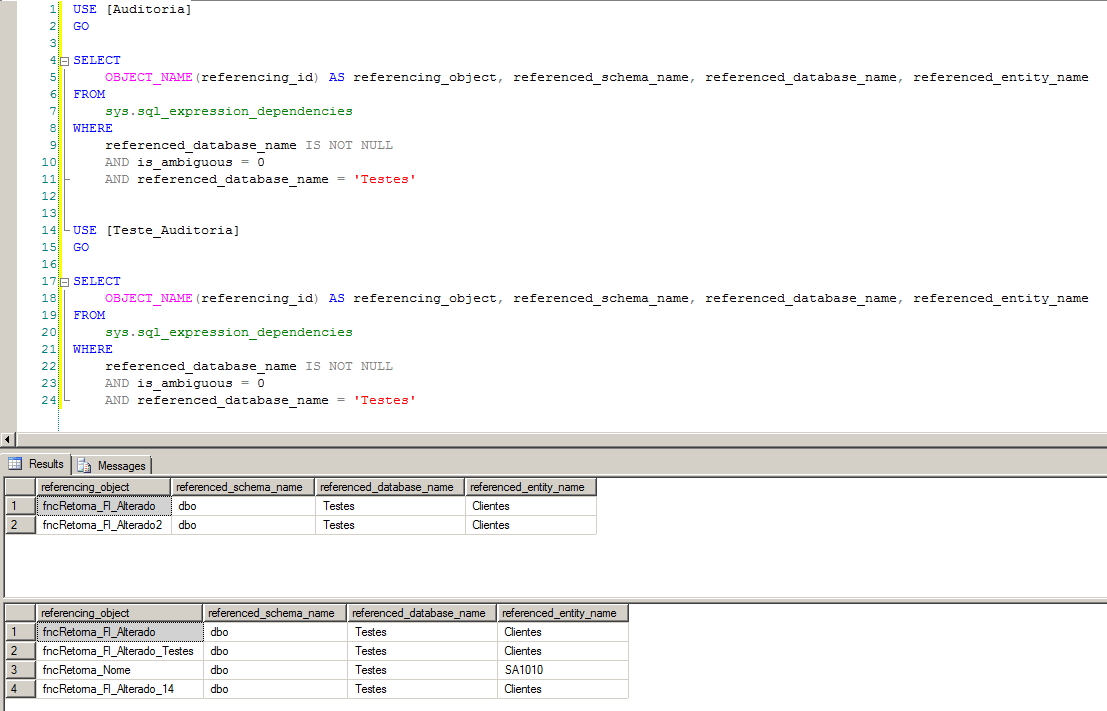
With the query below, it is possible to select all cross-database dependencies, where objects from the connection's current database have dependencies on other databases.
SELECT
    OBJECT_NAME(referencing_id) AS referencing_object,
    referenced_database_name,
    referenced_schema_name,
    referenced_entity_name
FROM
    sys.sql_expression_dependencies
WHERE
    referenced_database_name IS NOT NULL
    AND is_ambiguous = 0
Example:
Schema-bound dependencies
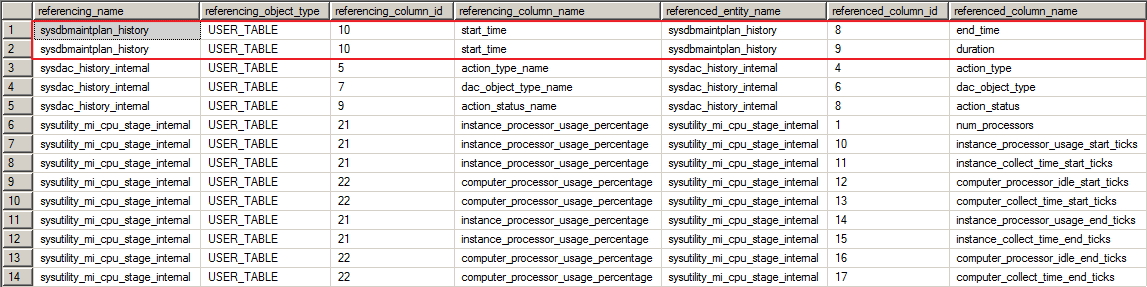
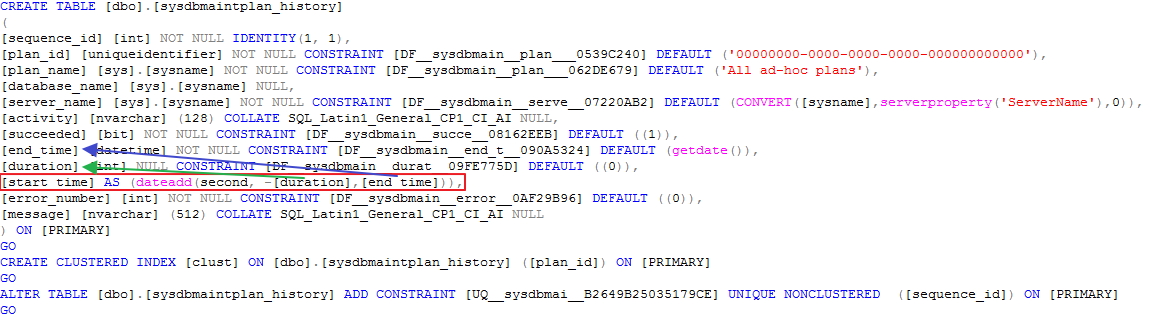
With the query below, it is possible to identify and map schema-bound dependencies, such as indexed views (created with the SCHEMABINDING hint), calculated columns and check constraints:
SELECT
    OBJECT_NAME(d.referencing_id) AS referencing_name,
    o.type_desc referencing_object_type,
    d.referencing_minor_id AS referencing_column_id,
    cc2.name AS referencing_column_name,
    d.referenced_entity_name,
    d.referenced_minor_id AS referenced_column_id,
    cc.name AS referenced_column_name
FROM
    sys.sql_expression_dependencies d
    JOIN sys.all_columns cc ON d.referenced_minor_id = cc.column_id AND d.referenced_id = cc.[object_id]
    JOIN sys.objects o ON d.referencing_id = o.[object_id]
    LEFT JOIN sys.all_columns cc2 ON d.referencing_minor_id = cc2.column_id AND d.referencing_id = cc2.[object_id]
WHERE
    d.is_schema_bound_reference = 1
    AND d.referencing_minor_id > 0
Return Example:
Demonstration of dependency:
Showing dependencies at multiple levels
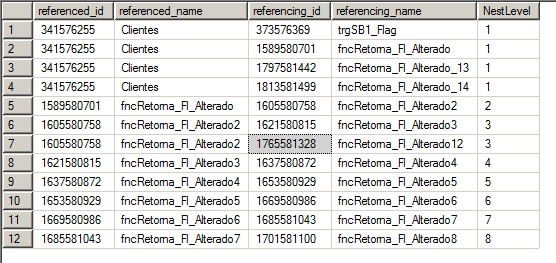
With the query below it is possible to list dependencies at various hierarchical levels, in the same way as the SQL Server Management Studio interface shows us
WITH Arvore_Dependencias ( referenced_id, referenced_name, referencing_id, referencing_name, NestLevel )
AS (
    SELECT
        A.[object_id] AS referenced_id,
        A.name AS referenced_name,
        A.[object_id] AS referencing_id,
        A.name AS referencing_name,
        0 AS NestLevel
   FROM
        sys.objects A
   WHERE
        A.name = 'Clientes'

   UNION ALL

   SELECT
        A.referenced_id,
        OBJECT_NAME(A.referenced_id),
        A.referencing_id,
        OBJECT_NAME(A.referencing_id),
        NestLevel + 1
   FROM
        sys.sql_expression_dependencies		A
        JOIN Arvore_Dependencias		B	ON A.referenced_id = B.referencing_id
)
SELECT DISTINCT
    referenced_id,
    referenced_name,
    referencing_id,
    referencing_name,
    NestLevel
FROM
    Arvore_Dependencias
WHERE
    NestLevel > 0
ORDER BY
    NestLevel,
    referencing_id
Example:
Finding dependencies by data type
As you may know, the TEXT, NTEXT, and IMAGE data types will be deprecated and no longer supported in future versions of SQL Server. If you plan to upgrade your application and replace these types, the query below could be a good starting point. The query below will show all objects that use these data types and their dependencies:
WITH Arvore_Dependencias
AS (
    SELECT DISTINCT
        A.name,
        A.[object_id] AS referenced_id,
        A.name AS referenced_name,
        A.[object_id] AS referencing_id,
        A.name AS referencing_name,
        0 AS NestLevel
    FROM
        sys.objects						A
        JOIN sys.columns					B	ON	A.[object_id] = B.[object_id]
    WHERE
        A.is_ms_shipped = 0
        AND B.system_type_id IN ( 34, 99, 35 ) -- TEXT, NTEXT e IMAGE

    UNION ALL

    SELECT
        B.name,
        A.referenced_id,
        OBJECT_NAME(A.referenced_id),
        A.referencing_id,
        OBJECT_NAME(A.referencing_id),
        NestLevel + 1
    FROM
        sys.sql_expression_dependencies		A
        JOIN Arvore_Dependencias		B	ON	A.referenced_id = B.referencing_id
 )
SELECT
    name AS parent_object_name,
    referenced_id,
    referenced_name,
    referencing_id,
    referencing_name,
    NestLevel
FROM
    Arvore_Dependencias t1
WHERE
    NestLevel > 0
ORDER BY
    name,
    NestLevel
Full dependency report
The query below will display a line for each database object that has dependencies, with the dependent objects separated by a comma.
SELECT
    DB_NAME() AS dbname,
    o.type_desc AS referenced_object_type,
    d1.referenced_entity_name,
    d1.referenced_id,
    STUFF((
            SELECT
                ', ' + OBJECT_NAME(d2.referencing_id)
            FROM
                sys.sql_expression_dependencies d2
            WHERE
                d2.referenced_id = d1.referenced_id
            ORDER BY
                OBJECT_NAME(d2.referencing_id)
            FOR XML PATH('')
          ), 1, 1, '') AS dependent_objects_list
FROM
    sys.sql_expression_dependencies d1
    JOIN sys.objects o ON d1.referenced_id = o.[object_id]
GROUP BY
    o.type_desc,
    d1.referenced_id,
    d1.referenced_entity_name
ORDER BY
    o.type_desc,
    d1.referenced_entity_name
Example:

Direct Dependencies Procedure
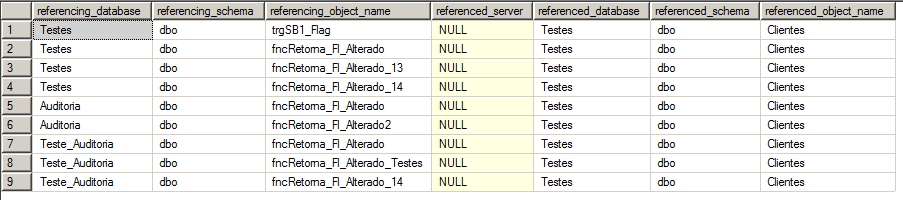
After demonstrating all these uses, I will share a stored procedure that I use whenever I need to list cross-database dependencies quickly. There is a prerequisite to create this SP, which is the fncSplit, which must be created first.
This procedure lists all direct dependencies of an object, in a cross-database manner:
View source code
Example:
Cross-database and multi-level procedure
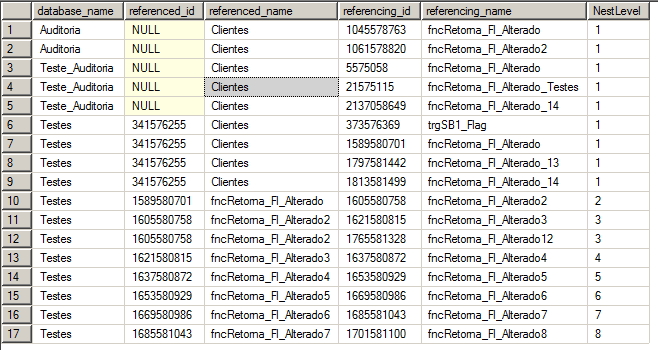
With the procedure below, which uses CTE and recursion, it is possible to list all dependent objects with various levels of hierarchy in the source database and direct dependencies (1st level) and cross-database.
View source codeExample:
How to identify, delete and recreate Foreign Keys (FK)
If you want to identify or recreate dependencies at the Foreign Key’s level, read the article How to identify, delete and recreate Foreign Keys (FK) of a table in SQL Server
That's it, folks!
Until the next post!
sql server tsql query tree dependency dependencies dependency tree nest nested level walker

Comments (0)
Loading comments...