
Hey guys,
Goodnight!
In this post I will comment on some difficulties I faced in a project in the BI sector at the company I work for, where we decided to implement the recently launched Microsoft Reporting Services 2016 (which incorporated Datazen, acquired by Microsoft) to provide reports, dashboards, KPIs and Sales and Billing dashboards via the internet, without the need to connect to a VPN, but using Active Directory authentication.
One of the biggest gains that this project will bring to the company is the possibility of viewing this information on Web devices (Chrome, Firefox, Internet Explorer and any other browser), Tablets and mobile devices (iOS and Android)
To implement the necessary structure, the DBA Tiago Neves performed the installation and configuration of SQL Server 2016 + Reporting Services and made the environment available to the BI team. However, when trying to publish any report using SQL Server Mobile Report Publisher, the error message below was generated:
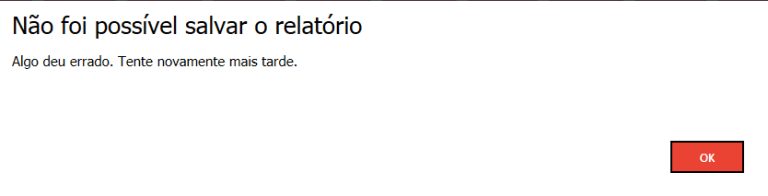
The report could not be saved. Something went wrong. Try again later
As you can see, this error message is very generic and does not help much in identifying and resolving the problem. Therefore, Tiago, DBA Caroline and I started analyzing the Reporting Services log files, which are usually located in “C:\Program Files\Microsoft SQL Server\MSRS13.Your_Instance\Reporting Services\LogFiles”, we encountered the following error message:
System.Reflection.TargetInvocationException Exception has been thrown by the target of an invocation. — System.InvalidOperationException This implementation is not part of the Windows Platform FIPS validated cryptographic algorithms.
With this message we were able to understand what was actually happening: The server had FIPS data encryption settings enabled, and Reporting Services by default does not support this configuration, as we can read on a Microsoft blog: “This is happening because FIPS is enabled on the Reporting Services server and Report Manager does not support the Local Security Policy ‘System cryptography: Use FIPS compliant algorithms for encryption, hashing, and signing'” (source here).
We spoke with the company's security analyst and he advised us not to disable this setting on the server due to the company's security policy.
Disabling FIPS
For testing purposes only, and in the Development environment, we disabled FIPS and Reporting Services behaved normally, allowing us to save and publish reports without any problems.
To disable this setting, simply access the Windows registry, find the setting “HKEY_LOCAL_MACHINE\SYSTEM\CurrentControlSet\Control\Lsa\fipsalgorithmpolicy” and change the value of the “Enabled” key to 0.
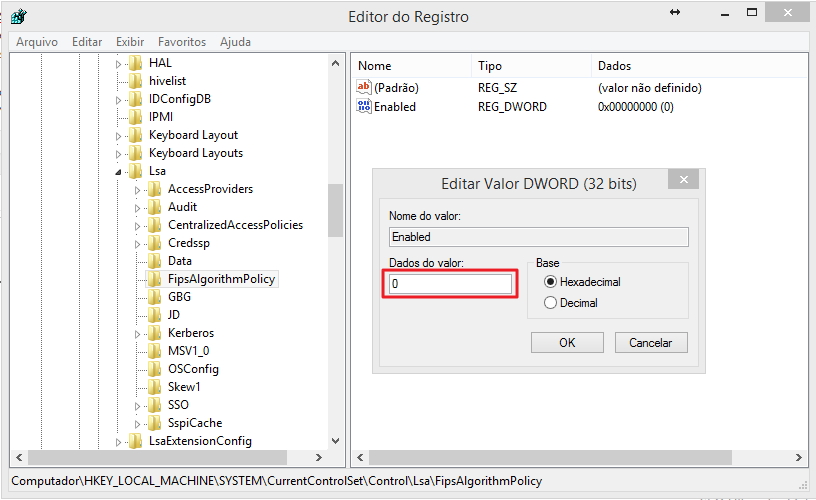
After that, restart the Reporting Services service and SQL Server Mobile Report Publisher will work normally.
Solving the problem without disabling FIPS
As we could not change this configuration on the servers, we needed to look for another solution to solve this problem. After a lot of research, Tiago found a solution in Technet Forum, where it is necessary to change the file machine.config of the server's Microsoft .NET Framework (Usually located at C:\Windows\Microsoft.NET\Framework64\v4.0.30319\Config) and add the following configuration to the end of the file:
<mscorlib>
    <cryptographySettings>
        <cryptoNameMapping>
            <cryptoClasses>
                <cryptoClass
                    SHA256CSP="System.Security.Cryptography.SHA256CryptoServiceProvider, System.Core, Version=4.0.0.0, Culture=neutral, PublicKeyToken=b77a5c561934e089" />
            </cryptoClasses>
            <!-- name mappings -->
            <nameEntry
                name="SHA256"
                class="SHA256CSP" />
            <nameEntry
                name="SHA256CryptoServiceProvider"
                class="SHA256CSP" />
            <nameEntry
                name="System.Security.Cryptography.SHA256CryptoServiceProvider"
                class="SHA256CSP" />
            <nameEntry
                name="System.Security.Cryptography.SHA256"
                class="SHA256CSP"/>
        </cryptoNameMapping>
    </cryptographySettings>
</mscorlib>
This configuration basically forces the .NET Framework, used by the SQL Server Mobile Report Publisher tool, to use the SHA256 encryption algorithm instead of FIPS, which is incompatible with Reporting Services since version 2005.
I recommend creating a backup of this file before editing it. After editing the file, simply restart the Reporting Services service for SQL Server Mobile Report Publisher to function normally, without having to disable the instance's FIPS.
Another solution to this problem is to follow the steps in the post SQL Server – How to encrypt and decrypt passwords (with Salt) using the CLR (C#), where I came across this error message when using algorithms that are not compatible with FIPS standards in SQL Server, using the CLR (C#).
I hope you enjoyed this post I made together with Tiago Neves and see you in the next post!
Hug!
System.InvalidOperationException: This implementation is not part of the Windows Platform FIPS-validated cryptographic algorithms.
System.InvalidOperationException: This implementation is not part of the Windows Platform FIPS-validated cryptographic algorithms.

Comentários (0)
Carregando comentários…