
Hey guys,
How are you today?
In this post, I will demonstrate how to use the XLMA language (XML for Analysis) to be able to process Analysis Services cubes and dimensions through Transact-SQL (T-SQL) queries, which can be used in a SQL Agent job to automate this processing, which, together with ETL loads to generate dimension and fact data, allow you to automate the entire process of loading and updating your Analysis Services cubes.
To be able to carry out the routines described in this post, you will need to have created a Linked Server for integration between SQL Server and Analysis Services (Here in the example, I call this object INTERFACE_CUBOS).
If you haven't created this Linked Server and don't know how to do it, access the post Analysis Services (SSAS) – How to query information and process commands via command line (XLMA) through SQL Server and follow the step by step to create it.
If you are not very familiar with SQL Server Analysis Services (SSAS) and would like to learn how to create your first Multidimensional Cube, learn more by accessing the post Analysis Services – How to create your first multidimensional cube in the star model (Star schema).
Types of Processing
Before demonstrating how to process cubes and dimensions via the command line, I need to explain what each type of processing is.
Process Default: Makes the least possible effort (with the least amount of tasks) to process the structure and data. The server converts this option into the one most suited to the needs of your environment at the moment.
Applicable: All Objects
Process Full: Processes the entire structure and data, deleting and recreating objects. This means that the processing discards everything that exists and creates the analytical structure again and then processes the data into this structure. If any new attribute is added to the dimension, a process full must occur.
Applicable: All Objects
Process Update: When any attribute changes occur in the dimension, whether adding, deleting or updating, this process must be carried out. It has enough intelligence to process only the difference in structure and data that is new, but it is slower (to apply “intelligence”).
Applicable: Dimension
Process Data: Discards all stored data and processes all data again, ignoring whether there has been a change in the structure or indices. The focus is just the data.
Applicable: Dimension, Cube, Measure and Partition
Process Add (Incremental): Processes only new data, ignoring data that already exists and also any new changes to the structure or indexes.
Applicable: Dimension and Partition
How to generate XLMA to process Analysis Services Cubes and Dimensions through Management Studio (SSMS)
A very simple way to generate XLMA scripts to automate the processing of dimensions, cubes, databases and partitions is through SQL Server Management Studio, as I will show below:
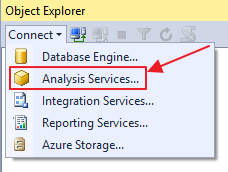
1) Click on “Connect” > “Analysis Services…” and enter the Analysis Services connection data
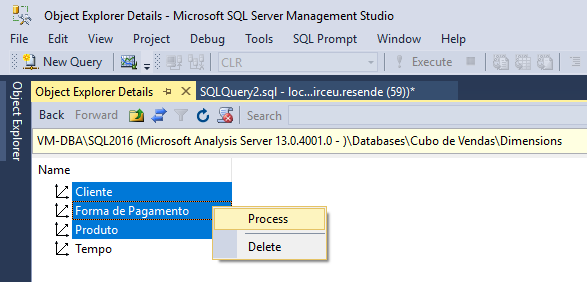
2) Expand the “Dimensions” folder (as in the figure below) and press the F7 key (Object Explorer Details) to expand the object details.

3) Select the dimensions you want to process, right-click and select the “Process” option.
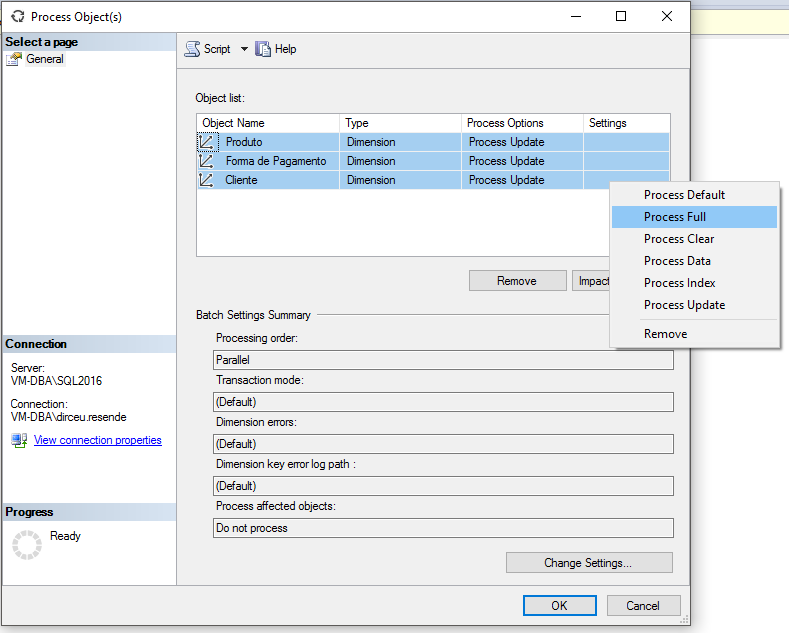
4) Select the processing mode you want for each of your partitions. In the example, I chose Process Full mode for the 3 dimensions.
5) After configuring the processing mode for each dimension, click the “Script” button to generate the XLMA for this action.
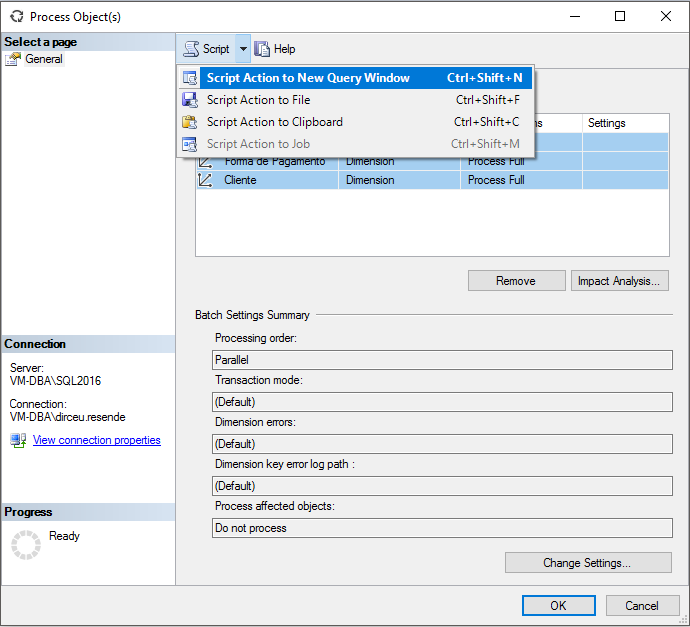
6) Done. Your XLMA has been generated. You can also repeat this for processing cubes, partitions, databases, etc.
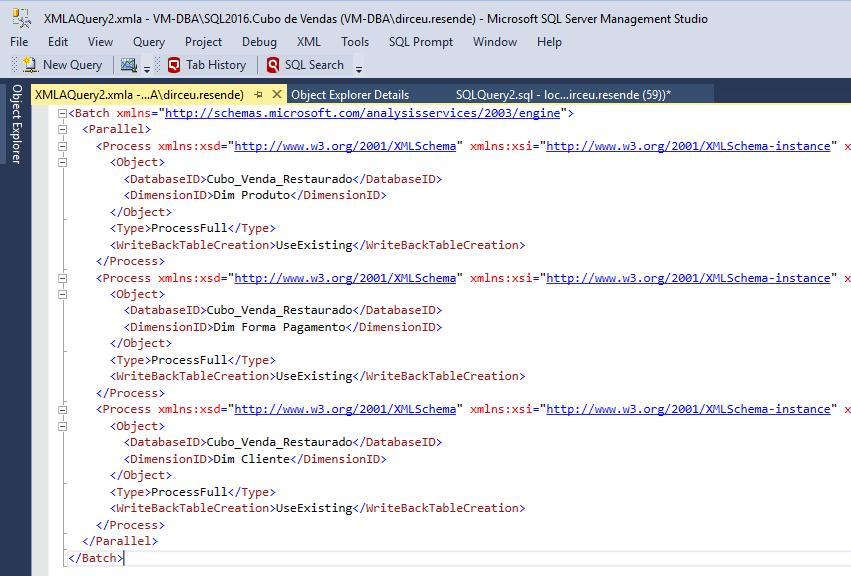
7) Now you can create Jobs using your XLMA to automate Analysis Services processing.
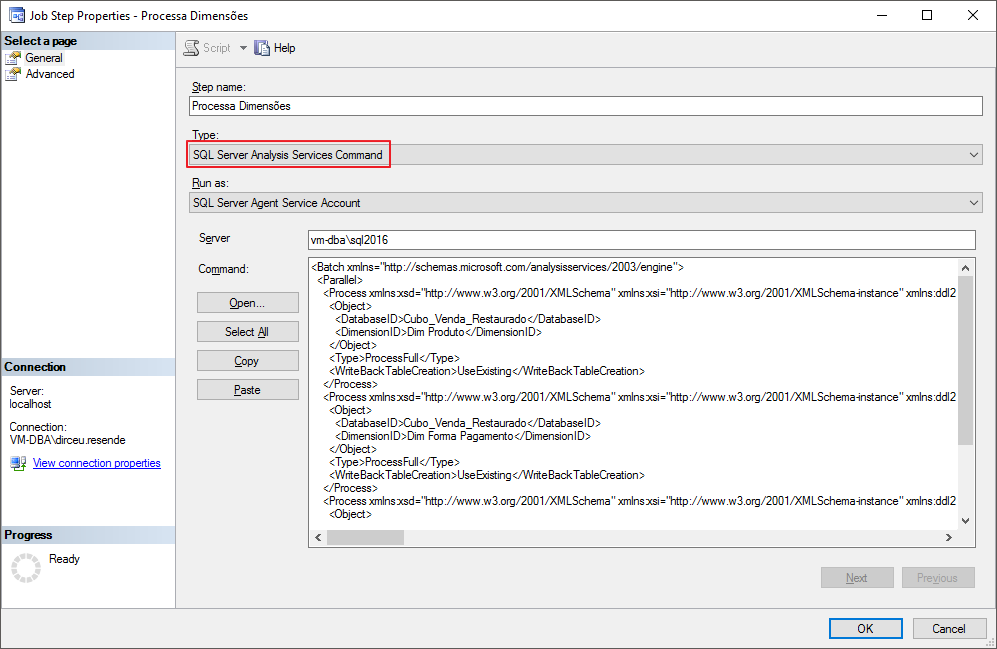
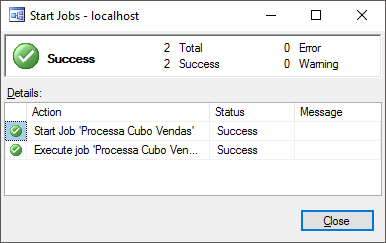
8) After the job has been created, simply run it to process the data.
Processing Analysis Services Cubes and Dimensions via command line using T-SQL (XLMA)
Many times in a BI analyst's life, he will need to automate the processing of cube and dimension information, so that the information is always up to date. To do this, you can use Integration Services Tasks (SSIS) or XLMA, which allows you to create and execute scripts through SQL Server, allowing you to create jobs with these commands easily and with much greater routine customization power than SSIS.
If you don't know how to run XLMA scripts through SQL Server, read the post Analysis Services (SSAS) – How to query information and process commands via command line (XLMA) through SQL Server.
How to process a cube dimension via command line
DECLARE @QueryXLMA VARCHAR(MAX) = '<Batch xmlns="http://schemas.microsoft.com/analysisservices/2003/engine">
  <Parallel>
    <Process xmlns:xsd="http://www.w3.org/2001/XMLSchema" xmlns:xsi="http://www.w3.org/2001/XMLSchema-instance" xmlns:ddl2="http://schemas.microsoft.com/analysisservices/2003/engine/2" xmlns:ddl2_2="http://schemas.microsoft.com/analysisservices/2003/engine/2/2" xmlns:ddl100_100="http://schemas.microsoft.com/analysisservices/2008/engine/100/100">
      <Object>
        <DatabaseID>Cubo_Venda_Restaurado</DatabaseID>
        <DimensionID>Dim Produto</DimensionID>
      </Object>
      <Type>ProcessFull</Type>
      <WriteBackTableCreation>UseExisting</WriteBackTableCreation>
    </Process>
  </Parallel>
</Batch>'


EXEC(@QueryXLMA) AT INTERFACE_CUBOS
GO
How to process multiple dimensions of a cube via command line
DECLARE @QueryXLMA VARCHAR(MAX) = '<Batch xmlns="http://schemas.microsoft.com/analysisservices/2003/engine">
  <Parallel>
    <Process xmlns:xsd="http://www.w3.org/2001/XMLSchema" xmlns:xsi="http://www.w3.org/2001/XMLSchema-instance" xmlns:ddl2="http://schemas.microsoft.com/analysisservices/2003/engine/2" xmlns:ddl2_2="http://schemas.microsoft.com/analysisservices/2003/engine/2/2" xmlns:ddl100_100="http://schemas.microsoft.com/analysisservices/2008/engine/100/100" xmlns:ddl200="http://schemas.microsoft.com/analysisservices/2010/engine/200" xmlns:ddl200_200="http://schemas.microsoft.com/analysisservices/2010/engine/200/200" xmlns:ddl300="http://schemas.microsoft.com/analysisservices/2011/engine/300" xmlns:ddl300_300="http://schemas.microsoft.com/analysisservices/2011/engine/300/300" xmlns:ddl400="http://schemas.microsoft.com/analysisservices/2012/engine/400" xmlns:ddl400_400="http://schemas.microsoft.com/analysisservices/2012/engine/400/400" xmlns:ddl500="http://schemas.microsoft.com/analysisservices/2013/engine/500" xmlns:ddl500_500="http://schemas.microsoft.com/analysisservices/2013/engine/500/500">
      <Object>
        <DatabaseID>Cubo_Venda_Restaurado</DatabaseID>
        <DimensionID>Dim Produto</DimensionID>
      </Object>
      <Type>ProcessFull</Type>
      <WriteBackTableCreation>UseExisting</WriteBackTableCreation>
    </Process>
    <Process xmlns:xsd="http://www.w3.org/2001/XMLSchema" xmlns:xsi="http://www.w3.org/2001/XMLSchema-instance" xmlns:ddl2="http://schemas.microsoft.com/analysisservices/2003/engine/2" xmlns:ddl2_2="http://schemas.microsoft.com/analysisservices/2003/engine/2/2" xmlns:ddl100_100="http://schemas.microsoft.com/analysisservices/2008/engine/100/100" xmlns:ddl200="http://schemas.microsoft.com/analysisservices/2010/engine/200" xmlns:ddl200_200="http://schemas.microsoft.com/analysisservices/2010/engine/200/200" xmlns:ddl300="http://schemas.microsoft.com/analysisservices/2011/engine/300" xmlns:ddl300_300="http://schemas.microsoft.com/analysisservices/2011/engine/300/300" xmlns:ddl400="http://schemas.microsoft.com/analysisservices/2012/engine/400" xmlns:ddl400_400="http://schemas.microsoft.com/analysisservices/2012/engine/400/400" xmlns:ddl500="http://schemas.microsoft.com/analysisservices/2013/engine/500" xmlns:ddl500_500="http://schemas.microsoft.com/analysisservices/2013/engine/500/500">
      <Object>
        <DatabaseID>Cubo_Venda_Restaurado</DatabaseID>
        <DimensionID>Dim Forma Pagamento</DimensionID>
      </Object>
      <Type>ProcessFull</Type>
      <WriteBackTableCreation>UseExisting</WriteBackTableCreation>
    </Process>
    <Process xmlns:xsd="http://www.w3.org/2001/XMLSchema" xmlns:xsi="http://www.w3.org/2001/XMLSchema-instance" xmlns:ddl2="http://schemas.microsoft.com/analysisservices/2003/engine/2" xmlns:ddl2_2="http://schemas.microsoft.com/analysisservices/2003/engine/2/2" xmlns:ddl100_100="http://schemas.microsoft.com/analysisservices/2008/engine/100/100" xmlns:ddl200="http://schemas.microsoft.com/analysisservices/2010/engine/200" xmlns:ddl200_200="http://schemas.microsoft.com/analysisservices/2010/engine/200/200" xmlns:ddl300="http://schemas.microsoft.com/analysisservices/2011/engine/300" xmlns:ddl300_300="http://schemas.microsoft.com/analysisservices/2011/engine/300/300" xmlns:ddl400="http://schemas.microsoft.com/analysisservices/2012/engine/400" xmlns:ddl400_400="http://schemas.microsoft.com/analysisservices/2012/engine/400/400" xmlns:ddl500="http://schemas.microsoft.com/analysisservices/2013/engine/500" xmlns:ddl500_500="http://schemas.microsoft.com/analysisservices/2013/engine/500/500">
      <Object>
        <DatabaseID>Cubo_Venda_Restaurado</DatabaseID>
        <DimensionID>Dim Cliente</DimensionID>
      </Object>
      <Type>ProcessFull</Type>
      <WriteBackTableCreation>UseExisting</WriteBackTableCreation>
    </Process>
  </Parallel>
</Batch>'


EXEC(@QueryXLMA) AT INTERFACE_CUBOS
GO
How to process a cube via command line
DECLARE @QueryXLMA VARCHAR(MAX) = '<Batch xmlns="http://schemas.microsoft.com/analysisservices/2003/engine">
  <Parallel>
    <Process xmlns:xsd="http://www.w3.org/2001/XMLSchema" xmlns:xsi="http://www.w3.org/2001/XMLSchema-instance" xmlns:ddl2="http://schemas.microsoft.com/analysisservices/2003/engine/2" xmlns:ddl2_2="http://schemas.microsoft.com/analysisservices/2003/engine/2/2" xmlns:ddl100_100="http://schemas.microsoft.com/analysisservices/2008/engine/100/100">
      <Object>
        <DatabaseID>Cubo_Venda_Restaurado</DatabaseID>
        <CubeID>Cubo_Venda</CubeID>
      </Object>
      <Type>ProcessFull</Type>
      <WriteBackTableCreation>UseExisting</WriteBackTableCreation>
    </Process>
  </Parallel>
</Batch>'


EXEC(@QueryXLMA) AT INTERFACE_CUBOS
GO
How to process Analysis Services cubes using PowerShell
If you are a fan of creating shell scripts, I will also present a solution I found in this link to process cubes and dimensions using PowerShell.
How to process all dimensions of a cube using PowerShell
param (
    $ServerName="vm-dba\sql2016",
    $DBName="Cubo de Vendas",
    $ProcessTypeDim="ProcessFull",
    $Transactional="Y",
    $Parallel="Y",
    $MaxParallel=8,
    $MaxCmdPerBatch=5,
    $PrintCmd="N"
)

$loadInfo = [Reflection.Assembly]::LoadWithPartialName("Microsoft.AnalysisServices") | Out-Null

if ($Transactional -eq "Y") {
    $TransactionalB=$true
}
else {
    $TransactionalB=$false
}


if ($Parallel -eq "Y") {
    $ParallelB=$true
}
else {
    $ParallelB=$false
}


$server = New-Object Microsoft.AnalysisServices.Server
$server.connect($ServerName)
if ($server.name -eq $null) {
    Write-Output ("Servidor '{0}' não encontrado" -f $ServerName)
    break
}

$DB = $server.Databases.FindByName($DBName)
if ($DB -eq $null) {
    Write-Output ("Database '{0}' não encontrado" -f $DBName)
    break
}

Write-Output("Inicio do processamento {0}" -f (Get-Date -uformat "%H:%M:%S") )
Write-Output("----------------------------------------------------------------")
Write-Output("Servidor  : {0}" -f $Server.Name)
Write-Output("Database  : {0}" -f $DB.Name)
Write-Output("Situação  : {0}" -f $DB.State)
Write-Output("Tamanho   : {0}MB" -f ($DB.EstimatedSize/1024/1024).ToString("#,##0"))
Write-Output("----------------------------------------------------------------")
Write-Output("Início do processamento do banco iniciado.   Horário: {0}" -f (Get-Date -uformat "%H:%M:%S"))
$server.CaptureXml=$TRUE # Não executa os comandos, apenas captura a saída

# Processa as dimensões
foreach ($dim in $DB.Dimensions) {
    $dim.Process($ProcessTypeDim)
}

$server.CaptureXML = $FALSE # Terminou de capturar os comandos. Todos estão em Server.CaptureLog
$cmdBatch = @"
<Batch xmlns="http://schemas.microsoft.com/analysisservices/2003/engine">
    <Parallel MaxParallel="##MaxParallel##">
        ##ProcessCmd##
    </Parallel>
</Batch>
"@

$cmdBatch = $cmdBatch -replace("##MaxParallel##", $MaxParallel)
# $ErrorActionPreference = "SilentlyContinue"
$currentCmdNo=0;
$currentCmdInBatchNo=0;
$processCmd="";
$currentBatchNo=0
$TotalCmdCount = $Server.CaptureLog.Count

foreach ($cmdLine in $Server.CaptureLog) {

    $currentCmdNo = $currentCmdNo + 1
    $processCmd = $processCmd + $cmdLine + "`n"
    $currentCmdInBatchNo=$currentCmdInBatchNo + 1

    if ($currentCmdInBatchNo -ge $MaxCmdPerBatch -or $currentCmdNo -eq $TotalCmdCount) {

        #MaxCmdPerBatch reached, execute commands
        $processCmd = $cmdBatch -replace("##ProcessCmd##", $processCmd)
        if ($PrintCmd -eq "Y") {
            Write-Output($processCmd)
        }

        $currentBatchNo = $currentBatchNo + 1;
        Write-Output("=== Iniciando batch No {0}. Time: {1} ..." -f $currentBatchNo, (Get-Date -uformat "%H:%M:%S"))
        $Result = $Server.Execute($processCmd)

        # Report errors and warnings
        foreach ($res in $Result) {
            foreach ($msg in $res.Messages) {
                if ($msg.Description -ne $null) {
                    Write-Output("{0}" -f $msg.Description)
                }
            }
        }

        # Reset temp values
        $processCmd = ""; $currentCmdInBatchNo=0;

    }
}

Write-Output("----------------------------------------------------------------")
Write-Output("Processamento do banco de dados finalizado. Horário: {0}" -f (Get-Date -uformat "%H:%M:%S"))

Write-Output("----------------------------------------------------------------")
Write-Output("Listando objetos que não foram processados")
How to process a cube using Powershell
param (
    $ServerName="vm-dba\sql2016",
    $DBName="Cubo de Vendas",
    $ProcessType="ProcessFull",
    $Transactional="Y",
    $Parallel="Y",
    $MaxParallel=8,
    $MaxCmdPerBatch=5,
    $PrintCmd="N"
)

$loadInfo = [Reflection.Assembly]::LoadWithPartialName("Microsoft.AnalysisServices") | Out-Null

if ($Transactional -eq "Y") {
    $TransactionalB=$true
}
else {
    $TransactionalB=$false
}


if ($Parallel -eq "Y") {
    $ParallelB=$true
}
else {
    $ParallelB=$false
}


$server = New-Object Microsoft.AnalysisServices.Server
$server.connect($ServerName)
if ($server.name -eq $null) {
    Write-Output ("Servidor '{0}' não encontrado" -f $ServerName)
    break
}

$DB = $server.Databases.FindByName($DBName)
if ($DB -eq $null) {
    Write-Output ("Database '{0}' não encontrado" -f $DBName)
    break
}

Write-Output("Inicio do processamento {0}" -f (Get-Date -uformat "%H:%M:%S") )
Write-Output("----------------------------------------------------------------")
Write-Output("Servidor  : {0}" -f $Server.Name)
Write-Output("Database  : {0}" -f $DB.Name)
Write-Output("Situação  : {0}" -f $DB.State)
Write-Output("Tamanho   : {0}MB" -f ($DB.EstimatedSize/1024/1024).ToString("#,##0"))
Write-Output("----------------------------------------------------------------")
Write-Output("Início do processamento do banco iniciado.   Horário: {0}" -f (Get-Date -uformat "%H:%M:%S"))
$server.CaptureXml=$TRUE # Não executa os comandos, apenas captura a saída

#Processa os cubos
foreach ($cube in $DB.Cubes) {
    foreach ($mg in $cube.MeasureGroups) {
        foreach ($part in $mg.Partitions) {
            $part.Process($ProcessType)
        }
    }
}

$server.CaptureXML = $FALSE # Terminou de capturar os comandos. Todos estão em Server.CaptureLog
$cmdBatch = @"
<Batch xmlns="http://schemas.microsoft.com/analysisservices/2003/engine">
    <Parallel MaxParallel="##MaxParallel##">
        ##ProcessCmd##
    </Parallel>
</Batch>
"@

$cmdBatch = $cmdBatch -replace("##MaxParallel##", $MaxParallel)
# $ErrorActionPreference = "SilentlyContinue"
$currentCmdNo=0;
$currentCmdInBatchNo=0;
$processCmd="";
$currentBatchNo=0
$TotalCmdCount = $Server.CaptureLog.Count

foreach ($cmdLine in $Server.CaptureLog) {

    $currentCmdNo = $currentCmdNo + 1
    $processCmd = $processCmd + $cmdLine + "`n"
    $currentCmdInBatchNo=$currentCmdInBatchNo + 1

    if ($currentCmdInBatchNo -ge $MaxCmdPerBatch -or $currentCmdNo -eq $TotalCmdCount) {

        #MaxCmdPerBatch reached, execute commands
        $processCmd = $cmdBatch -replace("##ProcessCmd##", $processCmd)
        if ($PrintCmd -eq "Y") {
            Write-Output($processCmd)
        }

        $currentBatchNo = $currentBatchNo + 1;
        Write-Output("=== Iniciando batch No {0}. Time: {1} ..." -f $currentBatchNo, (Get-Date -uformat "%H:%M:%S"))
        $Result = $Server.Execute($processCmd)

        # Report errors and warnings
        foreach ($res in $Result) {
            foreach ($msg in $res.Messages) {
                if ($msg.Description -ne $null) {
                    Write-Output("{0}" -f $msg.Description)
                }
            }
        }

        # Reset temp values
        $processCmd = ""; $currentCmdInBatchNo=0;

    }
}

Write-Output("----------------------------------------------------------------")
Write-Output("Processamento do banco de dados finalizado. Horário: {0}" -f (Get-Date -uformat "%H:%M:%S"))

Write-Output("----------------------------------------------------------------")
Write-Output("Listando objetos que não foram processados")
Automating the processing of Analysis Services cubes with Powershell
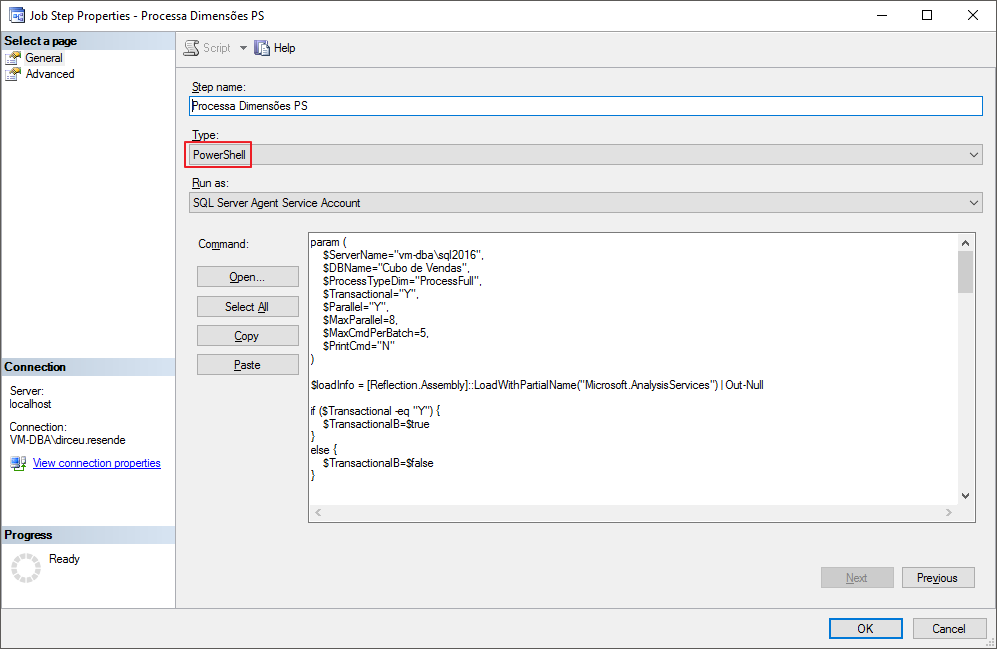
To be able to automate the processing of Cubes using PowerShell, simply create a Step in a SQL Server Agent job as shown below and paste the Powershell script in the “Command” field:
That's it, folks!
I hope you enjoyed the post and see you later!

Comments (0)
Loading comments...