
In this post I will talk a little about the SQL Server data compression method and how we can use this feature to compress all objects in a database. Data compression can be configured for the following database objects:
- For a table that is stored as a heap.
- For a table that is stored as a clustered index.
- For a nonclustered index.
- For an indexed view.
- For partitioned tables and indexes, the compression option can be configured for each partition, and the various partitions of an object can contain different compression settings.
Remember that compression is not available for system objects and the compression configuration is not automatically applied to nonclustered indexes. Therefore, each nonclustered index must be configured individually and manually.
ROW COMPRESSION LEVEL
This compression feature takes into account the type of variable data structures that define a column. Row Compression Level is a compression level that does not use any compression algorithm.
The main objective of Row Compression Level is to reduce the storage of fixed type data, that is, when you are enabling Row Level Compression you are just changing the physical storage format of data that is associated with a data type.
Row Level Compression extends the vardecimal storage format by storing data of all fixed-length types in a variable-length storage format. This type of compression will remove any extra bytes in the fixed data type. There are absolutely no changes required to the app.
For example, we have a CHAR(100) column that is using the Row Compression Level will only use the amount of storage defined by the data. Like this? Let's store the phrase “SQL Server 2008″ in the column, the phrase contains only 15 characters and only these 15 characters are stored as opposed to the 100 that were defined by the column, therefore, you have an 85% saving in storage space.
PAGE COMPRESSION LEVEL
In previous versions of SQL Server each value was stored on the page, regardless of whether the same value had already appeared in the same column for some other rows within a page. In SQL Server 2008, the redundant or duplicate value will be stored only once within the page and will be referenced in all other occurrences, thus we have the Page Compression Level.
Basically, the Page Compression Level is a superset of ROW compression and takes into account redundant data in one or more rows on a given page. It also uses prefix and dictionary compression.
The Page Compression Level method is more vital as it allows common data to be shared between rows on a given page.
This type of compression uses the following techniques:
- ROW COMPRESSION: Already seen above.
- PREFIX COMPRESSION: For each column on a page duplicate prefixes are identified. These prefixes are stored in the Information Compression (CI) headers, which reside after the page header. A reference number is assigned to these prefixes and this reference number is used wherever these prefixes are being used, decreasing the amount of bytes used.
- DICTIONARY COMPRESSION: Searches for duplicate values outside the page and stores them in the CI. The main difference between Prefix Compression and Dictionary Compression is that Prefix is restricted to just one column whereas Dictionary is applicable for the entire page.
After Prefix Compression has completed, Dictionary Compression is applied and searches for repeated values anywhere on the page and stores them in the CI area. Unlike Prefix Compression, Dictionary Compression is not restricted to a column and can replace repeated values that occur anywhere on a page.
Estimating space gain
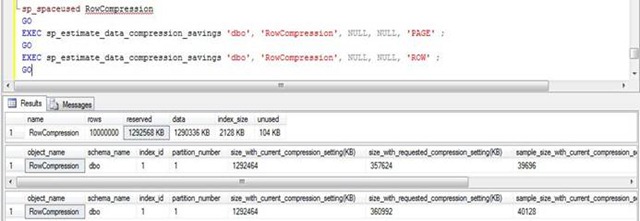
In SQL Server 2008 there are two ways to estimate space savings for storing tables and indexes. The first method is to use a system SP called sp_estimate_data_compression_savings and the second method is to use the Data Compression Wizard.
First let's use sp_estimate_data_compression_savings where:
1st parameter is the name of the schema;
2nd parameter is the name of the object;
3rd parameter is the index ID;
4th parameter is the Partition ID
5th parameter is the type of compression;
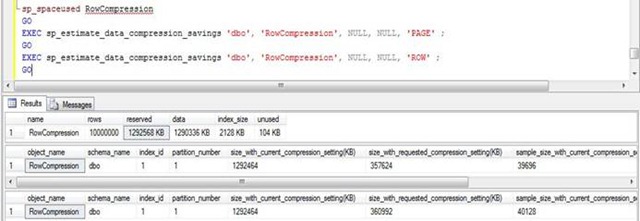
Note the size_with_current_compression_setting(KB) and size_with_requested_compression_setting(KB) columns, these columns show the current value and the value after compression. This way we can know how much space we will gain by applying compression.
Now let's use the wizard.
Right click on the table and choose Storege -> Manage Compression
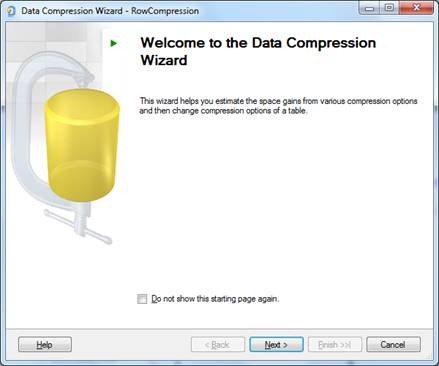
The compression wizard screen will open
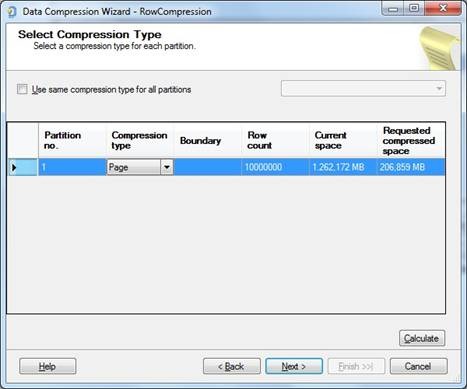
On the next screen of the watch, you can test the type of compression and before applying it you can calculate the space to check which one had the highest data compression rate.
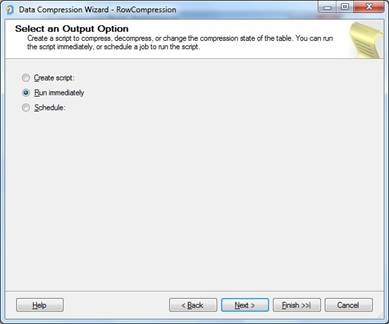
Continuing with the compression wizard, I chose the PAGE option, which generally obtains the best result, and will then ask what to do: Just generate the script, run the compression or schedule the change to activate the compression.
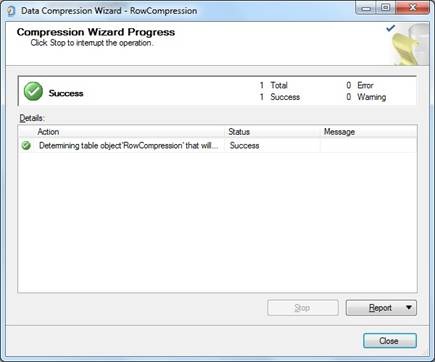
Finally, a data compression success message will be displayed on the screen.
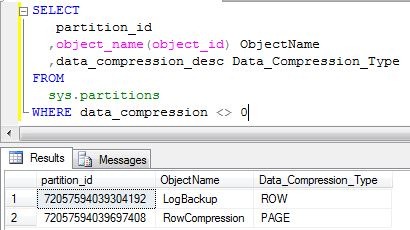
You can check all your objects and what compression levels they are by right-clicking on the object, in the Storage tab, the Compression option informs the type of compression or using the command:
SELECT
    A.[partition_id],
    A.[object_id],
    object_name(A.[object_id]) AS [object_name],
    data_compression_desc
FROM
    sys.partitions A
    join sys.objects B on A.[object_id] = B.[object_id]
WHERE
    B.is_ms_shipped = 0
Applying compression to an entire database
In this post we have already seen how beneficial data compression is, especially for storage. Well, let's put this into practice. I created a procedure that allows you to compact all objects in a database, easily and quickly. The procedure code is available here:
CREATE PROCEDURE [dbo].[stpCompacta_Database] (
    @Ds_Database SYSNAME,
    @Fl_Rodar_Shrink BIT = 1,
    @Fl_Parar_Se_Falhar BIT = 1,
    @Fl_Exibe_Comparacao_Tamanho BIT = 1,
    @Fl_Metodo_Compressao_Page BIT = 1
)
AS
BEGIN


    SET NOCOUNT ON


    DECLARE
        @Ds_Query VARCHAR(MAX),
        @Ds_Comando_Compactacao VARCHAR(MAX),
        @Ds_Metodo_Compressao VARCHAR(20) = (CASE WHEN @Fl_Metodo_Compressao_Page = 1 THEN 'PAGE' ELSE 'ROW' END),
        @Nr_Metodo_Compressao VARCHAR(20) = (CASE WHEN @Fl_Metodo_Compressao_Page = 1 THEN 2 ELSE 1 END)


    IF (OBJECT_ID('tempdb..#Comandos_Compactacao') IS NOT NULL) DROP TABLE #Comandos_Compactacao
    CREATE TABLE #Comandos_Compactacao
    (
        Id BIGINT IDENTITY(1, 1),
        Tabela SYSNAME,
        Indice SYSNAME NULL,
        Comando VARCHAR(MAX)
    )


    IF (@Fl_Exibe_Comparacao_Tamanho = 1)
    BEGIN

        SET @Ds_Query = '
        SELECT
            (SUM(a.total_pages) / 128) AS Vl_Tamanho_Tabelas_Antes_Compactacao
        FROM
            [' + @Ds_Database + '].sys.tables					t     WITH(NOLOCK)
            INNER JOIN [' + @Ds_Database + '].sys.indexes			i     WITH(NOLOCK) ON t.OBJECT_ID = i.object_id
            INNER JOIN [' + @Ds_Database + '].sys.partitions			p     WITH(NOLOCK) ON i.object_id = p.OBJECT_ID AND i.index_id = p.index_id
            INNER JOIN [' + @Ds_Database + '].sys.allocation_units		a     WITH(NOLOCK) ON p.partition_id = a.container_id
        WHERE
            i.OBJECT_ID > 255
        '

        EXEC(@Ds_Query)

    END


    SET @Ds_Query =
    'INSERT INTO #Comandos_Compactacao( Tabela, Indice, Comando )
    SELECT DISTINCT
        A.name AS Tabela,
        NULL AS Indice,
        ''ALTER TABLE ['' + ''' + @Ds_Database + ''' + ''].['' + C.name + ''].['' + A.name + ''] REBUILD PARTITION = ALL WITH (DATA_COMPRESSION = ' + @Ds_Metodo_Compressao + ')'' AS Comando
    FROM
        [' + @Ds_Database + '].sys.tables                   A
        INNER JOIN [' + @Ds_Database + '].sys.partitions    B   ON A.object_id = B.object_id
        INNER JOIN [' + @Ds_Database + '].sys.schemas       C   ON A.schema_id = C.schema_id
    WHERE
        B.data_compression <> ' + @Nr_Metodo_Compressao + ' -- NONE
        AND B.data_compression_desc NOT LIKE ''COLUMNSTORE%''
        AND B.index_id = 0
        AND A.type = ''U''

    UNION

    SELECT DISTINCT
        B.name AS Tabela,
        A.name AS Indice,
        ''ALTER INDEX ['' + A.name + ''] ON ['' + ''' + @Ds_Database + ''' + ''].['' + C.name + ''].['' + B.name + ''] REBUILD PARTITION = ALL WITH ( STATISTICS_NORECOMPUTE = OFF, ONLINE = OFF, SORT_IN_TEMPDB = OFF, DATA_COMPRESSION = ' + @Ds_Metodo_Compressao + ')''
    FROM
        [' + @Ds_Database + '].sys.indexes                  A
        INNER JOIN [' + @Ds_Database + '].sys.tables        B   ON A.object_id = B.object_id
        INNER JOIN [' + @Ds_Database + '].sys.schemas       C   ON B.schema_id = C.schema_id
        INNER JOIN [' + @Ds_Database + '].sys.partitions    D   ON A.object_id = D.object_id AND A.index_id = D.index_id
    WHERE
        D.data_compression <> ' + @Nr_Metodo_Compressao + ' -- NONE
        AND D.data_compression_desc NOT LIKE ''COLUMNSTORE%''
        AND D.index_id <> 0
        AND B.type = ''U''
    ORDER BY
        Tabela,
        Indice
    '

    EXEC(@Ds_Query)


    DECLARE
        @Qt_Comandos INT = (SELECT COUNT(*) FROM #Comandos_Compactacao),
        @Contador INT = 1,
        @Ds_Mensagem VARCHAR(MAX),
        @Nr_Codigo_Erro INT = (CASE WHEN @Fl_Parar_Se_Falhar = 1 THEN 16 ELSE 10 END)


    WHILE(@Contador <= @Qt_Comandos)
    BEGIN

        SELECT
            @Ds_Comando_Compactacao = Comando
        FROM
            #Comandos_Compactacao
        WHERE
            Id = @Contador


        BEGIN TRY

            SET @Ds_Mensagem = 'Executando comando "' + @Ds_Comando_Compactacao + '"... Aguarde...'
            RAISERROR(@Ds_Mensagem, 10, 1) WITH NOWAIT
            EXEC(@Ds_Comando_Compactacao)

        END TRY

        BEGIN CATCH

            SELECT
                ERROR_NUMBER() AS ErrorNumber,
                ERROR_SEVERITY() AS ErrorSeverity,
                ERROR_STATE() AS ErrorState,
                ERROR_PROCEDURE() AS ErrorProcedure,
                ERROR_LINE() AS ErrorLine,
                ERROR_MESSAGE() AS ErrorMessage;

            SET @Ds_Mensagem = 'Falha ao executar o comando "' + @Ds_Comando_Compactacao + '"'
            RAISERROR(@Ds_Mensagem, @Nr_Codigo_Erro, 1) WITH NOWAIT

            RETURN

        END CATCH


        SET @Contador = @Contador + 1

    END


    IF (@Fl_Exibe_Comparacao_Tamanho = 1)
    BEGIN

        SET @Ds_Query = '
        SELECT
            (SUM(a.total_pages) / 128) AS Vl_Tamanho_Tabelas_Depois_Compactacao
        FROM
            [' + @Ds_Database + '].sys.tables					t     WITH(NOLOCK)
            INNER JOIN [' + @Ds_Database + '].sys.indexes			i     WITH(NOLOCK) ON t.OBJECT_ID = i.object_id
            INNER JOIN [' + @Ds_Database + '].sys.partitions			p     WITH(NOLOCK) ON i.object_id = p.OBJECT_ID AND i.index_id = p.index_id
            INNER JOIN [' + @Ds_Database + '].sys.allocation_units		a     WITH(NOLOCK) ON p.partition_id = a.container_id
        WHERE
            i.OBJECT_ID > 255
        '

        EXEC(@Ds_Query)

    END


    IF (@Fl_Rodar_Shrink = 1)
    BEGIN

        SET @Ds_Query = '
        USE ' + @Ds_Database + '
        DBCC SHRINKFILE (' + @Ds_Database + ', 1) WITH NO_INFOMSGS
        '

        EXEC(@Ds_Query)

    END


    IF (@Qt_Comandos > 0)
        PRINT 'Database "' + @Ds_Database + '" compactado com sucesso!'
    ELSE
        PRINT 'Nenhum objeto para compactar no database "' + @Ds_Database + '"'


END
Example of use:
EXEC dbo.stpCompacta_Database
    @Ds_Database = 'Testes', -- sysname
    @Fl_Rodar_Shrink = 1, -- bit
    @Fl_Parar_Se_Falhar = 0, -- bit
    @Fl_Exibe_Comparacao_Tamanho = 1, -- bit
    @Fl_Metodo_Compressao_Page = 1 -- bit
Note: I do not recommend using the @Fl_Rodar_Shrink option in production environments.
sql server, compress table, compress database, compress, compression, compact, shrink

Comments (0)
Loading comments...