In this post I will demonstrate how to export data from a SQL Server table to an HTML file or a VARCHAR type variable, where two very similar Procedures will be presented, where one generates the HTML in the form of a physical file on disk and the other writes the generated HTML to an OUTPUT variable.
If you only need to use the procedure in which the HTML is returned as an OUTPUT variable, you can skip the prerequisites.
For the procedure where a physical file is generated on the disk, I need you to have created the procedure stpWrite_File_FSO, which I talked about in the post File operations using OLE Automation in SQL Server.
It is worth remembering that to use OLE Automation, this feature must be enabled on the server. If it is not enabled, see the post Enabling OLE Automation via T-SQL on SQL Server how to do this.
Creating a mass of data for tests
IF (OBJECT_ID('tempdb..##Teste') IS NOT NULL) DROP TABLE ##Teste
SELECT *
INTO ##Teste
FROM master.INFORMATION_SCHEMA.TABLES
Returning HTML as OUTPUT variable
This functionality should be used when you need to process or perform some action with the generated HTML, such as sending an email with the data from this table, for example.
CREATE PROCEDURE [dbo].[stpExporta_Tabela_HTML_Output]
    @Ds_Tabela [varchar](max),
    @Fl_Aplica_Estilo_Padrao BIT = 1,
	@Ds_Alinhamento VARCHAR(10) = 'left',
	@Ds_OrderBy VARCHAR(MAX) = '',
    @Ds_Saida VARCHAR(MAX) OUTPUT
AS
BEGIN


    SET NOCOUNT ON


    DECLARE
        @query NVARCHAR(MAX),
        @Database sysname,
        @Nome_Tabela sysname


    IF (LEFT(@Ds_Tabela, 1) = '#')
    BEGIN
        SET @Database = 'tempdb.'
        SET @Nome_Tabela = @Ds_Tabela
    END
    ELSE BEGIN
        SET @Database = LEFT(@Ds_Tabela, CHARINDEX('.', @Ds_Tabela))
        SET @Nome_Tabela = SUBSTRING(@Ds_Tabela, LEN(@Ds_Tabela) - CHARINDEX('.', REVERSE(@Ds_Tabela)) + 2, LEN(@Ds_Tabela))
    END


    SET @query = '
    SELECT ORDINAL_POSITION, COLUMN_NAME, DATA_TYPE, CHARACTER_MAXIMUM_LENGTH, NUMERIC_PRECISION, NUMERIC_SCALE
    FROM ' + @Database + 'INFORMATION_SCHEMA.COLUMNS
    WHERE TABLE_NAME = ''' + @Nome_Tabela + '''
    ORDER BY ORDINAL_POSITION'


    IF (OBJECT_ID('tempdb..#Colunas') IS NOT NULL) DROP TABLE #Colunas
    CREATE TABLE #Colunas (
        ORDINAL_POSITION int,
        COLUMN_NAME sysname,
        DATA_TYPE nvarchar(128),
        CHARACTER_MAXIMUM_LENGTH int,
        NUMERIC_PRECISION tinyint,
        NUMERIC_SCALE int
    )

    INSERT INTO #Colunas
    EXEC(@query)


    IF (@Fl_Aplica_Estilo_Padrao = 1)
    BEGIN

    SET @Ds_Saida = '<html>
<head>
    <title>Titulo</title>
    <style type="text/css">
        table { padding:0; border-spacing: 0; border-collapse: collapse; }
        thead { background: #00B050; border: 1px solid #ddd; }
        th { padding: 10px; font-weight: bold; border: 1px solid #000; color: #fff; }
        tr { padding: 0; }
        td { padding: 5px; border: 1px solid #cacaca; margin:0; text-align:' + @Ds_Alinhamento + '; }
    </style>
</head>'

    END


    SET @Ds_Saida = ISNULL(@Ds_Saida, '') + '
<table>
    <thead>
        <tr>'


    -- Cabeçalho da tabela
    DECLARE
        @contadorColuna INT = 1,
        @totalColunas INT = (SELECT COUNT(*) FROM #Colunas),
        @nomeColuna sysname,
        @tipoColuna sysname


    WHILE(@contadorColuna <= @totalColunas)
    BEGIN

        SELECT @nomeColuna = COLUMN_NAME
        FROM #Colunas
        WHERE ORDINAL_POSITION = @contadorColuna


        SET @Ds_Saida = ISNULL(@Ds_Saida, '') + '
            <th>' + @nomeColuna + '</th>'


        SET @contadorColuna = @contadorColuna + 1

    END


    SET @Ds_Saida = ISNULL(@Ds_Saida, '') + '
        </tr>
    </thead>
    <tbody>'


    -- Conteúdo da tabela

    DECLARE @saida VARCHAR(MAX)

    SET @query = '
SELECT @saida = (
    SELECT '


    SET @contadorColuna = 1

    WHILE(@contadorColuna <= @totalColunas)
    BEGIN

        SELECT
            @nomeColuna = COLUMN_NAME,
            @tipoColuna = DATA_TYPE
        FROM
            #Colunas
        WHERE
            ORDINAL_POSITION = @contadorColuna


        IF (@tipoColuna IN ('int', 'bigint', 'float', 'numeric', 'decimal', 'bit', 'tinyint', 'smallint', 'integer'))
        BEGIN

            SET @query = @query + '
    ISNULL(CAST([' + @nomeColuna + '] AS VARCHAR(MAX)), '''') AS [td]'

        END
        ELSE BEGIN

            SET @query = @query + '
    ISNULL([' + @nomeColuna + '], '''') AS [td]'

        END


        IF (@contadorColuna < @totalColunas)
            SET @query = @query + ','


        SET @contadorColuna = @contadorColuna + 1

    END


    SET @query = @query + '
FROM ' + @Ds_Tabela + (CASE WHEN ISNULL(@Ds_OrderBy, '') = '' THEN '' ELSE '
ORDER BY ' END) + @Ds_OrderBy + '
FOR XML RAW(''tr''), Elements
)'


    EXEC tempdb.sys.sp_executesql
        @query,
        N'@saida NVARCHAR(MAX) OUTPUT',
        @saida OUTPUT


    -- Identação
    SET @saida = REPLACE(@saida, '<tr>', '
        <tr>')

    SET @saida = REPLACE(@saida, '<td>', '
            <td>')

    SET @saida = REPLACE(@saida, '</tr>', '
        </tr>')


    SET @Ds_Saida = ISNULL(@Ds_Saida, '') + @saida


    SET @Ds_Saida = ISNULL(@Ds_Saida, '') + '
    </tbody>
</table>'


END
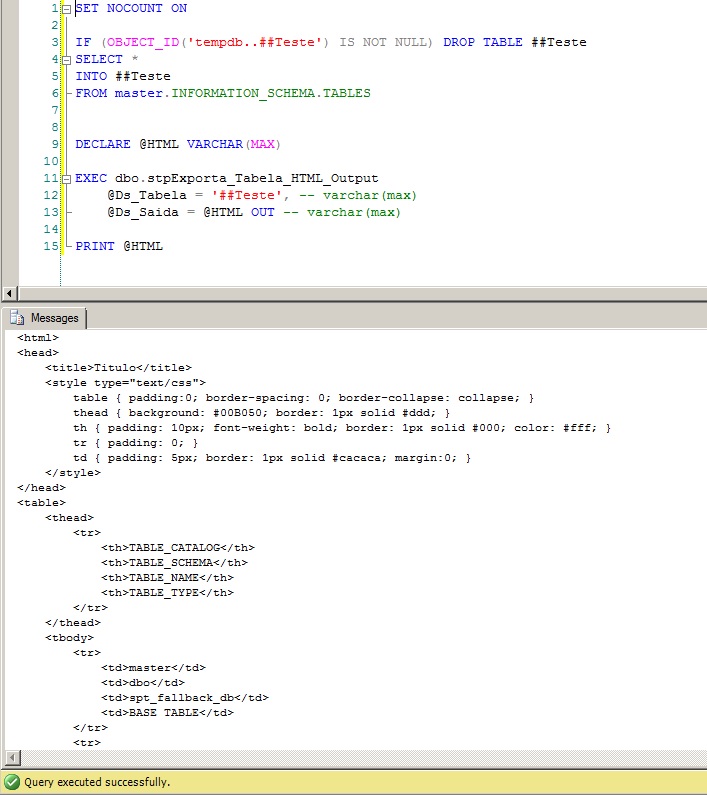
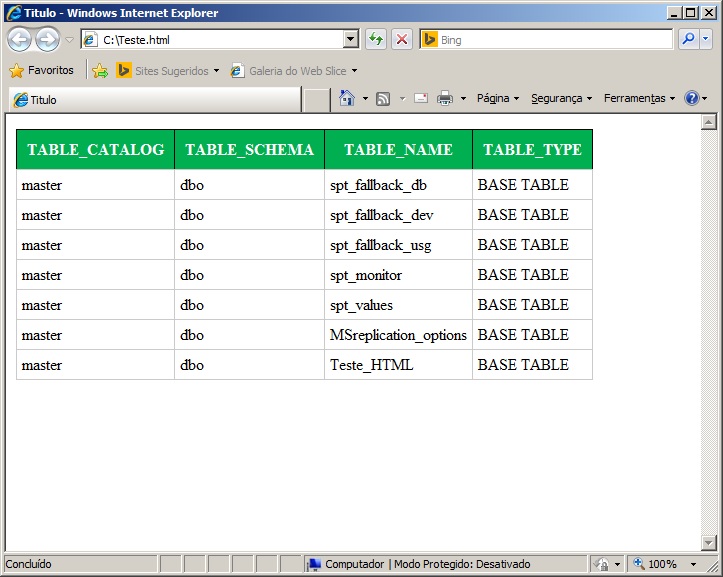
End result: SQL Server x HTML2
Exporting HTML to File
This functionality should be used when you need to generate a physical file on disk or on the network containing the contents of a table in HTML format.


Comments (0)
Loading comments...