
Hey guys!
In this article I want to bring you a solution that I created yesterday to include in a checklist that I am developing, which allows me to identify the latest version of the Service Pack (SP) and Cumulative Update (CU) for the version of SQL Server in which I am running this code.
To identify the latest updates for each version, I will use the website https://sqlserverbuilds.blogspot.com/, which is always up to date with the latest SQL Server updates (could also be the https://buildnumbers.wordpress.com/sqlserver/).
To extract data from the page to SQL Server, I will use the resource OLE Automation, which I have already published several articles explaining how to perform WebScraping of WEB pages and APIs using this resource.
After retrieving the page's HTML source code, I need to identify the table that contains the data according to the version I'm looking for and I also need to perform some treatments on the returned code to correct some inconsistencies:
- Conversion of HTML entities (ex: )
- Tag attributes without quotes (e.g. class=sp instead of class=”sp” = invalid HTML)
- Open and non-closed tags (e.g.
Column1 Column2 instead of Column1 Column2 )
This ends up being the most laborious part of this script, because if these inconsistencies in the code are not resolved, SQL Server returns an error when trying to convert XHTML to XML.
After carrying out all these treatments and converting the XHTML code to XML, I apply XQuery commands to identify the first row of the table of the respective version of SQL Server and return it in SP
Source code
After a brief summary of what I needed to do to accomplish this task, I will make the source code of the solution created available below, which can be used with a simple “F5”.
IF (OBJECT_ID('dbo.stpRetorna_Ultima_Versao_SQL') IS NULL) EXEC('CREATE PROCEDURE dbo.stpRetorna_Ultima_Versao_SQL AS SELECT 1')
GO

ALTER PROCEDURE dbo.stpRetorna_Ultima_Versao_SQL (
    @Versao VARCHAR(20) = NULL
)
AS
BEGIN


    --------------------------------------------------------------------------------
    -- Habilitando o OLE Automation (Se não estiver ativado)
    --------------------------------------------------------------------------------

    DECLARE @Fl_Ole_Automation_Ativado BIT = (SELECT (CASE WHEN CAST([value] AS VARCHAR(MAX)) = '1' THEN 1 ELSE 0 END) FROM sys.configurations WHERE [name] = 'Ole Automation Procedures')

    IF (@Fl_Ole_Automation_Ativado = 0)
    BEGIN

        EXECUTE sp_configure 'show advanced options', 1
        RECONFIGURE WITH OVERRIDE

        EXEC sp_configure 'Ole Automation Procedures', 1
        RECONFIGURE WITH OVERRIDE

    END


    DECLARE
        @obj INT,
        @Url VARCHAR(8000),
        @xml VARCHAR(MAX),
        @resposta VARCHAR(MAX)

    SET @Url = 'http://sqlserverbuilds.blogspot.com/'

    EXEC sys.sp_OACreate 'MSXML2.ServerXMLHTTP', @obj OUT
    EXEC sys.sp_OAMethod @obj, 'open', NULL, 'GET', @Url, false
    EXEC sys.sp_OAMethod @obj, 'send'


    DECLARE @xml_versao_sql TABLE (
        Ds_Dados VARCHAR(MAX)
    )

    INSERT INTO @xml_versao_sql(Ds_Dados)
    EXEC sys.sp_OAGetProperty @obj, 'responseText' --, @resposta OUT


    EXEC sys.sp_OADestroy @obj


    --------------------------------------------------------------------------------
    -- Desativando o OLE Automation (Se não estava habilitado antes)
    --------------------------------------------------------------------------------

    IF (@Fl_Ole_Automation_Ativado = 0)
    BEGIN

        EXEC sp_configure 'Ole Automation Procedures', 0
        RECONFIGURE WITH OVERRIDE

        EXECUTE sp_configure 'show advanced options', 0
        RECONFIGURE WITH OVERRIDE

    END


    DECLARE
        @Versao_SQL_Build VARCHAR(20)

    IF (@Versao IS NOT NULL)
        SET @Versao_SQL_Build = @Versao

    ELSE BEGIN

        SET @Versao_SQL_Build = (CASE LEFT(CONVERT(VARCHAR, SERVERPROPERTY('ProductVersion')), 2)
            WHEN '8.' THEN '2000'
            WHEN '9.' THEN '2005'
            WHEN '10' THEN (
                CASE
                    WHEN LEFT(CONVERT(VARCHAR, SERVERPROPERTY('ProductVersion')), 4) = '10.5' THEN '2008 R2'
                    WHEN LEFT(CONVERT(VARCHAR, SERVERPROPERTY('ProductVersion')), 4) = '10.0' THEN '2008'
                END)
            WHEN '11' THEN '2012'
            WHEN '12' THEN '2014'
            WHEN '13' THEN '2016'
            WHEN '14' THEN '2017'
            WHEN '15' THEN '2019'
            ELSE '2019'
        END)

    END


    SELECT TOP 1 @resposta = Ds_Dados FROM @xml_versao_sql


    SET @xml = @resposta COLLATE SQL_Latin1_General_CP1251_CS_AS

    DECLARE
        @PosicaoInicialVersao INT,
        @PosicaoFinalVersao INT,
        @ExpressaoBuscar VARCHAR(100) = 'Microsoft SQL Server ' + @Versao_SQL_Build + ' Builds',
        @RetornoTabela VARCHAR(MAX),
        @dadosXML XML

    SET @PosicaoInicialVersao = CHARINDEX(@ExpressaoBuscar, @xml) + LEN(@ExpressaoBuscar) + 6
    SET @PosicaoFinalVersao = CHARINDEX('</table>', @xml, @PosicaoInicialVersao)
    SET @RetornoTabela = SUBSTRING(@xml, @PosicaoInicialVersao, @PosicaoFinalVersao - @PosicaoInicialVersao + 8)


    -- Corrigindo classes sem aspas duplas ("")
    SET @RetornoTabela = REPLACE(@RetornoTabela, ' border=1 cellpadding=4 cellspacing=0 bordercolor="#CCCCCC" style="border-collapse:collapse"', '')
    SET @RetornoTabela = REPLACE(@RetornoTabela, ' target=_blank rel=nofollow', ' target="_blank" rel="nofollow"')
    SET @RetornoTabela = REPLACE(@RetornoTabela, ' class=h', '')
    SET @RetornoTabela = REPLACE(@RetornoTabela, ' class=lsp', '')
    SET @RetornoTabela = REPLACE(@RetornoTabela, ' class=cu', '')
    SET @RetornoTabela = REPLACE(@RetornoTabela, ' class=sp', '')
    SET @RetornoTabela = REPLACE(@RetornoTabela, ' class=rtm', '')
    SET @RetornoTabela = REPLACE(@RetornoTabela, ' width=580', '')
    SET @RetornoTabela = REPLACE(@RetornoTabela, ' width=125', '')
    SET @RetornoTabela = REPLACE(@RetornoTabela, ' class=lcu', '')
    SET @RetornoTabela = REPLACE(@RetornoTabela, ' class=cve', '')
    SET @RetornoTabela = REPLACE(@RetornoTabela, ' class=lrtm', '')
    SET @RetornoTabela = REPLACE(@RetornoTabela, ' class=beta', '')

    -- Corrigindo elementos não fechados corretamente
    SET @RetornoTabela = REPLACE(@RetornoTabela, '<th>', '</th><th>')
    SET @RetornoTabela = REPLACE(@RetornoTabela, '<tr></th>', '<tr>')
    SET @RetornoTabela = REPLACE(@RetornoTabela, '<th>Build<th ', '<th>Build</th><th ')
    SET @RetornoTabela = REPLACE(@RetornoTabela, '<th>Release Date</tr>', '<th>Release Date</th></tr>')

    SET @RetornoTabela = REPLACE(@RetornoTabela, '<td>', '</td><td>')
    SET @RetornoTabela = REPLACE(@RetornoTabela, '<tr></td>', '<tr>')

    SET @RetornoTabela = REPLACE(@RetornoTabela, '</tr>', '</td></tr>')
    SET @RetornoTabela = REPLACE(@RetornoTabela, '</th></td>', '</th>')
    SET @RetornoTabela = REPLACE(@RetornoTabela, '</td></td>', '</td>')

    -- Removendo elementos de entidades HTML
    SET @RetornoTabela = REPLACE(@RetornoTabela, ' ', ' ')
    SET @RetornoTabela = REPLACE(@RetornoTabela, '&kbln', '&kbln')
    SET @RetornoTabela = REPLACE(@RetornoTabela, '<br>', '<br/>')

    SET @dadosXML = CONVERT(XML, @RetornoTabela)


    DECLARE @Atualizacoes_SQL_Server TABLE
    (
        [Ultimo_Build] VARCHAR(100),
        [Ultimo_Build_SQLSERVR.EXE] VARCHAR(100),
        [Versao_Arquivo] VARCHAR(100),
        [Q] VARCHAR(100),
        [KB] VARCHAR(100),
        [Descricao_KB] VARCHAR(500),
        [Lancamento_KB] VARCHAR(100),
        [Download_Ultimo_Build] VARCHAR(100)
    )


    INSERT INTO @Atualizacoes_SQL_Server
    SELECT
        @dadosXML.value('(//table/tr/td[1])[1]','varchar(100)') AS Ultimo_Build,
        @dadosXML.value('(//table/tr/td[2])[1]','varchar(100)') AS [Ultimo_Build_SQLSERVR.EXE],
        @dadosXML.value('(//table/tr/td[3])[1]','varchar(100)') AS Versao_Arquivo,
        @dadosXML.value('(//table/tr/td[4])[1]','varchar(100)') AS [Q],
        @dadosXML.value('(//table/tr/td[5])[1]','varchar(100)') AS KB,
        @dadosXML.value('(//table/tr/td[6]/a)[1]','varchar(500)') AS Descricao_KB,
        @dadosXML.value('(//table/tr/td[7])[1]','varchar(100)') AS Lancamento_KB,
        @dadosXML.value('(//table/tr/td[6]/a/@href)[1]','varchar(100)') AS Download_Ultimo_Build


    DECLARE
        @Url_Ultima_Versao_SQL VARCHAR(500) = (SELECT TOP(1) Download_Ultimo_Build FROM @Atualizacoes_SQL_Server),
        @Ultimo_Build VARCHAR(100) = (SELECT TOP(1) Ultimo_Build FROM @Atualizacoes_SQL_Server),
        @Descricao_KB VARCHAR(500) = (SELECT TOP(1) Descricao_KB FROM @Atualizacoes_SQL_Server)


    IF (@Versao IS NOT NULL)
    BEGIN

        SELECT *
        FROM @Atualizacoes_SQL_Server

    END
    ELSE BEGIN

        IF (CONVERT(VARCHAR(100), SERVERPROPERTY('ProductVersion')) >= @Ultimo_Build)
            SELECT 'SQL Server ATUALIZADO!' AS SQL_Server_Atualizado
        ELSE BEGIN

            SELECT 'SQL Server DESATUALIZADO!!' AS SQL_Server_Desatualizado
            UNION ALL
            SELECT '----------------------------------------'
            UNION ALL
            SELECT 'Versão mais atual: ' + @Ultimo_Build + ' (' + @Descricao_KB + ')'
            UNION ALL
            SELECT 'Download da versão mais atual: '
            UNION ALL
            SELECT @Url_Ultima_Versao_SQL
            UNION ALL
            SELECT '----------------------------------------'
            UNION ALL
            SELECT 'Sua versão: ' + CONVERT(VARCHAR(100), SERVERPROPERTY('ProductVersion')) + ' (' + CONVERT(VARCHAR(100), SERVERPROPERTY('ProductLevel')) + ')'

            SELECT *
            FROM @Atualizacoes_SQL_Server

        END

    END


END
Usage examples
Now I will demonstrate some examples of how this Stored Procedure works in practice.
Retrieving the latest update from an updated SQL Server 2017
SELECT @@VERSION

-- Retorna a última versão do SQL Server instalado na instância atual
EXEC dbo.stpRetorna_Ultima_Versao_SQL
Result:

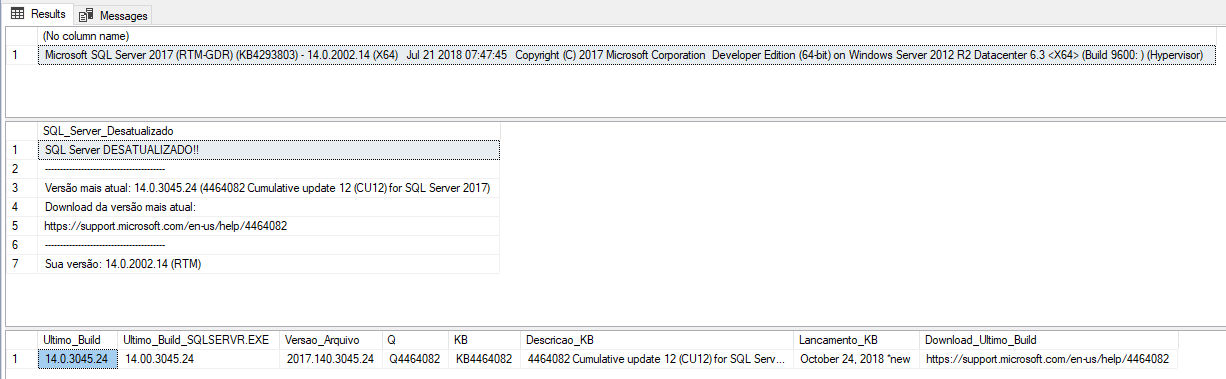
Retrieving the latest update from a SQL Server 2017
SELECT @@VERSION

-- Retorna a última versão do SQL Server instalado na instância atual
EXEC dbo.stpRetorna_Ultima_Versao_SQL
Result:
Retrieving the latest update from a SQL Server 2008 R2
SELECT @@VERSION

-- Retorna a última versão do SQL Server instalado na instância atual
EXEC dbo.stpRetorna_Ultima_Versao_SQL
Result:

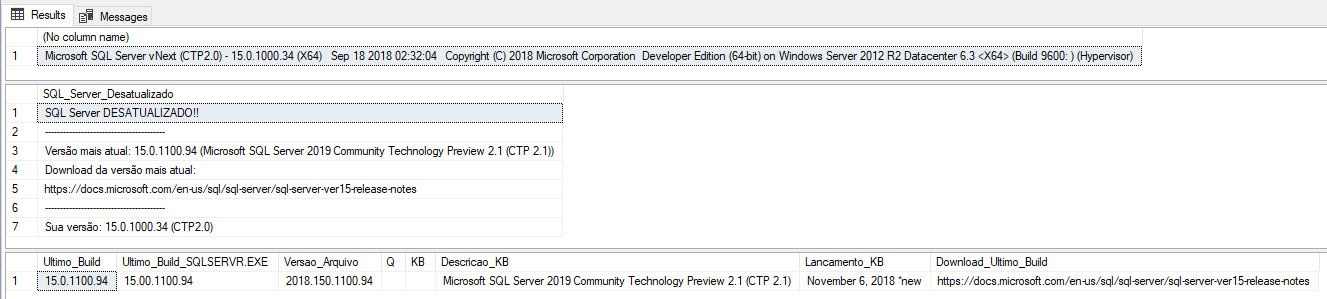
Retrieving the latest update from a SQL Server 2019
SELECT @@VERSION

-- Retorna a última versão do SQL Server instalado na instância atual
EXEC dbo.stpRetorna_Ultima_Versao_SQL
Result:
I need to show ALL updates for a version of SQL Server
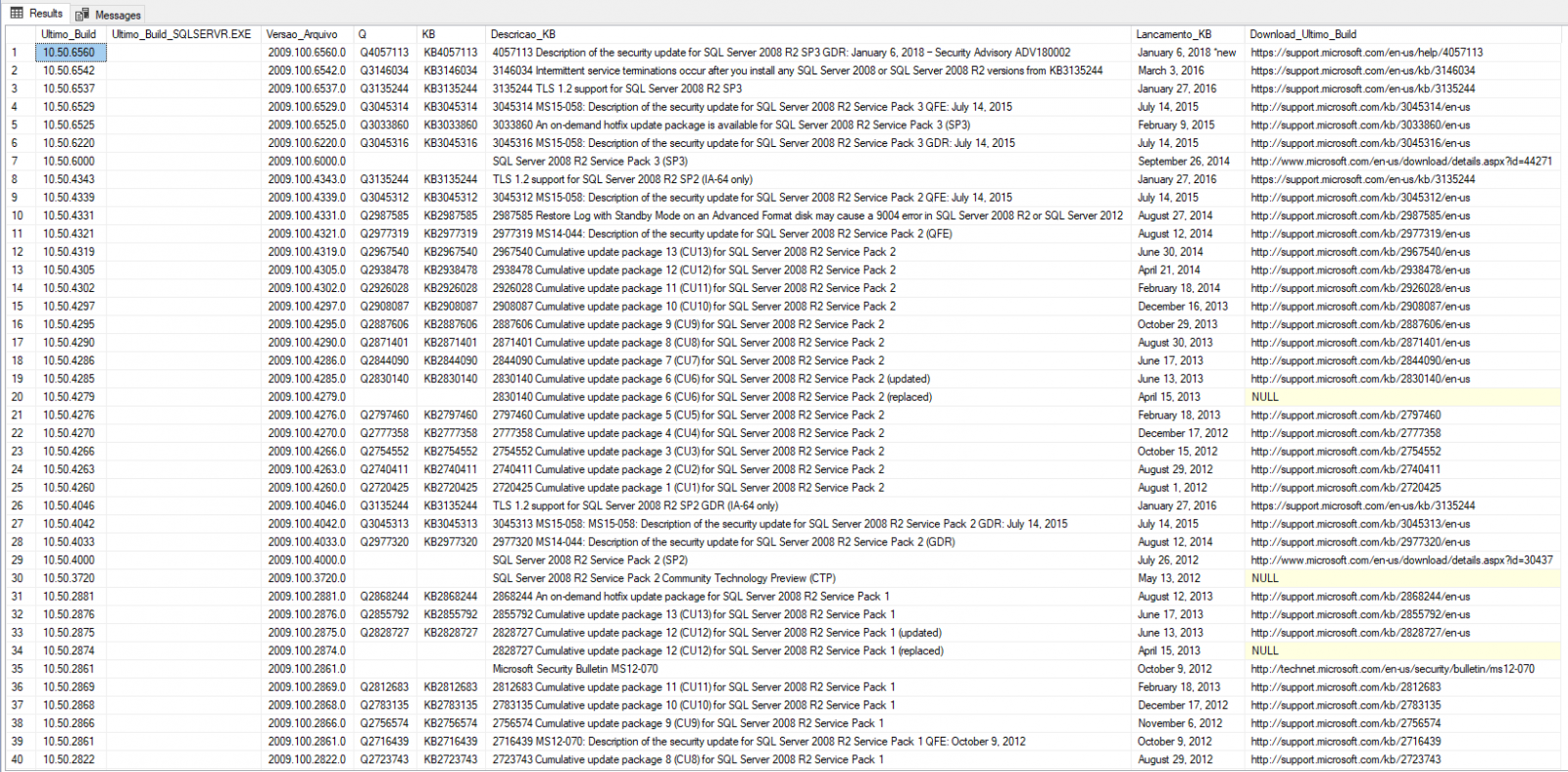
If you want to show all updates for the desired version of SQL Server and not just the last one, you can use the code below (after line 150):
SELECT
    Versoes.linha.value('(td[1])[1]','varchar(100)') AS Ultimo_Build,
    Versoes.linha.value('(td[2])[1]','varchar(100)') AS [Ultimo_Build_SQLSERVR.EXE],
    Versoes.linha.value('(td[3])[1]','varchar(100)') AS Versao_Arquivo,
    Versoes.linha.value('(td[4])[1]','varchar(100)') AS [Q],
    Versoes.linha.value('(td[5])[1]','varchar(100)') AS KB,
    (CASE
        WHEN Versoes.linha.value('(td[6]/a)[1]','varchar(500)') IS NOT NULL THEN Versoes.linha.value('(td[6]/a)[1]','varchar(500)')
        ELSE Versoes.linha.value('(td[6])[1]','varchar(500)')
    END) AS Descricao_KB,
    Versoes.linha.value('(td[7])[1]','varchar(100)') AS Lancamento_KB,
    Versoes.linha.value('(td[6]/a/@href)[1]','varchar(100)') AS Download_Ultimo_Build
FROM
    @dadosXML.nodes('//table/tr') Versoes(linha)
WHERE
    Versoes.linha.value('(td[1])[1]','varchar(100)') IS NOT NULL
Result:
Conclusion
Well guys, I hope you liked this article. I'm starting to use it in environments to do a quick check-up and it ended up being very practical. If you want to create monitoring for this in your environment, analyzing all instances, you can create this Stored Procedure in all instances and use the returned data to send automatic emails as needed.
In this monitoring scenario, another very interesting solution is the Reginaldo Silva, who made the post Get-SQLBuildVersion a different way to stay up to date, where he shared a solution written in PowerShell, which he developed, where he passes the instance name as a parameter and the script already performs this validation and parameters to send the result by email. Very practical to use in multiple instances.
Just like Reginaldo, I will highlight the article Cumulative update, apply or not, that is the question! of Luciano Moreira (Luti), where he explains his opinions about the constant application of SQL Server updates (I agree with him), since many DBA's are not in the habit of keeping SQL Server updated for fear of introducing a new bug after applying an update.
In my view, this doesn't make much sense nowadays, as these events are very rare and, by always applying updates, your environment is always updated with new features, bug fixes and security improvements, in addition to having a more mature and common update application process in the company's day-to-day activities.
Oh, it's worth remembering that starting with SQL Server 2017, we will no longer have Service Packs, only Cumulative Updates, as documented in this article here.
That's it, folks.
I hope you enjoyed this article and see you later!

Comments (0)
Loading comments...