
Hey guys!
In this article, I would like to document and share an experience I had TODAY, in the consultancy where I work, in which we had a problem with a client that meant that all Linked Servers that pointed to a certain instance began to show the error below, both when trying to query data and when trying to change objects (such as Stored Procedures) that used this linked server. And with great support from Rodrigo Ribeiro Gomes, we managed to solve this problem.
Msg 18456, Level 14, State 1, Line 4
Login failed for user ‘NT AUTHORITY\ANONYMOUS LOGON’.
My first suspicion when I came across this message was obviously something wrong with Kerberos Double Hop, which is a term used to describe our method of maintaining client Kerberos authentication credentials across two or more connections. This way, we can maintain the user's credentials and act on the user's behalf in other connections to other servers. as occurs when we use a Linked Server configured to use the security context of the logged in user (“Be made using the login’s current security context”) and we are using a connection with AD authentication to use this Linked Server.
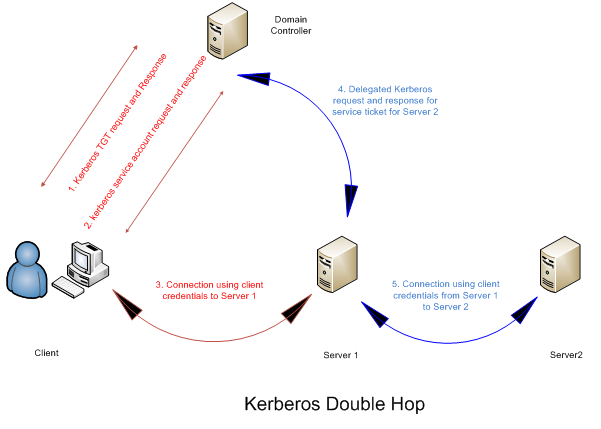
By default, SQL Server will always attempt to use Kerberos authentication mode when using an account with AD authentication. If Kerberos is not available, it will try to use the NTLM authentication mode (generally used in stand-alone systems).
Using a simple query, we were able to check the number of connections in each authentication mode:
SELECT auth_scheme, COUNT(*)
FROM sys.dm_exec_connections
GROUP BY auth_scheme
Example:
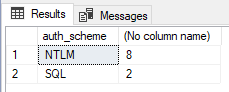
As occurred during the analysis, there was no connection using Kerberos authentication, only SQL (when you use SQL Server logins to connect to SQL Server) and NTLM (Connection using Windows Authentication when Kerberos is not available). This is a strong indication that Kerberos is not working correctly.
I turned on Kerberos logging to try to identify any problems. To do this, I created the LogLevel (DWORD) registry key with the value = 1 at the address HKEY_LOCAL_MACHINE\SYSTEM\CurrentControlSet\Control\Lsa\Kerberos\Parameters.
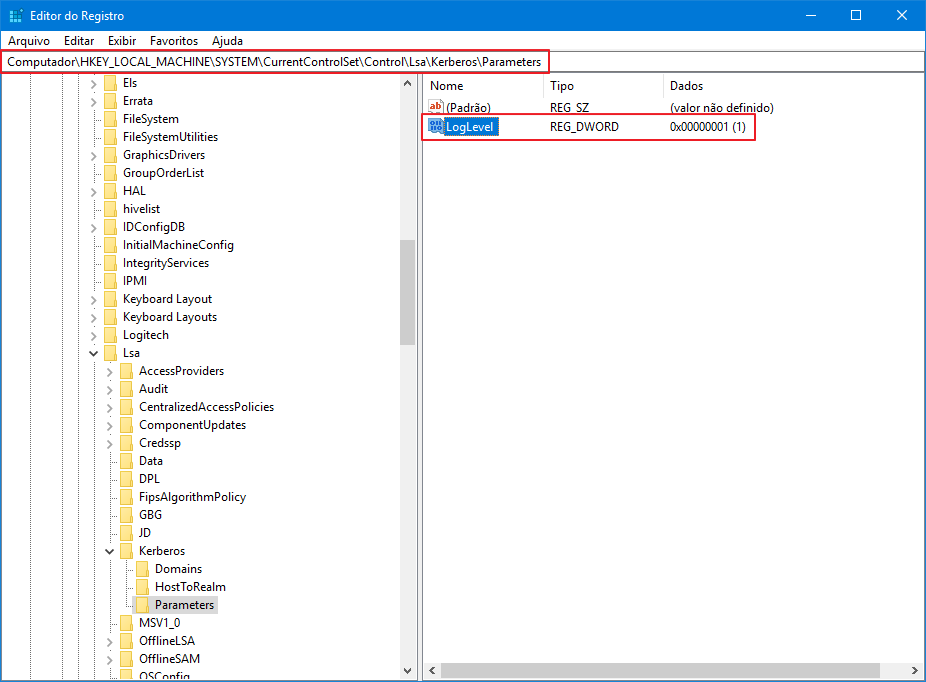
After enabling Kerberos logging, I analyzed the logs in Event Viewer and identified the following Kerberos error:
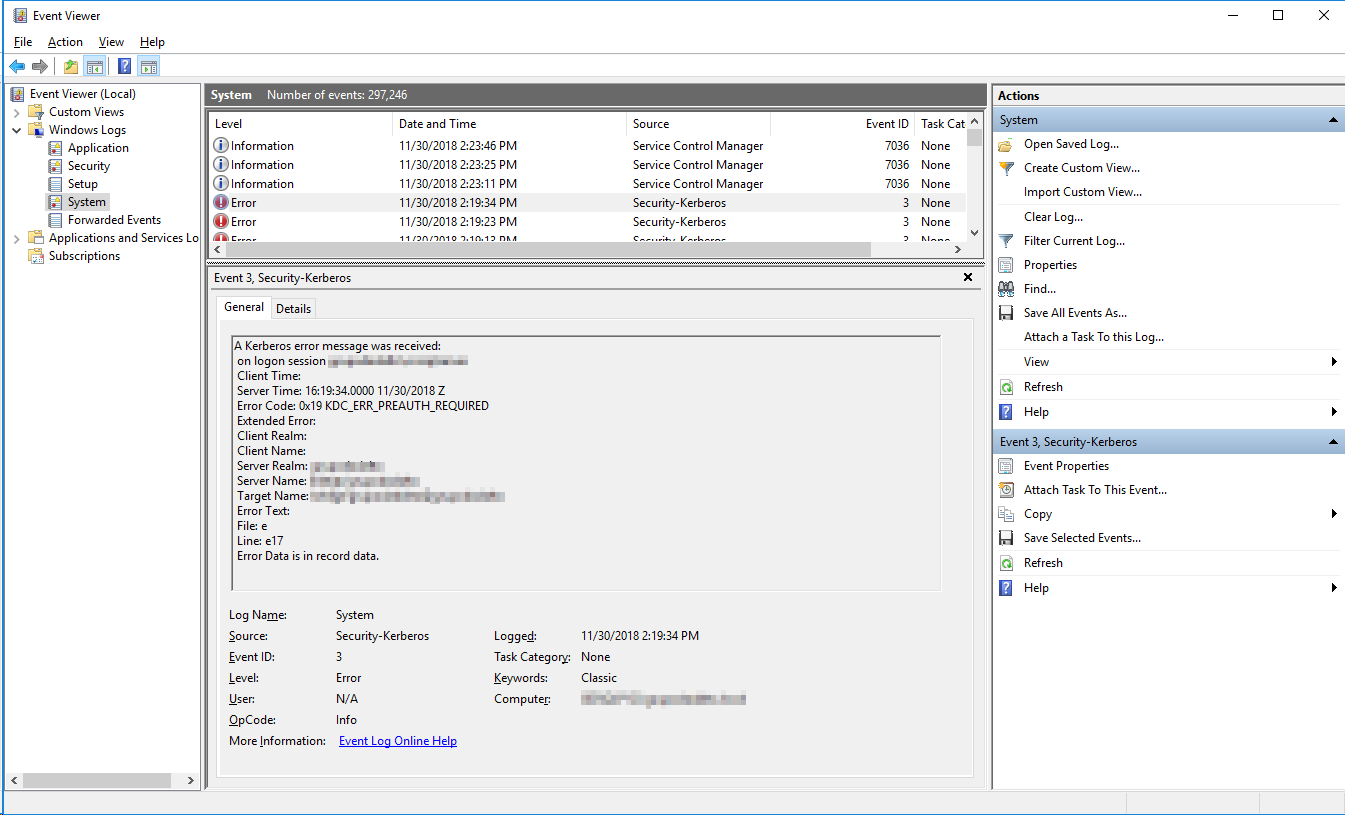
Error code: 0x19 KDC_ERR_PREAUTH_REQUIRED
When we consult the internet, we can understand that this error is “normal” for Kerberos and can be ignored. Therefore, I analyzed the servers registered in the SPN of the SQL Server Database Engine service account, which is an AD user in the format “DOMAIN\User”:
Listing the SPNs registered for the AD account running the SQL Server service
setspn -L DOMINIO\usuario

As this instance is part of a 2-node Windows Cluster and the problem started after a failover, I ran the results of setspn -L on both nodes and compared the results using Notepad++, which showed that the records were identical on both nodes.
The next step was to analyze the SQL Server logs with the xp_readerrorlog, to check whether the SPN was registered normally:
xp_readerrorlog 0,1,N'spn'Result:

If registration is not successful, you will see a message like this in the SQL Server log:

From the log record, SQL Server correctly registered the instance's SPN, but for some reason, it is no longer appearing when I use the setspn -L command that I demonstrated previously. It is probably these missing records that are causing the error in this post.
Therefore, I will manually register the SPN records for this instance in the same way they were initially registered:
setspn -A MSSQLSvc/INSTANCIA.dominio.local:porta DOMINIO\USUARIO
setspn -A MSSQLSvc/INSTANCIA.dominio.local:INSTANCIA DOMINIO\USUARIO
After manually registering these entries, the Linked Servers pointing to this instance returned to working normally and the error was corrected. I ran a query again in the DMV sys.dm_exec_connections and new user connections using Windows authentication (AD) are already being made using Kerberos instead of NTLM (existing connections need to be closed so that when they connect again, they start using Kerberos).
Result:

Once again, I would like to thank the support and guidance from Rodrigo Ribeiro Gomes, which were fundamental to solving this problem today.
I hope this article helps you resolve this issue if you are facing this scenario. Errors in Kerberos usually take some work to identify and correct, so the solution will not always be exactly that. As Rodrigo himself commented to me, there are cases in which even when the SPN records are correct, errors can occur in Kerberos, making it necessary to analyze Kerberos packets using tools such as Wireshark.
References:
– https://serverfault.com/questions/808198/how-to-enable-logging-for-kerberos-on-windows-2012-r21
– https://blogs.msdn.microsoft.com/sql_protocols/2006/12/02/understanding-kerberos-and-ntlm-authentication-in-sql-server-connections/
– https://blogs.technet.microsoft.com/askds/2008/06/13/understanding-kerberos-double-hop/
– https://comunidadesqlserver.wordpress.com/2017/06/22/troubleshooting-kerberos-configuration/
– https://community.microstrategy.com/s/article/KB34369-How-to-use-Wireshark-to-troubleshoot-Kerberos-Issues
– https://docs.microsoft.com/en-us/windows/desktop/secauthn/microsoft-ntlm
– https://blogs.technet.microsoft.com/askds/2008/05/29/kerberos-authentication-problems-service-principal-name-spn-issues-part-1/
That's it, folks!
I hope you enjoyed this article and see you later!

Comments (0)
Loading comments...