
Hey guys,
Good afternoon!
In this post I will demonstrate a new Transact-SQL feature available from SQL Server 2016 SP1, which is the CREATE OR ALTER command, which can be applied to procedures, functions, triggers and views.
For those who work or have worked with Oracle, you know that this is a copy of CREATE OR REPLACE, which has existed in this DBMS for many, many years and that since my first contact with SQL Server (SQL 2005) I have always asked myself why Microsoft didn't implement this, as it made the daily lives of DBA's and developers much easier.
Until the creation of this resource, for procedures, functions, triggers and views it was possible to use 3 commands:
– CREATE
– ALTER
– DROP
If the object in question did not exist in the base and you executed the ALTER command, SQL would return an error message:
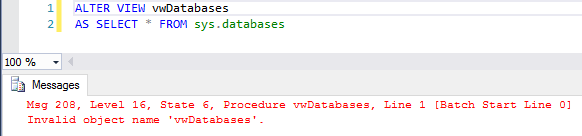
If the object in question existed in the database and you executed the CREATE command, SQL would also return an error message:

So how did the DBA/Developer do to prevent these error messages from occurring when updating objects?
If it exists, delete it and then create it
One way to ensure that the execution does not return an error is to check whether the object exists in the base and, if so, delete it from view/procedure/function/trigger. In this solution, I see two big problems:
- The DROP code needs to be explicitly declared with the object type (DROP VIEW, DROP FUNCTION, DROP PROCEDURE or DROP TRIGGER), making our code not so generic
- When deleting the object and recreating it immediately afterwards, the permissions for that object are lost and users who had access to that object will no longer have access. To prevent this from happening, you will have to save the permissions of each object before deleting it and creating it again, which can generate a lot of work depending on the number of objects to be changed in the database, in addition to the risk and responsibility of returning all permissions for all objects. To save the permissions, you can use the script I made available in the post Checking a user's permissions in SQL Server.
Usage example:
IF (OBJECT_ID('dbo.vwDatabases') IS NOT NULL) DROP VIEW dbo.vwDatabases
GO

CREATE VIEW dbo.vwDatabases
AS SELECT * FROM sys.databases
If it doesn't exist, create it and then change it
Another way to guarantee the creation/change of objects without error is with the solution I will present below, where I check if the object exists and if it does not, create an “empty” object and then execute the ALTER command with the correct source code.
This solution is better than the previous one, as it does not have the problem of losing object permissions, but it has the same problem of the code not being generalist, as you will need to define the type of the object in the “empty” object creation instruction (CREATE VIEW, CREATE PROCEDURE, etc..)
Usage example:
IF (OBJECT_ID('dbo.stpTeste') IS NULL)
    EXEC('CREATE PROCEDURE dbo.stpTeste AS SELECT 1')
GO

ALTER PROCEDURE dbo.stpTeste
AS
BEGIN

    PRINT 'Código da SP alterado'
    SELECT 1

END
CREATE OR ALTER
Feature available from SQL Server 2016 SP1, it is now possible to use the CREATE OR ALTER statement when creating Stored Procedures, Functions, Views and Triggers. When doing this, SQL Server itself will check if the object exists and will create it, if it does not exist, with the source code provided or make a change to the code, if the object already exists.
Usage example:
-- Garantindo que o objeto não existe
IF (OBJECT_ID('dbo.stpTeste') IS NOT NULL) DROP PROCEDURE dbo.stpTeste
GO

-- Fazendo a criação/alteração da Stored Procedure
CREATE OR ALTER PROCEDURE dbo.stpTeste
AS
BEGIN

    PRINT 'Código da SP alterado'
    SELECT 1

END
Result:
Command(s) completed successfully.
That's it, folks.
I hope you enjoyed this post and see you next time.

Comments (0)
Loading comments...