
Hey guys,
Are you all right?
In this post I will demonstrate how to use the SQL Server database's native support for JSON, a document standard widely used in integrations and Web services today. This feature is available from the 2016 version of SQL Server and aims to allow the export of database data to a string in JSON format and the reading and manipulation of data in JSON format.
If you are using a version prior to SQL Server 2016, that is, without native JSON support, but still need to work with JSON strings, read my post Reading JSON strings, importing into the database and exporting to XML in SQL Server and learn how to do it.
If you need to physically import/export JSON strings from/to text files, check out these two posts:
- SQL Server – How to import text files into the database (OLE Automation, CLR, BCP, BULK INSERT, OPENROWSET)
- SQL Server – How to export database data to text file (CLR, OLE, BCP)
Exporting database data to a JSON string
View contentIts syntax is very similar to that of XML, so if you already know how to manipulate XML through SQL Server, you will already be very familiar with this new feature in the 2016 version. If you don't know, see more by accessing the post SQL Server – How to read, import and export data from XML files.
Example 1
In this first example, I will use the default JSON mode, which is auto. It will simply generate JSON according to the data entered, without making any changes to its structure.
SELECT name, state_desc, recovery_model_desc
FROM sys.databases
FOR JSON AUTO
Original table:

Generated JSON:
[
    {
        "name": "master",
        "state_desc": "ONLINE",
        "recovery_model_desc": "SIMPLE"
    },
    {
        "name": "tempdb",
        "state_desc": "ONLINE",
        "recovery_model_desc": "SIMPLE"
    },
    {
        "name": "model",
        "state_desc": "ONLINE",
        "recovery_model_desc": "FULL"
    },
    {
        "name": "msdb",
        "state_desc": "ONLINE",
        "recovery_model_desc": "SIMPLE"
    },
    {
        "name": "CLR",
        "state_desc": "ONLINE",
        "recovery_model_desc": "SIMPLE"
    },
    {
        "name": "dirceuresende",
        "state_desc": "ONLINE",
        "recovery_model_desc": "SIMPLE"
    }
]
Example 2
Now in this example, I will use the ROOT parameter to define a root element for my JSON string and I will also change the field titles.
SELECT name AS [Database], state_desc AS [Situacao], recovery_model_desc AS [Recovery]
FROM sys.databases
FOR JSON PATH, ROOT('databases')
Original table:
Generated JSON:
{
    "databases": [
        {
            "Database": "master",
            "Situacao": "ONLINE",
            "Recovery": "SIMPLE"
        },
        {
            "Database": "tempdb",
            "Situacao": "ONLINE",
            "Recovery": "SIMPLE"
        },
        {
            "Database": "model",
            "Situacao": "ONLINE",
            "Recovery": "FULL"
        },
        {
            "Database": "msdb",
            "Situacao": "ONLINE",
            "Recovery": "SIMPLE"
        },
        {
            "Database": "CLR",
            "Situacao": "ONLINE",
            "Recovery": "SIMPLE"
        },
        {
            "Database": "dirceuresende",
            "Situacao": "ONLINE",
            "Recovery": "SIMPLE"
        }
    ]
}
Example 3
In this example, I will demonstrate 2 options to use with JSON. The INCLUDE_NULL_VALUES parameter is used to include columns with a NULL value in the generated JSON string (by default, columns with a NULL value are not generated). The WITHOUT_ARRAY_WRAPPER parameter is used to remove the characters “[” and “]” from the generated JSON string.
SELECT
    [name] AS [database.name],
    state_desc AS [database.state],
    create_date AS [database.create_date],
    NULL AS [database.valor_nulo]
FROM
    sys.databases FOR JSON PATH, INCLUDE_NULL_VALUES, WITHOUT_ARRAY_WRAPPER
Result:
{
    "database": {
        "name": "master",
        "state": "ONLINE",
        "create_date": "2003-04-08T09:13:36.390",
        "valor_nulo": null
    }
},
{
    "database": {
        "name": "tempdb",
        "state": "ONLINE",
        "create_date": "2017-02-12T04:26:38.907",
        "valor_nulo": null
    }
},
{
    "database": {
        "name": "model",
        "state": "ONLINE",
        "create_date": "2003-04-08T09:13:36.390",
        "valor_nulo": null
    }
},
{
    "database": {
        "name": "msdb",
        "state": "ONLINE",
        "create_date": "2016-04-30T00:46:38.773",
        "valor_nulo": null
    }
},
{
    "database": {
        "name": "CLR",
        "state": "ONLINE",
        "create_date": "2017-01-24T19:54:11.247",
        "valor_nulo": null
    }
},
{
    "database": {
        "name": "dirceuresende",
        "state": "ONLINE",
        "create_date": "2017-02-08T13:35:32.370",
        "valor_nulo": null
    }
}
Example 4
In this example, I will demonstrate how to export data from a table and store the generated JSON string in a variable.
DECLARE @stringJson VARCHAR(MAX) = (
    SELECT TOP 2
        [name] AS [database.name],
        state_desc AS [database.state],
        recovery_model_desc AS [database.options.recovery]
    FROM
        sys.databases FOR JSON AUTO
)

PRINT @stringJson
Result:

Example 5
In this last example, I will demonstrate how to completely control the structure of your JSON string using the PATH parameter.
SELECT TOP 2
    [name] AS [database.name],
    state_desc AS [database.state],
    recovery_model_desc AS [database.options.recovery],
    [compatibility_level] AS [database.options.compatibility_level],
    page_verify_option_desc AS [database.options.page_verify],
    collation_name AS [database.options.collation],
    create_date AS [database.create_date],
    is_read_only AS [database.parameters.read_only],
    is_auto_shrink_on AS [database.parameters.auto_shrink],
    is_auto_create_stats_on AS [database.parameters.auto_create_stats],
    is_read_committed_snapshot_on AS [database.parameters.sessions.read_commited_snapshot],
    is_ansi_null_default_on AS [database.parameters.sessions.ansi_nulls],
    is_ansi_warnings_on AS [database.parameters.sessions.ansi_warnings],
    is_arithabort_on AS [database.parameters.sessions.arithabort],
    user_access_desc AS [database.user_access]
FROM
    sys.databases FOR JSON PATH, ROOT('databases')
Generated JSON:
{
    "databases": [
        {
            "database": {
                "name": "master",
                "state": "ONLINE",
                "options": {
                    "recovery": "SIMPLE",
                    "compatibility_level": 130,
                    "page_verify": "CHECKSUM",
                    "collation": "Latin1_General_CI_AI"
                },
                "create_date": "2003-04-08T09:13:36.390",
                "parameters": {
                    "read_only": false,
                    "auto_shrink": false,
                    "auto_create_stats": true,
                    "sessions": {
                        "read_commited_snapshot": false,
                        "ansi_nulls": false,
                        "ansi_warnings": false,
                        "arithabort": false
                    }
                },
                "user_access": "MULTI_USER"
            }
        },
        {
            "database": {
                "name": "tempdb",
                "state": "ONLINE",
                "options": {
                    "recovery": "SIMPLE",
                    "compatibility_level": 130,
                    "page_verify": "CHECKSUM",
                    "collation": "Latin1_General_CI_AI"
                },
                "create_date": "2017-02-12T04:26:38.907",
                "parameters": {
                    "read_only": false,
                    "auto_shrink": false,
                    "auto_create_stats": true,
                    "sessions": {
                        "read_commited_snapshot": false,
                        "ansi_nulls": false,
                        "ansi_warnings": false,
                        "arithabort": false
                    }
                },
                "user_access": "MULTI_USER"
            }
        }
    ]
}
Manipulating data in JSON strings with JSON_VALUE
View contentExample 1
In this first example, I will demonstrate how to quickly extract information using the JSON_VALUE function.
DECLARE @stringJson VARCHAR(MAX) = '
{
    "info":{
      "type":1,

      "address":{
        "town":"Bristol",
        "county":"Avon",
        "country":"England"
      },
      "tags":["Sport", "Water polo"]
   },
   "type":"Basic"
}'

SELECT
    JSON_VALUE(@stringJson, '$.info.type') AS [info_type],
    JSON_VALUE(@stringJson, '$.info.address.town') AS [town],
    JSON_VALUE(@stringJson, '$.info.address.county') AS [county],
    JSON_VALUE(@stringJson, '$.info.address.country') AS [country],

    -- para retornar o array, utilize JSON_QUERY
    JSON_VALUE(@stringJson, '$.info.tags') AS [tags],

    -- retornando os dados do array
    JSON_VALUE(@stringJson, '$.info.tags[0]') AS [tags1],
    JSON_VALUE(@stringJson, '$.info.tags[1]') AS [tags2],
    JSON_VALUE(@stringJson, '$.info.tags[2]') AS [tags3], -- não existe = NULL

    JSON_VALUE(@stringJson, '$.type') AS [type]
Result:

Example 2
In this example, I will demonstrate how to read data from JSON strings that have multivalued data (arrays) and the reading will be done using array indices.
DECLARE @stringJson VARCHAR(MAX) = '
{
    "databases": [
        {
            "Database Name": "master",
            "Situacao": "ONLINE",
            "Recovery": "SIMPLE"
        },
        {
            "Database Name": "tempdb",
            "Situacao": "ONLINE",
            "Recovery": "SIMPLE"
        },
        {
            "Database Name": "model",
            "Situacao": "ONLINE",
            "Recovery": "FULL"
        },
        {
            "Database Name": "msdb",
            "Situacao": "ONLINE",
            "Recovery": "SIMPLE"
        },
        {
            "Database Name": "CLR",
            "Situacao": "ONLINE",
            "Recovery": "SIMPLE"
        },
        {
            "Database Name": "dirceuresende",
            "Situacao": "ONLINE",
            "Recovery": "SIMPLE"
        }
    ]
}'


SELECT
    JSON_VALUE(@stringJson, '$.databases[0]."Database Name"'),
    JSON_VALUE(@stringJson, '$.databases[0].Situacao'),

    JSON_VALUE(@stringJson, '$.databases[1]."Database Name"'),
    JSON_VALUE(@stringJson, '$.databases[1].Situacao'),

    JSON_VALUE(@stringJson, '$.databases[2]."Database Name"'),
    JSON_VALUE(@stringJson, '$.databases[2].Situacao'),

    JSON_VALUE(@stringJson, '$.databases[5]."Database Name"'),
    JSON_VALUE(@stringJson, '$.databases[5].Situacao')
Result:

Example 3
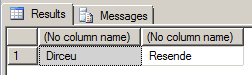
In this example, I will demonstrate how to use JSON_VALUE using a string embedded in the command itself.
SELECT
    JSON_VALUE('{"Primeiro Nome":"Dirceu", "Ultimo Nome": "Resende"}', '$."Primeiro Nome"'),
    JSON_VALUE('{"Primeiro Nome":"Dirceu", "Ultimo Nome": "Resende"}', '$."Ultimo Nome"')
Result:
Example 4
Finally, in this example I will demonstrate how to use the JSON_VALUE function as a computed column, where I insert a JSON string into the table, and the data is automatically calculated for me.
IF (OBJECT_ID('tempdb..#Teste') IS NOT NULL) DROP TABLE #Teste
CREATE TABLE #Teste (
    Id INT IDENTITY(1 ,1),
    stringJson VARCHAR(MAX),
    Nome AS JSON_VALUE(stringJson, '$."Primeiro Nome"'),
    Ultimo_Nome AS JSON_VALUE(stringJson, '$."Ultimo Nome"'),
)

INSERT #Teste (stringJson)
VALUES('{"Primeiro Nome":"Dirceu", "Ultimo Nome": "Resende"}')

SELECT *
FROM #Teste
Result:

Manipulating data in JSON strings with JSON_QUERY
View contentExample 1
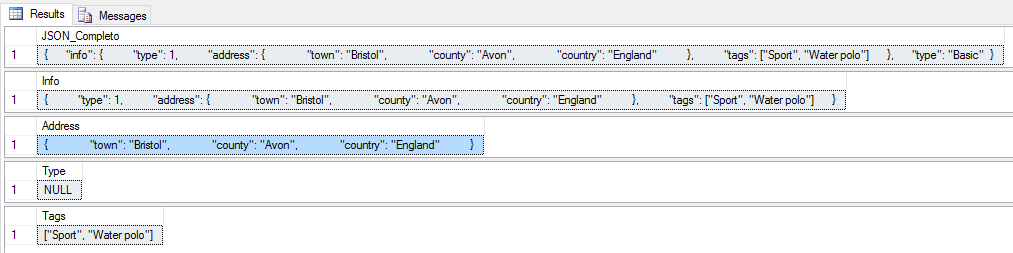
In this first example, I will demonstrate some basic uses of the JSON_QUERY function
DECLARE @stringJson VARCHAR(MAX) = '
{
    "info": {
        "type": 1,
        "address": {
            "town": "Bristol",
            "county": "Avon",
            "country": "England"
        },
        "tags": ["Sport", "Water polo"]
    },
    "type": "Basic"
} '

SELECT
    -- Retorna o objeto JSON completo
    JSON_QUERY(@stringJson, '$') AS JSON_Completo

SELECT
    -- Retorna o objeto JSON "info"
    JSON_QUERY(@stringJson, '$.info') AS [Info]

SELECT
    -- Retorna o objeto JSON "address"
    JSON_QUERY(@stringJson, '$.info.address') AS [Address]

SELECT
    -- Retorna NULL, pois JSON_QUERY só funciona com objetos
    -- Para retornar valores escalares, use a JSON_VALUE
    JSON_QUERY(@stringJson, '$.info.type') AS [Type]

SELECT
    -- Retorna o array de valores da propriedade "tags
    JSON_QUERY(@stringJson, '$.info.tags') AS [Tags]
Result:
Example 2
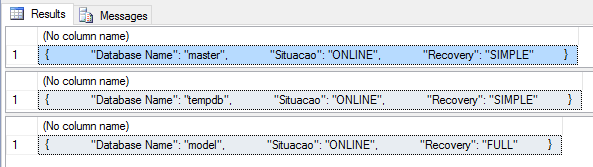
In this example, I will demonstrate how to return arrays using N-indices from a JSON string.
DECLARE @stringJson VARCHAR(MAX) = '
{
    "databases": [
        {
            "Database Name": "master",
            "Situacao": "ONLINE",
            "Recovery": "SIMPLE"
        },
        {
            "Database Name": "tempdb",
            "Situacao": "ONLINE",
            "Recovery": "SIMPLE"
        },
        {
            "Database Name": "model",
            "Situacao": "ONLINE",
            "Recovery": "FULL"
        },
        {
            "Database Name": "msdb",
            "Situacao": "ONLINE",
            "Recovery": "SIMPLE"
        },
        {
            "Database Name": "CLR",
            "Situacao": "ONLINE",
            "Recovery": "SIMPLE"
        },
        {
            "Database Name": "dirceuresende",
            "Situacao": "ONLINE",
            "Recovery": "SIMPLE"
        }
    ]
}'

SELECT JSON_QUERY(@stringJson, '$.databases[0]')
SELECT JSON_QUERY(@stringJson, '$.databases[1]')
SELECT JSON_QUERY(@stringJson, '$.databases[2]')
Result:
Example 3
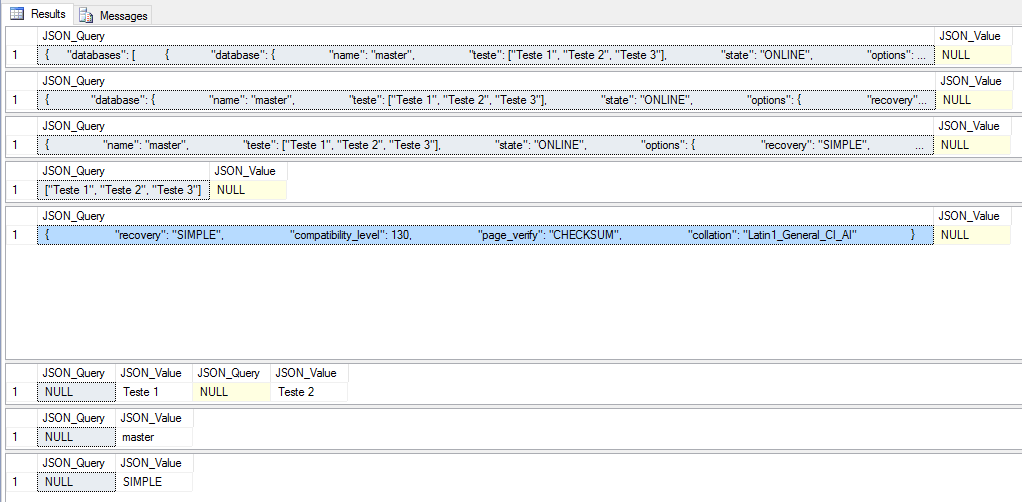
In this example, I will make some comparisons between JSON_QUERY and JSON_VALUE, to demonstrate the difference between the 2 functions.
DECLARE @stringJson VARCHAR(MAX) = '
{
    "databases": [
        {
            "database": {
                "name": "master",
                "teste": ["Teste 1", "Teste 2", "Teste 3"],
                "state": "ONLINE",
                "options": {
                    "recovery": "SIMPLE",
                    "compatibility_level": 130,
                    "page_verify": "CHECKSUM",
                    "collation": "Latin1_General_CI_AI"
                },
                "create_date": "2003-04-08T09:13:36.390",
                "parameters": {
                    "read_only": false,
                    "auto_shrink": false,
                    "auto_create_stats": true,
                    "sessions": {
                        "read_commited_snapshot": false,
                        "ansi_nulls": false,
                        "ansi_warnings": false,
                        "arithabort": false
                    }
                },
                "user_access": "MULTI_USER"
            }
        },
        {
            "database": {
                "name": "tempdb",
                "teste": ["Teste 1", "Teste 2", "Teste 3"],
                "state": "ONLINE",
                "options": {
                    "recovery": "SIMPLE",
                    "compatibility_level": 130,
                    "page_verify": "CHECKSUM",
                    "collation": "Latin1_General_CI_AI"
                },
                "create_date": "2017-02-12T04:26:38.907",
                "parameters": {
                    "read_only": false,
                    "auto_shrink": false,
                    "auto_create_stats": true,
                    "sessions": {
                        "read_commited_snapshot": false,
                        "ansi_nulls": false,
                        "ansi_warnings": false,
                        "arithabort": false
                    }
                },
                "user_access": "MULTI_USER"
            }
        }
    ]
}'


-- Quando usar o JSON_QUERY para retornar objetos
SELECT
    JSON_QUERY(@stringJson, '$') AS [JSON_Query],
    JSON_VALUE(@stringJson, '$') AS [JSON_Value]

SELECT
    JSON_QUERY(@stringJson, '$.databases[0]') AS [JSON_Query],
    JSON_VALUE(@stringJson, '$.databases[0]') AS [JSON_Value]

SELECT
    JSON_QUERY(@stringJson, '$.databases[0].database') AS [JSON_Query],
    JSON_VALUE(@stringJson, '$.databases[0].database') AS [JSON_Value]

SELECT
    JSON_QUERY(@stringJson, '$.databases[0].database.teste') AS [JSON_Query],
    JSON_VALUE(@stringJson, '$.databases[0].database.teste') AS [JSON_Value]

SELECT
    JSON_QUERY(@stringJson, '$.databases[0].database.options') AS [JSON_Query],
    JSON_VALUE(@stringJson, '$.databases[0].database.options') AS [JSON_Value]


-- Quando usar o JSON_VALUE para retornar valores
SELECT
    JSON_QUERY(@stringJson, '$.databases[0].database.teste[0]') AS [JSON_Query],
    JSON_VALUE(@stringJson, '$.databases[0].database.teste[0]') AS [JSON_Value],
    JSON_QUERY(@stringJson, '$.databases[0].database.teste[1]') AS [JSON_Query],
    JSON_VALUE(@stringJson, '$.databases[0].database.teste[1]') AS [JSON_Value]

SELECT
    JSON_QUERY(@stringJson, '$.databases[0].database.name') AS [JSON_Query],
    JSON_VALUE(@stringJson, '$.databases[0].database.name') AS [JSON_Value]

SELECT
    JSON_QUERY(@stringJson, '$.databases[0].database.options.recovery') AS [JSON_Query],
    JSON_VALUE(@stringJson, '$.databases[0].database.options.recovery') AS [JSON_Value]
Result:
Validating JSON strings with the ISJSON function
View contentI will demonstrate some examples so you can easily understand how to use this function.
Example 1
DECLARE @stringJson VARCHAR(MAX) = '
{
    "info":{
      "type":1,

      "address":{
        "town":"Bristol",
        "county":"Avon",
        "country":"England"
      },
      "tags":["Sport", "Water polo"]
   },
   "type":"Basic"
}'

SELECT ISJSON(@stringJson)
Result:
1 (valid JSON)
Example 2
In this example, I will use exactly the same JSON as the previous example, but I will remove a bracket “]” from the JSON string so that it is no longer valid.
-- Removi o caractere "]" da linha 12
DECLARE @stringJson VARCHAR(MAX) = '
{
    "info":{
      "type":1,

      "address":{
        "town":"Bristol",
        "county":"Avon",
        "country":"England"
      },
      "tags":["Sport", "Water polo"
   },
   "type":"Basic"
}'

SELECT ISJSON(@stringJson)
Result:
0 (invalid JSON)
Example 3
Finally, I'll demonstrate some quick JSON validation examples.
SELECT
    ISJSON('Teste') AS Invalido1,
    ISJSON('') AS Invalido2,
    ISJSON(NULL) AS Retorna_Null,
    ISJSON('{"Primeiro Nome":"Dirceu", "Ultimo Nome": "Resende"}') AS Valido1,
    ISJSON('"Primeiro Nome":"Dirceu", "Ultimo Nome": "Resende"') AS Invalido3
Result:

Importing JSON into a table with OPENJSON
View contentExample 1
DECLARE @stringJson VARCHAR(MAX) = '
{
    "databases": [
        {
            "Database Name": "master",
            "Situacao": "ONLINE",
            "Recovery": "SIMPLE"
        },
        {
            "Database Name": "tempdb",
            "Situacao": "ONLINE",
            "Recovery": "SIMPLE"
        },
        {
            "Database Name": "model",
            "Situacao": "ONLINE",
            "Recovery": "FULL"
        },
        {
            "Database Name": "msdb",
            "Situacao": "ONLINE",
            "Recovery": "SIMPLE"
        },
        {
            "Database Name": "CLR",
            "Situacao": "ONLINE",
            "Recovery": "SIMPLE"
        },
        {
            "Database Name": "dirceuresende",
            "Situacao": "ONLINE",
            "Recovery": "SIMPLE"
        }
    ]
}'


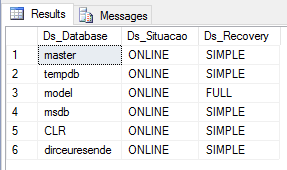
SELECT *
FROM
    OPENJSON(@stringJson, '$.databases')
WITH (
    Ds_Database NVARCHAR(100) '$."Database Name"',
    Ds_Situacao NVARCHAR(40) '$.Situacao',
    Ds_Recovery NVARCHAR(20) '$.Recovery'
) AS JsonImportado
Result:
Example 2
In this example, I will demonstrate how to import another JSON, this time without a root element and I will convert the date to DATETIME.
DECLARE @stringJson VARCHAR(MAX) = '
[
   {"Pedido": 1, "Dt_Pedido": "18/02/2017", "Cd_Cliente": 25, "Qtde_Itens": 5, "Cd_Produto": 5, "Vl_Unitario": 154.54},
   {"Pedido": 4, "Dt_Pedido": "14/02/2017", "Cd_Cliente": 7, "Qtde_Itens": 6, "Cd_Produto": 4, "Vl_Unitario": 59.99},
   {"Pedido": 6, "Dt_Pedido": "12/02/2017", "Cd_Cliente": 9, "Qtde_Itens": 8, "Cd_Produto": 2, "Vl_Unitario": 150},
   {"Pedido": 8, "Dt_Pedido": "12/02/2017", "Cd_Cliente": 5, "Qtde_Itens": 1, "Cd_Produto": 8, "Vl_Unitario": 287.00}
]'

SELECT
    JsonImportado.Nr_Pedido ,
    CONVERT(DATETIME, JsonImportado.Dt_Pedido, 103) AS Dt_Pedido,
    JsonImportado.Cd_Cliente ,
    JsonImportado.Qtde_Itens ,
    JsonImportado.Cd_Produto ,
    JsonImportado.Vl_Unitario
FROM
    OPENJSON(@stringJson)
WITH (
    Nr_Pedido INT '$.Pedido',
    Dt_Pedido NVARCHAR(10) '$.Dt_Pedido',
    Cd_Cliente INT '$.Cd_Cliente',
    Qtde_Itens INT '$.Qtde_Itens',
    Cd_Produto INT '$.Cd_Produto',
    Vl_Unitario FLOAT '$.Vl_Unitario'
) AS JsonImportado
Result:

Example 3
In this example, I will demonstrate how to import data from a multilevel JSON string into a table.
DECLARE @stringJson VARCHAR(MAX) = '
{
    "databases": [
        {
            "database": {
                "name": "master",
                "state": "ONLINE",
                "options": {
                    "recovery": "SIMPLE",
                    "compatibility_level": 130,
                    "page_verify": "CHECKSUM",
                    "collation": "Latin1_General_CI_AI"
                },
                "create_date": "2003-04-08T09:13:36.390",
                "parameters": {
                    "read_only": false,
                    "auto_shrink": false,
                    "auto_create_stats": true,
                    "sessions": {
                        "read_commited_snapshot": false,
                        "ansi_nulls": false,
                        "ansi_warnings": false,
                        "arithabort": false
                    }
                },
                "user_access": "MULTI_USER"
            }
        },
        {
            "database": {
                "name": "tempdb",
                "state": "ONLINE",
                "options": {
                    "recovery": "SIMPLE",
                    "compatibility_level": 130,
                    "page_verify": "CHECKSUM",
                    "collation": "Latin1_General_CI_AI"
                },
                "create_date": "2017-02-12T04:26:38.907",
                "parameters": {
                    "read_only": false,
                    "auto_shrink": false,
                    "auto_create_stats": true,
                    "sessions": {
                        "read_commited_snapshot": false,
                        "ansi_nulls": false,
                        "ansi_warnings": false,
                        "arithabort": false
                    }
                },
                "user_access": "MULTI_USER"
            }
        }
    ]
}'

SELECT
    *
FROM
    OPENJSON(@stringJson, '$.databases')
WITH (
    [Database_Name] NVARCHAR(100) '$.database.name',
    [Database_State] NVARCHAR(100) '$.database.state',
    [Recovery] NVARCHAR(40) '$.database.options.recovery',
    [Compatibility_Level] INT '$.database.options.compatibility_level',
    [Page_Verify] NVARCHAR(20) '$.database.options.page_verify',
    [Collation] NVARCHAR(50) '$.database.options.collation',

    -- Informação booleada em variável BIT
    [Read_Only] BIT '$.database.parameters.read_only',
    [Read_Commited_Snapshot] BIT '$.database.parameters.sessions.read_commited_snapshot',

    -- Informação booleada em variável NVARCHAR
    [Ansi_Nulls] NVARCHAR(50) '$.database.parameters.sessions.ansi_nulls',
    [Ansi_Warnings] NVARCHAR(50) '$.database.parameters.sessions.ansi_warnings',
    [Arithabort] NVARCHAR(50) '$.database.parameters.sessions.arithabort',
    [User_Acess] NVARCHAR(40) '$.database.user_access'
) AS JsonImportado
Result:

Example 4
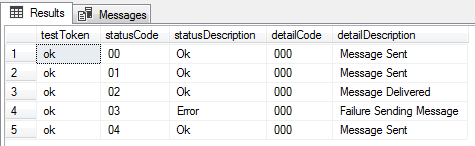
In this example, I will demonstrate how to import data from a multilevel JSON string, returning only the listing, to the table. In this scenario, I will have to use CROSS APPLY between the JSON nodes to traverse it.
DECLARE @json NVARCHAR(MAX) = '
[
   {
      "sendSmsMultiResponse":{
         "testToken": "ok",
         "sendSmsResponseList":[
            {
               "statusCode":"00",
               "statusDescription":"Ok",
               "detailCode":"000",
               "detailDescription":"Message Sent"
            },
            {
               "statusCode":"01",
               "statusDescription":"Ok",
               "detailCode":"000",
               "detailDescription":"Message Sent"
            },
            {
               "statusCode":"02",
               "statusDescription":"Ok",
               "detailCode":"000",
               "detailDescription":"Message Delivered"
            },
            {
               "statusCode":"03",
               "statusDescription":"Error",
               "detailCode":"000",
               "detailDescription":"Failure Sending Message"
            },
            {
               "statusCode":"04",
               "statusDescription":"Ok",
               "detailCode":"000",
               "detailDescription":"Message Sent"
            }
         ]
      }
   }
]'


SELECT
    lista.testToken,
    items.*
FROM
    OPENJSON(@json)
WITH (
    sendSmsMultiResponse NVARCHAR(MAX) AS JSON
) AS retorno
CROSS APPLY OPENJSON(retorno.sendSmsMultiResponse)
WITH (
    testToken NVARCHAR(100),
    sendSmsResponseList NVARCHAR(MAX) AS JSON
) AS lista
CROSS APPLY OPENJSON(lista.sendSmsResponseList)
WITH (
    statusCode NVARCHAR(10),
    statusDescription NVARCHAR(50),
    detailCode NVARCHAR(10),
    detailDescription NVARCHAR(50)
) AS items
Result:
Example 5
In this last example, I will demonstrate again how to import data from a multilevel JSON string, returning only the listing, to the table. In this scenario, I will have to use CROSS APPLY between the JSON nodes to traverse it.
DECLARE @json NVARCHAR(MAX) = '
[
   {
      "structures":[
         {
            "IdStructure":"CB0466F9-662F-412B-956A-7D164B5D358F",
            "IdProject":"97A76363-095D-4FAB-940E-9ED2722DBC47",
            "Name":"Test Structure",
            "BaseStructure":"Base Structure",
            "DatabaseSchema":"dbo",
            "properties":[
               {
                  "IdProperty":"618DC40B-4D04-4BF8-B1E6-12E13DDE86F4",
                  "IdStructure":"CB0466F9-662F-412B-956A-7D164B5D358F",
                  "Name":"Test Property 2",
                  "DataType":1,
                  "Precision":2,
                  "Scale":0,
                  "IsNullable":false,
                  "ObjectName":"Test Object",
                  "DefaultType":0,
                  "DefaultValue":"T"
               },
               {
                  "IdProperty":"FFF433EC-0BB5-41CD-8A71-B5F09B97C5FC",
                  "IdStructure":"CB0466F9-662F-412B-956A-7D164B5D358F",
                  "Name":"Test Property 1",
                  "DataType":2,
                  "Precision":4,
                  "Scale":0,
                  "IsNullable":true,
                  "ObjectName":"Test Object 2",
                  "DefaultType":1,
                  "DefaultValue":"F"
               }
            ]
         }
      ]
   }
]'


SELECT
    Structures.IdStructure,
    Structures.Name,
    Structures.BaseStructure,
    Structures.DatabaseSchema,
    Properties.IdProperty,
    Properties.NamePreoperty,
    Properties.DataType,
    Properties.Precision,
    Properties.Scale,
    Properties.IsNullable,
    Properties.ObjectName,
    Properties.DefaultType,
    Properties.DefaultValue
FROM
    OPENJSON(@json)
WITH
(
    structures NVARCHAR(MAX) AS JSON
) AS Projects
CROSS APPLY OPENJSON(Projects.structures)
WITH
(
    IdStructure UNIQUEIDENTIFIER,
    [Name] NVARCHAR(100),
    BaseStructure NVARCHAR(100),
    DatabaseSchema sysname,
    properties NVARCHAR(MAX) AS JSON
) AS Structures
CROSS APPLY OPENJSON(Structures.properties)
WITH
(
    IdProperty UNIQUEIDENTIFIER,
    NamePreoperty NVARCHAR(100) '$.Name',
    DataType INT,
    [Precision] INT,
    [Scale] INT,
    IsNullable BIT,
    ObjectName NVARCHAR(100),
    DefaultType INT,
    DefaultValue NVARCHAR(100)
) AS Properties
Result:

Modifying JSON strings with JSON_MODIFY
View contentUsage example
DECLARE @info NVARCHAR(MAX) = '{"nome":"Mike","habilidades":["C#","SQL"],"idade":29}'
PRINT '-- JSON Original'
PRINT @info
PRINT ''

-- Altera o nome de "Mike" para "Dirceu"
SET @info=JSON_MODIFY(@info,'$.nome','Dirceu')
PRINT '-- Altera o nome de "Mike" para "Dirceu"'
PRINT @info
PRINT ''

-- Insere uma nova propriedade chamada "sobrenome" com o valor "Resende"
SET @info=JSON_MODIFY(@info,'$.sobrenome','Resende')
PRINT '-- Insere uma nova propriedade chamada "sobrenome" com o valor "Resende"'
PRINT @info
PRINT ''

-- Adiciona um novo valor no array "habilidades"
SET @info=JSON_MODIFY(@info,'append $.habilidades','Azure')
PRINT '-- Adiciona um novo valor no array "habilidades"'
PRINT @info
PRINT ''

-- Tenta redefiner os valores do array "habilidades"
SET @info=JSON_MODIFY(@info,'$.habilidades', '["C++","T-SQL","PHP", "CSS"]')
PRINT '-- Tenta redefiner os valores do array "habilidades", mas tem problemas com os caracteres não-escapados'
PRINT @info
PRINT ''

-- Redefine os valores do array "habilidades"
SET @info=JSON_MODIFY(@info,'$.habilidades', JSON_QUERY('["C++","T-SQL","PHP", "CSS"]'))
PRINT '-- Redefine os valores do array "habilidades" utilizando JSON_QUERY para escapar os caracteres corretamente'
PRINT @info
PRINT ''

-- Renomeando a propriedade "nome" para "Primeiro Nome" (Precisa excluir e criar uma nova)
SET @info = JSON_MODIFY(@info, '$."Primeiro Nome"', JSON_VALUE(@info, '$.nome'))
SET @info = JSON_MODIFY(@info, '$.nome', NULL)
PRINT '-- Renomeando a propriedade "nome" para "Primeiro Nome"'
PRINT @info
PRINT ''

-- Remove a propriedade ""Primeiro Nome""
SET @info=JSON_MODIFY(@info,'$."Primeiro Nome"',NULL)
PRINT '-- Remove a propriedade "primeiroNome"'
PRINT @info
PRINT ''

-- Incrementa o valor da propriedade "Idade" de 29 para 30
SET @info = JSON_MODIFY(@info, '$.idade', CAST(JSON_VALUE(@info, '$.idade') AS INT) + 1)
PRINT '-- Incrementa o valor da propriedade "Idade" de 29 para 30'
PRINT @info
PRINT ''

-- Realiza mais de uma atualização no mesmo comando
SET @info = JSON_MODIFY(JSON_MODIFY(JSON_MODIFY(@info, '$.idade', 28), '$."Primeiro Nome"', 'Resende'), '$.sobrenome', 'Dirceu')
PRINT '-- Realiza mais de uma atualização no mesmo comando'
PRINT @info
PRINT ''
Result:

That's it, folks!
I hope you liked this post.
Until next time.

Comments (0)
Loading comments...