
Hey guys,
Are you all right?
In this post, I want to share with you a solution (of many possible ones) to create monitoring and alerting of locks in the SQL Server instance, which can inform you when one or more sessions have been in lock (waiting for some resource) for more than X minutes.
Anyone who works with critical environments knows how impactful a lock on the instance can be for several minutes, blocking one or more sessions in the database, or even in routines that are executed outside business hours and that end up not being executed due to such a block.
I recently came across a problem like this, where a change was made to a Stored Procedure outside of business hours, while it was running through a SQL Agent job. This routine ended up locking a critical table that was frequently accessed in production, and the sessions that accessed this table began to line up, generating hundreds of locks in the database, bringing a huge impact to the database routines, which were only noticed the following day. Several routines that should have been executed in the early hours of the morning ended up not being executed, waiting for the lock to end.
And everything could have been resolved with a simple lock alert on the cell phone, since the lock didn't start very late and a DBA on the team could have acted.
My idea is to share this alert so that this does not happen to your SQL Server databases and to always be proactive with problems that occur in your environment.
For this solution, I will use a Stored Procedure that will collect data from SQL Server DMVs to find the locked sessions and the block leaders (sessions causing the locks), generating an alert for the bank team informing the problem in a clear, simple and objective way.
How to create a lock alert on the instance
To create the lock alert, you can use the source code provided below and create a job in SQL Agent to execute this Stored Procedure every X minutes, according to your needs.
You can also set the time to determine how long a session can be locked before being notified (@Qt_Minutos_Lock – I set it to 3 minutes). This is to avoid many false emails and alerts.
In this monitoring, an alert is only sent when the last situation is “OK”, that is, there is no lock in the environment, or when the longest time in lock reaches the limit defined between alerts (@Qt_Minutos_Entre_Alertas – I configured 30 minutes between alerts), that is, alerts are not sent with each job execution, even if the sessions remain locked.
Two resources that help a lot with this monitoring are the nested_level and blocked_session_count columns:
- nested_level: lock hierarchy level. Level 1 are the sessions that are directly blocking the level 2 sessions and indirectly all sessions from levels 3 onwards, and so on.
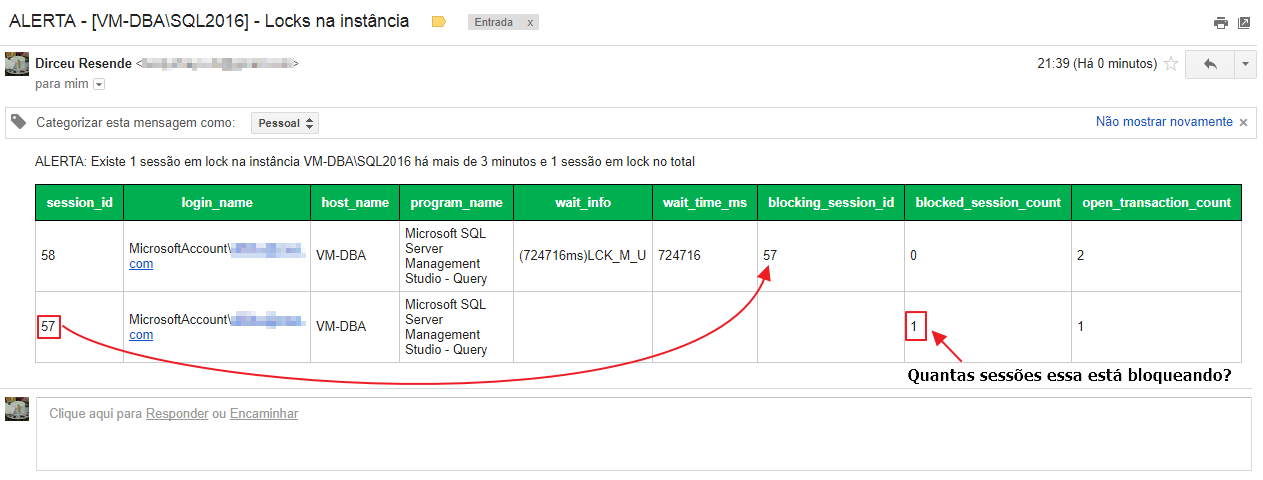
- blocked_session_count: Column that shows the number of other sessions that this specific session is blocking. Ex: If a session has this column filled with the value 8, this means that there are 8 locked sessions awaiting the release of resources from that session.
I will leave here some links that can help you improve this alert and better understand what was done:
- SQL Server – How to activate and configure Database mail to send and monitor emails through the database (sp_send_dbmail)
- How to export data from a SQL Server table to HTML
- SQL Server – How to send the result of a query by email in HTML format using the CLR (C#)
- How to use the Pushbullet API to send SMS text messages in C#, PHP, Java or SQL Server (with CLR)
- SQL Server – How to send SMS Torpedoes using the CLR (C#) and the Mais Resultado API (PG Soluções)
- SQL Server – How to integrate the database with Slack and send messages using the CLR (C#)
- SQL Server – How to integrate the database with Telegram and send messages using the CLR (C#)
- SQL Server – How to integrate the database with Ryver and send messages using CLR (C#)
Monitoring Stored Procedure source code
CREATE PROCEDURE [dbo].[stpMonitoramento_Locks]
AS BEGIN

    IF (OBJECT_ID('dbo.Alerta') IS NULL)
    BEGIN

        CREATE TABLE dbo.Alerta (
            Id_Alerta INT NOT NULL IDENTITY(1, 1),
            Nm_Alerta VARCHAR(200) NULL,
            Ds_Mensagem VARCHAR(2000) NULL,
            Fl_Tipo TINYINT NULL,
            Dt_Alerta DATETIME NULL DEFAULT (GETDATE())
        ) WITH (DATA_COMPRESSION = PAGE)

        ALTER TABLE dbo.Alerta ADD CONSTRAINT PK_Alerta PRIMARY KEY CLUSTERED (Id_Alerta) WITH (DATA_COMPRESSION = PAGE)

    END


    IF (OBJECT_ID('tempdb..##Monitoramento_Locks') IS NOT NULL) DROP TABLE ##Monitoramento_Locks
    CREATE TABLE ##Monitoramento_Locks
    (
        [nested_level] INT NULL,
        [session_id] INT NOT NULL,
        [login_name] NVARCHAR(128) NOT NULL,
        [host_name] NVARCHAR(128),
        [program_name] NVARCHAR(128),
        [wait_info] NVARCHAR(128),
        [wait_time_ms] BIGINT,
        [blocking_session_id] INT,
        [blocked_session_count] INT,
        [open_transaction_count] INT NOT NULL
    )

    INSERT INTO ##Monitoramento_Locks
    SELECT
        NULL AS nested_level,
        A.session_id AS session_id,
        A.login_name,
        A.[host_name],
        (CASE WHEN D.name IS NOT NULL THEN 'SQLAgent - TSQL Job (' + D.[name] + ' - ' + SUBSTRING(A.[program_name], 67, LEN(A.[program_name]) - 67) +  ')' ELSE A.[program_name] END) AS [program_name],
        '(' + CAST(COALESCE(E.wait_duration_ms, B.wait_time) AS VARCHAR(20)) + 'ms)' + COALESCE(E.wait_type, B.wait_type) + COALESCE((CASE
            WHEN COALESCE(E.wait_type, B.wait_type) LIKE 'PAGE%LATCH%' THEN ':' + DB_NAME(LEFT(E.resource_description, CHARINDEX(':', E.resource_description) - 1)) + ':' + SUBSTRING(E.resource_description, CHARINDEX(':', E.resource_description) + 1, 999)
            WHEN COALESCE(E.wait_type, B.wait_type) = 'OLEDB' THEN '[' + REPLACE(REPLACE(E.resource_description, ' (SPID=', ':'), ')', '') + ']'
            ELSE ''
        END), '') AS wait_info,
        COALESCE(E.wait_duration_ms, B.wait_time) AS wait_time_ms,
        NULLIF(B.blocking_session_id, 0) AS blocking_session_id,
        COALESCE(G.blocked_session_count, 0) AS blocked_session_count,
        A.open_transaction_count
    FROM
        sys.dm_exec_sessions AS A WITH (NOLOCK)
        LEFT JOIN sys.dm_exec_requests AS B WITH (NOLOCK) ON A.session_id = B.session_id
        LEFT JOIN msdb.dbo.sysjobs AS D ON RIGHT(D.job_id, 10) = RIGHT(SUBSTRING(A.[program_name], 30, 34), 10)
        LEFT JOIN (
            SELECT
                session_id,
                wait_type,
                wait_duration_ms,
                resource_description,
                ROW_NUMBER() OVER(PARTITION BY session_id ORDER BY (CASE WHEN wait_type LIKE 'PAGE%LATCH%' THEN 0 ELSE 1 END), wait_duration_ms) AS Ranking
            FROM
                sys.dm_os_waiting_tasks
        ) E ON A.session_id = E.session_id AND E.Ranking = 1
        LEFT JOIN (
            SELECT
                blocking_session_id,
                COUNT(*) AS blocked_session_count
            FROM
                sys.dm_exec_requests
            WHERE
                blocking_session_id != 0
            GROUP BY
                blocking_session_id
        ) G ON A.session_id = G.blocking_session_id
    WHERE
        A.session_id > 50
        AND A.session_id <> @@SPID
        AND (NULLIF(B.blocking_session_id, 0) IS NOT NULL OR COALESCE(G.blocked_session_count, 0) > 0)


    ------------------------------------------------
    -- Gera o nível dos locks
    ------------------------------------------------

    UPDATE ##Monitoramento_Locks
    SET nested_level = 1
    WHERE blocking_session_id IS NULL


    DECLARE @Contador INT = 2

    WHILE((SELECT COUNT(*) FROM ##Monitoramento_Locks WHERE nested_level IS NULL) > 0 AND @Contador < 50)
    BEGIN


        UPDATE A
        SET
            A.nested_level = @Contador
        FROM
            ##Monitoramento_Locks A
            JOIN ##Monitoramento_Locks B ON A.blocking_session_id = B.session_id
        WHERE
            A.nested_level IS NULL
            AND B.nested_level = (@Contador - 1)


        SET @Contador += 1


    END


    UPDATE ##Monitoramento_Locks
    SET nested_level = @Contador
    WHERE nested_level IS NULL


    CREATE CLUSTERED INDEX SK01 ON ##Monitoramento_Locks(nested_level, blocked_session_count DESC, wait_time_ms DESC)


    DECLARE
        @Qt_Sessoes_Bloqueadas INT,
        @Qt_Sessoes_Bloqueadas_Total INT,
        @Fl_Ultimo_Status INT,
        @Dt_Ultimo_Alerta DATETIME,
        @Ds_Mensagem VARCHAR(MAX),
        @Ds_Assunto VARCHAR(100),

        -- Configurações do monitoramento
        @Qt_Minutos_Lock INT = 3,
        @Qt_Minutos_Entre_Alertas INT = 30,
        @Ds_Email_Destinatario VARCHAR(MAX) = '[email protected]'


    SELECT
        @Qt_Sessoes_Bloqueadas = COUNT(*)
    FROM
        ##Monitoramento_Locks
    WHERE
        wait_time_ms > (60000 * @Qt_Minutos_Lock)
        AND blocking_session_id IS NOT NULL


    SELECT
        @Qt_Sessoes_Bloqueadas_Total = COUNT(*)
    FROM
        ##Monitoramento_Locks
    WHERE
        blocking_session_id IS NOT NULL


    SELECT
        @Fl_Ultimo_Status = ISNULL(A.Fl_Tipo, 0),
        @Dt_Ultimo_Alerta = ISNULL(A.Dt_Alerta, '1900-01-01')
    FROM
        dbo.Alerta A WITH(NOLOCK)
        JOIN
        (
            SELECT
                MAX(Id_Alerta) AS Id_Alerta
            FROM
                dbo.Alerta WITH(NOLOCK)
            WHERE
                Nm_Alerta = 'Block'
        ) B ON A.Id_Alerta = B.Id_Alerta


    SELECT
        @Fl_Ultimo_Status = ISNULL(@Fl_Ultimo_Status, 0),
        @Dt_Ultimo_Alerta = ISNULL(@Dt_Ultimo_Alerta, '1900-01-01')


    ------------------------------------
    -- Envia o CLEAR
    ------------------------------------

    IF (@Fl_Ultimo_Status = 1 AND @Qt_Sessoes_Bloqueadas = 0)
    BEGIN


        SELECT
            @Ds_Mensagem = CONCAT('CLEAR: Não existem mais sessões em lock na instância ', @@SERVERNAME),
            @Ds_Assunto = 'CLEAR - [' + @@SERVERNAME + '] - Locks na instância'


        INSERT INTO dbo.Alerta
        (
            Nm_Alerta,
            Ds_Mensagem,
            Fl_Tipo,
            Dt_Alerta
        )
        SELECT
            'Block',
            @Ds_Mensagem,
            0,
            GETDATE()

        -- Envia alerta por e-mail
        -- https://dirceuresende.com/blog/como-habilitar-enviar-monitorar-emails-pelo-sql-server-sp_send_dbmail/
        EXEC msdb.dbo.sp_send_dbmail
            @profile_name = 'ProfileEnvioEmail',
            @recipients = @Ds_Email_Destinatario,
            @subject = @Ds_Assunto,
            @body = @Ds_Mensagem,
            @body_format = 'html',
            @from_address = '[email protected]'


    END


    ------------------------------------
    -- Envia o alerta
    ------------------------------------

    IF (@Qt_Sessoes_Bloqueadas > 0 AND (@Fl_Ultimo_Status = 0 OR DATEDIFF(MINUTE, @Dt_Ultimo_Alerta, GETDATE()) >= @Qt_Minutos_Entre_Alertas))
    BEGIN


        SELECT
            @Ds_Mensagem = CONCAT('ALERTA: Existe', (CASE WHEN @Qt_Sessoes_Bloqueadas > 1 THEN 'm' ELSE '' END), ' ', CAST(@Qt_Sessoes_Bloqueadas AS VARCHAR(10)), ' ', (CASE WHEN @Qt_Sessoes_Bloqueadas > 1 THEN 'sessões' ELSE 'sessão' END), ' em lock na instância ', @@SERVERNAME, ' há mais de ', CAST(@Qt_Minutos_Lock AS VARCHAR(10)), ' minutos e ', CAST(@Qt_Sessoes_Bloqueadas_Total AS VARCHAR(10)), ' ', (CASE WHEN @Qt_Sessoes_Bloqueadas_Total > 1 THEN 'sessões' ELSE 'sessão' END), ' em lock no total'),
            @Ds_Assunto = 'ALERTA - [' + @@SERVERNAME + '] - Locks na instância'


        INSERT INTO dbo.Alerta
        (
            Nm_Alerta,
            Ds_Mensagem,
            Fl_Tipo,
            Dt_Alerta
        )
        SELECT
            'Block',
            @Ds_Mensagem,
            1,
            GETDATE()


        -- https://dirceuresende.com/blog/como-exportar-dados-de-uma-tabela-do-sql-server-para-html/
        DECLARE @HTML VARCHAR(MAX)

        EXEC dbo.stpExporta_Tabela_HTML_Output
            @Ds_Tabela = '##Monitoramento_Locks', -- varchar(max)
            @Fl_Aplica_Estilo_Padrao = 1, -- bit
            @Ds_Saida = @HTML OUTPUT -- varchar(max)


        SET @Ds_Mensagem += '<br><br>' + @HTML

        -- Envia alerta por e-mail
        -- https://dirceuresende.com/blog/como-habilitar-enviar-monitorar-emails-pelo-sql-server-sp_send_dbmail/
        EXEC msdb.dbo.sp_send_dbmail
            @profile_name = 'ProfileEnvioEmail',
            @recipients = @Ds_Email_Destinatario,
            @subject = @Ds_Assunto,
            @body = @Ds_Mensagem,
            @body_format = 'html',
            @from_address = '[email protected]'


    END


END
Observation: The CONCAT function is available starting with SQL Server 2012. If you use a version earlier than this, you will need to remove the CONCAT function from the code and use simple concatenation (using +).
Example of alert email
That's it, folks!
A hug and see you in the next post.

Comments (0)
Loading comments...