
Hey guys,
Are you all right?
In this post, I would like to share with you a way to create error and exception monitoring in your database using Extended Events (XE), allowing you to capture and generate a history of errors that occur in your SQL Server instance, errors that may have been generated by applications, Mobile applications, queries in Management Studio, Windows services, SQL Agent Jobs, in short, whatever the origin of the errors, you will be able to capture and treat them or report them to the development team, if it is their responsibility.
My motivation for creating this type of monitoring was to identify permission errors in systems and user login errors in the application where I work, since we changed that user's password and needed to have tools to detect if any legacy system or service (which does not have logs on the application side) was in error due to this change.
Using this XE session, you can catch virtually any error or exception that occurs in your database, such as:
– Permission errors on objects
– Syntax errors
– Non-existent objects
– Login errors
– Network errors
– Arithmetic and mathematical errors
– Warnings like “The definition of object ‘xxx’ has changed since it was compiled.”
– Occurrence of deadlocks
– Violation of constraints (Check, Foreign Key, Primary Key, Unique Key)
Therefore, with just a few commands, you can have a very detailed report of the errors that occur in your instance, especially useful for the development team to analyze errors in applications or the DBA team to analyze errors in SQL Agent jobs.
How to create error monitoring with XE
To create our error monitoring, we will use the Extended Events (XE) feature of SQL Server. You can create it using the commands below or using the SSMS interface, as I demonstrated in the post SQL Server – How to generate a deadlock history to analyze failures in routines.
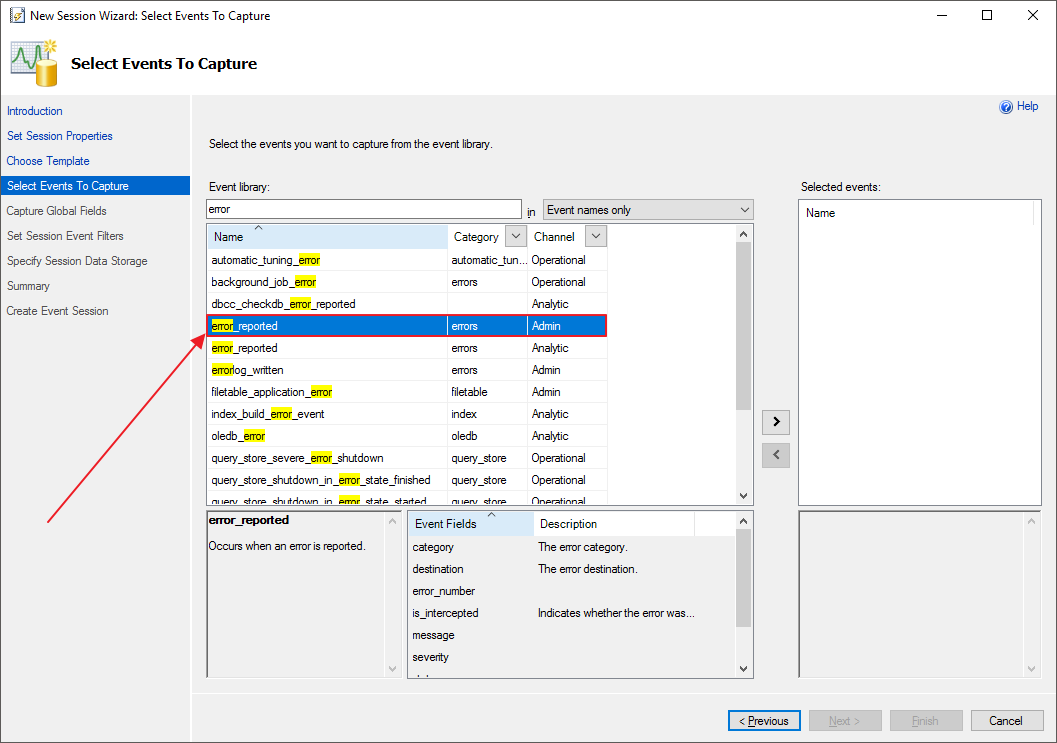
The event we want to monitor is the error_reported.
Step by step to create XE through the SSMS interface
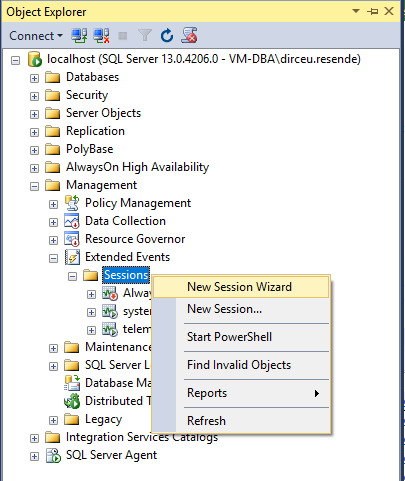
-
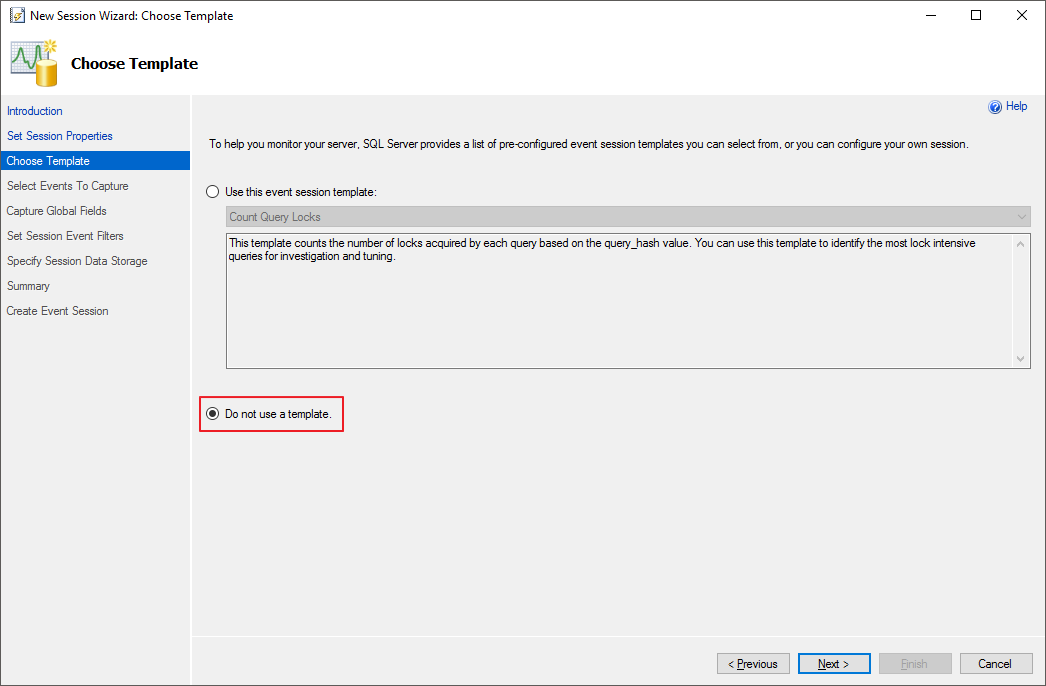
- We don't want to use a template, but rather create a new model according to our needs.
-
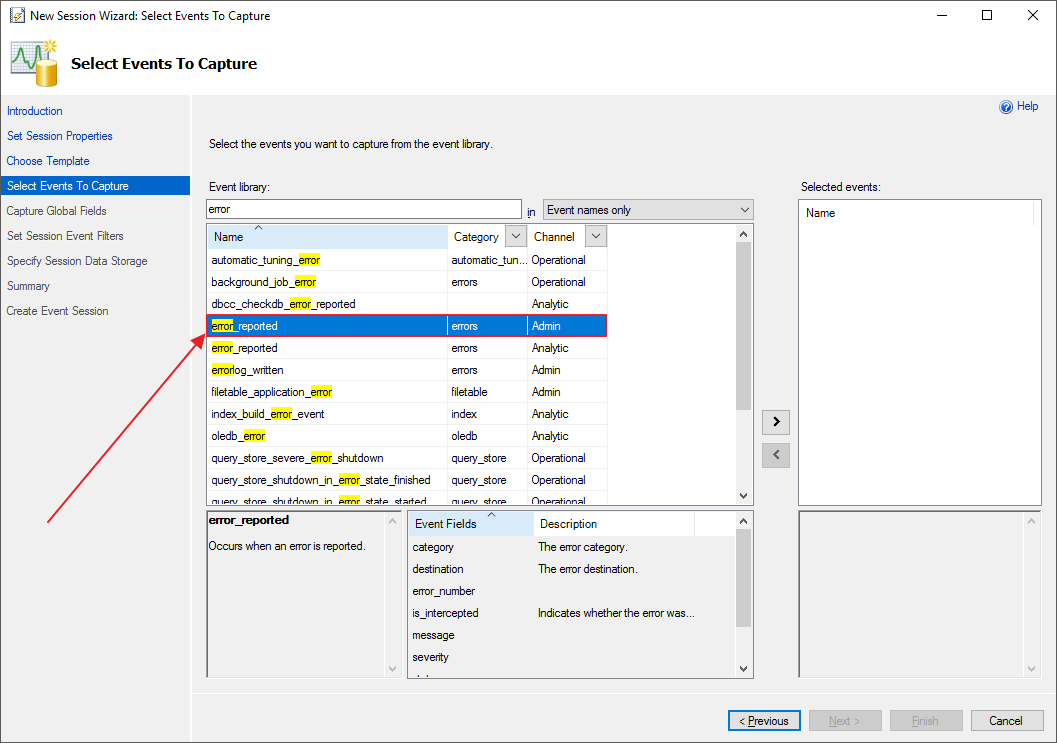
- Select the event you want to monitor. In this case, we want to monitor the “error_reported” event
-
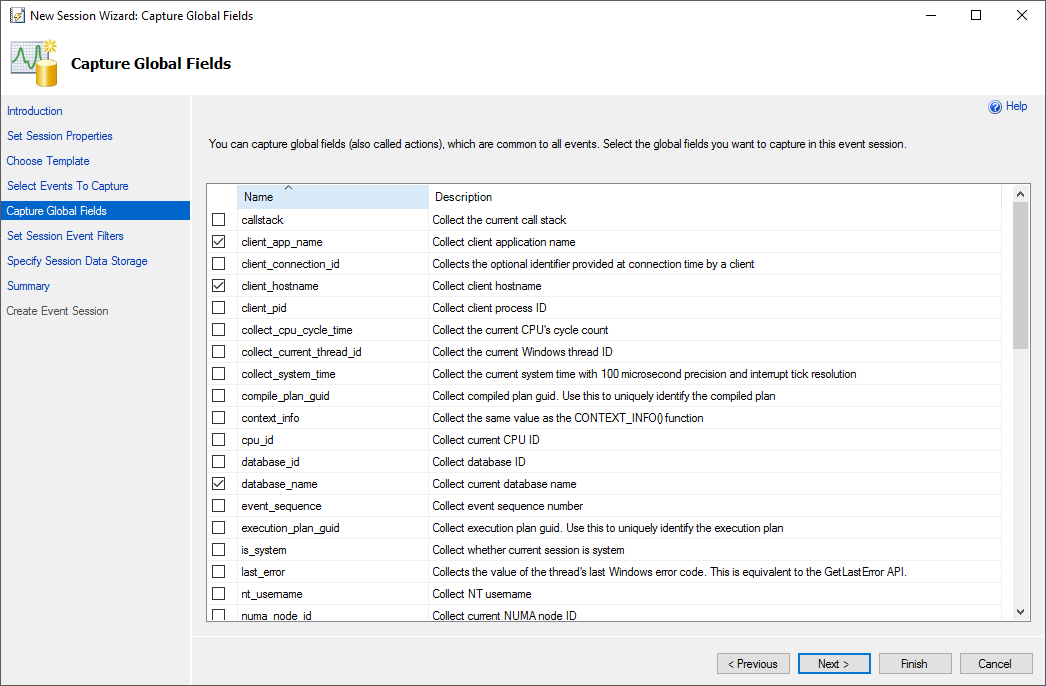
- Select the columns you want to be returned in the XE session
-
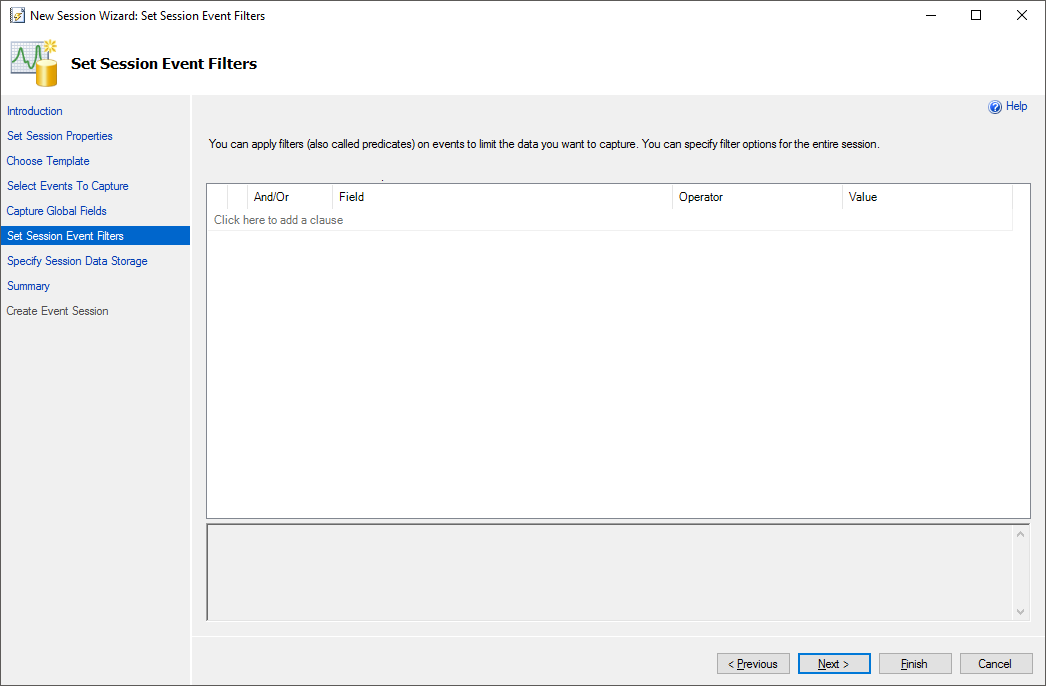
- Filters to select events. Here we do not have the option to filter by the severity field, so we will have to create this filter manually.
-
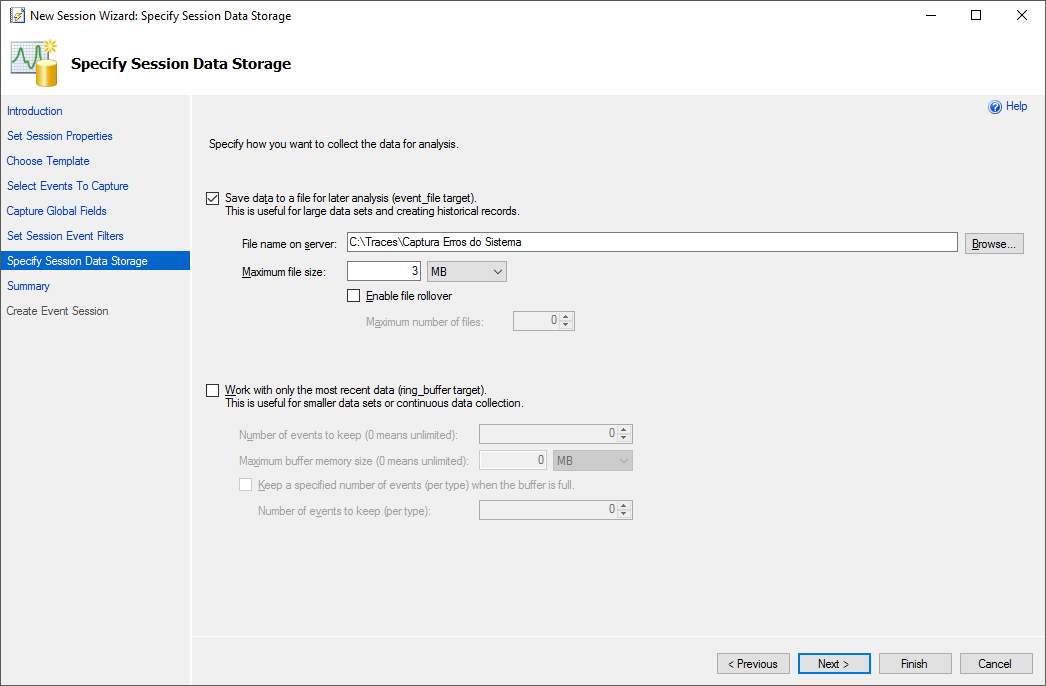
- Settings for where events will be stored on the server, maximum size, rollout, etc.
-
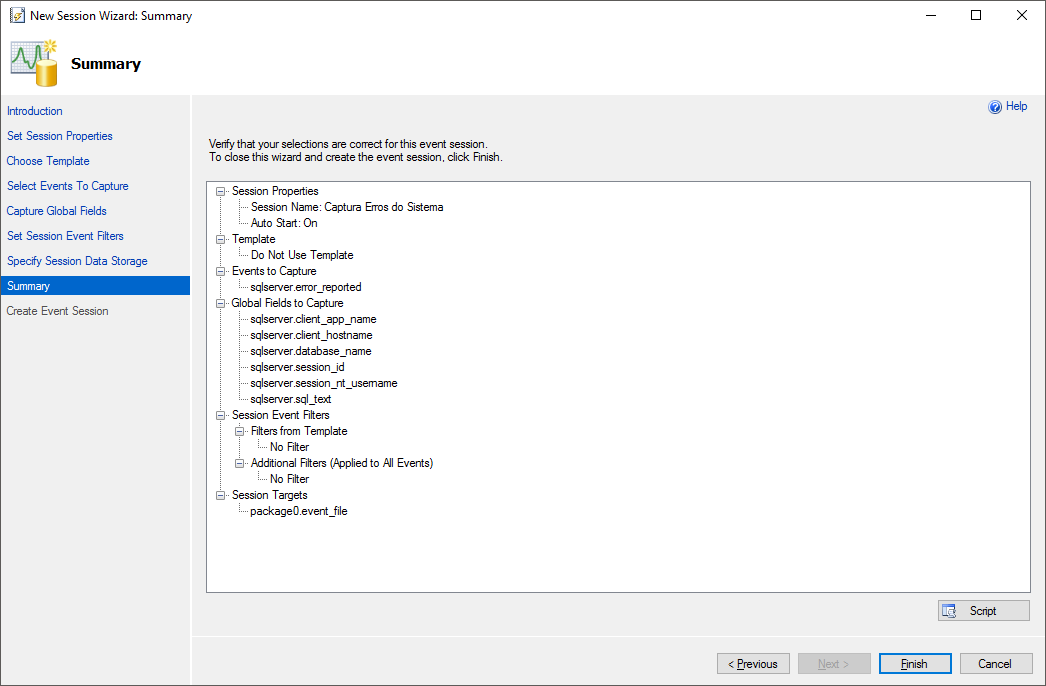
- Summary with our session settings
-
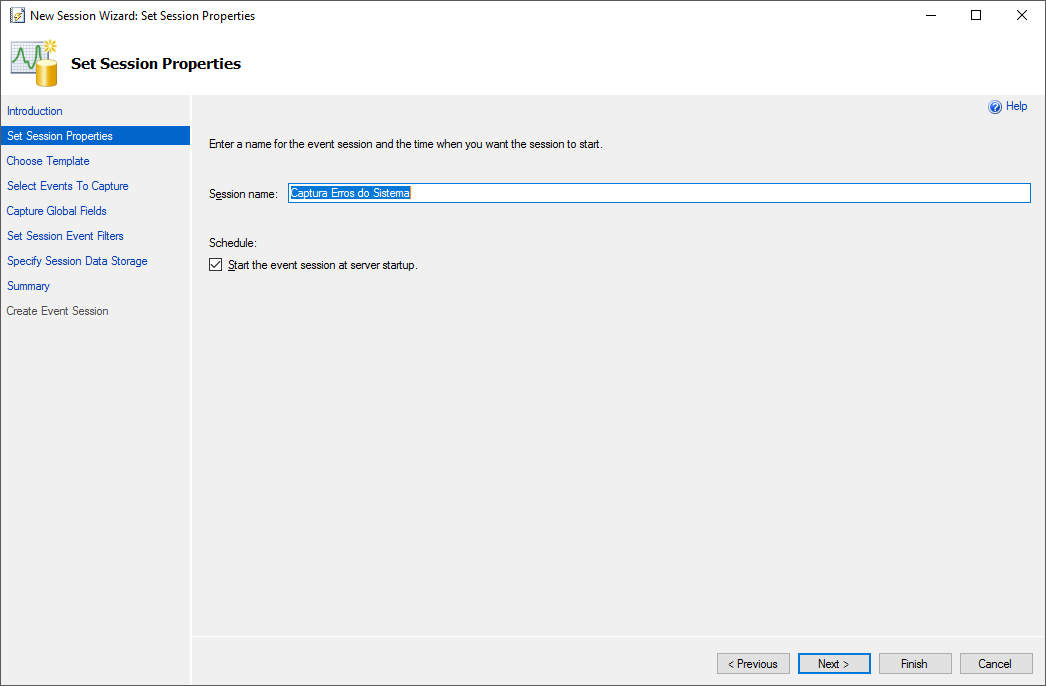
- This is where we configure the name of our event and whether it will automatically start when the instance is started
Once you have configured your XE session, click the “Script” button on the last screen instead of “Finish”.
I recommend doing this, as the filter using the Severity column cannot be applied through the SSMS interface, just editing the script and monitoring alerts with a severity lower than 10 can end up generating a very large volume of logs, as even alerts and warnings can end up being monitored (it's up to you).
The final script to create the monitoring looked like this:
-- Apaga a sessão, caso ela já exista
IF ((SELECT COUNT(*) FROM sys.server_event_sessions WHERE [name] = 'Captura Erros do Sistema') > 0) DROP EVENT SESSION [Captura Erros do Sistema] ON SERVER
GO

CREATE EVENT SESSION [Captura Erros do Sistema] ON SERVER
ADD EVENT sqlserver.error_reported (
    ACTION(client_app_name,sqlserver.client_hostname,sqlserver.database_name,sqlserver.session_id,sqlserver.session_nt_username,sqlserver.sql_text)

    -- Adicionado manualmente, pois não é possível filtrar pela coluna "Severity" pela interface
    WHERE severity > 10
)
ADD TARGET package0.event_file(SET filename=N'C:\Traces\Captura Erros do Sistema',max_file_size=(3),max_rollover_files=(1))
WITH (STARTUP_STATE=ON) -- Será iniciado automaticamente com a instância
GO

-- Ativando a sessão (por padrão, ela é criada desativada)
ALTER EVENT SESSION [Captura Erros do Sistema] ON SERVER STATE = START
GO
An important observation: If you define a directory to store your XE events, as I did in the example (C:\Traces\), you must create this directory manually. If you do not do this, an error message will be generated when trying to activate the session, informing you that this directory does not exist.
How to view captured errors
Now that our monitoring has been created and is active, we need to create a routine to handle the Extended Events file and store the results in a table.
This way, it is easy for other teams to query this data without having to have higher privileges to use the Extended Events functions, in addition to making it much easier (and much easier) to query these errors, since the data is recorded in XML format, and this would require knowledge in handling data in XML format and would end up weighing down the instance a bit when searching for and filtering certain values.
By creating the data processing routine, we can create indexes on the columns to facilitate and speed up data filtering, and also create a greater history of errors. In my case, I limited the file to only 3 MB, but as I copy the data to a table, even if the file is overwritten due to new events, I will continue to be able to consult the old data calmly.
I don't recommend creating giant files to store your events so you don't have to create this routine. The larger your XE results XML file, the greater the bank's effort will be when you need to filter some information directly in the XML. By keeping the file small, this effort will be minimal.
Data visualization script source code
IF (OBJECT_ID('dbo.Historico_Erros_Banco') IS NULL)
BEGIN

    -- DROP TABLE dbo.Historico_Erros_Banco
    CREATE TABLE dbo.Historico_Erros_Banco (
        Dt_Evento DATETIME,
        session_id INT,
        [database_name] VARCHAR(100),
        session_nt_username VARCHAR(100),
        client_hostname VARCHAR(100),
        client_app_name VARCHAR(100),
        [error_number] INT,
        severity INT,
        [state] INT,
        sql_text XML,
        [message] VARCHAR(MAX)
    )

    CREATE CLUSTERED INDEX SK01_Historico_Erros ON dbo.Historico_Erros_Banco(Dt_Evento)

END


DECLARE @TimeZone INT = DATEDIFF(HOUR, GETUTCDATE(), GETDATE())
DECLARE @Dt_Ultimo_Evento DATETIME = ISNULL((SELECT MAX(Dt_Evento) FROM dbo.Historico_Erros_Banco WITH(NOLOCK)), '1990-01-01')


IF (OBJECT_ID('tempdb..#Eventos') IS NOT NULL) DROP TABLE #Eventos

;WITH CTE AS (
    SELECT CONVERT(XML, event_data) AS event_data
    FROM sys.fn_xe_file_target_read_file(N'C:\Traces\Captura Erros do Sistema*.xel', NULL, NULL, NULL)
)
SELECT
    DATEADD(HOUR, @TimeZone, CTE.event_data.value('(//event/@timestamp)[1]', 'datetime')) AS Dt_Evento,
    CTE.event_data
INTO
    #Eventos
FROM
    CTE
WHERE
    DATEADD(HOUR, @TimeZone, CTE.event_data.value('(//event/@timestamp)[1]', 'datetime')) > @Dt_Ultimo_Evento


SET QUOTED_IDENTIFIER ON

INSERT INTO dbo.Historico_Erros_Banco
SELECT
    A.Dt_Evento,
    xed.event_data.value('(action[@name="session_id"]/value)[1]', 'int') AS [session_id],
    xed.event_data.value('(action[@name="database_name"]/value)[1]', 'varchar(100)') AS [database_name],
    xed.event_data.value('(action[@name="session_nt_username"]/value)[1]', 'varchar(100)') AS [session_nt_username],
    xed.event_data.value('(action[@name="client_hostname"]/value)[1]', 'varchar(100)') AS [client_hostname],
    xed.event_data.value('(action[@name="client_app_name"]/value)[1]', 'varchar(100)') AS [client_app_name],
    xed.event_data.value('(data[@name="error_number"]/value)[1]', 'int') AS [error_number],
    xed.event_data.value('(data[@name="severity"]/value)[1]', 'int') AS [severity],
    xed.event_data.value('(data[@name="state"]/value)[1]', 'int') AS [state],
    TRY_CAST(xed.event_data.value('(action[@name="sql_text"]/value)[1]', 'varchar(max)') AS XML) AS [sql_text],
    xed.event_data.value('(data[@name="message"]/value)[1]', 'varchar(max)') AS [message]
FROM
    #Eventos A
    CROSS APPLY A.event_data.nodes('//event') AS xed (event_data)
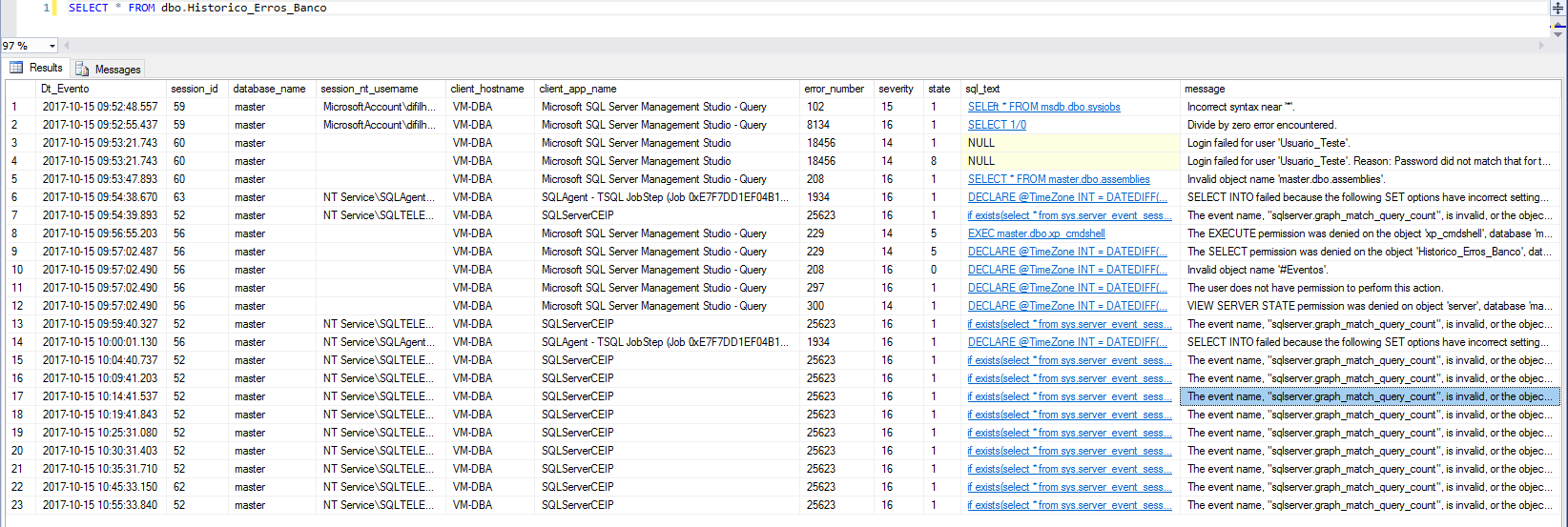
With this code, you can create an SP and schedule a SQL Agent job to perform this collection every “X” minutes on your instances. This way, any user with SELECT permissions on this table can easily query errors in your SQL Server instance.
What about SQL Server 2008?
If you are (STILL) using SQL Server 2008/2008 R2, you will not be able to create this XE session with the code above, as some features had not yet been implemented in this version of SQL Server, such as the client_app_name, sqlserver.client_hostname, sqlserver.database_name parameters. Furthermore, when using the fn_xe_file_target_read_file function in 2008, it is necessary to inform the metadata file path as well, in addition to the target package0.event_file not being supported.
Due to these differences, I will share here with you a version of the codes above, adapted to work in SQL Server 2008.
Monitoring script:
-- Apaga a sessão, caso ela já exista
IF ((SELECT COUNT(*) FROM sys.dm_xe_sessions WHERE [name] = 'Captura Erros do Sistema') > 0) DROP EVENT SESSION [Captura Erros do Sistema] ON SERVER
GO

CREATE EVENT SESSION [Captura Erros do Sistema] ON SERVER
ADD EVENT sqlserver.error_reported (
    ACTION(sqlserver.client_hostname,sqlserver.session_id,sqlserver.session_nt_username,sqlserver.sql_text)

    -- Adicionado manualmente, pois não é possível filtrar pela coluna "Severity" pela interface
    WHERE severity > 10
)
ADD TARGET package0.asynchronous_file_target(SET filename=N'C:\Traces\Captura Erros do SQL2008.xel',max_file_size=(3),max_rollover_files=(1))
WITH (STARTUP_STATE=ON) -- Será iniciado automaticamente com a instância
GO

-- Ativando a sessão (por padrão, ela é criada desativada)
ALTER EVENT SESSION [Captura Erros do Sistema] ON SERVER STATE = START
GO
Data collection script:
IF (OBJECT_ID('dbo.Historico_Erros_Banco') IS NULL)
BEGIN

    -- DROP TABLE dbo.Historico_Erros_Banco
    CREATE TABLE dbo.Historico_Erros_Banco (
        Dt_Evento DATETIME,
        session_id INT,
        session_nt_username VARCHAR(100),
        client_hostname VARCHAR(100),
        [error_number] INT,
        severity INT,
        [state] INT,
        sql_text XML,
        [message] VARCHAR(MAX)
    )

    CREATE CLUSTERED INDEX SK01_Historico_Erros ON dbo.Historico_Erros_Banco(Dt_Evento)

END


DECLARE @TimeZone INT = DATEDIFF(HOUR, GETUTCDATE(), GETDATE())
DECLARE @Dt_Ultimo_Evento DATETIME = ISNULL((SELECT MAX(Dt_Evento) FROM dbo.Historico_Erros_Banco WITH(NOLOCK)), '1990-01-01')


IF (OBJECT_ID('tempdb..#Eventos') IS NOT NULL) DROP TABLE #Eventos

;WITH CTE AS (
    SELECT CONVERT(XML, event_data) AS event_data
    FROM sys.fn_xe_file_target_read_file(N'C:\Traces\Captura Erros do SQL2008*.xel', 'C:\Traces\Captura Erros do SQL2008*.xem', NULL, NULL)
)
SELECT
    DATEADD(HOUR, @TimeZone, CTE.event_data.value('(//event/@timestamp)[1]', 'datetime')) AS Dt_Evento,
    CTE.event_data
INTO
    #Eventos
FROM
    CTE
WHERE
    DATEADD(HOUR, @TimeZone, CTE.event_data.value('(//event/@timestamp)[1]', 'datetime')) > @Dt_Ultimo_Evento


SET QUOTED_IDENTIFIER ON

INSERT INTO dbo.Historico_Erros_Banco
SELECT
    A.Dt_Evento,
    xed.event_data.value('(action[@name="session_id"]/value)[1]', 'int') AS [session_id],
    xed.event_data.value('(action[@name="session_nt_username"]/value)[1]', 'varchar(100)') AS [session_nt_username],
    xed.event_data.value('(action[@name="client_hostname"]/value)[1]', 'varchar(100)') AS [client_hostname],
    xed.event_data.value('(data[@name="error_number"]/value)[1]', 'int') AS [error_number],
    xed.event_data.value('(data[@name="severity"]/value)[1]', 'int') AS [severity],
    xed.event_data.value('(data[@name="state"]/value)[1]', 'int') AS [state],
    CAST(xed.event_data.value('(action[@name="sql_text"]/value)[1]', 'varchar(max)') AS XML) AS [sql_text],
    xed.event_data.value('(data[@name="message"]/value)[1]', 'varchar(max)') AS [message]
FROM
    #Eventos A
    CROSS APPLY A.event_data.nodes('//event') AS xed (event_data)
That's it, folks!
I hope you liked this post.
Big hug!

Comments (0)
Loading comments...