
Hey guys,
All good ?
In this post today I would like to show you the T-SQL FORMAT function, available since SQL Server 2012, and which to this day few people use on a daily basis to format dates and numbers.
When I analyze queries, functions and Stored Procedures, I see that even today, many developers insist on using CAST, CONVERT and concatenations to format dates and numbers, even with a function specifically for that. After reading this post, I hope you understand how to use this function and start simplifying your T-SQL codes with it.
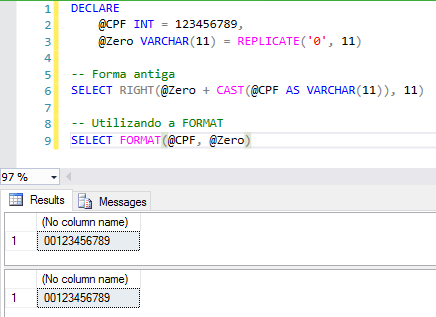
Who has never needed to fill in a number with 0 on the left to generate a layout? Format a date? Extract only the time from a date? There are numerous situations in which the FORMAT function is useful.
Formatting numeric data
Pre-defined formattingMost used formats
SELECT
    FORMAT(123456.99, 'C'), -- Formato de moeda padrão
    FORMAT(-123456.987654321, 'C4'), -- Formato de moeda com 4 casas decimais
    FORMAT(123456.987654321, 'C2', 'pt-br') -- Formato de moeda forçando a localidade pra Brasil e 2 casas decimais

SELECT
    FORMAT(123456.99, 'D'), -- Formato de número inteiro com valores numeric (NULL)
    FORMAT(123456, 'D'), -- Formato de número inteiro
    FORMAT(-123456, 'D4'), -- Formato de número inteiro com valores negativos
    FORMAT(123456, 'D10', 'pt-br'), -- formato de número inteiro com tamanho fixo em 10 caracteres
    FORMAT(-123456, 'D10', 'pt-br') -- formato de número inteiro com tamanho fixo em 10 caracteres

SELECT
    FORMAT(123456.99, 'E'), -- Formato de notação científica
    FORMAT(123456.99, 'E4') -- Formato de notação científica e 4 casas decimais de precisão

SELECT
    FORMAT(1, 'P'), -- Formato de porcentagem
    FORMAT(1, 'P2'), -- Formato de porcentagem com 2 casas decimais
    FORMAT(0.91, 'P'), -- Formato de porcentagem
    FORMAT(0.005, 'P4') -- Formato de porcentagem com 4 casas decimais

SELECT
    FORMAT(255, 'X'), -- Formato hexadecimal
    FORMAT(512, 'X8') -- Formato hexadecimal fixando o retorno em 8 caracteres
Examples
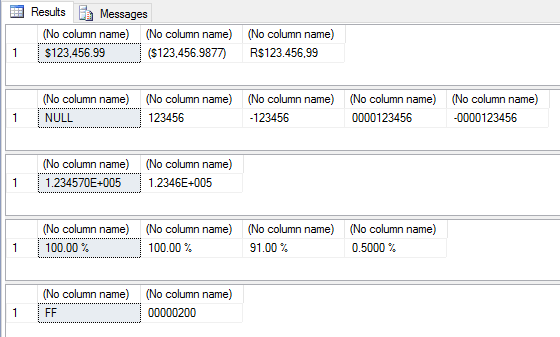
Other formats
SELECT
    FORMAT(123456.99, 'F'), -- Formato de número
    FORMAT(123456.99, 'F4') -- Formato de número com 4 casas decimais

SELECT
    FORMAT(123456.99, 'G'), -- Formato de número compacto
    FORMAT(123456.99, 'G4'), -- Formato de número (tenta forçar o número com 4 caracteres)
    FORMAT(123456.99, 'G20') -- Formato de número com tamanho máximo de 10 caracteres

SELECT
    FORMAT(123456.99, 'N'), -- Formato de número genérico
    FORMAT(123456.99, 'N4') -- Formato de número genérico fixando 4 casas decimais
Examples
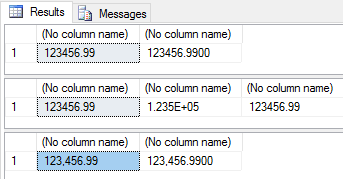
Filling a number with a leading zero
Formatting a number for Brazilian currency
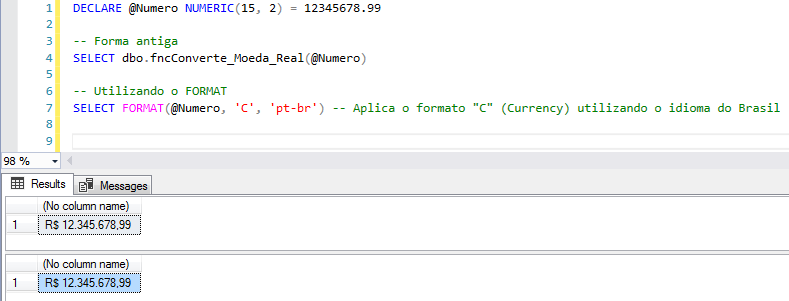
Function used in this example:
CREATE FUNCTION fncConverte_Moeda_Real (
    @Numero VARCHAR(40)
)
RETURNS VARCHAR(40)
AS
BEGIN

    DECLARE @Contador INT
    DECLARE @Pontos INT
    DECLARE @CasasVirgula INT
    DECLARE @Parte1 VARCHAR(40)
    DECLARE @Parte2 VARCHAR(40)


    SET @CasasVirgula = (LEN(SUBSTRING(@Numero, CHARINDEX('.', @Numero) + 1, LEN(@Numero))))


    IF @CasasVirgula > 2
        SET @Numero = (SUBSTRING(@Numero, 1, (CHARINDEX('.', @Numero)) + 2))


    IF CHARINDEX('.', @Numero) <> 0 BEGIN
        SET @Numero = REPLACE(@Numero, '.', ',')


        IF LEN(SUBSTRING(@Numero, CHARINDEX(',', @Numero) + 1, 2)) = 1
            SET @Numero = @Numero + '0'
    END
    ELSE
        SET @Numero = @Numero + ',00'


    SET @Contador = (CHARINDEX(',', @Numero) - 1)
    SET @Pontos = @Contador / 3


    WHILE @Pontos <> 0 BEGIN
        SET @Contador = @Contador - 3
        SET @Parte2 = (SUBSTRING(@Numero, @Contador + 1, LEN(@Numero)))
        SET @Parte1 = (SUBSTRING(@Numero, 1, (CHARINDEX(@Parte2, @Numero) - 1)))
        SET @Numero = @Parte1 + '.' + @Parte2
        SET @Pontos = @Pontos - 1
    END


    IF (SUBSTRING(@Numero, 1, 1)) = '.'
        SET @Numero = (SUBSTRING(@Numero, 2, LEN(@Numero)))


    SET @Numero = 'R$ ' + @Numero


    RETURN @Numero

END
Other examples:
SELECT
    -- Formato de moeda brasileira (manualmente)
    FORMAT(123456789.9, 'R$ ###,###,###,###.00'),
    -- Utilizando sessão (;) para formatar valores positivos e negativos
    FORMAT(123456789.9, 'R$ ###,###,###,###.00;-R$ ###,###,###,###.00'),

    -- Utilizando sessão (;) para formatar valores positivos e negativos
    FORMAT(-123456789.9, 'R$ ###,###,###,###.00;-R$ ###,###,###,###.00'),
    -- Utilizando sessão (;) para formatar valores positivos e negativos
    FORMAT(-123456789.9, 'R$ ###,###,###,###.00;(R$ ###,###,###,###.00)'),

    -- Formatando porcentagem com 2 casas decimais
    FORMAT(0.9975, '#.00%'),
    -- Formatando porcentagem com 4 casas decimais
    FORMAT(0.997521654, '#.0000%'),
    -- Formatando porcentagem com 4 casas decimais
    FORMAT(123456789.997521654, '#.0000%'),

    -- Formatando porcentagem com 2 casas decimais e utilizando sessão (;)
    FORMAT(0.123456789, '#.00%;-#.00%'),
    -- Formatando porcentagem com 2 casas decimais e utilizando sessão (;)
    FORMAT(-0.123456789, '#.00%;-#.00%'),
    -- Formatando porcentagem com 2 casas decimais e utilizando sessão (;)
    FORMAT(-0.123456789, '#.00%;(#.00%)')
Result:

Formatting dates
Pre-defined formattingMost common formats
SET LANGUAGE 'English'

SELECT
    FORMAT(GETDATE(), 'd'), -- Padrão de data abreviada.
    FORMAT(GETDATE(), 'D'), -- Padrão de data completa.

    FORMAT(GETDATE(), 'R'), -- Padrão RFC1123

    FORMAT(GETDATE(), 't'), -- Padrão de hora abreviada.
    FORMAT(GETDATE(), 'T') -- Padrão de hora completa.


SET LANGUAGE 'Brazilian'

SELECT
    FORMAT(GETDATE(), 'd'), -- Padrão de data abreviada.
    FORMAT(GETDATE(), 'D'), -- Padrão de data completa.

    FORMAT(GETDATE(), 'R'), -- Padrão RFC1123

    FORMAT(GETDATE(), 't'), -- Padrão de hora abreviada.
    FORMAT(GETDATE(), 'T') -- Padrão de hora completa.
Result:

Complete table:
Format | Description | Examples |
|---|---|---|
"d" | Abbreviated date pattern. More information: Date Short Format Specifier ("d"). | 2009-06-15T13:45:30 -> 15/6/2009 (en-US) 2009-06-15T13:45:30 -> 15/06/2009 (fr-FR) 2009-06-06/2009/15 (ja-JP) -> 15T13:45:30 |
"D" | Full date pattern. More information:Full date format specifier ("D"). | 2009-06-15T13:45:30 -> Monday, June 15, 2009 (en-US) 2009-06-15T13:45:30 -> 15 г июня 2009. (ru-RU) 2009-06-15T13:45:30 -> Montag, 15. Juni 2009 (de-DE) |
"f" | Full date/time pattern (abbreviated time). More information: Full date and abbreviated time format specifier ("f"). | 2009-06-15T13:45:30 -> Monday, June 15, 2009 1:45 PM (en-US) 2009-06-15T13:45:30 -> juni den 15 2009 13:45 (sv-SE) 2009-06-15T13:45:30 -> Δευτέρα, 15 Ιουνίου 2009 1:45 μμ (el-GR) |
"F" | Full date/time pattern (full time). More information: Full date and full time ("F") format specifier. | 2009-06-15T13:45:30 -> Monday, June 15, 2009 1:45:30 PM (en-US) 2009-06-15T13:45:30 -> juni den 15 2009 13:45:30 (sv-SE) 2009-06-15T13:45:30 -> Δευτέρα, 15 Ιουνίου 2009 1:45:30 μμ (el-GR) |
"g" | General date/time standard (abbreviated time). More information: General short date and time format specifier ("g"). | 2009-06-15T13:45:30 -> 15/6/2009 1:45 PM (en-US) 2009-06-15T13:45:30 -> 15/06/2009 13:45 (es-ES) 2009-06-15T13:45:30 -> 15/6/2009 13:45 (zh-CN) |
"G" | General date/time pattern (full time). More information: General date and time format specifier ("G"). | 2009-06-15T13:45:30 -> 15/6/2009 1:45:30 PM (en-US) 2009-06-15T13:45:30 -> 15/06/2009 13:45:30 (es-ES) 2009-06-15T13:45:30 -> 15/6/2009 13:45:30 (zh-CN) |
"M", "m" | Month/day pattern. More information: Month format specifier ("M", "m"). | 2009-06-15T13:45:30 -> June 15 (en-US) 2009-06-15 -> 15T13:45:30. juni (da-DK) 2009-06-15T13:45:30 -> Juni 15 (id-ID) |
"O", "o" | Round trip date/time pattern. More information: Round trip format specifier ("O", "o"). | DateTime values: 2009-06-15T13:45:30 (DateTimeKind)--> 2009-06-15T13:45:30.0000000-07:00 2009-06-15T13:45:30 (DateTimeKind)--> 2009-06-15T13:45:30.0000000Z 2009-06-15T13:45:30 (DateTimeKind)--> 2009-06-15T13:45:30.0000000 DateTimeOffset values: 2009-06-15T13:45:30-07:00 --> 2009-06-15T13:45:30.0000000-07:00 |
"R", "r" | RFC1123 standard More information: RFC1123 format specifier ("R", "r"). | 2009-06-15T13:45:30 -> Monday, 15 June 2009 20:45:30 GMT |
"s" | Sortable date/time pattern. More information: Sortable format specifier ("s"). | 2009-06-15T13:45:30 (DateTimeKind) -> 2009-06-15T13:45:30 2009-06-15T13:45:30 (DateTimeKind) -> 2009-06-15T13:45:30 |
"t" | Abbreviated time standard. More information: Abbreviated time format specifier ("t"). | 2009-06-15T13:45:30 -> 1:45 PM (en-US) 2009-06-15T13:45:30 -> 13:45 (hr-HR) 2009-06-01:45 -> 15T13:45:30 م (air-EG) |
"T" | Full time pattern. More information: Full Time Format Specifier ("T"). | 2009-06-15T13:45:30 -> 1:45:30 PM (en-US) 2009-06-15T13:45:30 -> 13:45:30 (hr-HR) 2009-06-01:45:30 -> 15T13:45:30 م (ar-EG) |
"u" | Universal sortable date/time pattern. More information: Universal Sortable Pattern Format Specifier ("u"). | With a DateTime value: 2009-06-2009-06-15-> 15T13:45:30 13:45:30Z With a DateTimeOffset value: 2009-06-2009-06-15-> 15T13:45:30 20:45:30Z |
"U" | Universal full date/time standard. More information: Full Universal Standard ("U") Format Specifier. | 2009-06-15T13:45:30 -> Monday, June 15, 2009 8:45:30 PM (en-US) 2009-06-15T13:45:30 -> juni den 15 2009 20:45:30 (sv-SE) 2009-06-15T13:45:30 -> Δευτέρα, 15 Ιουνίου 2009 8:45:30 μμ (el-GR) |
"Y", "y" | Year month pattern. More information: Year month ("Y") format specifier. | 2009-06-15T13:45:30 -> June 2009 (en-US) 2009-06-15T13:45:30 -> juni 2009 (da-DK) 2009-06-15T13:45:30 -> Juni 2009 (id-ID) |
Any other single character | Specifier unknown. | Generates a FormatException of execution time. |
SELECT
    -- Formato de data típico do Brasil
    FORMAT(GETDATE(), 'dd/MM/yyyy'),

    -- Formato de data/hora típico dos EUA
    FORMAT(GETDATE(), 'yyyy-MM-dd HH:mm:ss.fff'),

    -- Exibindo a data por extenso
    FORMAT(GETDATE(), 'dddd, dd \d\e MMMM \d\e yyyy'),

    -- Exibindo a data por extenso (forçando o idioma pra PT-BR)
    FORMAT(GETDATE(), 'dddd, dd \d\e MMMM \d\e yyyy', 'pt-br'),

    -- Exibindo a data/hora, mas zerando os minutos e segundos
    FORMAT(GETDATE(), 'dd/MM/yyyy HH:00:00', 'pt-br')
Result:

Complete table:
Format | Description | Examples |
|---|---|---|
"d" | The day of the month, from 1 to 31. Get more information: the "d" custom format specifier. | 2009-06-01T13:45:30 -> 1 2009-06-15T13:45:30 -> 15 |
"dd" | The day of the month, from 01 to 31. Get more information: the "dd" custom format specifier. | 2009-06-01 -> 01T13:45:30 2009-06-15T13:45:30 -> 15 |
"ddd" | The abbreviated name of the day of the week. Get more information: the "ddd" custom format specifier. | 2009-06-15T13:45:30 -> Mon (en-US) 2009-06-15T13:45:30 -> Пн (ru-RU) 2009-06-15T13:45:30 -> lun. (fr-FR) |
"dddd" | The full name of the day of the week. Get more information: the "dddd" custom format specifier. | 2009-06-15T13:45:30 -> Monday (en-US) 2009-06-15T13:45:30 -> понедельник (ru-RU) 2009-06-15T13:45:30 -> lundi (fr-FR) |
"f" | The tenths of a second in a date and time value. Get more information: the "f" custom format specifier. | 2009-06-15T13:45:30.6170000 -> 6 2009-06-15T13:45:30.05 -> 0 |
"ff" | The hundredths of a second in a date and time value. Get more information: the "ff" custom format specifier. | 2009-06-15T13:45:30.6170000 -> 61 2009-06-00 -> 15T13:45:30.0050000 |
"fff" | The milliseconds in a date and time value. Get more information: the "fff" custom format specifier. | 6/15/2009 13:45:30.617 -> 617 6/15/2009 13:45:30.0005 -> 000 |
"ffff" | The ten thousandths of a second in a date and time value. Get more information: the "ffff" custom format specifier. | 2009-06-15T13:45:30.6175000 -> 6175 2009-06-0000 -> 15T13:45:30.0000500 |
"fffff" | The hundredths of thousandths of a second in a date and time value. Get more information: the "fffff" custom format specifier. | 2009-06-15T13:45:30.6175400 -> 61754 6/15/2009 13:45:30.000005 -> 00000 |
"ffffff" | The millionths of a second in a date and time value. Get more information: the "ffffff" custom format specifier. | 2009-06-15T13:45:30.6175420 -> 617542 2009-06-15T13:45:30.0000005 -> 000000 |
"fffffff" | The ten millionths of a second in a date and time value. Get more information: the "fffffff" custom format specifier. | 2009-06-15T13:45:30.6175425 -> 6175425 2009-06-15T13:45:30.0001150 -> 0001150 |
"F" | If nonzero, the tenths of a second in a datetime value. Get more information: custom format specifier "F". | 2009-06-15T13:45:30.6170000 -> 6 2009-06-15T13:45:30.0500000 -> (no output) |
"FF" | If nonzero, the hundredths of a second in a datetime value. Get more information: the "FF" custom format specifier. | 2009-06-15T13:45:30.6170000 -> 61 2009-06-15T13:45:30.0050000 -> (no output) |
"FFF" | If non-zero, the milliseconds in a date and time value. Get more information: the "FFF" custom format specifier. | 2009-06-15T13:45:30.6170000 -> 617 2009-06-15T13:45:30.0005000 -> (no output) |
"FFFF" | If nonzero, the tenths of thousandths of a second in a datetime value. Get more information: the "FFFF" custom format specifier. | 2009-06-15T13:45:30.5275000 -> 5275 2009-06-15T13:45:30.0000500 -> (no output) |
"FFFFF" | If nonzero, the hundredths of thousandths of a second in a datetime value. Get more information: the "FFFFF" custom format specifier. | 2009-06-15T13:45:30.6175400 -> 61754 2009-06-15T13:45:30.0000050 -> (no output) |
"FFFFFF" | If nonzero, the millionths of a second in a datetime value. Get more information: the "FFFFFF" custom format specifier. | 2009-06-15T13:45:30.6175420 -> 617542 2009-06-15T13:45:30.0000005 -> (no output) |
"FFFFFFF" | If nonzero, the ten millionths of a second in a datetime value. Get more information: the "FFFFFFF" custom format specifier. | 2009-06-15T13:45:30.6175425 -> 6175425 2009-06-15T13:45:30.0001150 -> 000115 |
"g", "gg" | The period or era. Get more information: "g" or "gg" custom format specifier. | 2009-06-15T13:45:30.6170000 -> A.D. |
"h" | The time, using a 12-hour clock from 1 to 12. Get more information: the "h" custom format specifier. | 2009-06-15T01:45:30 -> 1 2009-06-15T13:45:30 -> 1 |
"hh" | The time, using a 12-hour clock from 01 to 12. Get more information: the "hh" custom format specifier. | 2009-06-01 -> 15T01:45:30 2009-06-01 -> 15T13:45:30 |
"H" | The time, using a 24-hour clock from 0 to 23. Get more information: custom format specifier "H". | 2009-06-15T01:45:30 -> 1 2009-06-13 -> 15T13:45:30 |
"HH" | The time, using a 24-hour clock from 00 to 23. Get more information: the "HH" custom format specifier. | 2009-06-01 -> 15T01:45:30 2009-06-13 -> 15T13:45:30 |
"K" | Time zone information. Get more information: the "K" custom format specifier. | With DateTime values: 2009-06-15T13:45:30, what type is not specified -> 2009-06-15T13:45:30, type Utc -> Z 2009-06-15T13:45:30, type Local->-07:00 (depends on local computer settings) With DateTimeOffset values: 2009-06-15T01:45:30-07:00--> -07:00 2009-06-15T08:45:30 + 00:00 --> + 00:00 |
"m" | The minute, from 0 to 59. Get more information: the "m" custom format specifier. | 2009-06-15T01:09:30 -> 9 2009-06-29 -> 15T13:29:30 |
"mm" | The minute, from 00 to 59. Get more information: the "mm" custom format specifier. | 2009-06-15T01:09:30 -> 09 2009-06-45 -> 15T01:45:30 |
“M” | The month, from 1 to 12. Get more information: the "M" custom format specifier. | 2009-06-15T13:45:30 -> 6 |
"MM" | The month, from 01 to 12. Get more information: the "MM" custom format specifier. | 2009-06-06 -> 15T13:45:30 |
"MMM" | The abbreviated name of the month. Get more information: the "MMM" custom format specifier. | 2009-06-15T13:45:30 -> Jun (en-US) 2009-06-15T13:45:30 -> juin (fr-FR) 2009-06-15T13:45:30 -> Jun (zu-ZA) |
"MMMM" | The full name of the month. Get more information: the "MMMM" custom format specifier. | 2009-06-15T13:45:30 -> June (en-US) 2009-06-15T13:45:30 -> juni (da-DK) 2009-06-15T13:45:30 -> uJuni (zu-ZA) |
"s" | The second, from 0 to 59. Get more information: the "s" custom format specifier. | 2009-06-15T13:45:09 -> 9 |
"ss" | The second, from 00 to 59. Get more information: the "ss" custom format specifier. | 2009-06-15T13:45:09 -> 09 |
"t" | The first character of the AM/PM designator. Get more information: the "t" custom format specifier. | 2009-06-15T13:45:30 -> P (en-US) 2009-06-15T13:45:30 -> 午 (ja-JP) 2009-06-15T13:45:30 -> (fr-FR) |
"tt" | The AM/PM designator. Get more information: the "tt" custom format specifier. | 2009-06-15T13:45:30 -> PM (en-US) 2009-06-15T13:45:30 -> 午後 (ja-JP) 2009-06-15T13:45:30 -> (fr-FR) |
"y" | The year, from 0 to 99. Get more information: the "y" custom format specifier. | 0001-01-01T00:00:00 -> 1 0900-01-01T00:00:00 -> 0 1900-01-01T00:00:00 -> 0 2009-06-15T13:45:30 -> 9 2019-06-19 -> 15T13:45:30 |
"AA" | The year, from 00 to 99. Get more information: the "yy" custom format specifier. | 0001-01-01 -> 01T00:00:00 0900-01-00 -> 01T00:00:00 1900-01-00 -> 01T00:00:00 2019-06-19 -> 15T13:45:30 |
"yyy" | The year, with a minimum of three digits. Get more information: the "yyy" custom format specifier. | 0001-01-01T00:00:00 -> 001 0900-01-01T00:00:00 -> 900 1900-01-1900 -> 01T00:00:00 2009-06-2009 -> 15T13:45:30 |
"yyyy" | The year as a four-digit number. Get more information: the "yyyy" custom format specifier. | 0001-01-01T00:00:00 -> 0001 0900-01-01T00:00:00 -> 0900 1900-01-1900 -> 01T00:00:00 2009-06-2009 -> 15T13:45:30 |
"yyyyy" | The year as a five-digit number. Get more information: the "yyyyy" custom format specifier. | 0001-01-01T00:00:00 -> 00001 2009-06-15T13:45:30 -> 02009 |
"z" | UTC time difference, no leading zeros. Get more information: the "z" custom format specifier. | 2009-06-15T13:45:30-07:00 -> -7 |
"zz" | UTC time difference, with a leading zero of a single-digit value. Get more information: the "zz" custom format specifier. | 2009-06-15T13:45:30-07:00->-07 |
"zzz" | Hours and minutes offset from UTC. Get more information: the "zzz" custom format specifier. | 2009-06-15T13:45:30-07:00->-07:00 |
":" | The time separator. Get more information: the ":" custom format specifier. | 2009-06--> 15T13:45:30: (en-US) 2009-06--> 15T13:45:30. (it-IT) 2009-06--> 15T13:45:30: (ja-JP) |
"/" | The date separator. More information: the "/" custom format specifier. | 2009-06-15T13:45:30 -> / (en-US) 2009-06--> 15T13:45:30 - (air-DZ) 2009-06--> 15T13:45:30. (tr-TR) |
"sequence" 'sequence' | Literal string delimiter. Get more information: Character literals. | 2009-06-15T13:45:30 ("arr:" h:m t) -> arr: 1:45 P 2009-06-15T13:45:30 ('arr:' h:m t) -> arr: 1:45 P |
% | Sets the following character as a custom format specifier. Get more information:using simple custom format specifiers. | 2009-06-15T13:45:30 (%h) -> 1 |
\ | The escape character. Get more information: Character literals and using the escape character. | 2009-06-15T13:45:30 (h \h) -> 1 h |
Any other character | The character is copied into the result string unchanged. Get more information: Character literals. | 2009-06-15T01:45:30 (arr hh: mm t) -> arr 01:45 a |
Formatting numbers and dates before SQL Server 2012
Now that you've seen how simple and quick it is to format numbers and dates using the native FORMAT function, it's even difficult to want to format these types of data manually again, right?
Unfortunately, the FORMAT function was introduced in SQL Server 2012, that is, in versions 2005 and 2008, you will still have to use the traditional (expensive and laborious) ways of formatting dates and numbers. Or not.
For those who have a database project in their instance (also known as SQLCLR), you can easily implement 2 functions very similar (practically the same) to the FORMAT function, allowing you to easily format data using these functions, even in versions 2005 and 2008 of SQL Server.
If you don't know SQLCLR, or don't know how to create your first project, read the post Introduction to SQL CLR (Common Language Runtime) in SQL Server.
How to format dates with the CLR
See how the usage is practically the same as the FORMAT function (I did not implement the third parameter – culture):
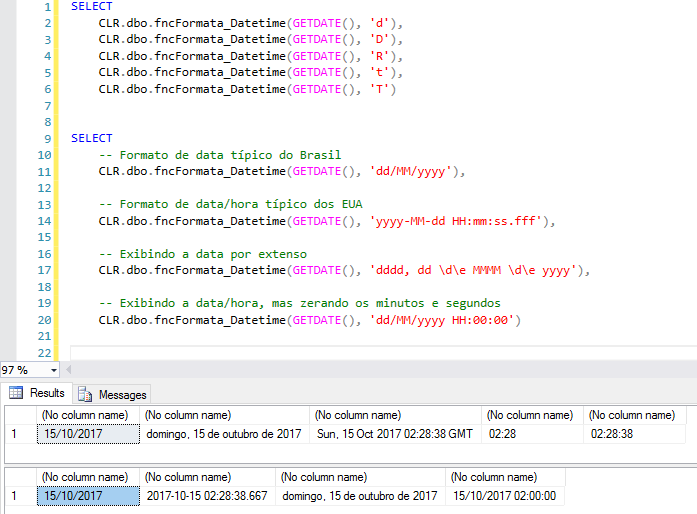
Note that both pre-defined formats and custom formats remain unchanged using the CLR function. This happens because the FORMAT function internally uses the same C# function that I used in these SQLCLR functions.
fncFormata_Datetime source code
using System.Data.SqlTypes;
using System.Globalization;

public partial class UserDefinedFunctions
{
    [Microsoft.SqlServer.Server.SqlFunction]
    public static SqlString fncFormata_Datetime(SqlDateTime Dt_Referencia, SqlString Ds_Mascara)
    {
        return Dt_Referencia.IsNull ? SqlString.Null : Dt_Referencia.Value.ToString(Ds_Mascara.Value, new CultureInfo("pt-BR"));
    }
};
How to format numbers with the CLR
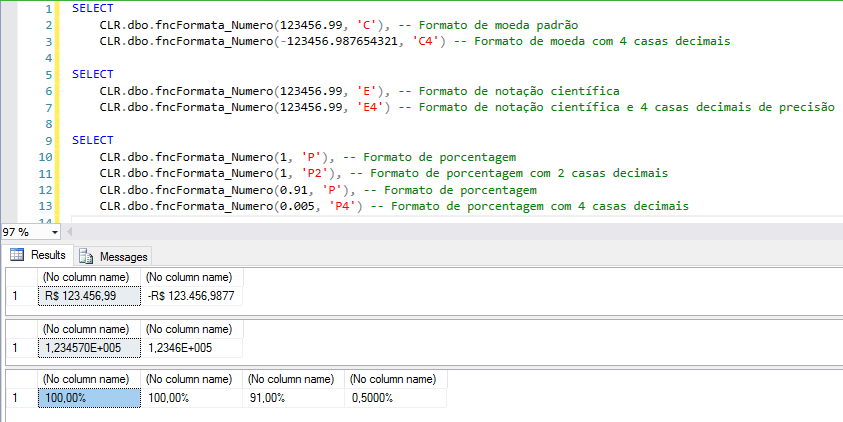
Examples with standard formats
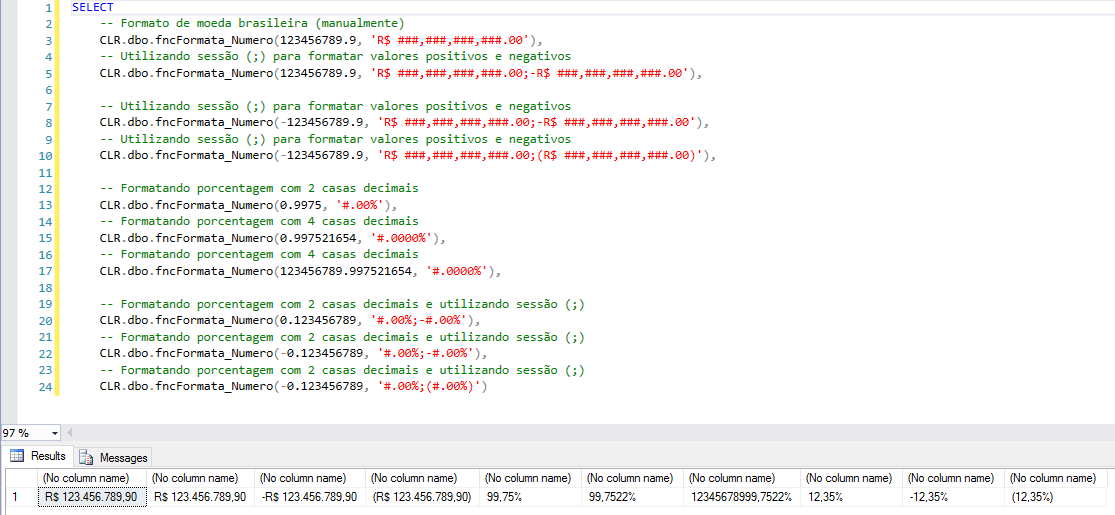
Examples with custom formats
fncFormata_Numero source code
using System.Data.SqlTypes;
using System.Globalization;

public partial class UserDefinedFunctions
{
    [Microsoft.SqlServer.Server.SqlFunction]
    public static SqlString fncFormata_Numero(SqlDouble Ds_String, SqlString Ds_Formato)
    {

        if (Ds_String.IsNull)
            return SqlString.Null;

        return Ds_Formato.IsNull ? Ds_String.Value.ToString(CultureInfo.InvariantCulture) : Ds_String.Value.ToString(Ds_Formato.Value, CultureInfo.CreateSpecificCulture("pt-br"));

    }
}
That's it, folks!
I hope you start using the FORMAT function more in your daily life (when necessary) and if you are using the 2005 or 2008 versions of SQL Server, know that it is possible to simulate the behavior of this function using SQLCLR.
A big hug and see you later.
References:
FORMAT (Transact-SQL)
Formatting types in the .NET Framework
Standard numeric format strings
Custom numeric format strings
Standard date and time format strings
Custom date and time format strings

Comments (0)
Loading comments...