
Hey guys!
A topic that I don't usually see much on a daily basis is the concern of DBA's and developers about the use of resources marked as “deprecated” by Microsoft, that is, they are marked to be removed in some future version of SQL Server according to Microsoft's roadmap.
Although we can see that some features have been marked as deprecated since version 2000 and are still present in version 2017, it is very dangerous to maintain systems, routines and, above all, create new developments using features that can be removed, “breaking” your system and taking you by surprise during a version update.
The idea of this post is to demonstrate how you can identify features that are marked for deactivation and take the appropriate steps to change your code, so that good development practices are used by always being aligned with the latest product features.
To meet this demand, I will use the Extended Events (XE) feature and the “Deprecation Announcement” and “Deprecation Final Support” events:
- Deprecation Announcement: This event is triggered when a feature is identified that was announced as “deprecated”, that is, it will be deactivated in a future version of SQL Server, but will not be in the next version.
- Deprecation Final Support: This event is triggered when a feature is identified that was announced as “deprecated” and will be deactivated in the next version of SQL Server. These are the most concerning cases in the short term, as these features will stop working as soon as you upgrade SQL Server
If you've been following my blog for a while, you may remember other posts I've written about Extended Events:
– SQL Server – How to create error and exception monitoring in your database using Extended Events (XE)
– SQL Server – How to generate a deadlock history to analyze failures in routines
To identify which resources you use in your environment, let's create a new session using XE

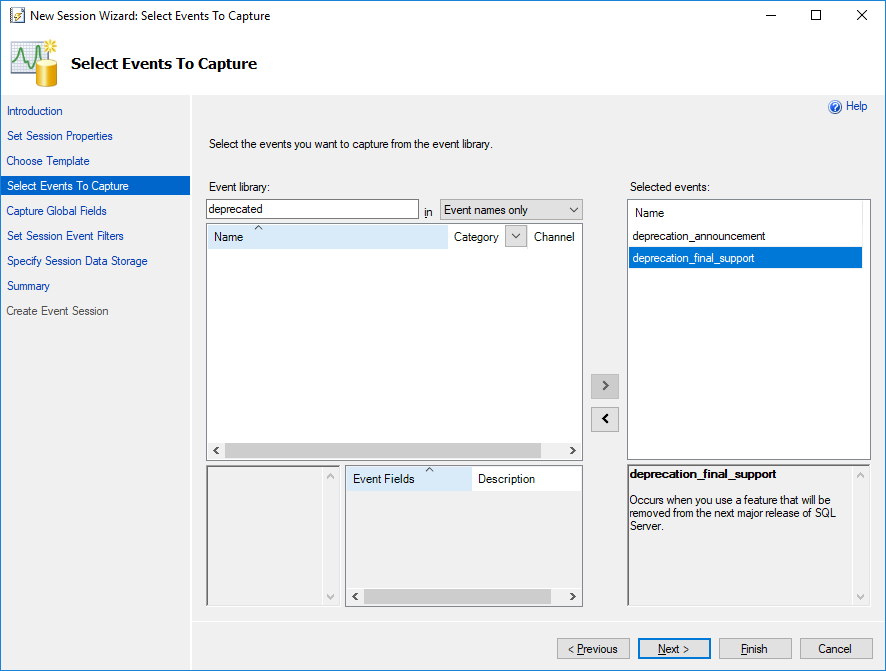
I chose not to use any template and chose the 2 events already mentioned, as shown in the print
On this screen you can choose some columns that you would like to collect information about.

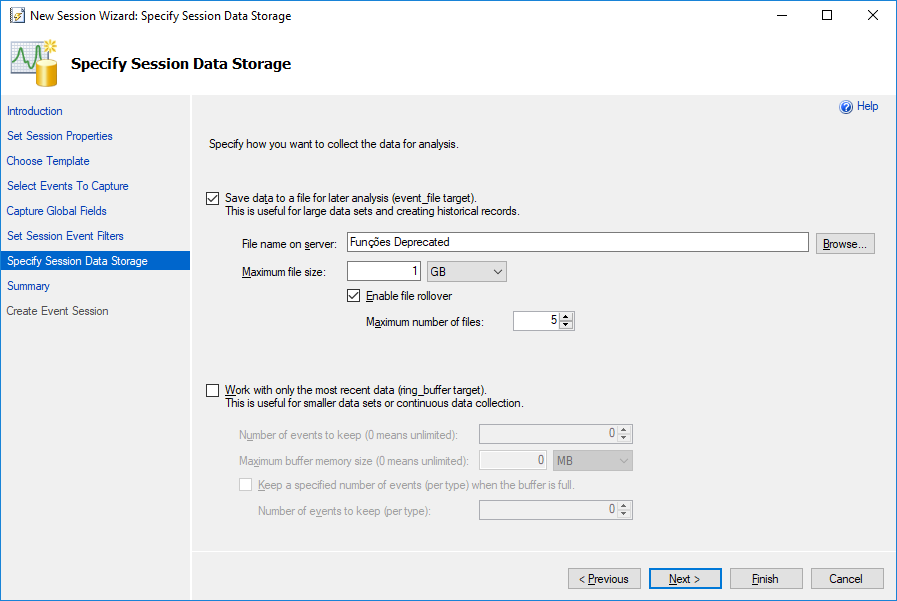
In this configuration step, you must define where the results file will be written, whether it will be written as a physical file on disk and defining the maximum size it will reach or using the ring_buffer, to always have the most recent information (recommended use for continuous recording).
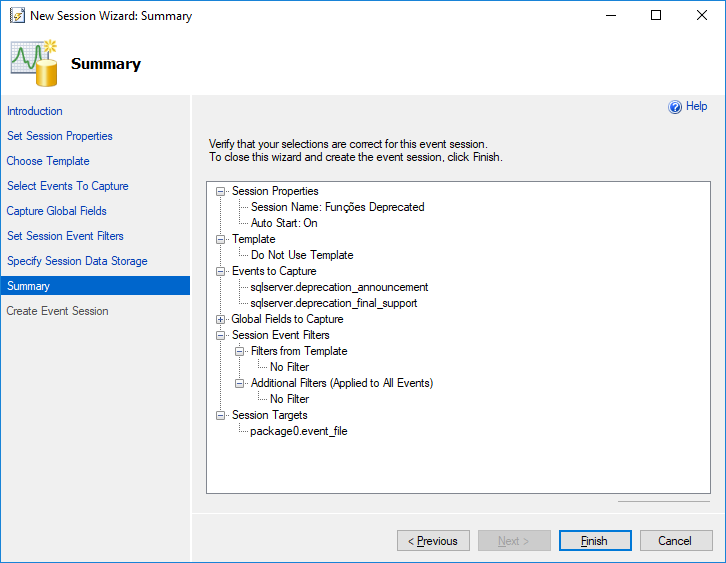
Below is a summary of the settings I used to create this Extended Event.
Below is the source code of the generated script:
-- Apaga a sessão, caso ela já exista
IF ((SELECT COUNT(*) FROM sys.dm_xe_sessions WHERE [name] = 'Funções Deprecated') > 0) DROP EVENT SESSION [Funções Deprecated] ON SERVER
GO

CREATE EVENT SESSION [Funções Deprecated] ON SERVER
ADD EVENT sqlserver.deprecation_announcement(
  ACTION(package0.callstack,package0.collect_system_time,sqlserver.client_app_name,sqlserver.client_hostname,sqlserver.database_name,sqlserver.is_system,sqlserver.nt_username,sqlserver.server_instance_name,sqlserver.server_principal_name,sqlserver.server_principal_sid,sqlserver.session_id,sqlserver.session_nt_username,sqlserver.session_server_principal_name,sqlserver.sql_text,sqlserver.tsql_stack,sqlserver.username)),
ADD EVENT sqlserver.deprecation_final_support(
    ACTION(package0.callstack,package0.collect_system_time,sqlserver.client_app_name,sqlserver.client_hostname,sqlserver.database_name,sqlserver.is_system,sqlserver.nt_username,sqlserver.server_instance_name,sqlserver.server_principal_name,sqlserver.server_principal_sid,sqlserver.session_id,sqlserver.session_nt_username,sqlserver.session_server_principal_name,sqlserver.sql_text,sqlserver.tsql_stack,sqlserver.username))
ADD TARGET package0.event_file(SET filename=N'C:\Traces\Funções Deprecated.xel')
WITH (STARTUP_STATE=ON)
GO

-- Ativando a sessão (por padrão, ela é criada desativada)
ALTER EVENT SESSION [Funções Deprecated] ON SERVER STATE = START
GO
Below are examples used to test the feature:
SELECT * FROM sys.sysdatabases
SELECT * FROM sys.syscolumns
SELECT @@remserver
DBCC SHOWCONTIG
sp_lock
SET FMTONLY ON
SET FMTONLY OFF
SELECT * FROM sys.traces
And now, I will use this script to collect the recorded data:
DECLARE @TimeZone INT = DATEDIFF(HOUR, GETUTCDATE(), GETDATE())

IF (OBJECT_ID('tempdb..#Eventos') IS NOT NULL) DROP TABLE #Eventos
;WITH CTE AS (
    SELECT CONVERT(XML, event_data) AS event_data
    FROM sys.fn_xe_file_target_read_file(N'C:\Traces\Funções Deprecated*.xel', NULL, NULL, NULL)
)
SELECT
    DATEADD(HOUR, @TimeZone, CTE.event_data.value('(//event/@timestamp)[1]', 'datetime')) AS Dt_Evento,
    CTE.event_data
INTO
    #Eventos
FROM
    CTE


SELECT
    A.Dt_Evento,
    xed.event_data.value('(//event/@name)[1]', 'varchar(100)') AS [event_name],
    xed.event_data.value('(//data[@name="feature_id"]/value)[1]', 'varchar(100)') AS [feature_id],
    xed.event_data.value('(//data[@name="feature"]/value)[1]', 'varchar(100)') AS [feature],
    xed.event_data.value('(action[@name="session_id"]/value)[1]', 'int') AS [session_id],
    xed.event_data.value('(action[@name="database_name"]/value)[1]', 'varchar(100)') AS [database_name],
    xed.event_data.value('(action[@name="session_nt_username"]/value)[1]', 'varchar(100)') AS [session_nt_username],
    xed.event_data.value('(action[@name="client_hostname"]/value)[1]', 'varchar(100)') AS [client_hostname],
    xed.event_data.value('(action[@name="client_app_name"]/value)[1]', 'varchar(100)') AS [client_app_name],
    TRY_CAST(xed.event_data.value('(action[@name="sql_text"]/value)[1]', 'varchar(max)') AS XML) AS [sql_text],
    xed.event_data.value('(data[@name="message"]/value)[1]', 'varchar(max)') AS [message]
FROM
    #Eventos A
    CROSS APPLY A.event_data.nodes('//event') AS xed (event_data)
Viewing the results:

If you want to know all the resources that are marked as deprecated, access this article here and in case of migration to a new version of SQL Server, be sure to use this tip together with the Data Migration Assistant (DMA).
That's it, folks!
I hope you enjoyed this post and see you next time.
Big hug!

Comments (0)
Loading comments...