
Hey guys,
Goodnight!
In this post, I will demonstrate how to identify weak, empty, or username-equal passwords in SQL Server. This is especially useful for database administrators to avoid attacks due to careless users when choosing their passwords.
Introduction
To perform this check, we will use the PWDCOMPARE function, present in SQL Server since 2008, but unfortunately, it is marked as deprecated and will be discontinued in some future version of SQL Server (although I have not identified any other alternative for this). This function is very simple, where you enter the password you would like to test, the comparison hash and the function returns a boolean value (0 or 1) if the password you tried matches the hash entered.
Although this function is public, that is, any user of the instance can use it, this does not represent a threat to the security of the database, since the password_hash column of the sys.sql_logins view is only visible to users with CONTROL SERVER privilege on the instance, which I imagine are very few users, all of them DBA's. Otherwise, it would be very easy for a malicious user to perform brute force attacks to try to guess the passwords, but this is not possible due to this permission restriction (although this is possible for a DBA user).
Another important point to mention is that this technique only applies to users with SQL Server authentication. Users with Active Directory authentication (Windows AD) have the value of the password_hash column as NULL, even for sysadmin users.
Identifying the user password hash (password_hash)
An important step to being able to identify these fragile passwords is to be able to discover the hash of the user's password. We will need this hash to use in the PWDCOMPARE function and identify the user's current password.
To retrieve this user hash is very simple, just use one of the 2 queries below:
SELECT
    password_hash
FROM
    sys.sql_logins
WHERE
    [name] = 'Usuario'


SELECT LoginProperty('Usuario', 'PasswordHash')
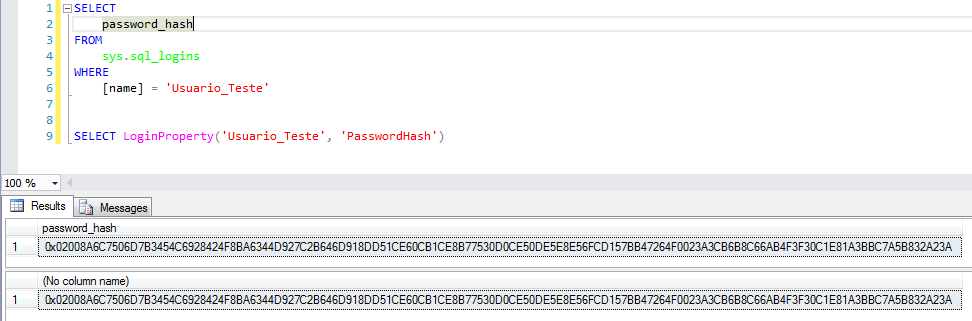
Identifying weak passwords
Now that we have identified how to recover the password_hash, let's check how fragile our users' passwords are at the bank. To do this, I will create a table of weak passwords that I will try, and then I will test each password, on each user, to find which password matched.
Password table creation script:
With the script below, I will create a table with the passwords that I will use to try to identify the user's current password. Feel free to change this script and add your password attempts.
In this script you can easily create a list with all the possibilities and perform a brute force attack, if you are a user with DBA privileges, have lost a user's password and really need to discover a certain password (because it is much easier to simply change it, if that is the case).
IF (OBJECT_ID('tempdb..#Senhas') IS NOT NULL) DROP TABLE #Senhas
CREATE TABLE #Senhas (
    Senha VARCHAR(100)
)

-- Inserindo senhas mais comuns (pesquisei no google)
INSERT INTO #Senhas
VALUES
    ('teste'), ('TESTE'), ('password'), ('qwerty'),
    ('football'), ('baseball'), ('welcome'), ('abc123'),
    ('1qaz2wsx'), ('dragon'), ('master'), ('monkey'), ('letmein'),
    ('login'), ('princess'), ('qwertyuiop'), ('solo'), ('passw0rd'),
    ('starwars'), ('teste123'), ('TESTE123'), ('deuseamor'), ('jesuscristo'),
    ('iloveyou'), ('MARCELO'), ('jc2512'), ('maria'), ('jose'), ('batman'),
    ('123123'), ('123123123'), ('FaMiLia'), (''), (' '), ('sexy'),
    ('abel123'), ('freedom'), ('whatever'), ('qazwsx'), ('trustno1'), ('sucesso'),
    ('1q2w3e4r'), ('1qaz2wsx'), ('1qazxsw2'), ('zaq12wsx'), ('! qaz2wsx'),
    ('!qaz2wsx'), ('123mudar'), ('gabriel'), ('102030'), ('010203'), ('101010'), ('131313'),
    ('vitoria'), ('flamengo'), ('felipe'), ('brasil'), ('felicidade'), ('mariana'), ('101010')


-- Números repetidos
DECLARE
    @Contador INT = 1,
    @Total INT = 10,
    @Contador2 INT = 1,
    @Total2 INT = 10

WHILE(@Contador < @Total)
BEGIN

    WHILE(@Contador2 < @Total2)
    BEGIN

        INSERT INTO #Senhas
        SELECT REPLICATE(CAST(@Contador AS VARCHAR(100)), @Contador2)

        SET @Contador2 += 1

    END

    SET @Contador += 1
    SET @Contador2 = 1

END


SET @Contador = 12
SET @Contador2 = 1

-- Letras repetidos
WHILE(@Contador <= 126)
BEGIN

    WHILE(@Contador2 <= @Total2)
    BEGIN

        INSERT INTO #Senhas
        SELECT REPLICATE(CHAR(@Contador), @Contador2)

        SET @Contador2 += 1

    END

    SET @Contador += 1
    SET @Contador2 = 1

END


-- Sequências
DECLARE @Atual VARCHAR(100) = ''

SET @Contador = 0

WHILE(@Contador <= @Total)
BEGIN

    SET @Atual = @Atual + CAST((CASE WHEN @Contador = 10 THEN 0 ELSE @Contador END) AS VARCHAR(100))

    INSERT INTO #Senhas
    SELECT @Atual

    SET @Contador = @Contador + 1

END


SET @Contador = 1
SET @Atual = ''

WHILE(@Contador <= @Total)
BEGIN

    SET @Atual = @Atual + CAST((CASE WHEN @Contador = 10 THEN 0 ELSE @Contador END) AS VARCHAR(100))

    INSERT INTO #Senhas
    SELECT @Atual

    SET @Contador = @Contador + 1

END


-- Logins
INSERT INTO #Senhas
SELECT [name]
FROM sys.sql_logins

INSERT INTO #Senhas
SELECT LOWER([name])
FROM sys.sql_logins

INSERT INTO #Senhas
SELECT UPPER([name])
FROM sys.sql_logins

INSERT INTO #Senhas
SELECT DISTINCT REVERSE(Senha)
FROM #Senhas
And now, we try to identify weak passwords in the instance:
SELECT
    A.[name],
    B.Senha
FROM
    sys.sql_logins		A
    CROSS APPLY #Senhas		B
WHERE
    PWDCOMPARE(B.Senha, A.password_hash) = 1
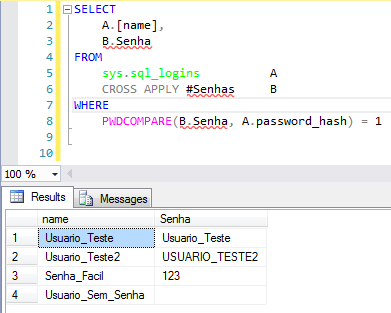
In the report above, all users where it was possible to identify the password are shown, with their respective passwords found.
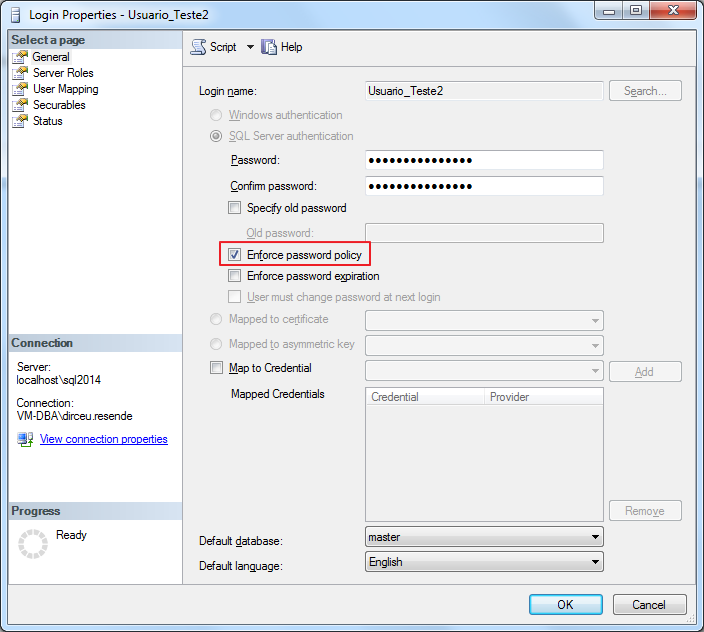
Ideally, in the next password settings, you activate the “Enforce password policy” option (https://msdn.microsoft.com/en-us/library/ms161959.aspx), to ensure your passwords are strong and secure.
I hope you enjoyed the post and see you later.

Comments (0)
Loading comments...