
Hey guys!
In this very quick post, I would like to share with you a simple script, showing how to list the largest tables and indexes in the database and return the size of each table and each index, and can also list the objects of all databases in your SQL Server instance.
I had already created some articles related to datafile sizes and disk sizes, but I didn't have a specific article for index table sizes, so I thought it was time to create something like that.
I had also shared this same script in the article SQL Server – Useful day-to-day DBA queries that you always have to look for on the Internet, but the indexing doesn't work so well to find this script here.
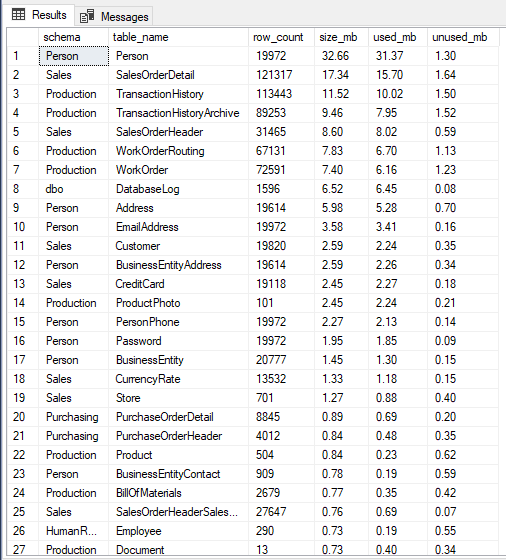
To list the largest tables in the database and return the size of each table, simply run the script below in the desired database:
SELECT TOP 100
    s.[name] AS [schema],
    t.[name] AS [table_name],
    p.[rows] AS [row_count],
    CAST(ROUND(((SUM(a.total_pages) * 8) / 1024.00), 2) AS NUMERIC(36, 2)) AS [size_mb],
    CAST(ROUND(((SUM(a.used_pages) * 8) / 1024.00), 2) AS NUMERIC(36, 2)) AS [used_mb],
    CAST(ROUND(((SUM(a.total_pages) - SUM(a.used_pages)) * 8) / 1024.00, 2) AS NUMERIC(36, 2)) AS [unused_mb]
FROM
    sys.tables t
    JOIN sys.indexes i ON t.[object_id] = i.[object_id]
    JOIN sys.partitions p ON i.[object_id] = p.[object_id] AND i.index_id = p.index_id
    JOIN sys.allocation_units a ON p.[partition_id] = a.container_id
    LEFT JOIN sys.schemas s ON t.[schema_id] = s.[schema_id]
WHERE
    t.is_ms_shipped = 0
    AND i.[object_id] > 255
GROUP BY
    t.[name],
    s.[name],
    p.[rows]
ORDER BY
    [size_mb] DESC
Result:
If you want to list the largest tables, considering all databases in your instance, use the script below:
IF (OBJECT_ID('tempdb..#tamanho_tabelas') IS NOT NULL) DROP TABLE #tamanho_tabelas
CREATE TABLE #tamanho_tabelas (
    [database]   NVARCHAR(256),
    [schema]     NVARCHAR(256),
    [table_name] NVARCHAR(256),
    [row_count]  BIGINT,
    [size_mb]    DECIMAL(36, 2),
    [used_mb]    DECIMAL(36, 2),
    [unused_mb]  DECIMAL(36, 2)
)

INSERT INTO #tamanho_tabelas
EXEC sys.[sp_MSforeachdb] '
IF (''?'' NOT IN (''model'', ''master'', ''tempdb'', ''msdb''))
BEGIN

    SELECT TOP 100
        ''?'' AS [database],
        s.[name] AS [schema],
        t.[name] AS [table_name],
        p.[rows] AS [row_count],
        CAST(ROUND(((SUM(a.total_pages) * 8) / 1024.00), 2) AS NUMERIC(36, 2)) AS [size_mb],
        CAST(ROUND(((SUM(a.used_pages) * 8) / 1024.00), 2) AS NUMERIC(36, 2)) AS [used_mb],
        CAST(ROUND(((SUM(a.total_pages) - SUM(a.used_pages)) * 8) / 1024.00, 2) AS NUMERIC(36, 2)) AS [unused_mb]
    FROM
        [?].sys.tables t
        JOIN [?].sys.indexes i ON t.[object_id] = i.[object_id]
        JOIN [?].sys.partitions p ON i.[object_id] = p.[object_id] AND i.index_id = p.index_id
        JOIN [?].sys.allocation_units a ON p.[partition_id] = a.container_id
        LEFT JOIN [?].sys.schemas s ON t.[schema_id] = s.[schema_id]
    WHERE
        t.is_ms_shipped = 0
        AND i.[object_id] > 255
    GROUP BY
        t.[name],
        s.[name],
        p.[rows]
    ORDER BY
        5 DESC

END'

SELECT TOP 100 *
FROM [#tamanho_tabelas]
ORDER BY [size_mb] DESC
Result:

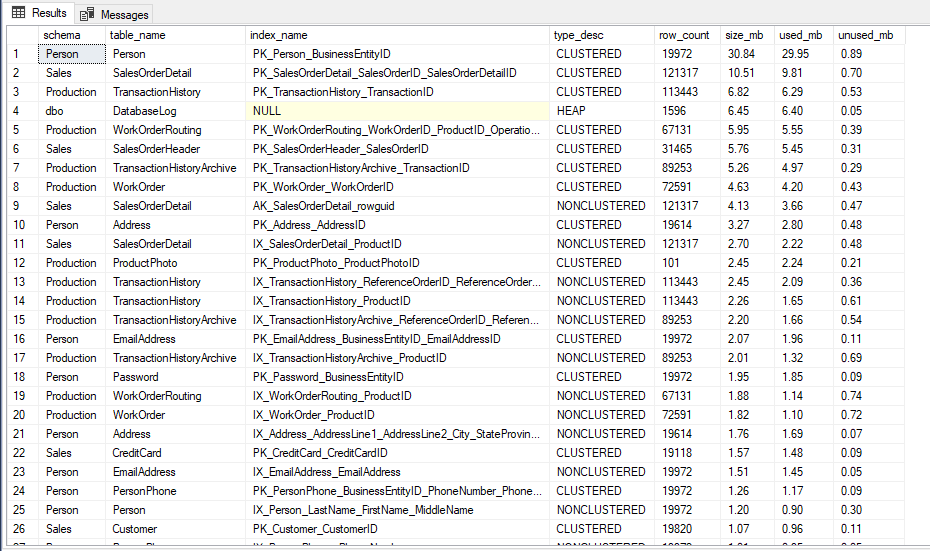
Another very common need is to find the bank's largest indexes to analyze whether they are still useful or whether they are taking up a lot of space unnecessarily.
To do this, simply use the script below to return the list of the largest indexes in the database:
SELECT TOP(100)
    s.[name] AS [schema],
    t.[name] AS [table_name],
    i.[name] AS [index_name],
    i.[type_desc],
    p.[rows] AS [row_count],
    CAST(ROUND(((SUM(a.total_pages) * 8) / 1024.00), 2) AS NUMERIC(36, 2)) AS [size_mb],
    CAST(ROUND(((SUM(a.used_pages) * 8) / 1024.00), 2) AS NUMERIC(36, 2)) AS [used_mb],
    CAST(ROUND(((SUM(a.total_pages) - SUM(a.used_pages)) * 8) / 1024.00, 2) AS NUMERIC(36, 2)) AS [unused_mb]
FROM
    sys.tables t
    JOIN sys.indexes i ON t.[object_id] = i.[object_id]
    JOIN sys.partitions p ON i.[object_id] = p.[object_id] AND i.index_id = p.index_id
    JOIN sys.allocation_units a ON p.[partition_id] = a.container_id
    LEFT JOIN sys.schemas s ON t.[schema_id] = s.[schema_id]
WHERE
    t.is_ms_shipped = 0
    AND i.[object_id] > 255
GROUP BY
    t.[name],
    s.[name],
    i.[name],
    i.[type_desc],
    p.[rows]
ORDER BY
    [size_mb] DESC
Result:
And if you want to perform the same query, on all banks in your instance, use this script here:
IF (OBJECT_ID('tempdb..#tamanho_indices') IS NOT NULL) DROP TABLE #tamanho_indices
CREATE TABLE #tamanho_indices (
    [database]   NVARCHAR(256),
    [schema]     NVARCHAR(256),
    [table_name] NVARCHAR(256),
    [index_name] NVARCHAR(256),
    [index_type] NVARCHAR(50),
    [row_count]  BIGINT,
    [size_mb]    DECIMAL(36, 2),
    [used_mb]    DECIMAL(36, 2),
    [unused_mb]  DECIMAL(36, 2)
)

INSERT INTO #tamanho_indices
EXEC sys.[sp_MSforeachdb] '
IF (''?'' NOT IN (''model'', ''master'', ''tempdb'', ''msdb''))
BEGIN

    SELECT TOP(100)
        ''?'' AS [database],
        s.[name] AS [schema],
        t.[name] AS [table_name],
        i.[name] AS [index_name],
        i.[type_desc],
        p.[rows] AS [row_count],
        CAST(ROUND(((SUM(a.total_pages) * 8) / 1024.00), 2) AS NUMERIC(36, 2)) AS [size_mb],
        CAST(ROUND(((SUM(a.used_pages) * 8) / 1024.00), 2) AS NUMERIC(36, 2)) AS [used_mb],
        CAST(ROUND(((SUM(a.total_pages) - SUM(a.used_pages)) * 8) / 1024.00, 2) AS NUMERIC(36, 2)) AS [unused_mb]
    FROM
        [?].sys.tables t
        JOIN [?].sys.indexes i ON t.[object_id] = i.[object_id]
        JOIN [?].sys.partitions p ON i.[object_id] = p.[object_id] AND i.index_id = p.index_id
        JOIN [?].sys.allocation_units a ON p.[partition_id] = a.container_id
        LEFT JOIN [?].sys.schemas s ON t.[schema_id] = s.[schema_id]
    WHERE
        t.is_ms_shipped = 0
        AND i.[object_id] > 255
    GROUP BY
        t.[name],
        s.[name],
        i.[name],
        i.[type_desc],
        p.[rows]
    ORDER BY
        7 DESC

END'

SELECT TOP 100 *
FROM [#tamanho_indices]
ORDER BY [size_mb] DESC
Result:

And that's it, folks!
I hope you liked this tip, a big hug and see you next time!

Comments (0)
Loading comments...