
Hey guys!
In this article I would like to share with you a feature available since SQL Server 2005, which allows you to execute T-SQL code on behalf of another user. I'm talking about the EXECUTE AS command.
With this great demand for security that companies are seeking, driven by demands to adapt to the GDPR, organizations are often taking this opportunity to review the entire security, auditing and monitoring aspects and this was one of the reasons that motivated me to write this article.
If you want to delve deeper into more articles about security, be sure to click this link here to visit my other articles on this subject.
If you are experiencing a security problem or want specialized consultancy to analyze, test and apply the best security practices in your company, do not hesitate to contact me on this link here.
Introduction
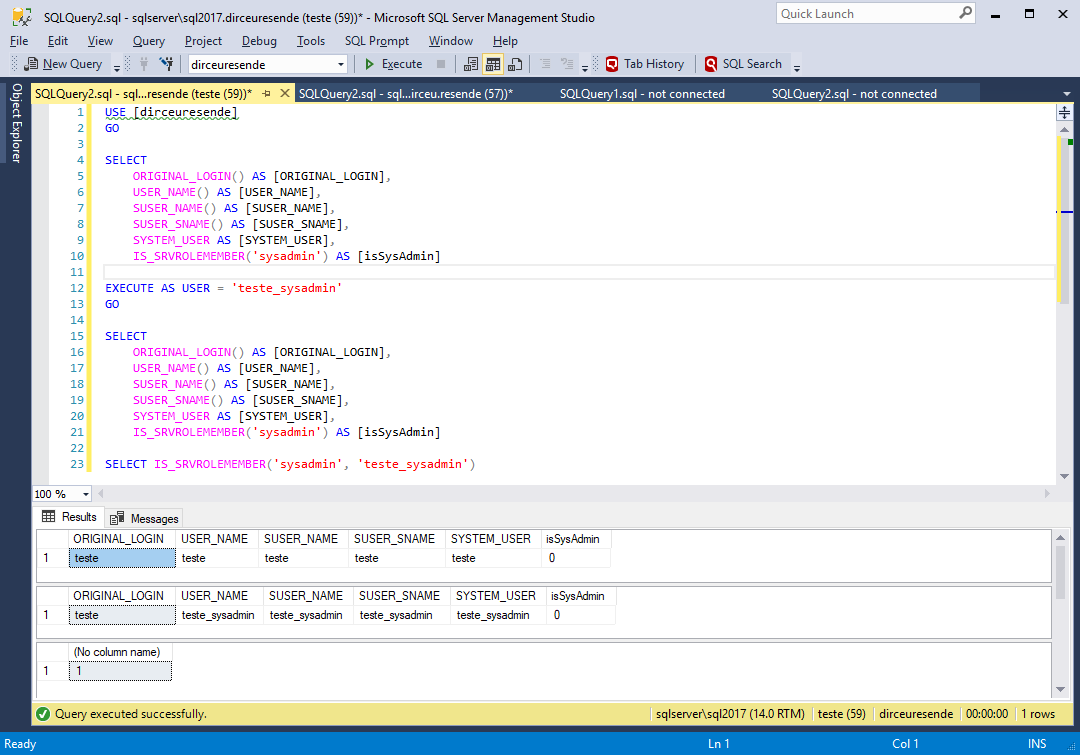
By default, all operations during a session are subject to permission checks for that user. When an EXECUTE AS statement is executed, the session execution context is switched to the specific login or user name. After context switching, permissions are checked on the user's login and security tokens for the account, rather than on the person calling the EXECUTE AS statement.
I will demonstrate how this works by creating a user called “test”, with db_datareader permission on the AdventureWorks database, but with reading denied on the Person.Person table:
USE [master]
GO

CREATE LOGIN [teste] WITH PASSWORD=N'aaa', DEFAULT_DATABASE=[master], CHECK_EXPIRATION=OFF, CHECK_POLICY=OFF
GO

USE [AdventureWorks]
GO

CREATE USER [teste] FOR LOGIN [teste]
GO

ALTER ROLE [db_datareader] ADD MEMBER [teste]
GO

DENY SELECT ON Person.Person TO [teste]
GO
After executing the above script, I will check which user is currently in the context of my session:
SELECT
    ORIGINAL_LOGIN() AS [ORIGINAL_LOGIN],
    USER_NAME() AS [USER_NAME],
    SUSER_NAME() AS [SUSER_NAME],
    SUSER_SNAME() AS [SUSER_SNAME],
    SYSTEM_USER AS [SYSTEM_USER],
    IS_SRVROLEMEMBER('sysadmin') AS [isSysAdmin]
Result:

Now, I will use the EXECUTE AS statement to change the current user in my session:
EXECUTE AS USER = 'teste'
GO

SELECT
    ORIGINAL_LOGIN() AS [ORIGINAL_LOGIN],
    USER_NAME() AS [USER_NAME],
    SUSER_NAME() AS [SUSER_NAME],
    SUSER_SNAME() AS [SUSER_SNAME],
    SYSTEM_USER AS [SYSTEM_USER],
    IS_SRVROLEMEMBER('sysadmin') AS [isSysAdmin]
GO
Result:

As this user is in the database role “db_datareader”, he should not have any problems when trying to query data from the Address table, for example:

But if we try to query data from the Person table, which I applied a DENY SELECT to this user, he will not be able to execute the command. It's worth remembering that my original user is sysadmin, that is, he has no access restrictions.

With this, I was able to demonstrate a very interesting way of one of the purposes of EXECUTE AS, which is validate whether a given user can perform an activity after the DBA grants permission, for example.
Types of personifications
View contentReverting the EXECUTE AS and returning to the original user
View contentThe REVERT command
The other way to do this is using the REVERT command, which will return the security context to the previous user:
USE [dirceuresende]
GO

SELECT
    ORIGINAL_LOGIN() AS [ORIGINAL_LOGIN],
    USER_NAME() AS [USER_NAME],
    SUSER_NAME() AS [SUSER_NAME],
    SUSER_SNAME() AS [SUSER_SNAME],
    SYSTEM_USER AS [SYSTEM_USER],
    IS_SRVROLEMEMBER('sysadmin') AS [isSysAdmin]

EXECUTE AS USER = 'teste_sysadmin'
GO

SELECT
    ORIGINAL_LOGIN() AS [ORIGINAL_LOGIN],
    USER_NAME() AS [USER_NAME],
    SUSER_NAME() AS [SUSER_NAME],
    SUSER_SNAME() AS [SUSER_SNAME],
    SYSTEM_USER AS [SYSTEM_USER],
    IS_SRVROLEMEMBER('sysadmin') AS [isSysAdmin]
GO

REVERT
GO

SELECT
    ORIGINAL_LOGIN() AS [ORIGINAL_LOGIN],
    USER_NAME() AS [USER_NAME],
    SUSER_NAME() AS [SUSER_NAME],
    SUSER_SNAME() AS [SUSER_SNAME],
    SYSTEM_USER AS [SYSTEM_USER],
    IS_SRVROLEMEMBER('sysadmin') AS [isSysAdmin]
GO
Result:

It is worth remembering that the EXECUTE AS command can be nested, that is, a tree of security contexts can be created, as shown below:
USE [master]
GO

SELECT ORIGINAL_LOGIN() AS [ORIGINAL_LOGIN], USER_NAME() AS [USER_NAME], SUSER_NAME() AS [SUSER_NAME], SUSER_SNAME() AS [SUSER_SNAME], SYSTEM_USER AS [SYSTEM_USER], IS_SRVROLEMEMBER('sysadmin') AS [isSysAdmin]
GO

EXECUTE AS LOGIN = 'teste_sysadmin'
GO

SELECT ORIGINAL_LOGIN() AS [ORIGINAL_LOGIN], USER_NAME() AS [USER_NAME], SUSER_NAME() AS [SUSER_NAME], SUSER_SNAME() AS [SUSER_SNAME], SYSTEM_USER AS [SYSTEM_USER], IS_SRVROLEMEMBER('sysadmin') AS [isSysAdmin]
GO

EXECUTE AS LOGIN = 'teste'
GO

SELECT ORIGINAL_LOGIN() AS [ORIGINAL_LOGIN], USER_NAME() AS [USER_NAME], SUSER_NAME() AS [SUSER_NAME], SUSER_SNAME() AS [SUSER_SNAME], SYSTEM_USER AS [SYSTEM_USER], IS_SRVROLEMEMBER('sysadmin') AS [isSysAdmin]
GO

EXECUTE AS LOGIN = 'teste2'
GO

SELECT ORIGINAL_LOGIN() AS [ORIGINAL_LOGIN], USER_NAME() AS [USER_NAME], SUSER_NAME() AS [SUSER_NAME], SUSER_SNAME() AS [SUSER_SNAME], SYSTEM_USER AS [SYSTEM_USER], IS_SRVROLEMEMBER('sysadmin') AS [isSysAdmin]
GO
Result:

And now, let's undo the stack to show the nesting of this context:
SELECT ORIGINAL_LOGIN() AS [ORIGINAL_LOGIN], USER_NAME() AS [USER_NAME], SUSER_NAME() AS [SUSER_NAME], SUSER_SNAME() AS [SUSER_SNAME], SYSTEM_USER AS [SYSTEM_USER], IS_SRVROLEMEMBER('sysadmin') AS [isSysAdmin]
GO

REVERT
GO

SELECT ORIGINAL_LOGIN() AS [ORIGINAL_LOGIN], USER_NAME() AS [USER_NAME], SUSER_NAME() AS [SUSER_NAME], SUSER_SNAME() AS [SUSER_SNAME], SYSTEM_USER AS [SYSTEM_USER], IS_SRVROLEMEMBER('sysadmin') AS [isSysAdmin]
GO

REVERT
GO

SELECT ORIGINAL_LOGIN() AS [ORIGINAL_LOGIN], USER_NAME() AS [USER_NAME], SUSER_NAME() AS [SUSER_NAME], SUSER_SNAME() AS [SUSER_SNAME], SYSTEM_USER AS [SYSTEM_USER], IS_SRVROLEMEMBER('sysadmin') AS [isSysAdmin]
GO

REVERT
GO

SELECT ORIGINAL_LOGIN() AS [ORIGINAL_LOGIN], USER_NAME() AS [USER_NAME], SUSER_NAME() AS [SUSER_NAME], SUSER_SNAME() AS [SUSER_SNAME], SYSTEM_USER AS [SYSTEM_USER], IS_SRVROLEMEMBER('sysadmin') AS [isSysAdmin]
GO
Result:

RUN AS… WITH COOKIES
This parameter specifies that the execution context can only be reverted to the previous context if the calling REVERT WITH COOKIE statement contains the correct @varbinary_variable value. This is a security measure, used especially in connection pools, to ensure that only those who know the cookie hash can reverse the security context.
Example (I removed the GO commands to avoid losing variable information):
USE [master]
GO

-- Exibe as informações do usuário original
SELECT ORIGINAL_LOGIN() AS [ORIGINAL_LOGIN], USER_NAME() AS [USER_NAME], SUSER_NAME() AS [SUSER_NAME], SUSER_SNAME() AS [SUSER_SNAME], SYSTEM_USER AS [SYSTEM_USER], IS_SRVROLEMEMBER('sysadmin') AS [isSysAdmin];

-- Cria a variável do cookie e armazena o hash gerado
DECLARE @cookie VARBINARY(8000);
EXECUTE AS LOGIN = 'teste_sysadmin' WITH COOKIE INTO @cookie;

-- Exibe o cookie
SELECT @cookie;

-- Mostra o usuário personificado (teste_sysadmin(
SELECT ORIGINAL_LOGIN() AS [ORIGINAL_LOGIN], USER_NAME() AS [USER_NAME], SUSER_NAME() AS [SUSER_NAME], SUSER_SNAME() AS [SUSER_SNAME], SYSTEM_USER AS [SYSTEM_USER], IS_SRVROLEMEMBER('sysadmin') AS [isSysAdmin];

-- Volta o contexto de segurança para o usuário original
REVERT WITH COOKIE = @cookie;

-- Exibe as informações do usuário original novamente
SELECT ORIGINAL_LOGIN() AS [ORIGINAL_LOGIN], USER_NAME() AS [USER_NAME], SUSER_NAME() AS [SUSER_NAME], SUSER_SNAME() AS [SUSER_SNAME], SYSTEM_USER AS [SYSTEM_USER], IS_SRVROLEMEMBER('sysadmin') AS [isSysAdmin];
Result:

Now I will try to apply the REVERT command without specifying the token:

Now I will try to exchange the token and try to apply the REVERT command:

EXECUTE AS … WITH NO REVERT
After presenting the REVERT and REVERT WITH COOKIES commands, there is another clause that means that impersonate cannot be reverted to the original user in this session. This statement is WITH NO REVERT. In this case, the only way to revert is to open a new session.
When the WITH NO REVERT COOKIE = @varbinary_variable clause is specified, the SQL Server Database Engine passes the cookie value to @varbinary_variable. The execution context set by this statement can only be reverted to the previous context if the calling statement REVERT WITH COOKIE = @varbinary_variable has the same @varbinary_variable value.
This option is useful in an environment where connection pooling is used. Connection pooling is the maintenance of a group of database connections for reuse by applications on an application server. Because the value passed to @varbinary_variable is known only to the caller of the EXECUTE AS statement (in this case, the application), the caller can ensure that the established execution context cannot be changed by anyone else.
Example:
USE [master]
GO

SELECT ORIGINAL_LOGIN() AS [ORIGINAL_LOGIN], USER_NAME() AS [USER_NAME], SUSER_NAME() AS [SUSER_NAME], SUSER_SNAME() AS [SUSER_SNAME], SYSTEM_USER AS [SYSTEM_USER], IS_SRVROLEMEMBER('sysadmin') AS [isSysAdmin]
GO

EXECUTE AS LOGIN = 'teste_sysadmin' WITH NO REVERT
GO

SELECT ORIGINAL_LOGIN() AS [ORIGINAL_LOGIN], USER_NAME() AS [USER_NAME], SUSER_NAME() AS [SUSER_NAME], SUSER_SNAME() AS [SUSER_SNAME], SYSTEM_USER AS [SYSTEM_USER], IS_SRVROLEMEMBER('sysadmin') AS [isSysAdmin]
GO

REVERT
GO

SELECT ORIGINAL_LOGIN() AS [ORIGINAL_LOGIN], USER_NAME() AS [USER_NAME], SUSER_NAME() AS [SUSER_NAME], SUSER_SNAME() AS [SUSER_SNAME], SYSTEM_USER AS [SYSTEM_USER], IS_SRVROLEMEMBER('sysadmin') AS [isSysAdmin]
GO
Result:

What are the permissions to use EXECUTE AS?
View contentHowever, you who are a DBA must keep in mind that this permission is EXTREMELY dangerous for a common user, since he can use EXECUTE AS to execute commands using the login of a sysadmin user, for example, and thus do anything in the instance.
This was one of the reasons why IMPERSONATE ANY LOGIN permission was created in SQL Server 2014. Users with CONTROL SERVER permission already had this privilege implicitly and with this, they could use EXECUTE AS to execute commands as another user, including sysadmin users. Starting with SQL Server 2014, the DBA can now apply a DENY IMPERSONATE ANY LOGIN command to users with CONTROL SERVER permission and prevent this from happening.
It is worth mentioning that there is also the GRANT IMPERSONATE ON LOGIN/USER::[user1] TO [user2] command, which allows you to grant IMPERSONATE access to specific users. Furthermore, members of the db_owner database role can use EXECUTE AS on users created in these databases. Remembering that, even if you are impersonating a sysadmin user through a database that you are db_owner, for example, using EXECUTE AS USER, you will not have the sysadmin “powers” of that user, as EXECUTE AS User only inherits permissions at the database level. As you are already db_owner, you will not inherit any new permissions that you do not already have, you can only execute commands as another user (which is still a risk).
Explicit Permissions to use IMPERSONATE
As I mentioned above, there are some conditions for using the EXECUTE AS command in SQL Server.
Condition #1: IMPERSONATE ANY LOGIN
Users who have explicit IMPERSONATE ANY LOGIN permission can run commands as any login to the SQL Server instance. Remember that permissions are at the instance level, that is, they apply to all databases in that instance and commands that require privileges such as sysadmin and CONTROL SERVER can be used through EXECUTE AS LOGIN.
To release this permission, you must use the following command:
GRANT IMPERSONATE ANY LOGIN TO [login];
Condition #2: IMPERSONATE LOGIN
Users who have the IMPERSONATE LOGIN permission can run commands as specific logins on the SQL Server instance. This command empowers loginA to execute commands as if it were loginB and must be released for each desired login. Remember that permissions are at the instance level, that is, they apply to all databases in that instance and commands that require privileges such as sysadmin and CONTROL SERVER can be used through EXECUTE AS LOGIN.
To release this permission, you must use the following command:
GRANT IMPERSONATE ON LOGIN::LoginB TO [LoginA];
Condition #3: IMPERSONATE USER
Users who have the IMPERSONATE USER permission can execute commands as specific users in a database. This command empowers userA to execute commands as if it were userB in the database, which has IMPERSONATE permission and must be released for each desired login. Commands that require instance-level permissions (Ex: Shutdown, change server role members, create Linked Server, etc.) are NOT executed by IMPERSONATE USER, only commands that require database-level permissions, such as INSERT, UPDATE, DELETE, etc.
To release this permission, you must use the following command:
GRANT IMPERSONATE ON USER::UsuarioB TO [UsuarioA];
Implicit Permissions to use IMPERSONATE
Now I will demonstrate that there are some implicit conditions where you can use the EXECUTE AS command in SQL Server without having explicit permission to do so.
Condition #1: SYSADMIN
SQL Server “Administrator” role. Users in this role can do anything in the database and therefore already have IMPERSONATE LOGIN, IMPERSONATE USER and IMPERSONATE ANY LOGIN permissions and cannot have privileges denied with DENY.
To add someone to this role, use the following command:
ALTER SERVER ROLE [sysadmin] ADD MEMBER [Login];
Condition #2: CONTROL SERVER
SQL Server “Administrator” permission. Users who have this permission can do almost anything in the database and therefore already have IMPERSONATE LOGIN, IMPERSONATE USER and IMPERSONATE ANY LOGIN permissions, but, unlike the sysadmin role, these users MAY be denied IMPERSONATE privileges with DENY.
To add someone to this role, use the following command:
GRANT CONTROL SERVER TO [Login];
Condition #3: SECURITYADMIN
Users who are in the server role securityadmin control the security and permissions of the SQL Server instance. Being in this role, these users have the IMPERSONATE ANY LOGIN permission and therefore, they can do anything in the database, as they can use the EXECUTE AS LOGIN command and execute commands as if they were a sysadmin user and for this reason, Microsoft's own documentation treats this role as equivalent to the sysadmin role in terms of security concerns. Unlike the sysadmin role, these users MAY be denied IMPERSONATE privileges with DENY.
To add someone to this role, use the following command:
ALTER SERVER ROLE [securityadmin] ADD MEMBER [Login];
Condition #4: db_owner
Users who are in the database role db_owner can execute any DDL, DCL or DML command in the database in which they have this role. For this reason, these users already have the IMPERSONATE USER permission implicit in all database users. It is worth remembering that these users MAY be denied IMPERSONATE privileges with DENY.
To add someone to this role, use the following command:
ALTER DATABASE ROLE [db_owner] ADD MEMBER [Usuario];
Condition #5: db_securityadmin
Users who are in the database role db_securityadmin can manage security and permissions on the database. For this reason, these users have the IMPERSONATE USER permission implicit in all database users, being able to execute commands as if they were even one of the users in the db_owner role. It is worth remembering that these users MAY be denied IMPERSONATE privileges with DENY.
To add someone to this role, use the following command:
ALTER DATABASE ROLE [db_securityadmin] ADD MEMBER [Usuario];
Who has permission to run EXECUTE AS ?
View contentSpeaking at the database level, where the user can perform IMPERSONATE on database users, he will need to be in the database role db_owner or have IMPERSONATE ON USER permission for the specific users he can impersonate.
Therefore, I will demonstrate below how to identify who are the users who have these permissions in your SQL Server instance.
Users with CONTROL SERVER permissions or sysadmin and securityadmin roles
To identify users with CONTROL SERVER permissions or roles sysadmin and securityadmin, who can execute EXECUTE AS for any login, run the script below:
-- Verificando usuários com permissões CONTROL SERVER ou roles sysadmin e securityadmin
SELECT
    A.[name] AS [login],
    A.principal_id,
    A.[sid],
    A.[type_desc],
    A.is_disabled,
    B.[permission_name]
FROM
    sys.server_principals A
    JOIN (
        SELECT
            grantee_principal_id,
            [permission_name] COLLATE SQL_Latin1_General_CP1_CI_AI AS [permission_name]
        FROM
            sys.server_permissions
        WHERE
            class_desc = 'SERVER'
            AND [permission_name] = 'CONTROL SERVER'
            AND [state] IN ('G', 'W')

        UNION

        SELECT
            a1.member_principal_id,
            a2.[name] COLLATE SQL_Latin1_General_CP1_CI_AI AS [role]
        FROM
            sys.server_role_members AS a1
            JOIN sys.server_principals AS a2 ON a1.role_principal_id = a2.principal_id
        WHERE
            a2.[name] IN ('sysadmin', 'securityadmin')
    ) B ON A.principal_id = B.grantee_principal_id
WHERE
    A.is_fixed_role = 0
Result:

Users with IMPERSONATE ANY LOGIN
To identify which users have the explicit IMPERSONATE ANY LOGIN permission, and thus can execute commands as any user, run the script below:
-- Verificando usuários com IMPERSONATE ANY LOGIN
SELECT
    A.class,
    A.class_desc,
    A.[type],
    A.[permission_name],
    A.[state],
    A.state_desc,
    B.[name] AS grantee, -- quem recebeu a permissão
    C.[name] AS grantor -- quem concedeu a permissão
FROM
    sys.server_permissions A
    JOIN sys.server_principals B ON A.grantee_principal_id = B.principal_id
    LEFT JOIN sys.server_principals C ON A.grantor_principal_id = C.principal_id
WHERE
    A.[type] = 'IAL'
Result:

Users with IMPERSONATE LOGIN
To identify which users have explicit IMPERSONATE LOGIN permission and can execute commands as some specific users, run the script below:
-- Verificando usuários com IMPERSONATE LOGIN
SELECT
    A.class,
    A.class_desc,
    A.[type],
    A.[permission_name],
    A.[state],
    A.state_desc,
    B.[name] AS grantee, -- quem recebeu a permissão
    C.[name] AS impersonated_user -- quem pode ser personificado por quem recebeu a permissão
FROM
    sys.server_permissions A
    JOIN sys.server_principals B ON A.grantee_principal_id = B.principal_id
    LEFT JOIN sys.server_principals C ON A.grantor_principal_id = C.principal_id
WHERE
    A.[type] = 'IM'
Result:

Users in the db_owner or db_securityadmin database roles
To identify who are the users who are in the db_owner or db_securityadmin database roles, and can execute commands as any database user, run the script below:
-- Verificando usuários na role db_owner ou db_securityadmin
SELECT
    DB_NAME() AS [database],
    B.[name] AS [user],
    C.[name] AS [database_role]
FROM
    sys.database_role_members A
    JOIN sys.database_principals B ON A.member_principal_id = B.principal_id
    JOIN sys.database_principals C ON A.role_principal_id = C.principal_id
WHERE
    C.[name] IN ('db_owner', 'db_securityadmin')
    AND B.[name] <> 'dbo'
Result:

Users in the db_owner and db_securityadmin roles (checks all databases)
As in the previous example, to identify who are the users who are in the db_owner or db_securityadmin database roles, now analyzing all databases in the instance, run the script below:
-- Verificando usuários nas roles db_owner e db_securityadmin em todos os databases
IF (OBJECT_ID('tempdb..#Dbowner_Database') IS NOT NULL) DROP TABLE #Dbowner_Database
CREATE TABLE #Dbowner_Database ( [database] nvarchar(128), [user] nvarchar(128), [database_role] nvarchar(128) )

INSERT INTO #Dbowner_Database
EXEC sys.sp_MSforeachdb '
SELECT
    ''?'' AS [database],
    B.[name] AS [user],
    C.[name] AS [database_role]
FROM
    [?].sys.database_role_members A
    JOIN [?].sys.database_principals B ON A.member_principal_id = B.principal_id
    JOIN [?].sys.database_principals C ON A.role_principal_id = C.principal_id
WHERE
    C.[name] IN (''db_owner'', ''db_securityadmin'')
    AND B.[name] <> ''dbo'''


SELECT * FROM #Dbowner_Database
Result:

Users with IMPERSONATE USER in a database
To identify users who have explicit IMPERSONATE USER permission and can execute commands as some specific database users, run the script below:
-- Verificando usuários com IMPERSONATE USER em um database
SELECT
    A.class,
    A.class_desc,
    A.[type],
    A.[permission_name],
    A.[state],
    A.state_desc,
    B.[name] AS grantee, -- quem recebeu a permissão
    C.[name] AS impersonated_user -- quem pode ser personificado por quem recebeu a permissão
FROM
    sys.database_permissions A
    JOIN sys.database_principals B ON A.grantee_principal_id = B.principal_id
    LEFT JOIN sys.database_principals C ON A.grantor_principal_id = C.principal_id
WHERE
    A.[type] = 'IM'
Result:

Users with IMPERSONATE USER (checks all databases)
As in the previous example, to identify who are the users who are in the sysadmin or db_securityadmin database roles, now looking at all databases in the instance, run the script below:
-- Verificando usuários com IMPERSONATE USER em todos os databases
IF (OBJECT_ID('tempdb..#Permissoes') IS NOT NULL) DROP TABLE #Permissoes
CREATE TABLE #Permissoes ( [database] nvarchar(128), [class] tinyint, [class_desc] nvarchar(60), [type] char(4), [permission_name] nvarchar(128), [state] char(1), [state_desc] nvarchar(60), [grantee] nvarchar(128), [impersonated_user] nvarchar(128) )

INSERT INTO #Permissoes
EXEC sys.sp_MSforeachdb '
SELECT
    ''?'' as [database],
    A.class,
    A.class_desc,
    A.[type],
    A.[permission_name],
    A.[state],
    A.state_desc,
    B.[name] AS grantee,
    C.[name] AS impersonated_user
FROM
    [?].sys.database_permissions A
    JOIN [?].sys.database_principals B ON A.grantee_principal_id = B.principal_id
    LEFT JOIN [?].sys.database_principals C ON A.grantor_principal_id = C.principal_id
WHERE
    A.[type] = ''IM'''


SELECT * FROM #Permissoes
Result:

RUN AS on database objects
View contentBefore the examples, I will remind you of the possible ways to EXECUTE AS on objects:
- CALLER: Run as CALLER is the default; if no other options are specified, the procedure runs in the caller's security context.
- OWNER: Execute as OWNER executes the procedure in the context of the object's owner. If the object is created in a schema owned by dbo or the database owner, the procedure runs with unlimited permissions.
- SELF: Run as SELF runs in the security context of the object's creator. This is equivalent to running as specified user, where the specified user is the person who creates or changes the object.
- LOGIN/USER: As already described above, you can also use a specific user (permissions at the database level) or login (permissions at the instance level) in the object header, allowing everyone who has EXECUTE permission on this object, such as a Stored Procedure, to execute this object with the context of that specified user/login automatically.
The types of objects that can have the EXECUTE AS clause in the definition are:
- Stored Procedures – CALLER | SELF | OWNER | ‘user_name’
- Functions (except inline table-valued functions) – CALLER | SELF | ‘user_name’
- DDL Triggers with Database Scope – CALLER | SELF | ‘user_name’
- DDL Triggers with Server Scope and logon triggers – CALLER | SELF | ‘login_name’
- Queues – SELF | OWNER | ‘user_name’
- Azure SQL Database – Stored Procedures – CALLER | SELF | OWNER | ‘user_name’
- Azure SQL Database – Functions (except inline table-valued functions) – CALLER | SELF | OWNER | ‘user_name’
- Azure SQL Database – DDL Triggers with Database Scope – CALLER | SELF | ‘user_name’
To demonstrate a common use of EXECUTE AS in Stored Procedures, I will create an SP in msdb for executing jobs by passing the job name as a parameter:
USE [msdb]
GO

CREATE OR ALTER PROCEDURE dbo.stpInicia_Job (
    @Job_Name AS VARCHAR(128)
)
WITH EXECUTE AS OWNER
AS
BEGIN

    EXEC msdb.dbo.sp_start_job
        @job_name = @Job_Name

END
GO

GRANT EXECUTE ON dbo.stpInicia_Job TO [teste]
GO
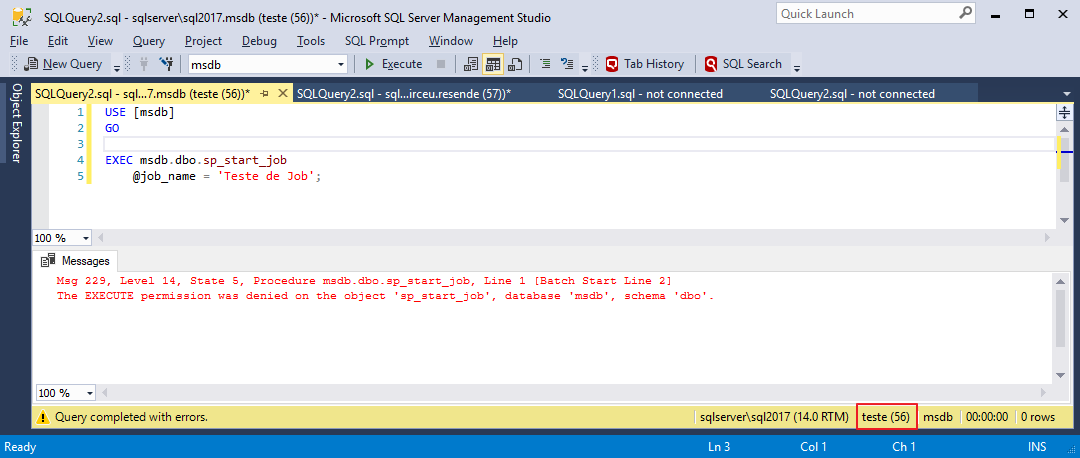
Now I will try to manually run sp_start_job:

and then try to run it through this SP that I created:
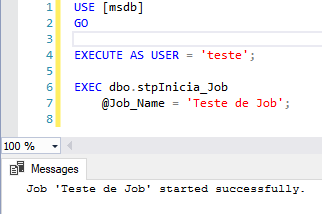
By adding an EXECUTE AS clause to an object, you do not need to do anything for the user to have access to this SP, besides the usual EXECUTE permission on this Stored Procedure, for example. I will repeat the examples connected directly with the “test” user, without using EXECUTE AS at any time:
And now, I'm going to execute the Procedure that I created and which will allow me to run any job on the instance, even without having permissions to do so in my user:

Note: This SP stpInicia_Job MUST be created in msdb due to the way permissions work in SQL Server. If you create a Stored Procedure and within it there are queries or commands on objects from other databases, the executing user will have to have explicit permissions on these objects, even using EXECUTE AS. If everything inside the Stored Procedure only references objects from the database itself, the executor does not need to have any permission on the objects involved within the SP, just EXECUTE permission on the Stored Procedure itself.
It is worth remembering that when you create an object with EXECUTE AS USER = 'User', deactivating or denying the connect privilege for the login associated with that user will NOT change the behavior of using that object, since the login actions end up not influencing the permissions at the database level in this situation (except in cases where the user is a sysadmin, for example, and does not have explicit permissions on the database for that object).
In other words, if an SP has the WITH EXECUTE AS USER = 'User1' clause and you disable the login associated with that user, this will not cause an SP that has execute to generate an error when someone tries to execute it. But if you rename or delete this user in the database, then SP will stop working.
Security Tests in Audit Routines
View contentTest #1 – IMPERSONATE ANY LOGIN
To test the improperly used impersonate, I will take the same user from the example (test) and grant the IMPERSONATE ANY LOGIN privilege.
USE [master]
GO

GRANT IMPERSONATE ANY LOGIN TO [teste]
GO
And now, I'm going to connect to the instance with this user:

And let's try to perform the select on the Person table, which I applied a DENY SELECT to this user:
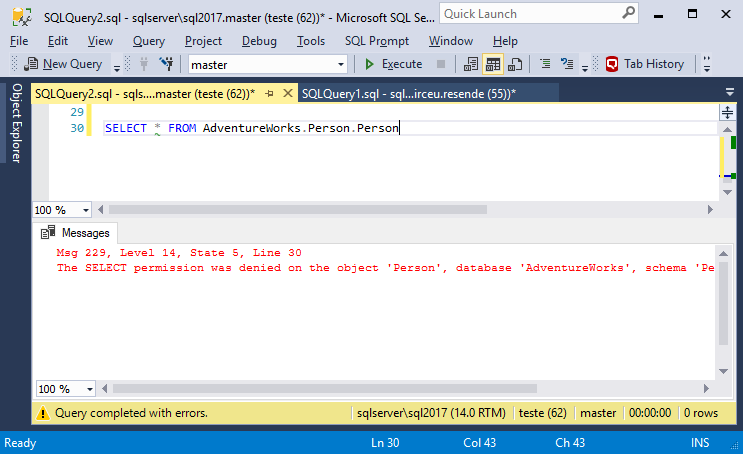
Well, he really doesn't have permission. What if we used another user to access the data? For example, the user “dirceu.resende”, which is sysadmin.

Let's check what permissions he has access to after impersonate?
SELECT
    ORIGINAL_LOGIN() AS [ORIGINAL_LOGIN],
    USER_NAME() AS [USER_NAME],
    SUSER_NAME() AS [SUSER_NAME],
    SUSER_SNAME() AS [SUSER_SNAME],
    SYSTEM_USER AS [SYSTEM_USER],
    IS_SRVROLEMEMBER('sysadmin') AS [isSysAdmin]

SELECT 'login' AS token_type, *
FROM sys.login_token AS LT

UNION ALL

SELECT 'user' AS token_type, *
FROM sys.user_token AS UT
GO

EXECUTE AS LOGIN = 'dirceu.resende'
GO

SELECT 'login' AS token_type, *
FROM sys.login_token AS LT

UNION ALL

SELECT 'user' AS token_type, *
FROM sys.user_token AS UT
Result:

Hmm... What if we tried to create a change in a table? This “test” user only has the db_datareader permission.

Yeah.. This user can actually do everything that the impersonated user can do.. As I am impersonating a user who is a member of the server role sysadmin, a regular user can now do ANYTHING, even shut down the server! And does he want to continue being an “ordinary” user?

Ready! Now he himself has become a sysadmin. If you want, you can even delete other sysadmin users and “take” control of the instance for yourself. See how this permission can be extremely dangerous!
And it doesn't stop there... Look at another example of how this permission, when used improperly, can cause great damage. Imagine that you, DBA, have a routine to log changes made to your database, such as the one I make available in the post How to create an Audit trigger to log object manipulation in SQL Server.
Now, imagine a malicious user using this to do wrong things and blame it on another colleague? Let's test it... First, I'll create the table and change a column. All logs will be recorded using the user who performed the actions.

And now, to delete the table, I will use EXECUTE AS to delete it as if it were another user.
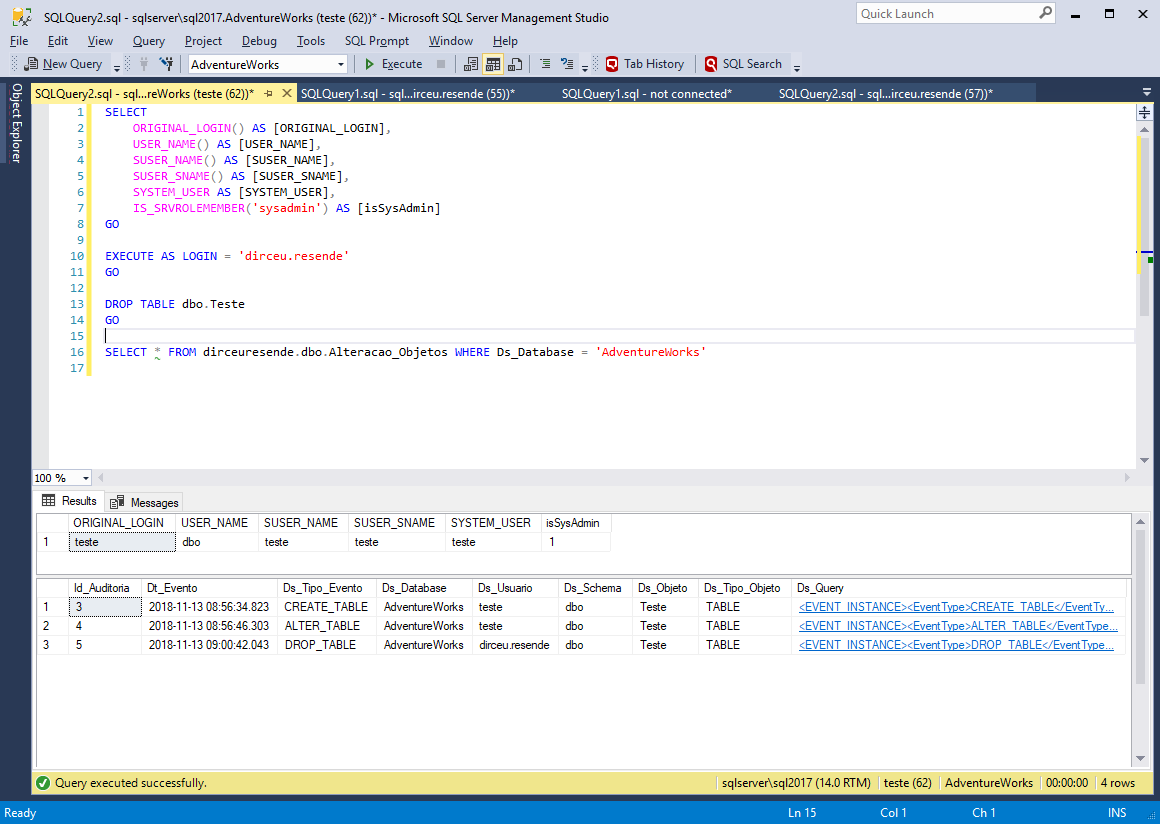
Ready. I messed up and even blamed it on my colleague. Do you want to resolve this? Start using the ORIGINAL_LOGIN() function in your audit and log routines. To demonstrate this, I will change the trigger I created to create this audit:

Now, I will create a table again, change it and impersonate the login “dirceu.resende” to delete the table and leave the responsibilities in his accounts:

Yes, this time it didn't work... The ORIGINAL_LOGIN() function revealed the real executor of the commands, even with EXECUTE AS.
Test #2 – Test with IMPERSONATE USER
Another test we can try is to release the impersonate privilege on a specific user. For example, I want the “test” user to be able to use the EXECUTE AS command just like the “test2” user, both with a low level of access. To do this, I will create the user “teste2”, with the same permissions as “teste”, but without the DENY of select in the Person table.
USE [master]
GO

CREATE LOGIN [teste2] WITH PASSWORD=N'aaa', DEFAULT_DATABASE=[master], CHECK_EXPIRATION=OFF, CHECK_POLICY=OFF
GO

USE [AdventureWorks]
GO

CREATE USER [teste2] FOR LOGIN [teste2]
GO

ALTER ROLE [db_datareader] ADD MEMBER [teste2]
GO
User created, let's try to use EXECUTE AS from the “test” user:
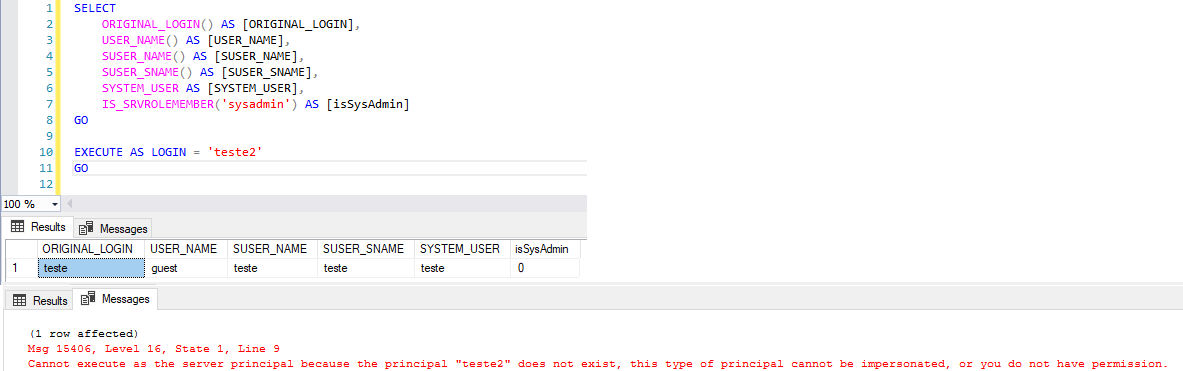
Obviously, there was a mistake. The “test” user does not have IMPERSONATE permission. Let's grant permission and try again:
USE [master]
GO

GRANT IMPERSONATE ON LOGIN::teste2 TO [teste]
GO
Let's test whether it worked:

Oops! Now I am executing the commands as if I were the user “teste2”. The “test” user cannot query the Person table, as he has a DENY SELECT there. Let's try to read the data through the user “teste2” with EXECUTE AS:
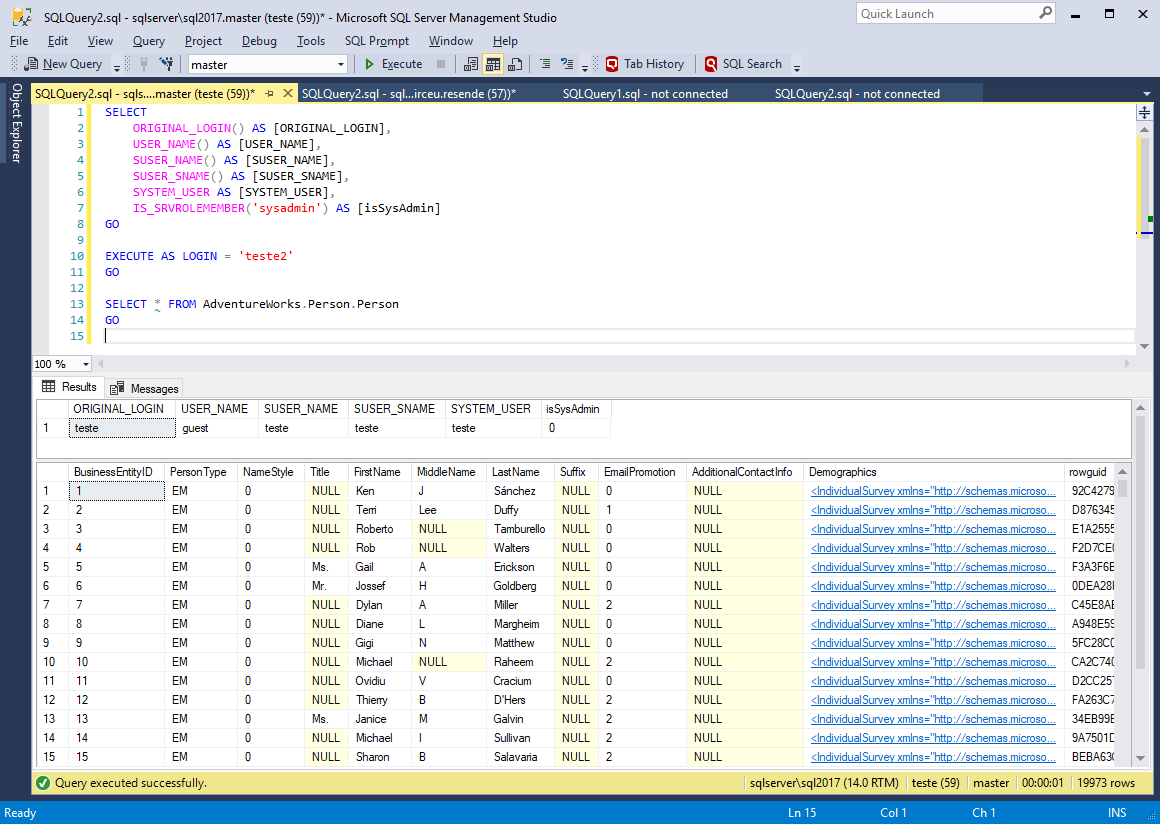
Oops! We were able to read the data from the table, even though the “test” user did not have permission to do so. Let's confirm if he really can't:

Yeah... It really isn't possible, just with EXECUTE AS... And can I use EXECUTE AS on another user that I don't have access to?
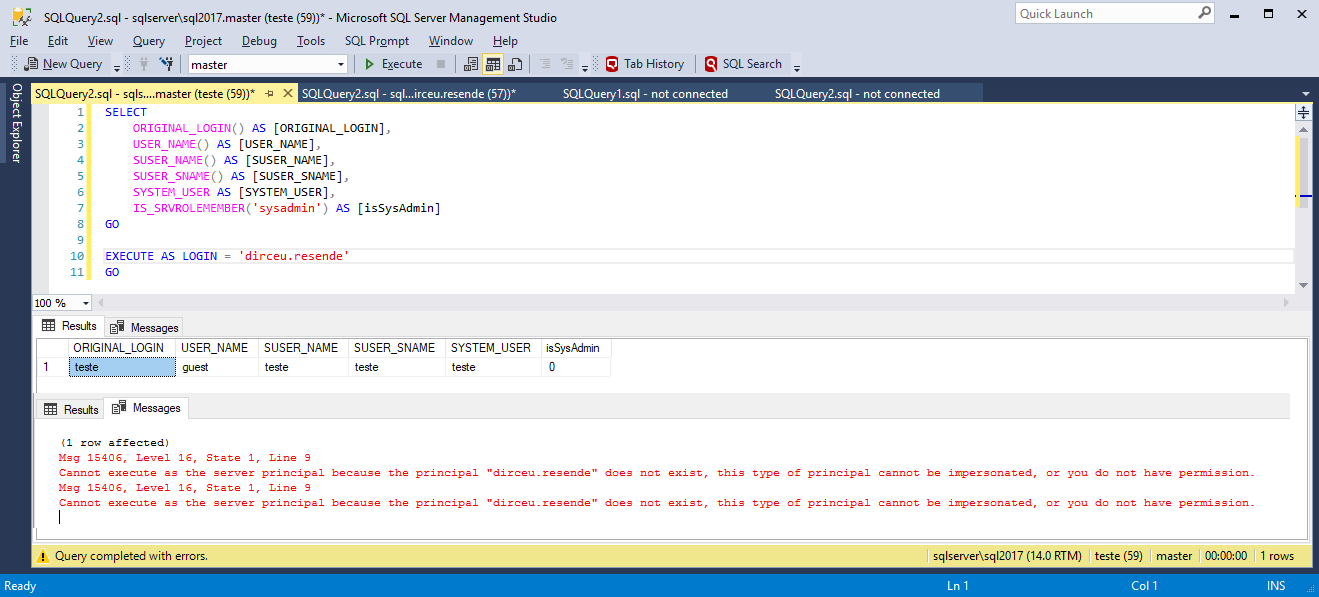
Wonder! I was unable to apply IMPERSONATE to another user, especially “dirceu.resende”, which is sysadmin. Imagine the damage that could cause.
RUN AS and Resource Governor
View contentWhat I want to test here is whether EXECUTE AS “tricks” the Resource Governor as well, managing to execute a query without being limited by the RG.
To do this, I will create the Resource Pool, Workload Group, the classification function and enable the Resource Governor on the instance, limiting the resources that can be used by the “test” user:
USE [master]
GO

----------------------------------------------------------------------------------------------
-- "Limpeza" do Resource Governor
----------------------------------------------------------------------------------------------

ALTER RESOURCE GOVERNOR WITH (CLASSIFIER_FUNCTION=NULL)
GO

ALTER RESOURCE GOVERNOR RECONFIGURE
GO

ALTER RESOURCE GOVERNOR DISABLE
GO

IF (EXISTS(SELECT NULL FROM sys.resource_governor_workload_groups WHERE [name] = 'Grupo1')) DROP WORKLOAD GROUP [Grupo1]
GO

IF (EXISTS(SELECT NULL FROM sys.dm_resource_governor_resource_pools WHERE [name] = 'PoolA')) DROP RESOURCE POOL [PoolA]
GO

IF (OBJECT_ID('dbo.fncClassifica_ResourceGovernor') IS NOT NULL) DROP FUNCTION dbo.fncClassifica_ResourceGovernor
GO


----------------------------------------------------------------------------------------------
-- Criação do Pool de Recursos
----------------------------------------------------------------------------------------------

CREATE RESOURCE POOL [PoolA]
WITH (
    MIN_CPU_PERCENT=0,
    MAX_CPU_PERCENT=20,
    CAP_CPU_PERCENT=20,
    MIN_MEMORY_PERCENT=0,
    MAX_MEMORY_PERCENT=30,
    AFFINITY SCHEDULER = AUTO,
    MIN_IOPS_PER_VOLUME=0,
    MAX_IOPS_PER_VOLUME=300
)
GO


----------------------------------------------------------------------------------------------
-- Criação do Workload Group
----------------------------------------------------------------------------------------------

CREATE WORKLOAD GROUP [Grupo1]
WITH (
    GROUP_MAX_REQUESTS=0,
    IMPORTANCE=LOW,
    REQUEST_MAX_CPU_TIME_SEC=2,
    REQUEST_MAX_MEMORY_GRANT_PERCENT=25,
    REQUEST_MEMORY_GRANT_TIMEOUT_SEC=0,
    MAX_DOP=1
) USING [PoolA]
GO


----------------------------------------------------------------------------------------------
-- Criação da função de classificação
----------------------------------------------------------------------------------------------

CREATE FUNCTION fncClassifica_ResourceGovernor()
RETURNS SYSNAME
WITH SCHEMABINDING
AS
BEGIN

    DECLARE @grp_name AS SYSNAME, @Usuario VARCHAR(200) = SUSER_NAME(), @Programa VARCHAR(200) = APP_NAME()

    IF (@Usuario IN ('teste', 'teste2'))
        SET @grp_name = 'Grupo1'
    ELSE IF (@Programa LIKE '%Management Studio%')
        SET @grp_name = 'Grupo2'


    RETURN @grp_name

END
GO


----------------------------------------------------------------------------------------------
-- Habilita o Resource Governor, aplica a função de classificação e confirma as alterações
----------------------------------------------------------------------------------------------

ALTER RESOURCE GOVERNOR WITH (CLASSIFIER_FUNCTION=dbo.fncClassifica_ResourceGovernor)
GO

ALTER RESOURCE GOVERNOR RECONFIGURE
GO
After creating and activating the Resource Governor, I will run a heavy query to test the resource limitation:

While the query is running, I will look at the Query to return running queries (sp_WhoIsActive without consuming TempDB) which profile is being used for this query:

Well then. The query using the “test” user was using the Resource Governor “Group” workload group, which has IOPS, CPU and memory limitations, as I configured. I will create the user “dirceu.resende” for the sysadmin login “dirceu.resende” in the AdventureWorks database and release the IMPERSONATE permission on this user to the “test” user:
-- Cria o usuário "dirceu.resende"
USE [AdventureWorks]
GO

CREATE USER [dirceu.resende] FOR LOGIN [dirceu.resende]
GO

-- Libera permissão de IMPERSONATE no usuário "dirceu.resende" para o usuário "teste"
GRANT IMPERSONATE ON USER::[dirceu.resende] TO [teste]
GO

-- Notem que mesmo o login "dirceu.resende" sendo sysadmin, preciso liberar a permissão de leitura para ele nos objetos envolvidos pro EXECUTE AS USER funcionar.
-- Se fosse EXECUTE AS LOGIN, não precisaria, pois iria receber os privilégios de um sysadmin
ALTER ROLE [db_datareader] ADD MEMBER [dirceu.resende]
GO
Now let's test using EXECUTE AS USER for a user that does not have this limitation, such as the user “dirceu.resende”:
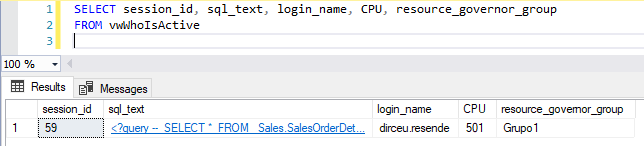
As expected, the Resource Governor was not “tricked” by EXECUTE AS USER and continued to limit the “test” user even disguised as “dirceu.resende”, since he only inherits “powers” at the database level and not at the instance level. Now, what happens if I try to run EXECUTE AS LOGIN ? Let's test!
GRANT IMPERSONATE ON LOGIN::[dirceu.resende] TO [teste]
GO
And to my surprise, even though I received the “powers” of a sysadmin, Resource Governor continued to limit the resources of the “test” user, even using EXECUTE AS LOGIN from the “dirceu.resende” user (and yes, I opened a new session to test):


And now, I will run the query with the user “dirceu.resende”, without using impersonate, which will show us that the Resource Governor is now not limiting the resources of this session (default pool):

References
- https://docs.microsoft.com/pt-br/sql/t-sql/statements/execute-as-transact-sql?view=sql-server-2017
- https://docs.microsoft.com/pt-br/sql/t-sql/statements/revert-transact-sql?view=sql-server-2017
- https://www.mssqltips.com/sqlservertip/1227/granting-permission-with-the-execute-as-command-in-sql-server/
- https://docs.microsoft.com/pt-br/dotnet/framework/data/adonet/sql/customizing-permissions-with-impersonation-in-sql-server
That's it, folks!
Big hug and see you later!

Comments (0)
Loading comments...