
Hey guys,
Goodnight!
In this post, I'm going to talk about a very interesting feature of SQL Server that works as a major differentiator for the database, which is the ability to integrate natively with Excel, allowing you to query and manipulate spreadsheets through the database, without needing any other external resource.
For this to be possible, you need to install the OLEDB ACE or JET drivers to integrate with Excel. To learn more about this, visit the post SQL Server – How to install Microsoft.ACE.OLEDB.12.0 and Microsoft.Jet.OLEDB.4.0 drivers.
Example spreadsheet that will be used in this post:
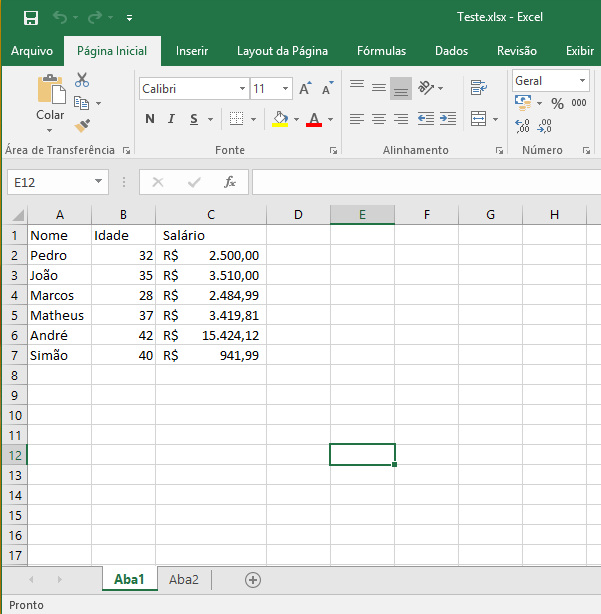
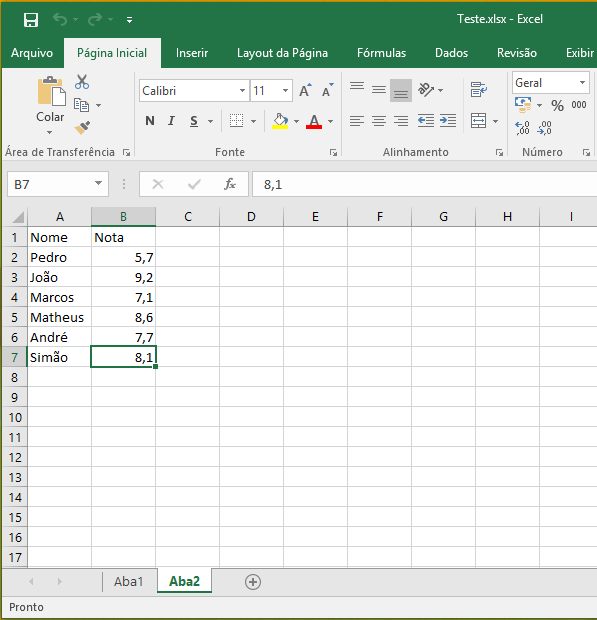
How to Import an Excel Spreadsheet into SQL Server
The most used way is certainly reading data from an Excel spreadsheet into the SQL Server database. To do this, we will use OPENROWSET and the ACE OLEDB 12.0 driver, since my operating system and my bank are in the 64-bit version and using an Office 2016 spreadsheet (The JET plugin supports up to version 2003).
The basic command for reading is like this:
SELECT *
FROM OPENROWSET (
    'Microsoft.ACE.OLEDB.12.0',
    'Excel 12.0;Database=C:\Teste.xlsx;',
    'SELECT * FROM [Aba1$]'
)
Example:
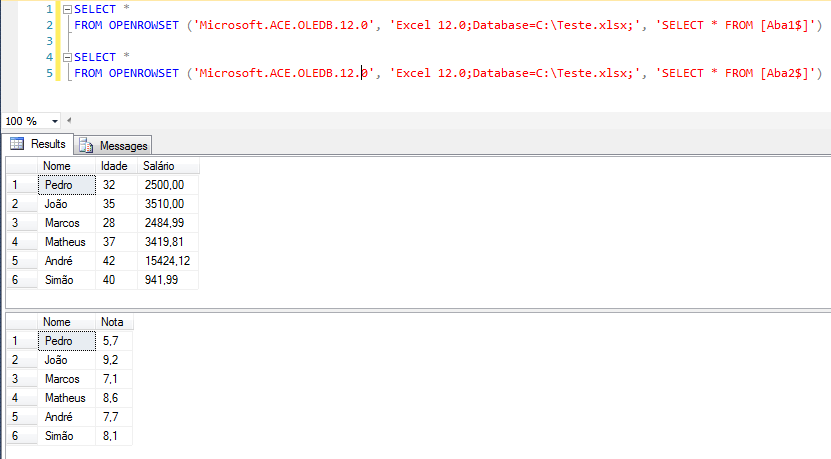
Another way, which makes this integration much easier, is to create a Stored Procedure to facilitate the use of data:
CREATE PROCEDURE [dbo].[stpImporta_Excel](
    @Caminho VARCHAR(5000),
    @Aba VARCHAR(200),
    @Colunas VARCHAR(5000)
)
AS
BEGIN

    DECLARE @Exec VARCHAR(MAX)

    SET @Exec = 'SELECT * from OPENROWSET (''Microsoft.ACE.OLEDB.12.0'', ''Excel 12.0;Database='
        + @Caminho
        + ';'',	''SELECT '
        + @Colunas
        + ' FROM ['
        + @Aba
        + '$]'') A'

    EXEC(@Exec)

END
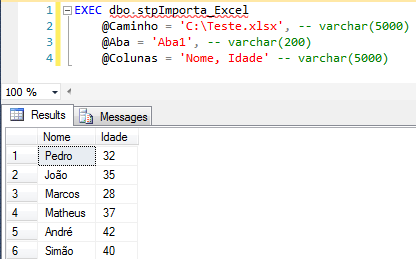
And then you can use it like this:
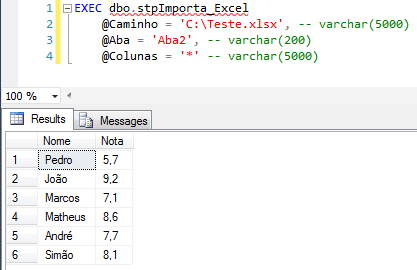
You can return only specific columns too:
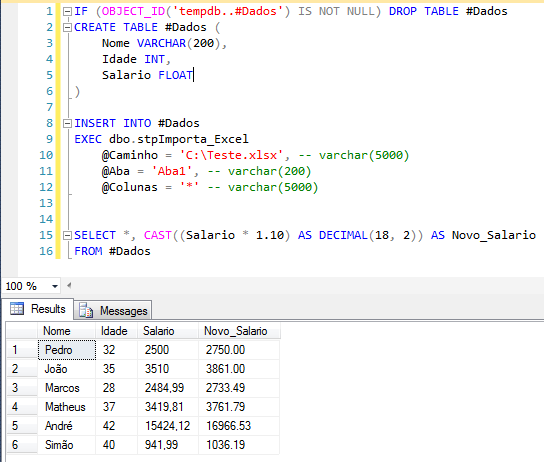
Or import the result to a database table:
How to insert/export data from SQL Server to Excel
In a very simple way, it is also possible to insert data from our database into an Excel spreadsheet. The basic syntax is as follows:
INSERT INTO
OPENROWSET (
    'Microsoft.ACE.OLEDB.12.0',
    'Excel 12.0;Database=C:\Teste.xlsx;',
    'SELECT * FROM [Aba1$]'
)
SELECT 'Paulo', 32, 2584.44
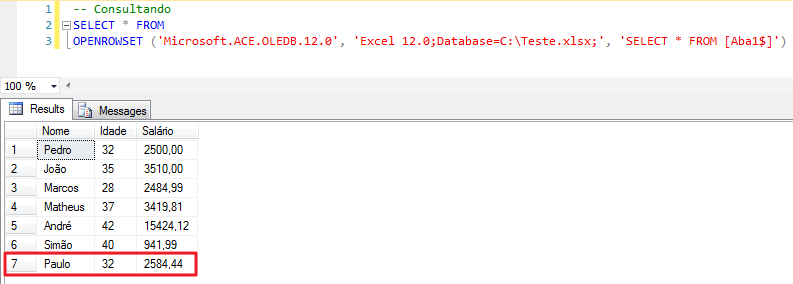
Example of insertion:

Example of the query proving that the record was inserted:
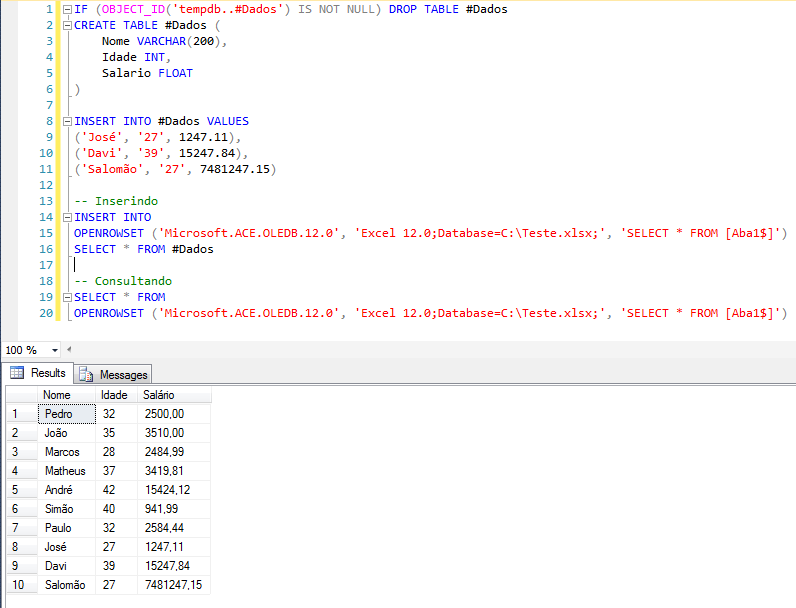
Inserting from a table:
Once again, we can use a Stored Procedure to facilitate day-to-day operations:
CREATE PROCEDURE [dbo].[stpInsere_em_Excel](
    @Caminho VARCHAR(MAX),
    @Aba varchar(200),
    @Tabela varchar(200),
    @Colunas varchar(MAX)
)
AS
BEGIN

    IF (@Colunas = '*')
    BEGIN

        SELECT
            @Colunas = isnull(nullif(@Colunas,'*') + ',','') + b.name
        FROM
            sysobjects a WITH(NOLOCK)
            JOIN syscolumns b WITH(NOLOCK) ON a.id = b.id
        WHERE
            a.xtype = 'U'
            AND a.name = @Tabela

    END


    DECLARE @Exec VARCHAR(MAX)

    SET @Exec = 'INSERT INTO OPENROWSET (''Microsoft.ACE.OLEDB.12.0'', ''Excel 12.0;Database='
        + @Caminho
        + ';'',	''SELECT '
        + @Colunas
        + ' FROM ['
        + @Aba
        + '$]'') '
        + 'SELECT '
        + @Colunas
        + ' FROM '
        + @Tabela

    EXEC(@Exec)

END
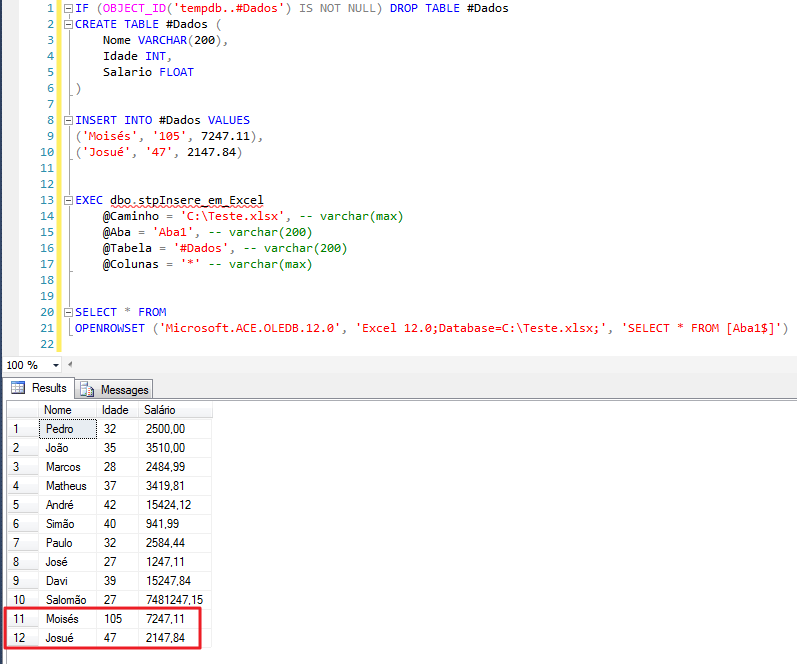
Example of using the procedure:
How to update data from an Excel spreadsheet using SQL Server
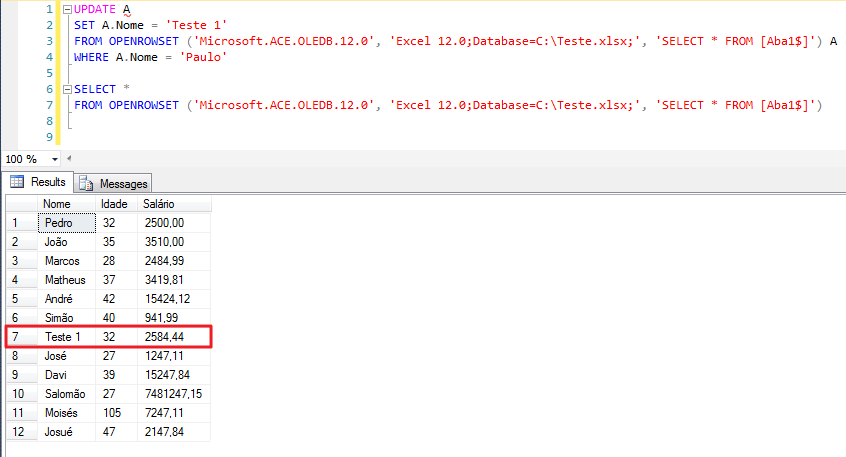
Like other operations, it is also possible to update data from an Excel spreadsheet through SQL Server. The basic syntax is this:
UPDATE A
SET A.Nome = 'Teste 1'
FROM OPENROWSET (
    'Microsoft.ACE.OLEDB.12.0',
    'Excel 12.0;Database=C:\Teste.xlsx;',
    'SELECT * FROM [Aba1$]'
) A
WHERE A.Nome = 'Paulo'
Example:
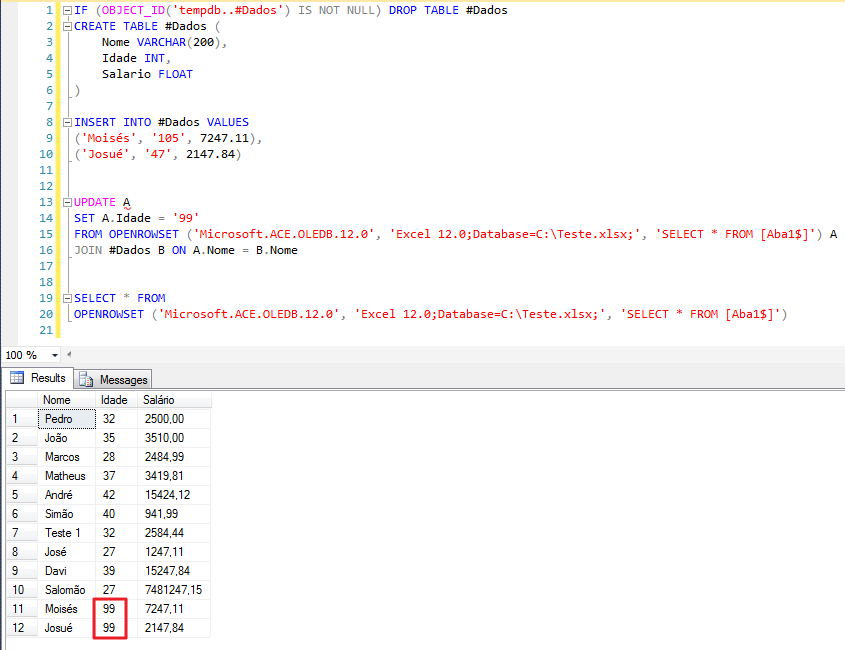
Example with JOIN using local database tables:
Stored Procedure to make everyday life easier:
CREATE PROCEDURE [dbo].[stpAtualiza_em_Excel](
    @Caminho varchar(max),
    @Aba varchar(200),
    @Tabela varchar(200),
    @Colunas_Join varchar(max),
    @Colunas_Update varchar(max)
)
AS
BEGIN

    DECLARE
        @join VARCHAR(MAX) ,
        @update VARCHAR(MAX);


    SELECT
        @join = ISNULL(@join + ' and ', '') + 'a.' + LTRIM(RTRIM(s)) + ' = b.' + LTRIM(RTRIM(s))
    FROM
        dbo.fncQuebra_Texto(@Colunas_Join, ',') AS a;


    SELECT
        @update = ISNULL(@update + ',', '') + 'a.' + LTRIM(RTRIM(s)) + ' = b.' + LTRIM(RTRIM(s))
    FROM
        dbo.fncQuebra_Texto(@Colunas_Update, ',') AS a;


    DECLARE @Exec VARCHAR(MAX)

    SET @Exec = 'UPDATE A '
        + 'SET '
        + @update
        + ' FROM OPENROWSET (''Microsoft.ACE.OLEDB.12.0'', ''Excel 12.0;Database='
        + @Caminho
        + ';'',	''Select * From ['
        + @Aba
        + '$]'') A'
        + ' JOIN '
        + @Tabela
        + ' b'
        + ' ON '
        + @join

    EXEC(@Exec)

END
fncQuebra_Texto function required to use SP:
CREATE FUNCTION [dbo].[fncQuebra_Texto] (
    @str NVARCHAR(4000) ,
    @separator CHAR(1)
)
RETURNS TABLE
AS
RETURN
(
    WITH tokens ( p, a, b )
    AS (
        SELECT   1, 1, CHARINDEX(@separator, @str)
        UNION ALL
        SELECT   p + 1, b + 1, CHARINDEX(@separator, @str, b + 1)
        FROM     tokens
        WHERE    b > 0
    )
    SELECT
        p - 1 zeroBasedOccurance ,
        SUBSTRING(@str, a, CASE WHEN b > 0 THEN b - a ELSE 4000 END) AS s
    FROM
        tokens
);
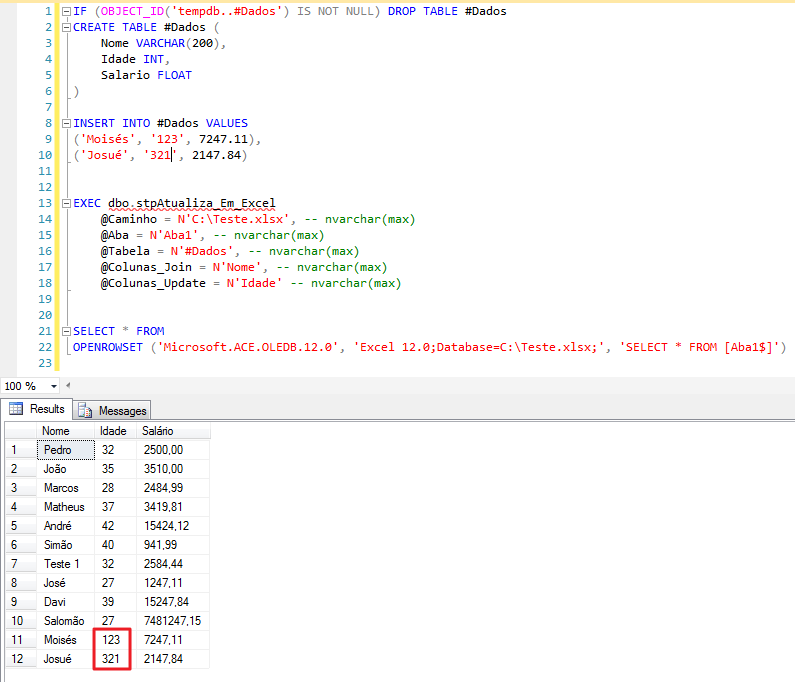
Use of SP:
Unfortunately, deleting data from Excel spreadsheets via SQL Server is not possible. If you try, you will encounter this error message:
OLE DB provider “Microsoft.ACE.OLEDB.12.0” for linked server “(null)” returned message “Deleting data in a linked table is not supported by this ISAM.”.
Msg 7345, Level 16, State 1, Line 1
That's it, folks!
A hug and thanks for visiting.
sql server import read export update data from an excel spreadsheet to the bank import read export data spreadsheet datasheet
sql server import read export update data from an excel spreadsheet to the bank import read export data spreadsheet datasheet

Comments (0)
Loading comments...