
Hey guys,
Good morning!
In this post, I will present and demonstrate the use of the open-source tool SQLQueryStress, by Adam Machanic (creator of sp_WhoIsActive), which is used to perform stress tests by executing a given query, allowing you to perform a series of tests on your SQL instance. As this project is no longer maintained and updated by Adam, Erik Ejlskov Jensen created a Github to create new features and improvements for the tool.
The tool allows you to define how many threads will be executed simultaneously, how many executions and what is the time interval between each execution, allowing you to perform various types of tests, of which I highlight:
- Check instance behavior with a given number of running sessions
- Execute several queries at the same time to stress the server's CPU, disk and memory and check their behavior
- Simulation of a critical environment with multiple transactions per second during system testing and SQL queries
- Identify how many times an SP is executed per day, perform an optimization and simulate what the time savings would be on the day
- Execute a query or SP several times, with random parameters and analyze its behavior
Anyway, the list of possibilities is very large and the software gives you several tools to improve your analysis, such as the possibility of using or not using the Connection Pool, clearing caches, clearing the buffer, etc.
Using the tool is very simple, so I won't do many demonstrations. The purpose of this post is to share this tool for those who did not yet know it, so that they can improve their analysis of the performance of the SQL Server instances that you demonstrate or carry out performance tests on a query.
After downloading the tool executable in this link, you will see the SQLQueryStress splash screen. Click on the “Database” button to configure the database connection.
I do not recommend using this software in production environments, unless it is during a scheduled maintenance time and you want to stress test the instance.
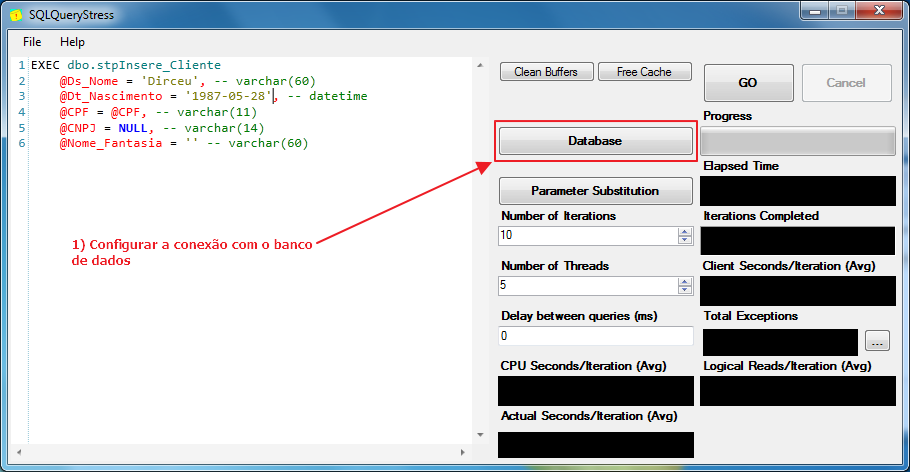
SQLQueryStress home screen
On this screen, you can enter the name of the server\connection instance, as well as authentication type, user and password data.
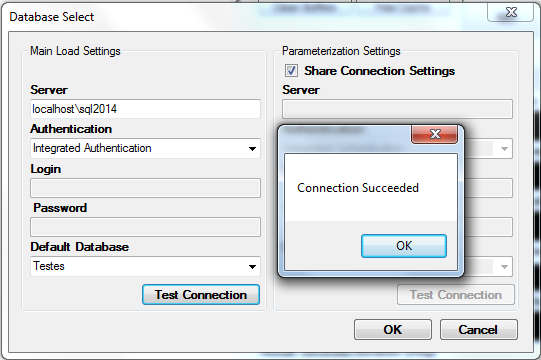
Database connection configuration screen
Back on the home screen, let's define the query that will be executed, the execution parameters and start processing.
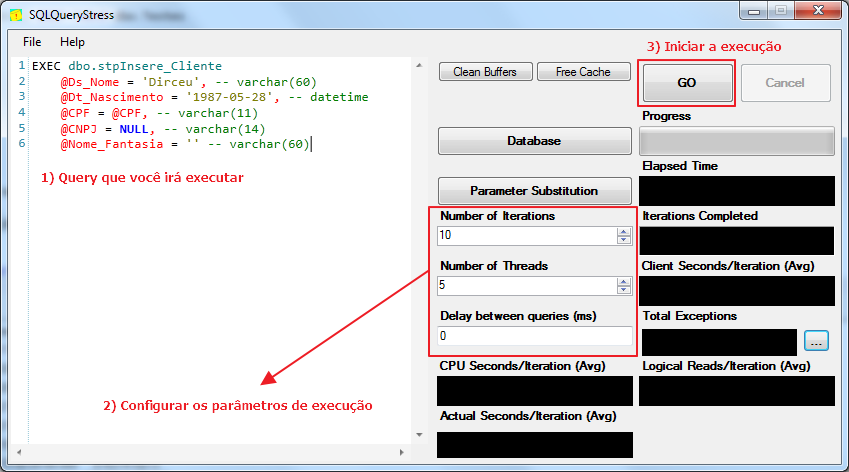
Execution parameters:
– Number of Iterations: This is the number of times the query will be executed
– Number of Threads: Number of sessions that will run in parallel (at the same time)
– Delay between queries (ms): Number of milliseconds between the end of a query and the beginning of the next.
It is worth mentioning that the number of times the query will be executed is based on the Number of Iterations x Number of Threads, that is, if you place 10 iterations with 5 threads, your query will be executed 50 times.
Execution result:
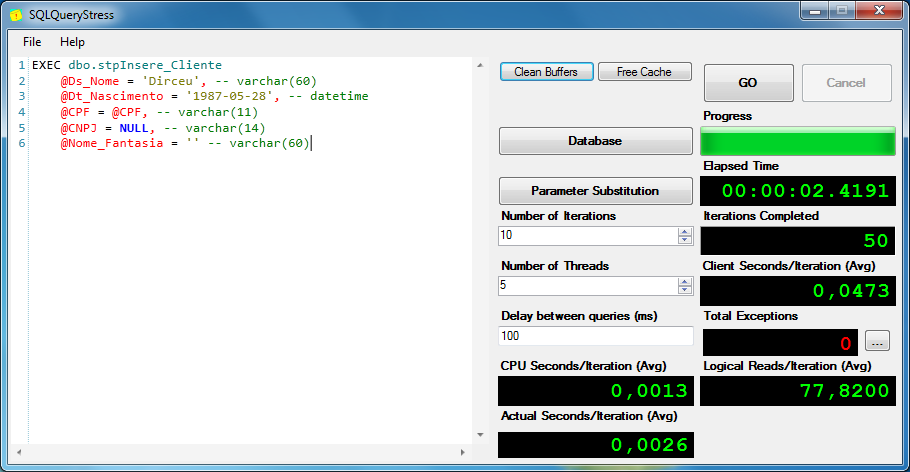
WhoIsActive result, demonstrating the connections being executed:

(Note: I had to put a WAITFOR DELAY on the SP for them to appear in WhoIsActive, since the test SP is very simple and runs very fast)
How to use Parameter Substitution
Click here to learn more about Parameter Substitution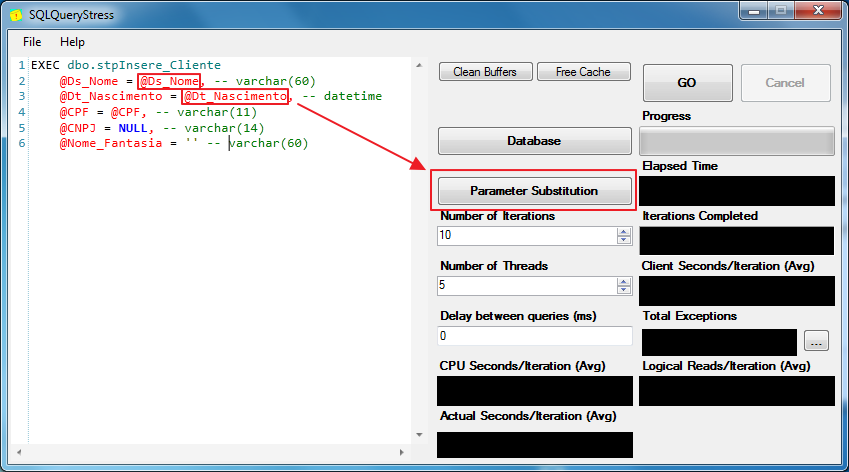
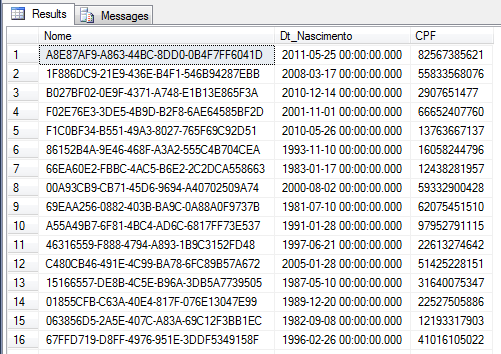
In this example, I will create a table and insert several random values that will be used as parameters for the SP calls that I will test in SQLQueryStress.
Creating the function to generate random numbers:
IF (OBJECT_ID('dbo.fncRand') IS NOT NULL) DROP FUNCTION dbo.fncRand
GO

/*
Vou criar uma função para usar no SELECT e realmente trazer valores aleatórios
para cada linha
*/
CREATE FUNCTION dbo.fncRand(@Numero BIGINT)
RETURNS BIGINT
AS
BEGIN
    RETURN (ABS(CHECKSUM(PWDENCRYPT(N''))) / 2147483647.0) * @Numero
END
GO
Generation of random data for tests
IF (OBJECT_ID('dbo.Testes') IS NOT NULL) DROP TABLE dbo.Testes
CREATE TABLE dbo.Testes (
    Nome VARCHAR(60),
    Dt_Nascimento DATETIME,
    CPF VARCHAR(11)
)


-- Carga inicial
INSERT INTO dbo.Testes
SELECT
    CAST(NEWID() AS VARCHAR(50)) AS Nome,
    DATEADD(DAY, dbo.fncRand(12000), '1980-01-01') AS Dt_Nascimento,
    RIGHT(REPLICATE('0', 11) + CAST(dbo.fncRand(99999999999) AS VARCHAR(11)), 11) AS CPF


DECLARE @Contador INT = 1, @Total INT = 16

WHILE(@Contador <= @Total)
BEGIN

    -- Executo esse trecho várias vezes
    INSERT INTO dbo.Testes
    SELECT
        CAST(NEWID() AS VARCHAR(50)) AS Nome,
        DATEADD(DAY, dbo.fncRand(12000), '1980-01-01') AS Dt_Nascimento,
        RIGHT(REPLICATE('0', 11) + CAST(dbo.fncRand(99999999999) AS VARCHAR(11)), 11) AS CPF
    FROM
        dbo.Testes


    SET @Contador += 1


END
Example of a table with random data:
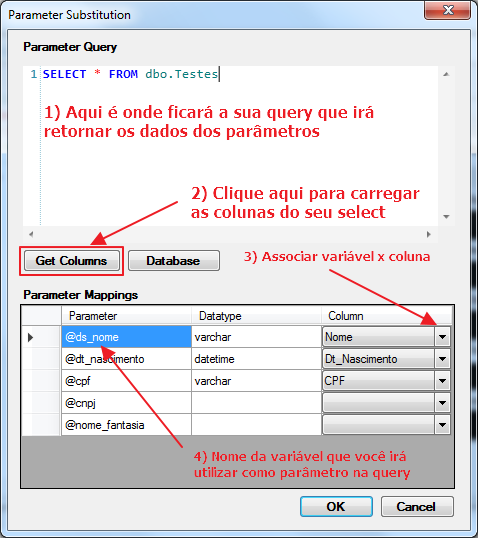
Once the table with the test data has already been created and populated, simply configure the substitution of parameters in the software:
That's it, folks!
I hope you enjoyed this post and this excellent tool for testing queries and the processing limit of your SQL Server instance.
A hug and see you next time.

Comments (0)
Loading comments...