
Hey guys,
Goodnight! All good ?
In this post I will comment on a resource used by many developers to quickly “solve” some common problems when developing Transact-SQL queries. This feature is SET ANSI_WARNINGS OFF.
What is the SET ANSI_WARNINGS OFF command for?
The ANSI_WARNINGS session control option changes the behavior of the SQL Server engine for some conditions, which are:
- String truncation (Trying to store a 10-character text in a VARCHAR(9))
- Division by ZERO
- NULL values in aggregation functions (MAX, SUM, COUNT, etc.)
The default value is ON, which will present the ISO standard behavior for this type of situation, causing error messages to be generated in the first two situations and an alert to be generated in the last situation.
If you use the SET ANSI_WARNINGS OFF command, the SQL Server engine will reproduce non-standard behavior and try to execute the SELECT 10/0 command, instead of an error message, it will return NULL and display only an alert, allowing your routines to return wrong information and incorrect data.
For this reason, some SQL developers, wanting to prevent the application from returning an error in these situations, end up opting for the easier way of “solving” errors like those listed above instead of actually acting on the problem and resolving it effectively. This usually occurs in companies due to several reasons, which I highlight:
- Lack of technical knowledge to identify and correct the error
- Lack of desire to effectively resolve the problem
- Very tight deadlines for delivering working software without errors
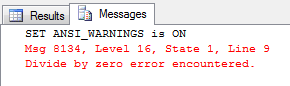
Msg 8134 Divide by zero error encountered
A common error in the daily lives of SQL developers, the classic division by zero message is an indication that some value in your calculations is wrong. This is a basic arithmetic error that causes a serious exception in SQL Server, causing the command to be interrupted and the transaction to undergo an automatic rollback. This is the default behavior of the SQL Server engine, following the ISO standard.
Controlling this behavior is done in conjunction with the ARITHABORT command. When ANSI_WARNIGS is enabled, ARITHABORT is automatically enabled, causing the engine to run in its default mode (ISO).
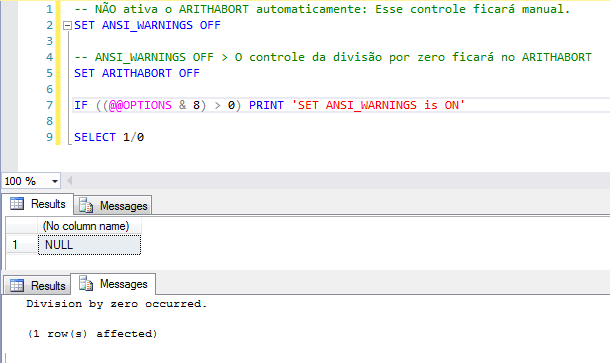
When ANSI_WARNINGS is disabled, ARITHABORT can be changed to change the Engine's default behavior. If ARITHABORT is disabled, when encountering a division by zero error, SQL Server will ignore the error and continue executing normally, just displaying an alert in the Messages tab.
Example:
-- Ativa o ARITHABORT automaticamente
SET ANSI_WARNINGS ON

-- Mesmo desativando manualmente, ficará ATIVADO por causa do ANSI_WARNINGS ON
SET ARITHABORT OFF

IF ((@@OPTIONS & 8) > 0) PRINT 'SET ANSI_WARNINGS is ON'

SELECT 1/0
As we saw in the example above, ANSI_WARNINGS OFF allows division by zero calculations to be executed silently, generating incorrect data and without the development team knowing, since no exception will be generated in the application.
Return with SET ANSI_WARNINGS ON (Default):
Return with SET ANSI_WARNINGS OFF:
Msg 8152 String or binary data would be truncated
This error message is very common among SQL developers and you have certainly seen it while creating your queries, making integrations between systems, etc. This message occurs when you try to store more characters than allowed in a column.
The default behavior of the SQL Server engine, following the ANSI standard, causes an exception to be generated when executing your Transact-SQL code if you
have a text of 10 characters and try to insert this text in a column that only allows up to 9 characters.
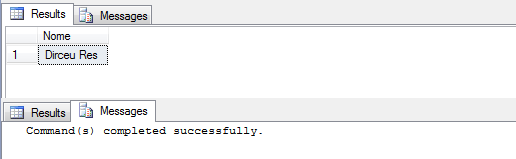
When you use the SET ANSI_WARNINGS OFF command, you prevent the SQL Server engine from generating this error during execution, causing your 10-character text to be truncated and stored in the 9-character column. Excess characters will be silently discarded, ignoring and masking a problem in recording data on your system, without anyone knowing.
Example:
SET NOCOUNT ON
SET ANSI_WARNINGS OFF

IF ((@@OPTIONS & 8) > 0) PRINT 'SET ANSI_WARNINGS is ON'

IF (OBJECT_ID('tempdb..#Teste') IS NOT NULL) DROP TABLE #Teste
CREATE TABLE #Teste ( Nome VARCHAR(10) )

INSERT INTO #Teste
VALUES ('Dirceu Resende') -- 14 caracteres

SELECT * FROM #Teste
Return with SET ANSI_WARNINGS ON (Default):

Return with SET ANSI_WARNINGS OFF:
Null value is eliminated by an aggregate or other SET operation
Alert message that occurs when an aggregation function (MAX, SUM, COUNT, AVG, etc.) is applied to a data set and at least 1 record has a null value (NULL).
Example:
SET NOCOUNT ON
SET ANSI_WARNINGS ON

IF ((@@OPTIONS & 8) > 0) PRINT 'SET ANSI_WARNINGS is ON'
SELECT MAX(Nota)
FROM (
    SELECT 7 AS Nota
    UNION SELECT 6.5
    UNION SELECT 5.9
    UNION SELECT 4.2
    UNION SELECT NULL
    UNION SELECT 8.7
) AS Aluno
Return with SET ANSI_WARNINGS ON (Default):
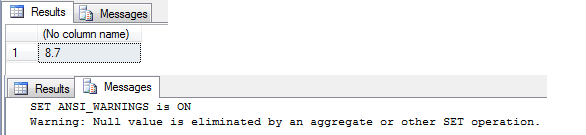
Return with SET ANSI_WARNINGS OFF
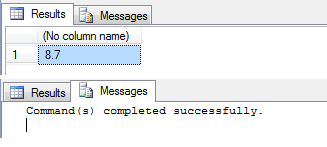
Note that in this case, if the ANSI_WARNINGS option is disabled, you may be ignoring the existence of null values in your result set, which may indicate a possible problem, since in certain situations, this may represent an error in your query that you are masking.
If you want to know how to remove the warning “Null value is eliminated by an aggregate or other SET operation” correctly, find out more by accessing the post SQL Server – Warning: Null value is eliminated by an aggregate or other SET operation.
INSERT failed because the following SET options have incorrect settings: ‘ANSI_WARNINGS’
Another serious side effect of using ANSI_WARNINGS OFF is the impact that this command has on indexed views and indexes created on calculated columns, which are often designed to gain performance, but the simple creation of an index with the intention of improving ends up creating a big headache for the DBA, since all routines that insert data into tables that have calculated columns will fail after creating the index on the calculated column.
Unlike the previous errors, which can cause incorrect and inconsistent data, this example prevents the routines from working in general, which has already happened to me, as I created an index to optimize a slow query in production and it started triggering error alerts in one of the modules of the system where I work.
Example:
SET ANSI_WARNINGS ON
IF ((@@OPTIONS & 8) > 0) PRINT 'SET ANSI_WARNINGS is ON'

IF (OBJECT_ID('tempdb..#Teste') IS NOT NULL) DROP TABLE #Teste
CREATE TABLE #Teste (
    Nota1 NUMERIC(5, 2) NOT NULL,
    Nota2 NUMERIC(5, 2) NOT NULL,
    Media AS ((Nota1 + Nota2) / 2)
)

CREATE NONCLUSTERED INDEX SK01_Teste ON #Teste(Media)

INSERT INTO #Teste
VALUES (7.6, 8.9)

SELECT * FROM #Teste
Return with SET ANSI_WARNINGS ON (Default):
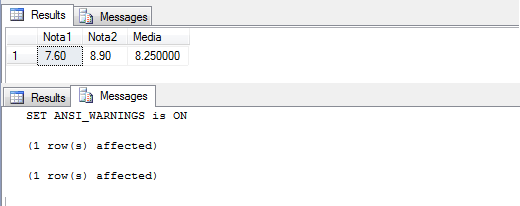
Return with SET ANSI_WARNINGS OFF:
Msg 1934, Level 16, State 1, Line 12
CREATE INDEX failed because the following SET options have incorrect settings: ‘ANSI_WARNINGS’. Verify that SET options are correct for use with indexed views and/or indexes on computed columns and/or filtered indexes and/or query notifications and/or XML data type methods and/or spatial index operations.
That's it, folks!
I hope you enjoyed the post and see you next time.

Comments (0)
Loading comments...