
Hey guys,
Good morning!
In this post, I will demonstrate how to list and eliminate processes that are running on the SQL Server server using the CLR (C#). These features can be especially useful for quickly identifying which user processes are running, which processes are using the most memory or CPU usage, for example.
During the development of a PowerShell script, where I was converting Excel files (XLSX) to PDF, the processes were “hanging” waiting for some interaction on the screen, which as I was executing via the command line on the server, there was no way to finish this interaction. Therefore, with each test, a new process was running on the server awaiting this interaction.
As a result, several processes were left running without doing anything. For this reason, I chose to develop a Stored Procedure in the CLR to eliminate these processes from the server. If you want to know more details about using the Process library, see more by accessing my post SQL Server – How to run PowerShell and Prompt-DOS (MS-DOS) scripts using CLR (C#).
How to list processes in SQL Server using the Process lib
In the Stored Procedure below, I use the Process library and the GetProcesses method to return information about the processes running on the server in question.
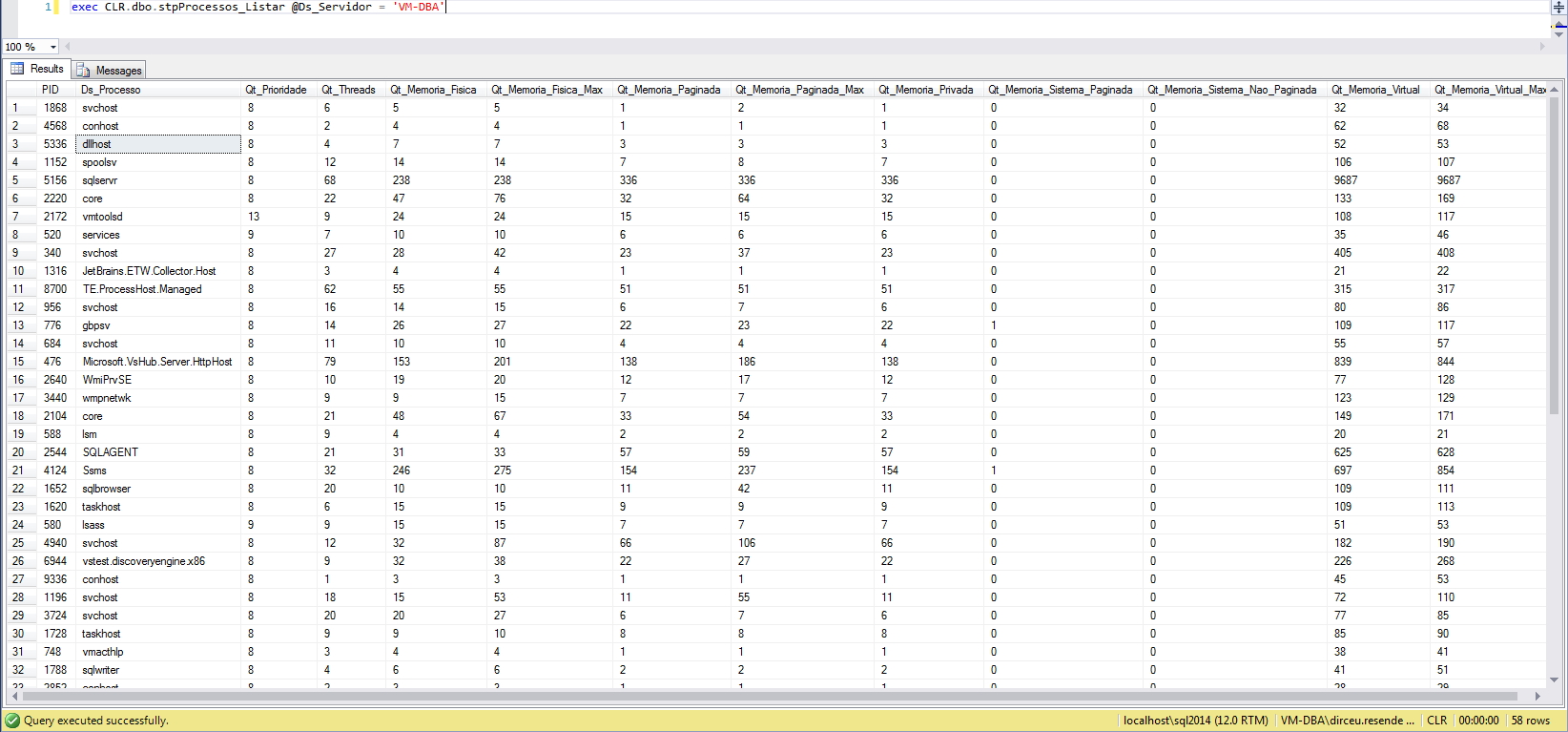
using System;
using System.Data;
using System.Data.SqlTypes;
using System.Diagnostics;
using System.Linq;
using Microsoft.SqlServer.Server;
using Bibliotecas.Model;

public partial class StoredProcedures
{
    [Microsoft.SqlServer.Server.SqlProcedure]
    public static void stpProcessos_Listar(SqlString Ds_Servidor)
    {
        try
        {

            var pipe = SqlContext.Pipe;

            var colunas = new SqlMetaData[13];
            colunas[0] = new SqlMetaData("PID", SqlDbType.Int);
            colunas[1] = new SqlMetaData("Ds_Processo", SqlDbType.NVarChar, 1024);
            colunas[2] = new SqlMetaData("Qt_Prioridade", SqlDbType.Int);
            colunas[3] = new SqlMetaData("Qt_Threads", SqlDbType.Int);
            colunas[4] = new SqlMetaData("Qt_Memoria_Fisica", SqlDbType.Float);
            colunas[5] = new SqlMetaData("Qt_Memoria_Fisica_Max", SqlDbType.Float);
            colunas[6] = new SqlMetaData("Qt_Memoria_Paginada", SqlDbType.Float);
            colunas[7] = new SqlMetaData("Qt_Memoria_Paginada_Max", SqlDbType.Float);
            colunas[8] = new SqlMetaData("Qt_Memoria_Privada", SqlDbType.Float);
            colunas[9] = new SqlMetaData("Qt_Memoria_Sistema_Paginada", SqlDbType.Float);
            colunas[10] = new SqlMetaData("Qt_Memoria_Sistema_Nao_Paginada", SqlDbType.Float);
            colunas[11] = new SqlMetaData("Qt_Memoria_Virtual", SqlDbType.Float);
            colunas[12] = new SqlMetaData("Qt_Memoria_Virtual_Max", SqlDbType.Float);

            var linhaSQL = new SqlDataRecord(colunas);

            pipe.SendResultsStart(linhaSQL);

            var processes = Process.GetProcesses(Ds_Servidor.Value);
            foreach (var process in processes.Where(process => !string.IsNullOrEmpty(process.ProcessName)))
            {

                linhaSQL.SetSqlInt32(0, new SqlInt32(process.Id));
                linhaSQL.SetSqlString(1, new SqlString(process.ProcessName));
                linhaSQL.SetSqlInt32(2, new SqlInt32(process.BasePriority));
                linhaSQL.SetSqlInt32(3, new SqlInt32(process.Threads.Count));
                linhaSQL.SetSqlDouble(4, new SqlDouble(process.WorkingSet64 / 1048576));
                linhaSQL.SetSqlDouble(5, new SqlDouble(process.PeakWorkingSet64 / 1048576));
                linhaSQL.SetSqlDouble(6, new SqlDouble(process.PagedMemorySize64 / 1048576));
                linhaSQL.SetSqlDouble(7, new SqlDouble(process.PeakPagedMemorySize64 / 1048576));
                linhaSQL.SetSqlDouble(8, new SqlDouble(process.PrivateMemorySize64 / 1048576));
                linhaSQL.SetSqlDouble(9, new SqlDouble(process.PagedSystemMemorySize64 / 1048576));
                linhaSQL.SetSqlDouble(10, new SqlDouble(process.NonpagedSystemMemorySize64 / 1048576));
                linhaSQL.SetSqlDouble(11, new SqlDouble(process.VirtualMemorySize64 / 1048576));
                linhaSQL.SetSqlDouble(12, new SqlDouble(process.PeakVirtualMemorySize64 / 1048576));

                pipe.SendResultsRow(linhaSQL);
            }

            pipe.SendResultsEnd();

        }
        catch (Exception e)
        {
            Retorno.Erro("Erro : " + e.Message);
        }
    }
}
How to list processes in SQL Server using the tasklist binary
This time, I will again use the Process library to execute the tasklist binary, which is native to Windows, and export the information returned by the MS-DOS prompt to CSV and process the data in C#.
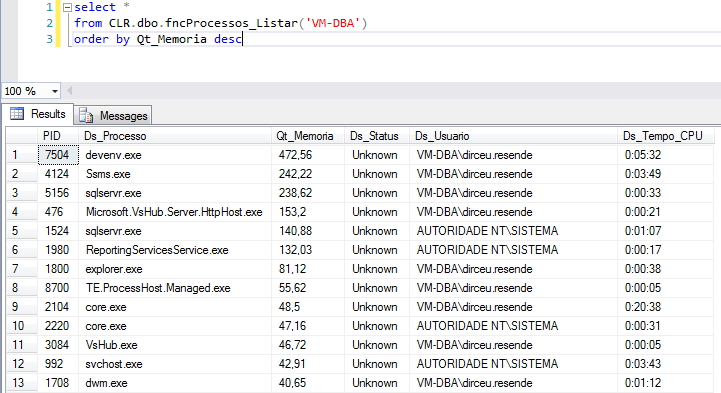
using System;
using System.Collections;
using System.Data.SqlTypes;
using System.Diagnostics;
using System.Text;

public partial class UserDefinedFunctions
{

    private class ProcessProperties
    {

        public SqlString PID;
        public SqlString Ds_Processo;
        public SqlDouble Qt_Memoria;
        public SqlString Ds_Status;
        public SqlString Ds_Usuario;
        public SqlString Ds_Tempo_CPU;


        public ProcessProperties(SqlString pid, SqlString processo, SqlDouble memoria, SqlString status, SqlString usuario, SqlString cpu)
        {

            PID = pid;
            Ds_Processo = processo;
            Qt_Memoria = memoria;
            Ds_Status = status;
            Ds_Usuario = usuario;
            Ds_Tempo_CPU = cpu;

        }
    }


    [Microsoft.SqlServer.Server.SqlFunction(
        FillRowMethodName = "ListarProcessos",
        TableDefinition = "PID nvarchar(30), Ds_Processo nvarchar(1024), Qt_Memoria float, Ds_Status nvarchar(30), Ds_Usuario nvarchar(256), Ds_Tempo_CPU nvarchar(40)"
    )]
    public static IEnumerable fncProcessos_Listar(string Ds_Servidor)
    {

        var scriptProc = new Process
        {
            StartInfo =
            {
                FileName = @"tasklist", // Arquivo ou comando que será executado
                Arguments = "/S \"" + Ds_Servidor + "\" /V /FO csv", // Parâmetros utilizados
                UseShellExecute = false, // Indica se deve usar o shell do sistema operacional para iniciar o processo
                RedirectStandardOutput = true, // Alertas e avisos serão exportados e disponíveis para consulta
                RedirectStandardError = true, // Erros serão exportados e disponíveis para consulta
                StandardOutputEncoding = Encoding.GetEncoding(850), // Codificação Windows-1252
                CreateNoWindow = true // O processo será executado sem criar uma nova janela
            }
        };

        scriptProc.Start();


        var output = scriptProc.StandardOutput.ReadToEnd();

        var linhas = output.Split('\n');
        var Qt_Linhas = (linhas.Length - 1);
        var ProcessPropertiesCollection = new ArrayList();

        for (var i = 1; i < Qt_Linhas; i++)
        {

            var linha = linhas[i];

            if (linha.Trim().Length <= 0) continue;

            var registro = linha.Replace("\",\"", "|").Replace("\"", "").Split('|');
            if (registro.Length <= 4) continue;


            if (registro.Length > 7)
            {

                ProcessPropertiesCollection.Add(new ProcessProperties(
                    registro[1],
                    registro[0],
                    Math.Round(double.Parse(registro[4].Replace(".", "").Replace(" K", "")) / 1024, 2),
                    registro[5],
                    registro[6],
                    registro[7]
                ));

            }
            else
            {

                ProcessPropertiesCollection.Add(new ProcessProperties(
                    registro[1],
                    registro[0],
                    Math.Round(double.Parse(registro[4].Replace(".", "").Replace(" K", "")) / 1024, 2),
                    "",
                    registro[5],
                    registro[6]
                ));

            }

        }

        return ProcessPropertiesCollection;

    }

    protected static void ListarProcessos(object objProcessProperties, out SqlString pid, out SqlString processo, out SqlDouble memoria, out SqlString status, out SqlString usuario, out SqlString cpu)
    {

        var ProcessProperties = (ProcessProperties)objProcessProperties;

        pid = ProcessProperties.PID;
        processo = ProcessProperties.Ds_Processo;
        memoria = ProcessProperties.Qt_Memoria;
        status = ProcessProperties.Ds_Status;
        usuario = ProcessProperties.Ds_Usuario;
        cpu = ProcessProperties.Ds_Tempo_CPU;

    }

}
How to kill processes in SQL Server using the Process lib
To kill a process on the server where I am currently connected, we can use the Process library and the Kill() method, informing the process number so that it can be terminated on the server where the Stored Procedure is being executed.
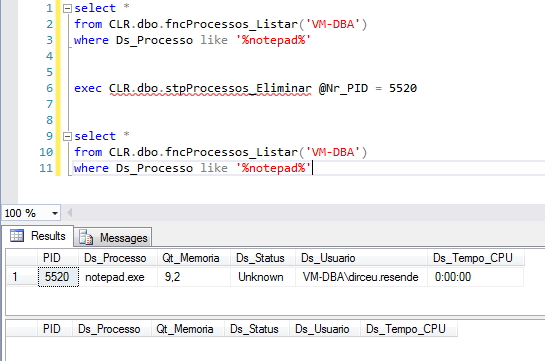
using System;
using System.Data.SqlTypes;
using System.Diagnostics;
using Bibliotecas.Model;

public partial class StoredProcedures
{
    [Microsoft.SqlServer.Server.SqlProcedure]
    public static void stpProcessos_Eliminar(SqlInt32 Nr_PID)
    {

        if (Nr_PID.IsNull)
            return;

        try
        {
            Process.GetProcessById(Nr_PID.Value).Kill();
        }
        catch (Exception e)
        {
            Retorno.Erro("Erro : " + e.Message);
        }

    }

}
How to remotely kill processes in SQL Server using the taskkill binary
Unlike the Stored Procedure above, in this example I will use the Process library to execute the native Windows binary, taskkill.exe, to kill a process using the informed PID, remotely, that is, on any server.
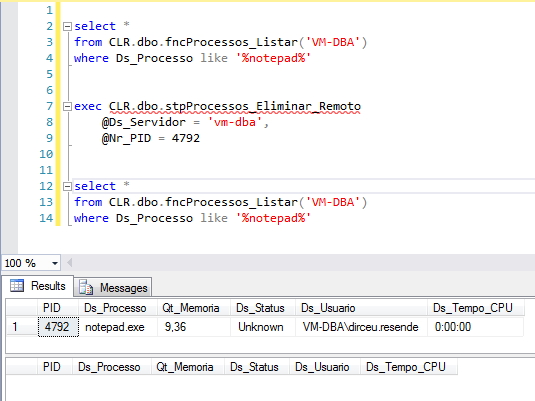
using System;
using System.Data.SqlTypes;
using System.Diagnostics;
using Bibliotecas.Model;

public partial class StoredProcedures
{
    [Microsoft.SqlServer.Server.SqlProcedure]
    public static void stpProcessos_Eliminar_Remoto(SqlString Ds_Servidor, SqlInt32 Nr_PID)
    {

        if (Ds_Servidor.IsNull || Nr_PID.IsNull)
            return;

        try
        {

            using (var scriptProc = new Process {
                StartInfo = {
                    FileName = "taskkill.exe", // Arquivo ou comando que será executado
                    Arguments = "/S " + Ds_Servidor.Value + " /F /PID " + Nr_PID.Value,
                    UseShellExecute = false, // Indica se deve usar o shell do sistema operacional para iniciar o processo
                    CreateNoWindow = true // O processo será executado sem criar uma nova janela
                }
            })
            {
                scriptProc.Start();
                scriptProc.WaitForExit(1000 * 5); // 5 segundos
            }

        }
        catch (Exception e)
        {
            Retorno.Erro("Erro : " + e.Message);
        }

    }

}
As you can see, in some Stored Procedures I use the Return class to display alert messages and error messages in the database via the CLR. The source code for this class is available in my post SQL Server – How to send warnings and error messages to the database using the CLR (C#).
I hope you liked the post and see you soon!
sql server clr c# csharp windows process process list view list view report kill kill kill process
sql server clr c# csharp windows process process list view list view report kill kill kill process

Comentários (0)
Carregando comentários…