
Hey guys,
Are you all right?
In this post I would like to demonstrate to you How to retrieve the source code of an encrypted object (WITH ENCRYPTION) in SQL Server. How many times have I seen programmers encrypting objects in SQL Server in the false hope that this code will actually be protected from changes and views by other users.
Introduction
For those who have worked in IT for some time, I think it is unanimous among them that there is no really effective source code protection. If you program in .NET, you have the JetBrains dotPeck. If you encrypt your objects in Oracle Database, there is the website Unwrap It! which breaks this ONLINE encryption. In PHP, I have already used Zend Guard to encrypt source files and there are online tools that also break encryption.
In SQL Server this is no different either. There are even tools (Redgate SQL Prompt, ApexSQL Complete and several others) that do this for you automatically, showing the source code of encrypted objects in such a natural and transparent way that you don't even notice that the object was encrypted.
Although it is possible to break object encryption in SQL Server, this does not directly mean a security flaw. To be able to break this encryption, you will need to use a DAC connection, which I already explained how to enable and use in the post Enabling and using dedicated remote administrator connection (DAC) in SQL Server.
The DAC connection is a dedicated connection for sysadmins (which greatly limits the users who can perform this procedure) who need to connect to instances that are experiencing problems that prevent new connections, such as the instance's limit of simultaneous users being reached.
As the connection method is different (it even uses a dedicated port), this “special” connection is always available, even in this situation. It is worth mentioning that this connection only allows 1 user to be connected at a time, so if someone is already connected, someone else will not be able to use it.
This whole requirement to use the DAC connection is simply so that you can read the data from the sys.sysobjvalues table. Even if you are a sysadmin, you will only be able to access the data in this table using the DAC connection.
Example WITHOUT using the DAC connection
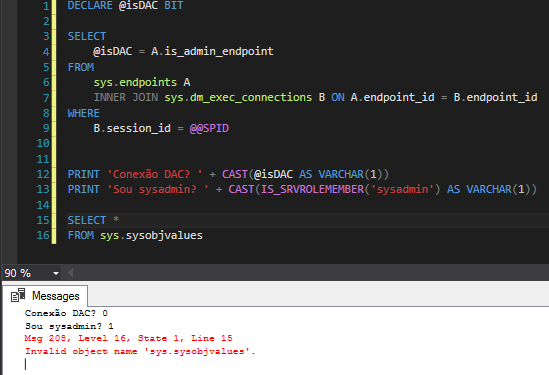
Msg 208, Level 16, State 1, Line 16
Invalid object name ‘sys.sysobjvalues’.
Example using the DAC connection
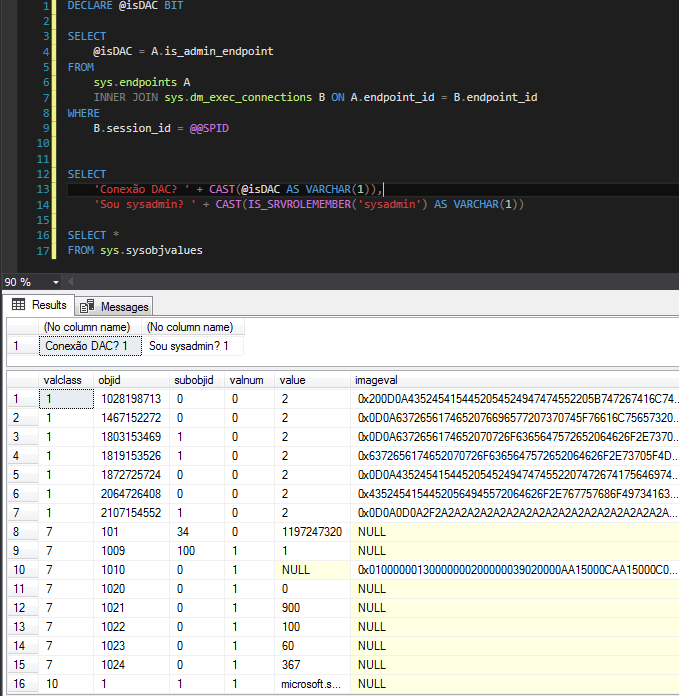
SQL Server uses the RC4™ stream cipher encryption algorithm to encrypt objects and stores this data in the imageval column of the sys.sysobjvalues table. In this post, I will demonstrate an algorithm that allows you to recover this information and return the original source code of the encrypted object.
How to list the encrypted objects in the database
To identify which objects in your database are encrypted, I separated 4 queries to achieve this goal:
Using the sys.sql_modules view:
SELECT
    B.[name],
    B.[type_desc]
FROM
    sys.sql_modules A
    JOIN sys.objects B ON A.[object_id] = B.[object_id]
WHERE
    A.[definition] IS NULL
Using the OBJECTPROPERTY function:
SELECT
    [name],
    [type_desc]
FROM
    sys.objects
WHERE
    OBJECTPROPERTY([object_id], 'IsEncrypted') = 1
Using the sys.syscomments view:
SELECT
    A.[name],
    A.[type_desc]
FROM
    sys.objects A
    JOIN sys.syscomments B ON A.[object_id] = B.id
WHERE
    B.[encrypted] = 1
Using the INFORMATION_SCHEMA database:
SELECT
    ROUTINE_NAME,
    ROUTINE_TYPE
FROM
    INFORMATION_SCHEMA.ROUTINES
WHERE
    ROUTINE_DEFINITION IS NULL
How to create an encrypted SP
For this post, I will create a very simple and encrypted SP, and I will demonstrate how to obtain its source code.
USE [dirceuresende]
GO

CREATE PROCEDURE dbo.stpTeste_Decrypt
WITH ENCRYPTION
AS
BEGIN

    ----------------------------- Comentário da SP -----------------------------
    PRINT 'dirceuresende'

    SELECT 'dirceuresende'

END
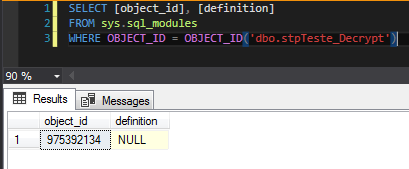
As you can see below, it is not possible to view the source code of an encrypted object using the sys.sql_modules view, even if you are a member of the sysadmin role.
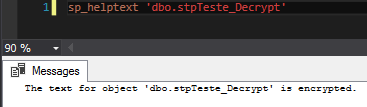
Not even using the sp_helptext system procedure is it possible to obtain the source code of this object, returning the alert message “The text for object ‘dbo.stpTeste_Decrypt’ is encrypted.”, as we can see below:
Breaking object encryption by SSMS
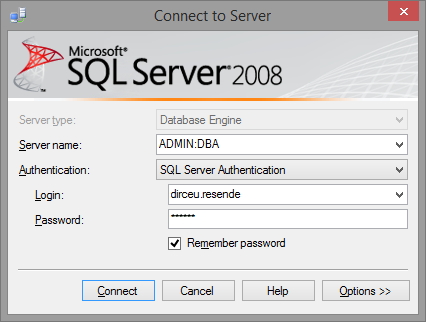
To break object encryption through SQL Server Management Studio (SSMS), initiate a DAC connection to the desired instance. To do this, simply add the prefix “ADMIN:” before the name of your instance, thus: “ADMIN:server\instance”, as shown in the image below:
Now use the code below and you will be able to view the source code of your encrypted object.
Source code
USE [dirceuresende]
GO

SET NOCOUNT ON

-- Aqui você tem que alterar para o objeto que você quer descriptografar
DECLARE
    @ObjectOwnerOrSchema NVARCHAR(128) = 'dbo',
    @ObjectName NVARCHAR(128) = 'stpTeste_Decrypt'


DECLARE
    @i INT,
    @ObjectDataLength INT,
    @ContentOfEncryptedObject NVARCHAR(MAX),
    @ContentOfDecryptedObject NVARCHAR(MAX),
    @ContentOfFakeObject NVARCHAR(MAX),
    @ContentOfFakeEncryptedObject NVARCHAR(MAX),
    @ObjectType NVARCHAR(128),
    @ObjectID INT


SET @ObjectID = OBJECT_ID('[' + @ObjectOwnerOrSchema + '].[' + @ObjectName + ']')

IF @ObjectID IS NULL
BEGIN
    RAISERROR('The object name or schema provided does not exist in the database', 16, 1)
    RETURN
END


IF NOT EXISTS(SELECT TOP 1 * FROM sys.syscomments WHERE id = @ObjectID AND encrypted = 1)
BEGIN
    RAISERROR('The object provided exists however it is not encrypted. Aborting.', 16, 1)
    RETURN
END


IF OBJECT_ID('[' + @ObjectOwnerOrSchema + '].[' + @ObjectName + ']', 'PROCEDURE') IS NOT NULL
    SET @ObjectType = 'PROCEDURE'
ELSE
    IF OBJECT_ID('[' + @ObjectOwnerOrSchema + '].[' + @ObjectName + ']', 'TRIGGER') IS NOT NULL
        SET @ObjectType = 'TRIGGER'
    ELSE
        IF OBJECT_ID('[' + @ObjectOwnerOrSchema + '].[' + @ObjectName + ']', 'VIEW') IS NOT NULL
            SET @ObjectType = 'VIEW'
        ELSE
            SET @ObjectType = 'FUNCTION'


SELECT TOP 1 @ContentOfEncryptedObject = imageval
FROM sys.sysobjvalues
WHERE [objid] = OBJECT_ID('[' + @ObjectOwnerOrSchema + '].[' + @ObjectName + ']')
AND valclass = 1 and subobjid = 1

SET @ObjectDataLength = DATALENGTH(@ContentOfEncryptedObject)/2
SET @ContentOfFakeObject = N'ALTER ' + @ObjectType + N' [' + @ObjectOwnerOrSchema + N'].[' + @ObjectName + N'] WITH ENCRYPTION AS'

WHILE DATALENGTH(@ContentOfFakeObject)/2 < @ObjectDataLength
BEGIN
    IF DATALENGTH(@ContentOfFakeObject)/2 + 4000 < @ObjectDataLength
        SET @ContentOfFakeObject = @ContentOfFakeObject + REPLICATE(N'-', 4000)
    ELSE
        SET @ContentOfFakeObject = @ContentOfFakeObject + REPLICATE(N'-', @ObjectDataLength - (DATALENGTH(@ContentOfFakeObject)/2))
END


SET XACT_ABORT OFF
BEGIN TRAN

EXEC(@ContentOfFakeObject)

IF @@ERROR <> 0
    ROLLBACK TRAN

SELECT TOP 1 @ContentOfFakeEncryptedObject = imageval
FROM sys.sysobjvalues
WHERE [objid] = OBJECT_ID('[' + @ObjectOwnerOrSchema + '].[' + @ObjectName + ']')
AND valclass = 1 and subobjid = 1

IF @@TRANCOUNT > 0
    ROLLBACK TRAN

SET @ContentOfFakeObject = N'CREATE ' + @ObjectType + N' [' + @ObjectOwnerOrSchema + N'].[' + @ObjectName + N'] WITH ENCRYPTION AS'

WHILE DATALENGTH(@ContentOfFakeObject)/2 < @ObjectDataLength
BEGIN
    IF DATALENGTH(@ContentOfFakeObject)/2 + 4000 < @ObjectDataLength
        SET @ContentOfFakeObject = @ContentOfFakeObject + REPLICATE(N'-', 4000)
    ELSE
        SET @ContentOfFakeObject = @ContentOfFakeObject + REPLICATE(N'-', @ObjectDataLength - (DATALENGTH(@ContentOfFakeObject)/2))
END

SET @i = 1
SET @ContentOfDecryptedObject = N''

WHILE DATALENGTH(@ContentOfDecryptedObject)/2 < @ObjectDataLength
BEGIN
    IF DATALENGTH(@ContentOfDecryptedObject)/2 + 4000 < @ObjectDataLength
        SET @ContentOfDecryptedObject = @ContentOfDecryptedObject + REPLICATE(N'A', 4000)
    ELSE
        SET @ContentOfDecryptedObject = @ContentOfDecryptedObject + REPLICATE(N'A', @ObjectDataLength - (DATALENGTH(@ContentOfDecryptedObject)/2))
END

WHILE (@i <= @ObjectDataLength)
BEGIN
    SET @ContentOfDecryptedObject = STUFF(@ContentOfDecryptedObject, @i, 1,
        NCHAR(
            UNICODE(SUBSTRING(@ContentOfEncryptedObject, @i, 1)) ^
            (
                UNICODE(SUBSTRING(@ContentOfFakeObject, @i, 1)) ^
                UNICODE(SUBSTRING(@ContentOfFakeEncryptedObject, @i, 1))
            )))

    SET @i = @i + 1

END

SET @i = 0

WHILE DATALENGTH(@ContentOfDecryptedObject)/2 > (@i + 1)*2000
BEGIN
    PRINT(SUBSTRING(@ContentOfDecryptedObject, 1 + 2000*@i, 2000*(@i + 1)))
    SET @i = @i + 1
END

PRINT(SUBSTRING(@ContentOfDecryptedObject, 1 + 2000*@i, 2000*(@i + 1)))
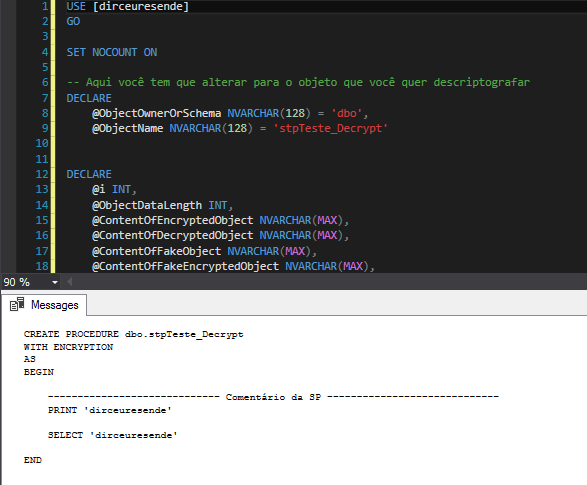
Result:
Breaking object encryption using the CLR (C#)
Now that I've explained how to break the objects, I'll show you a more practical and functional solution in everyday life, which can allow even non-sysadmin users to view the source of encrypted objects, and without needing you to open a new DAC connection, which could even be from another server or instance.
To do this, I will use the CLR to make the connection via DAC, using a sysadmin user. Therefore, even if the person is not a sysadmin, as long as they have permission in this role, they will be able to view the source of unencrypted objects. To break down the code, I will use the same code shown above, just running it through the CLR (C#) on a DAC connection, transparent to the user using the function.
Source code
using System.Data;
using System.Data.SqlTypes;
using System.Data.SqlClient;
using Microsoft.SqlServer.Server;

public partial class UserDefinedFunctions
{
    [Microsoft.SqlServer.Server.SqlFunction(
        DataAccess = DataAccessKind.Read,
        SystemDataAccess = SystemDataAccessKind.Read
    )]
    public static SqlString fncDescriptografa_Objeto(SqlString Ds_Servidor, SqlString Ds_Database, SqlString Ds_Schema, SqlString Ds_Objeto)
    {


        var conexaoLocal => "data source=LOCALHOST;initial catalog=CLR;Application Name=SQLCLR;persist security info=False;Enlist=False;packet size=4096;user id='usuario';password='senha'";
        var servidor = conexaoLocal.Replace("LOCALHOST", $"ADMIN:{Ds_Servidor.Value}");

        using (var con = new SqlConnection(servidor))
        {

            con.Open();

            using (var cmd = new SqlCommand($@"
USE [{Ds_Database.Value}];

DECLARE
    @ObjectOwnerOrSchema NVARCHAR(128) = '{Ds_Schema}',
    @ObjectName NVARCHAR(128) = '{Ds_Objeto}'

DECLARE
    @i INT,
    @ObjectDataLength INT,
    @ContentOfEncryptedObject NVARCHAR(MAX),
    @ContentOfDecryptedObject NVARCHAR(MAX),
    @ContentOfFakeObject NVARCHAR(MAX),
    @ContentOfFakeEncryptedObject NVARCHAR(MAX),
    @ObjectType NVARCHAR(128),
    @ObjectID INT

SET NOCOUNT ON

SET @ObjectID = OBJECT_ID('[' + @ObjectOwnerOrSchema + '].[' + @ObjectName + ']')
IF (@ObjectID IS NULL)
BEGIN
    RAISERROR('The object name or schema provided does not exist in the database', 16, 1)
    RETURN
END

IF NOT EXISTS(SELECT TOP 1 * FROM syscomments WHERE id = @ObjectID AND encrypted = 1)
BEGIN
    RAISERROR('The object provided exists however it is not encrypted. Aborting.', 16, 1)
    RETURN
END

IF OBJECT_ID('[' + @ObjectOwnerOrSchema + '].[' + @ObjectName + ']', 'PROCEDURE') IS NOT NULL
    SET @ObjectType = 'PROCEDURE'
ELSE
    IF OBJECT_ID('[' + @ObjectOwnerOrSchema + '].[' + @ObjectName + ']', 'TRIGGER') IS NOT NULL
        SET @ObjectType = 'TRIGGER'
    ELSE
        IF OBJECT_ID('[' + @ObjectOwnerOrSchema + '].[' + @ObjectName + ']', 'VIEW') IS NOT NULL
            SET @ObjectType = 'VIEW'
        ELSE
            SET @ObjectType = 'FUNCTION'


SELECT TOP 1 @ContentOfEncryptedObject = imageval
FROM sys.sysobjvalues
WHERE objid = OBJECT_ID('[' + @ObjectOwnerOrSchema + '].[' + @ObjectName + ']')
        AND valclass = 1 and subobjid = 1

SET @ObjectDataLength = DATALENGTH(@ContentOfEncryptedObject)/2
SET @ContentOfFakeObject = N'ALTER ' + @ObjectType + N' [' + @ObjectOwnerOrSchema + N'].[' + @ObjectName + N'] WITH ENCRYPTION AS'

WHILE DATALENGTH(@ContentOfFakeObject)/2 < @ObjectDataLength
BEGIN
    IF DATALENGTH(@ContentOfFakeObject)/2 + 4000 < @ObjectDataLength
        SET @ContentOfFakeObject = @ContentOfFakeObject + REPLICATE(N'-', 4000)
    ELSE
        SET @ContentOfFakeObject = @ContentOfFakeObject + REPLICATE(N'-', @ObjectDataLength - (DATALENGTH(@ContentOfFakeObject)/2))
END

SET XACT_ABORT OFF
BEGIN TRAN

EXEC(@ContentOfFakeObject)

IF @@ERROR <> 0
    ROLLBACK TRAN

SELECT TOP 1 @ContentOfFakeEncryptedObject = imageval
FROM sys.sysobjvalues
WHERE objid = OBJECT_ID('[' + @ObjectOwnerOrSchema + '].[' + @ObjectName + ']')
AND valclass = 1 and subobjid = 1


IF @@TRANCOUNT > 0
    ROLLBACK TRAN


SET @ContentOfFakeObject = N'CREATE ' + @ObjectType + N' [' + @ObjectOwnerOrSchema + N'].[' + @ObjectName + N'] WITH ENCRYPTION AS'


WHILE DATALENGTH(@ContentOfFakeObject) / 2 < @ObjectDataLength
BEGIN
    IF DATALENGTH(@ContentOfFakeObject) / 2 + 4000 < @ObjectDataLength
        SET @ContentOfFakeObject = @ContentOfFakeObject + REPLICATE(N'-', 4000)
    ELSE
        SET @ContentOfFakeObject = @ContentOfFakeObject + REPLICATE(N'-', @ObjectDataLength - (DATALENGTH(@ContentOfFakeObject) / 2))
END


SET @i = 1

SET @ContentOfDecryptedObject = N''


WHILE DATALENGTH(@ContentOfDecryptedObject) / 2 < @ObjectDataLength
BEGIN
    IF DATALENGTH(@ContentOfDecryptedObject) / 2 + 4000 < @ObjectDataLength
        SET @ContentOfDecryptedObject = @ContentOfDecryptedObject + REPLICATE(N'A', 4000)
    ELSE
        SET @ContentOfDecryptedObject = @ContentOfDecryptedObject + REPLICATE(N'A', @ObjectDataLength - (DATALENGTH(@ContentOfDecryptedObject) / 2))
END


WHILE (@i <= @ObjectDataLength)
BEGIN

    SET @ContentOfDecryptedObject = STUFF(@ContentOfDecryptedObject, @i, 1,
        NCHAR(
            UNICODE(SUBSTRING(@ContentOfEncryptedObject, @i, 1)) ^
            (
                UNICODE(SUBSTRING(@ContentOfFakeObject, @i, 1)) ^ UNICODE(SUBSTRING(@ContentOfFakeEncryptedObject, @i, 1))
            ))
    )

    SET @i = @i + 1

END


SELECT @ContentOfDecryptedObject", con) { CommandType = CommandType.Text })
            {

                var resultado = (cmd.ExecuteScalar() != null) ? (string) cmd.ExecuteScalar() : "";

                return resultado;

            }

        }

    }
}
After creating the function in your CLR project and publishing the change, let's use it:
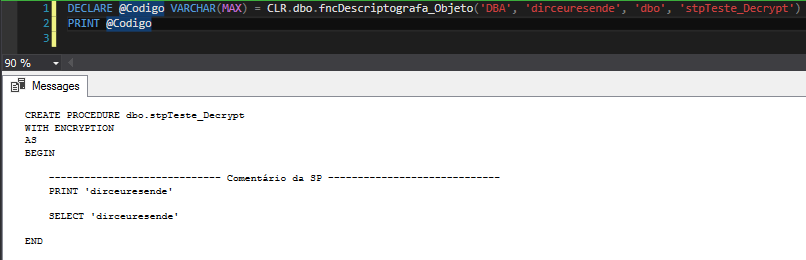
It is worth remembering that in this solution, the user who uses the function does not need (and should not) be using a DAC connection.
References:
https://sqlperformance.com/2016/05/sql-performance/the-internals-of-with-encryption
https://www.codeproject.com/Articles/5068/RC-Encryption-Algorithm-C-Version
https://sqljunkieshare.com/2012/03/07/decrypting-encrypted-stored-procedures-views-functions-in-sql-server-20052008-r2/
https://pt.linkedin.com/pulse/uma-procedure-cryptada-e-agora-f%C3%A1bio-oliveira
That's it, folks!
I hope you enjoyed this post and see you next time.
SQL Server how to retrieve view get decrypt stored procedure source code encrypted objects WITH ENCRYPTION
SQL Server how to retrieve view get decrypt stored procedure source code encrypted objects WITH ENCRYPTION

Comentários (0)
Carregando comentários…