
Hey guys!
All in peace, right?!
In this article I would like to comment on a performance problem in queries that we encounter a lot here in our daily lives at Fabrício Lima – BD Solutions, one of the best and most recognized Performance Tuning companies in Brazil. We are talking about something that is often terribly simple to solve and inexplicably and extremely common, implicit conversion.
For the examples in this article, I will use the following structure of the Orders table:
CREATE TABLE dbo.Pedidos (
    Id_Pedido INT IDENTITY(1,1),
    Dt_Pedido DATETIME,
    [Status] INT,
    Quantidade INT,
    Ds_Pedido VARCHAR(10),
    Valor NUMERIC(18, 2)
)

CREATE CLUSTERED INDEX SK01_Pedidos ON dbo.Pedidos(Id_Pedido)
CREATE NONCLUSTERED INDEX SK02_Pedidos ON dbo.Pedidos (Ds_Pedido)
GO
What is implicit conversion?
Implicit conversion occurs when SQL Server needs to convert the value of one or more columns or variables to another data type in order to enable comparison, concatenation or other operations with other columns or variables, since SQL Server cannot compare a varchar column with another int type, for example, if it did not convert one of the columns so that they both have the same data type.
When we talk about conversion, we have 2 types:
- Explicit: It occurs when the query developer himself converts the data using functions such as CAST, CONVERT, etc.
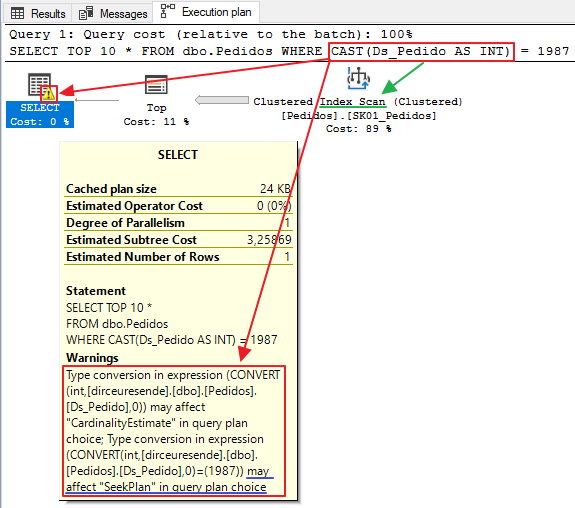
- Implicit: Occurs when SQL Server is forced to convert the data type between columns or variables internally because they were declared with different types.
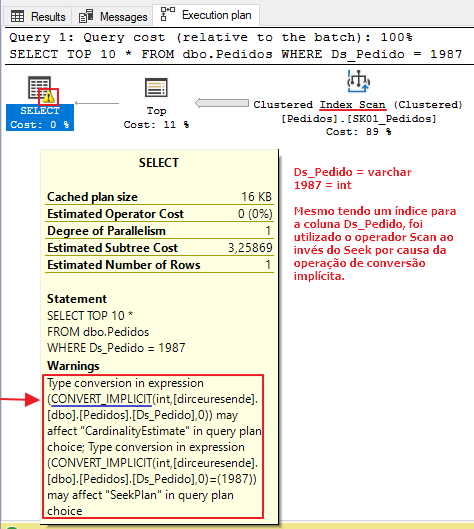
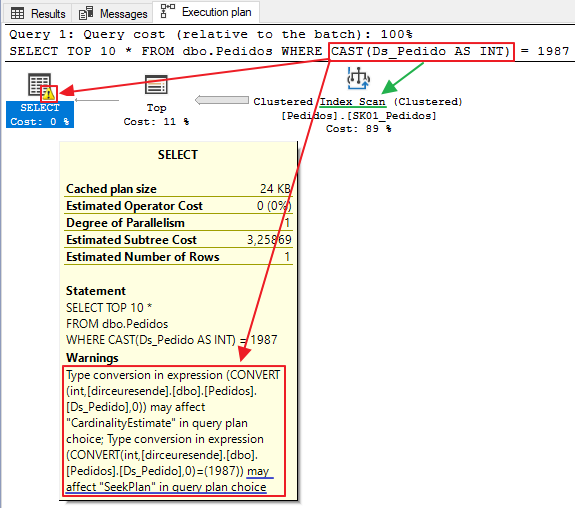
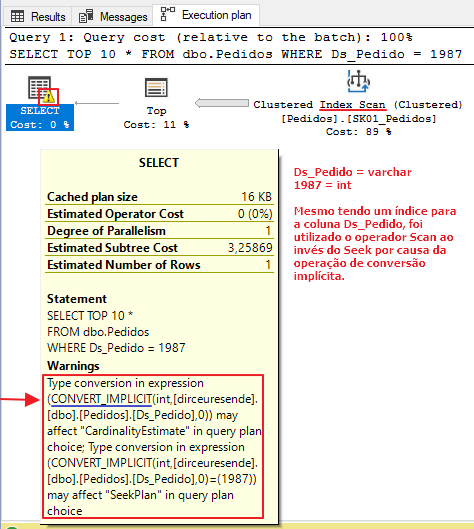
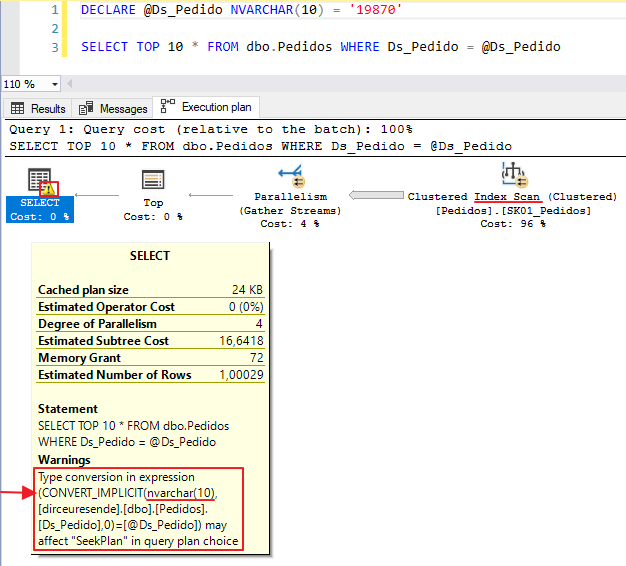
As this conversion is applied to all records in the columns involved, this operation can end up being very costly and significantly hampering query execution, since even if there is an index for these columns, the query optimizer will end up using the Scan operator instead of Seek, not using this index in the best possible way. As a consequence, execution time and the number of logical reads may end up increasing significantly.
What is the impact of conversion on my query?
As I mentioned above, when it is necessary to compare data with different types, either the query developer needs to do the explicit conversion using CAST/CONVERT, or SQL Server will have to do the implicit conversion internally to equalize the data types.
But will this really make any significant difference in my consultation? Let's analyze...
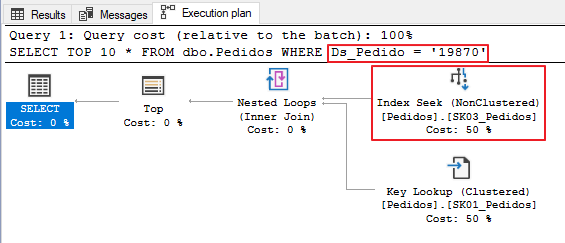
Test 1 – Using the same data type between the column and the variable
In this first test, we will use the correct way to write queries. The data type of the column (varchar) is the same as the literal variable (varchar) and no data conversion occurs. As a result of this, the query will be executed in 0ms, with only 6 logical reads to disk.

Test 2 – Implicit Conversion
In the second test, I will use a simple query, without data type conversions. As the Ds_Pedido column is of type varchar and the literal value 19870 is of type integer, SQL Server will have to carry out the (implicit) conversion of this data.

Test 3 – Converting data types (Explicit conversion)
In this last test, I will use a CAST function to apply the explicit conversion and evaluate how the query behaved in relation to the other two queries.

Implicit conversion only occurs between string and numbers?
In truth no. I will demonstrate some examples of conversion between strings and strings, but it can occur between strings and dates, uniqueidentifier and strings, etc.
VARCHAR and NVARCHAR
A very common error that we see on a daily basis is the occurrence of implicit conversion between varchar and nvarchar values/columns. This occurs a lot in applications that use ORMs, such as the Entity Framework.
Many people end up thinking that there is no need to convert between varchar and nvarchar, but let's see in the example below that this does happen:
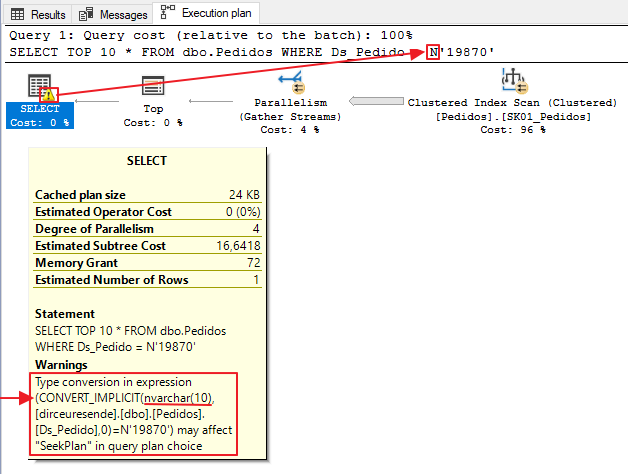
Another example, using a variable of type NVARCHAR(10):
Does implicit conversion not occur between numbers with different types?
More or less. Implicit conversion may occur in the Compute Scalar operator, but does not prevent the use of the Seek operator. Because the numbers are all from the same family, SQL Server can natively compare numbers with different data types, such as INT vs BIGINT, or BIGINT vs SMALLINT, for example.
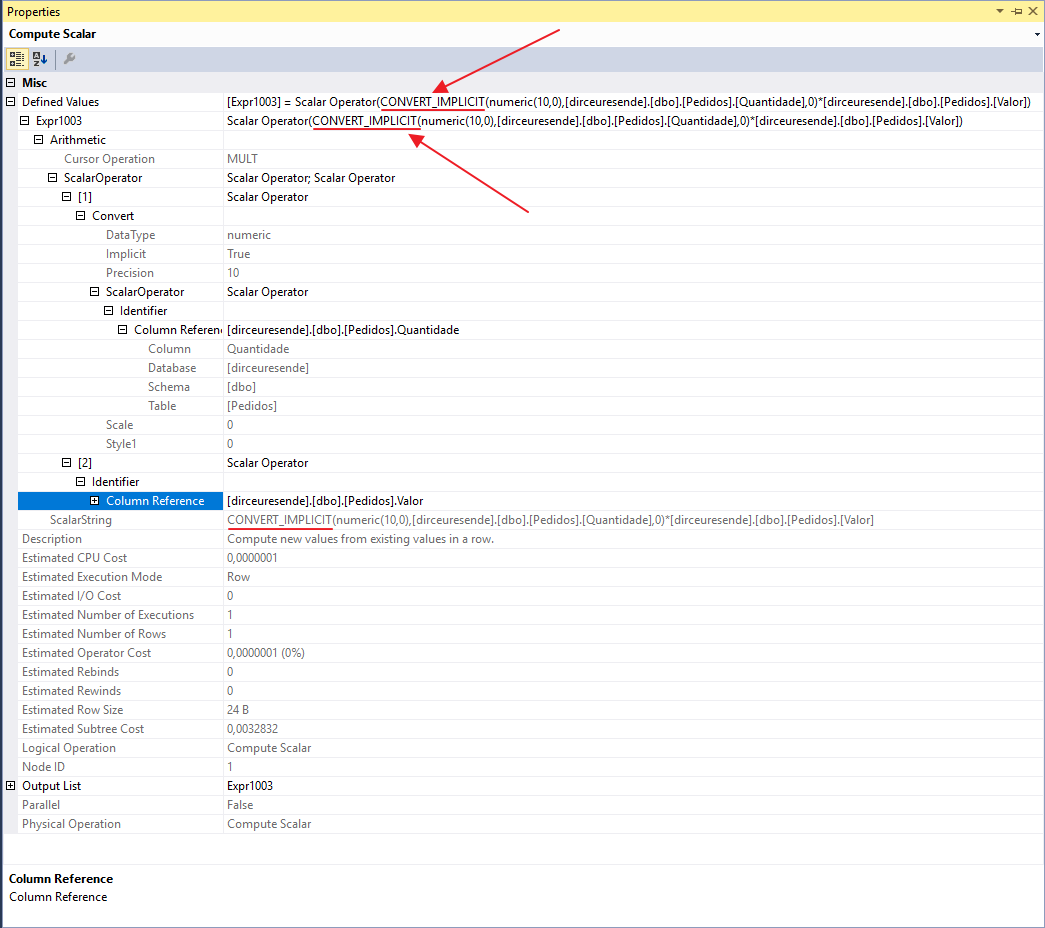
After a tip from the great José Says, I ended up paying attention to the fact that when using some expressions with numbers of different data types, we do not see a warning in the execution plan demonstrating the implicit conversion, nor is the Scan operator used instead of Seek, but the implicit conversion does occur, in the Compute Scalar operator, as I will demonstrate below:

Before analyzing the implicit conversion, let's create a new index to avoid this Key Lookup operator, in a technique known as “Covering index”:
CREATE NONCLUSTERED INDEX SK05_Pedidos ON dbo.Pedidos (Ds_Pedido) INCLUDE(Quantidade, Valor)
Analyzing the execution plan again, we see that the Key Lookup operator has left the plan, the new index is being used with the Seek operator and there is no implicit conversion warning. Where is she?
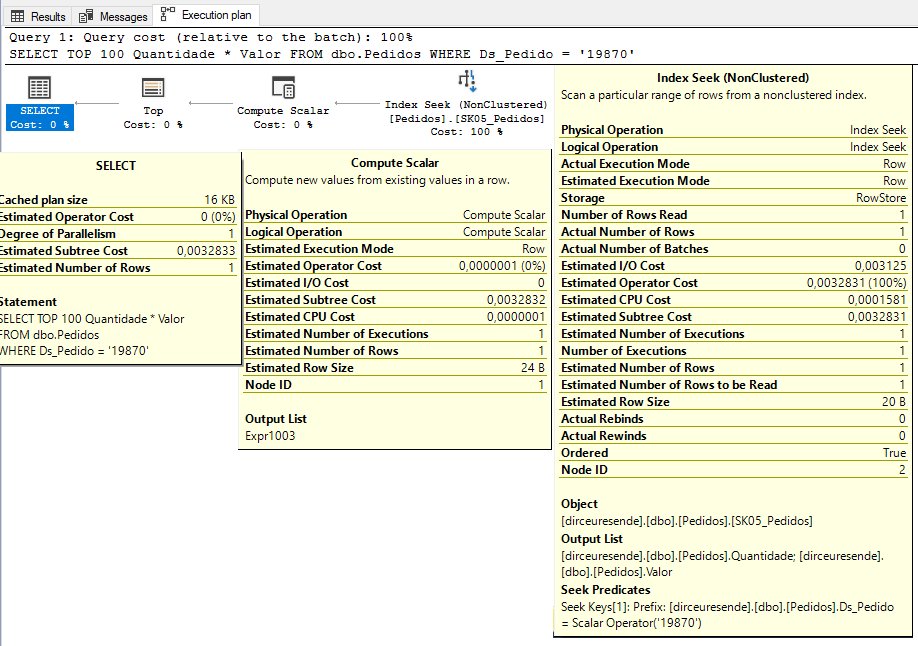
When viewing the properties of the Compute Scalar operator, we were able to identify that SQL Server performed the implicit conversion to multiply the Value column (numeric) by the Quantity column (int):
In the article Implicit Conversions that cause Index Scans, from Jonathan Kehayias, he carried out a series of tests between various types of data and the result of this study is the table below, which demonstrates which crossings between types of data cause the Scan event instead of the Seek when compared:

In official SQL Server documentation, we can find the table below, which illustrates which crosses between data types that generate implicit conversion, which need to use explicit conversion and which conversions are not possible:

Does implicit conversion occur in JOIN too?
In any operation or expression comparison with different data types, implicit conversion may occur (according to the rules seen above), whether in SELECT, WHERE, JOIN, CROSS APPLY, etc., as I will demonstrate below.
I created a table called Orders2, with the same structure and data as the Orders table. After that, I performed an ALTER TABLE operation to change the data type of the Ds_Pedido column to NVARCHAR(10) and with that, we have the following example:
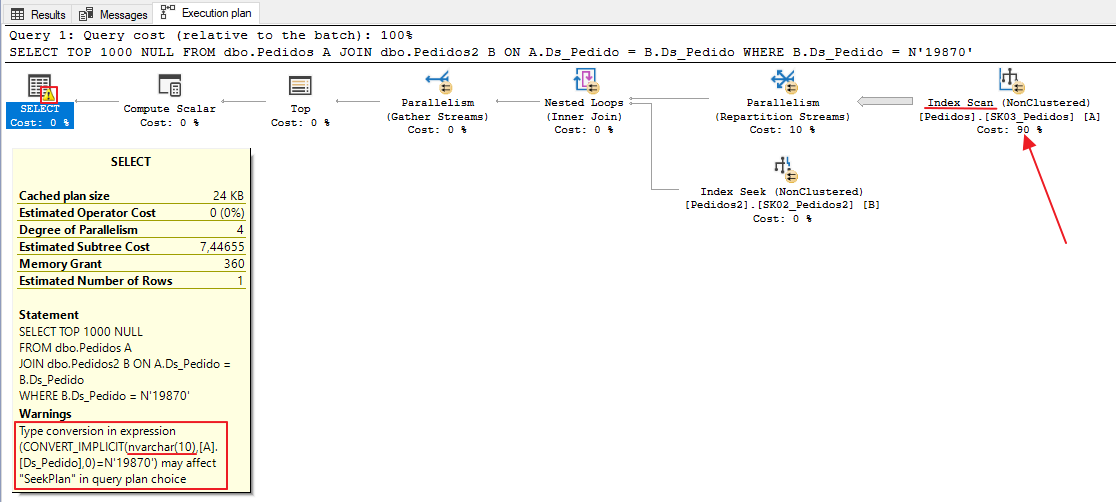
Note that there was an implicit conversion between the Ds_Pedido columns, since in the Orders table it is of type VARCHAR and in the Orders2 table it is of type NVARCHAR. Because of this, instead of using the Index Seek operation, Index Scan was used to read the data from the Orders table.
If we analyze the number of readings from the 2 tables, we see a striking difference due to the implicit conversion:

In this case, we can observe a SERIOUS data modeling error, which allowed two tables that have relationships with each other to use different types of data. To resolve this performance problem in this scenario, and obtain maximum performance from this query, let's change the type of the Ds_Pedido column in the Orders table to nvarchar(10), the same type as in the Orders2 table, since the filter used in WHERE is of type NVARCHAR:
ALTER TABLE Pedidos ALTER COLUMN Ds_Pedido nvarchar(10)But then we encountered this error when trying to change the column's data type:
Msg 5074, Level 16, State 1, Line 8
The index ‘SK03_Pedidos’ is dependent on column ‘Ds_Pedido’.
Msg 4922, Level 16, State 9, Line 8
ALTER TABLE ALTER COLUMN Ds_Pedido failed because one or more objects access this column.
Not to mention that there may be other relationships between this table and others using this column, which currently work well, and which may start to have implicit conversion problems when changing the data type. Like everything in performance, making this type of correction requires validations, analyzes and lots of testing!
If you need a script to identify and recreate Foreign Keys that reference a table, read my post How to identify, delete and recreate Foreign Keys (FK) of a table in SQL Server.
In this case above, we will consider that this column being of type VARCHAR was a modeling error and we will correct the problem. To do this, I will use the T-SQL commands below to delete the index, change the type and create the index again:
DROP INDEX SK03_Pedidos ON dbo.Pedidos
GO

ALTER TABLE Pedidos ALTER COLUMN Ds_Pedido nvarchar(10)
GO

CREATE NONCLUSTERED INDEX [SK03_Pedidos] ON [dbo].[Pedidos] ([Ds_Pedido])
GO
After matching the data type between the two columns, let's repeat the query made previously and analyze the results:
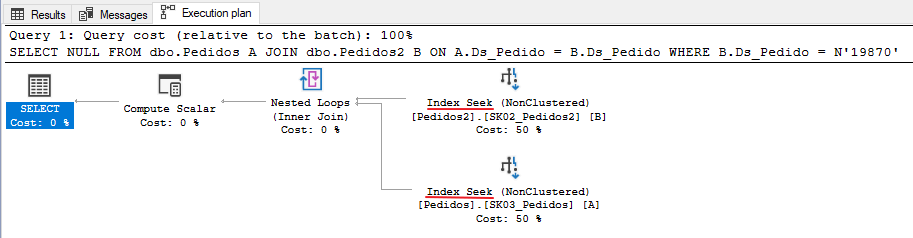
Now the execution plan is excellent. We have eliminated implicit conversion and are using Seek operators on indexes. Let's see how the execution time and logical readings turned out:

0ms execution time and only 3 logical reads. Excellent!! Optimized query.
But what about cases where we cannot perform the ALTER TABLE command due to other relationships that already exist? What alternatives do we have for this?
A: There are several solutions, but one that I really like is the use of calculated and indexed columns, which have a low impact on the application (although it can have an impact, especially in INSERT operations) and are usually very effective and practical, since whenever the original column is changed, the calculated column is updated automatically too (as well as indexes that reference the calculated column, if they exist). But remember: TEST BEFORE IMPLEMENTING!
I will demonstrate how you can implement this solution in the example above:
ALTER TABLE dbo.Pedidos ADD Ds_Pedido_NVARCHAR AS (CONVERT(NVARCHAR(10), Ds_Pedido))
GO

CREATE NONCLUSTERED INDEX SK04_Pedidos ON dbo.Pedidos(Ds_Pedido_NVARCHAR)
GO
When creating this calculated column, it will not take up ANY space in your database, as it is calculated in real time. Only the created index will take up space and it will bring performance gains to this solution:
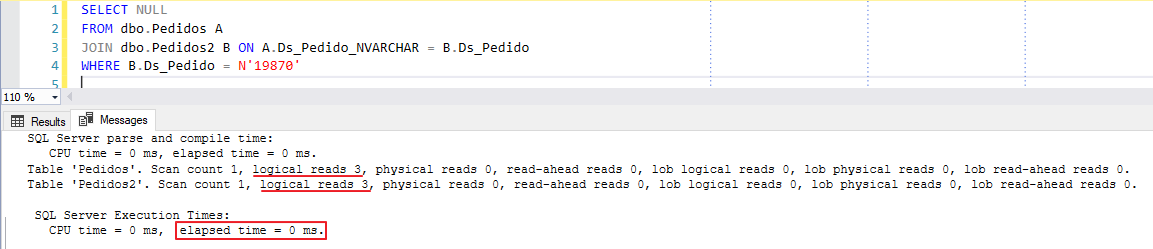
And if we analyze our execution plan using the new calculated column, we see that it has no implicit conversion and is performing a Seek operation, just like when I demonstrated what it would be like if the columns were of the same type:

How does SQL Server choose which type to convert?
This is an excellent question. How can we consult the page Data type precedenceFrom Microsoft documentation, when an operator combines two expressions of different data types, the rules for data type precedence specify that the data type with the lower precedence is converted to the data type with the higher precedence. If the conversion is not a supported implicit conversion, an error is returned.
SQL Server uses the following order of precedence for data types:
- user custom data types (highest level)
- sql_variant
- xml
- datetimeoffset
- datetime2
- datetime
- smalldatetime
- date
- team
- float
- real
- decimal
- money
- smallmoney
- bigint
- int
- smallint
- tinyint
- bit
- ntext
- text
- image
- timestamp
- uniqueidentifier
- nvarchar (including nvarchar(max) )
- nchar
- varchar (including varchar(max) )
- char
- varbinary (including varbinary(max) )
- binary (lowest level)
In other words, that's why in the example above, when we compare a varchar column with an nvarchar expression, the column was converted to nvarchar instead of the other way around (which actually made more sense to convert a fixed value than an entire column).
How to identify implicit conversions in your environment
As I said previously, implicit conversion operations are very common in SQL Server environments and therefore, I will share two ways to identify the occurrence of these events in your environment.
Method 1 – Plan cache DMV’s
Using the script below, you will be able to identify the queries that consumed the most CPU and have implicit conversion through SQL Server DMVs. There is no need to enable any options or create any objects, as these queries are native and automatically collected by default.
SELECT TOP ( 100 )
    DB_NAME(B.[dbid]) AS [Database],
    B.[text] AS [Consulta],
    A.total_worker_time AS [Total Worker Time],
    A.total_worker_time / A.execution_count AS [Avg Worker Time],
    A.max_worker_time AS [Max Worker Time],
    A.total_elapsed_time / A.execution_count AS [Avg Elapsed Time],
    A.max_elapsed_time AS [Max Elapsed Time],
    A.total_logical_reads / A.execution_count AS [Avg Logical Reads],
    A.max_logical_reads AS [Max Logical Reads],
    A.execution_count AS [Execution Count],
    A.creation_time AS [Creation Time],
    C.query_plan AS [Query Plan]
FROM
    sys.dm_exec_query_stats AS A WITH ( NOLOCK )
    CROSS APPLY sys.dm_exec_sql_text(A.plan_handle) AS B
    CROSS APPLY sys.dm_exec_query_plan(A.plan_handle) AS C
WHERE
    CAST(C.query_plan AS NVARCHAR(MAX)) LIKE ( '%CONVERT_IMPLICIT%' )
    AND B.[dbid] = DB_ID()
    AND B.[text] NOT LIKE '%sys.dm_exec_sql_text%' -- Não pegar a própria consulta
ORDER BY
    A.total_worker_time DESC
Result:

Method 2 – Extended Events (XE)
Using the script below, you can capture implicit conversion events generated through Extended Events events.
The advantage of this solution over querying the plancache is that the data is stored permanently, as the plan cache is “truncated” whenever the SQL Server service is restarted, not all queries are stored there and when they are, the storage is temporary. Furthermore, if you start the service using the -x parameter, several DMVs, such as dm_exec_query_stats, are not populated.
The disadvantage is that you need to create objects in the database (Job, XE, table), generating much more work to obtain this information, which will only be collected after the creation of these controls. Events that occurred in the past will not be identified.
XE Script:
IF (EXISTS(SELECT NULL FROM sys.dm_xe_sessions WHERE [name] = 'Conversão Implícita')) DROP EVENT SESSION [Conversão Implícita] ON SERVER
GO

CREATE EVENT SESSION [Conversão Implícita]
ON SERVER
ADD EVENT sqlserver.plan_affecting_convert (
    ACTION (
        sqlserver.client_app_name,
        sqlserver.client_hostname,
        sqlserver.database_name,
        sqlserver.username,
        sqlserver.sql_text
    )
    WHERE (
        [convert_issue] = 2 -- 1 = Cardinality Estimate / 2 = Seek Plan
    )
)
ADD TARGET package0.event_file (
    SET filename = N'C:\Traces\Conversão Implícita',
    max_file_size = ( 50 ),
    max_rollover_files = ( 16 )
)
GO

ALTER EVENT SESSION [Conversão implícita] ON SERVER STATE = START
GO
And after creating this XE, you can use the script below to collect the data and record it in a history table.
IF (OBJECT_ID('dbo.Historico_Conversao_Implicita') IS NULL)
BEGIN

    -- DROP TABLE dbo.Historico_Conversao_Implicita
    CREATE TABLE dbo.Historico_Conversao_Implicita (
        Dt_Evento DATETIME,
        [database_name] VARCHAR(100),
        username VARCHAR(100),
        client_hostname VARCHAR(100),
        client_app_name VARCHAR(100),
        [convert_issue] VARCHAR(50),
        [expression] VARCHAR(MAX),
        sql_text XML
    )

    CREATE CLUSTERED INDEX SK01_Historico_Erros ON dbo.Historico_Conversao_Implicita(Dt_Evento)

END


DECLARE @TimeZone INT = DATEDIFF(HOUR, GETUTCDATE(), GETDATE())
DECLARE @Dt_Ultimo_Evento DATETIME = ISNULL((SELECT MAX(Dt_Evento) FROM dbo.Historico_Conversao_Implicita WITH(NOLOCK)), '1990-01-01')


IF (OBJECT_ID('tempdb..#Eventos') IS NOT NULL) DROP TABLE #Eventos
;WITH CTE AS (
    SELECT CONVERT(XML, event_data) AS event_data
    FROM sys.fn_xe_file_target_read_file(N'C:\Traces\Conversão Implícita*.xel', NULL, NULL, NULL)
)
SELECT
    DATEADD(HOUR, @TimeZone, CTE.event_data.value('(//event/@timestamp)[1]', 'datetime')) AS Dt_Evento,
    CTE.event_data
INTO
    #Eventos
FROM
    CTE
WHERE
    DATEADD(HOUR, @TimeZone, CTE.event_data.value('(//event/@timestamp)[1]', 'datetime')) > @Dt_Ultimo_Evento


SET QUOTED_IDENTIFIER ON

INSERT INTO dbo.Historico_Conversao_Implicita
SELECT
    A.Dt_Evento,
    A.[database_name],
    A.username,
    A.client_hostname,
    A.client_app_name,
    A.convert_issue,
    A.expression,
    TRY_CAST(A.sql_text AS XML) AS sql_text
FROM (
    SELECT DISTINCT
        A.Dt_Evento,
        xed.event_data.value('(action[@name="database_name"]/value)[1]', 'varchar(100)') AS [database_name],
        xed.event_data.value('(action[@name="username"]/value)[1]', 'varchar(100)') AS [username],
        xed.event_data.value('(action[@name="client_hostname"]/value)[1]', 'varchar(100)') AS [client_hostname],
        xed.event_data.value('(action[@name="client_app_name"]/value)[1]', 'varchar(100)') AS [client_app_name],
        xed.event_data.value('(data[@name="convert_issue"]/text)[1]', 'varchar(100)') AS [convert_issue],
        xed.event_data.value('(data[@name="expression"]/value)[1]', 'varchar(max)') AS [expression],
        xed.event_data.value('(action[@name="sql_text"]/value)[1]', 'varchar(max)') AS [sql_text]
    FROM
        #Eventos A
        CROSS APPLY A.event_data.nodes('//event') AS xed (event_data)
) A
And now just create 1 job to collect this data periodically. To access the collected data, simply consult the newly created table to analyze the conversion occurrences implicit in your environment:

Other articles on Implicit Conversion
Do you want other points of view and examples on this topic? Check out some articles from other authors that I have selected for you:
- https://portosql.wordpress.com/2018/10/25/os-perigos-da-conversao-implicita-1/
- https://portosql.wordpress.com/2018/11/28/os-perigos-da-conversao-implicita-2/
- https://sqlkiwi.blogspot.com/2011/07/join-performance-implicit-conversions-and-residuals.html
- https://www.sqlskills.com/blogs/jonathan/implicit-conversions-that-cause-index-scans/
- https://hackernoon.com/are-implicit-conversions-killing-your-sql-query-performance-70961e547f11
- https://docs.microsoft.com/en-us/sql/t-sql/data-types/data-type-conversion-database-engine?view=sql-server-2017
Well guys, I hope you liked this post, really understood the dangers of explicit and implicit conversion and don't let this happen again in your consultations. The DBA thanks you.
Big hug and see you next time.

Comentários (0)
Carregando comentários…