
Hey guys!!!
In this article, I would like to share with you something that I see a lot on a daily basis when I am carrying out Tuning consultancy, which are time-consuming queries, with high I/O and CPU consumption, and which use WHERE or JOIN functions in tables with many records and how we can use a very simple calculated (or computed) column indexing technique to solve this problem.
As I comment in the article Understanding how indexes work in SQL Server, when using functions in WHERE or JOINS clauses, we are violating the concept of Query SARGability, that is, we are making this query no longer use Seek operations in the indexes, since SQL Server needs to read the entire table, apply the desired function and then compare the values and return the results.
What I want in this article is to show you this scenario happening, how to identify it and some possible solutions to improve query performance. So, let's go!
Creating the demo base for this article
To create this example table similar to mine (the data is random, right... lol), to be able to follow the article and simulate these scenarios, you can use the script below:
IF (OBJECT_ID('_Clientes') IS NOT NULL) DROP TABLE _Clientes
CREATE TABLE _Clientes (
    Id_Cliente INT IDENTITY(1,1),
    Dados_Serializados VARCHAR(MAX)
)

INSERT INTO _Clientes ( Dados_Serializados )
SELECT
    CONVERT(VARCHAR(19), DATEADD(SECOND, (ABS(CHECKSUM(PWDENCRYPT(N''))) / 2147483647.0) * 199999999, '2015-01-01'), 121) + '|' +
    CONVERT(VARCHAR(20), CONVERT(INT, (ABS(CHECKSUM(PWDENCRYPT(N''))) / 2147483647.0) * 9)) + '|' +
    CONVERT(VARCHAR(20), CONVERT(INT, (ABS(CHECKSUM(PWDENCRYPT(N''))) / 2147483647.0) * 10)) + '|' +
    CONVERT(VARCHAR(20), CONVERT(INT, 0.459485495 * (ABS(CHECKSUM(PWDENCRYPT(N''))) / 2147483647.0)) * 1999)
GO 10000

INSERT INTO _Clientes ( Dados_Serializados )
SELECT Dados_Serializados
FROM _Clientes
GO 9

CREATE CLUSTERED INDEX SK01_Pedidos ON _Clientes(Id_Cliente)
CREATE NONCLUSTERED INDEX SK02_Pedidos ON _Clientes(Dados_Serializados)
GO
Demo using native function
To demonstrate how a query can be slow simply because it uses a WHERE or JOIN function, I will initially use the query below:
SELECT *
FROM _Clientes
WHERE Dados_Serializados = '2016-11-22 04:49:06|2|0|0'
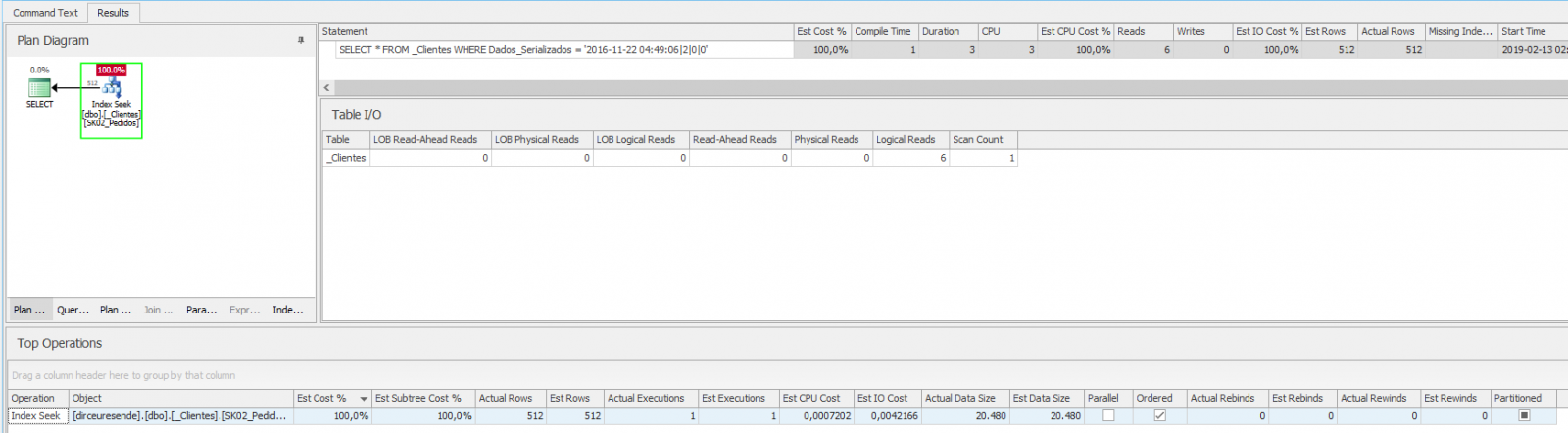
If we analyze the execution plan of this query, we see that it is using the Index Seek operator, making only 6 readings and 512 records. Analyzing the CPU and IO information, we can conclude that 3ms of CPU (compile) and 3ms of execution time are quite acceptable:
Now let's use a function in this same query:
SELECT *
FROM _Clientes
WHERE SUBSTRING(Dados_Serializados, 1, 10) = '2016-11-22'
Execution analysis:
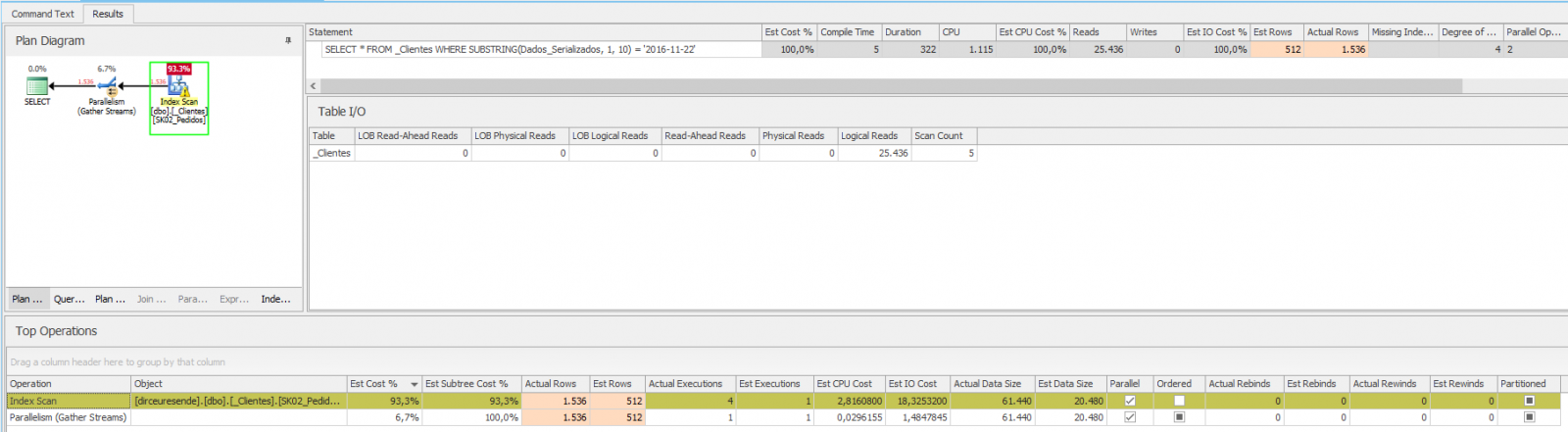
In other words, the result was terrible... Index Scan, high cpu time, high execution time, many logical readings. All this because of the function used, which stopped using the Index Seek operator and started using Index Scan.
To solve this, it's very simple, especially because this function as it is set up (equal to a LEFT), is helping us, because in these cases, we can replace the function with LIKE 'texto%' easily, as SQL Server will use the Seek operation on the index:
SELECT *
FROM _Clientes
WHERE Dados_Serializados LIKE '2016-11-22%'
Execution analysis:

We can notice that when using LIKE ‘texto%’, the index was used with the Seek operation, making our query performant again.
LIKE and SARGability
IMPORTANT: Unlike LIKE 'text%', if you add the '%' symbol before the text, to filter everything that contains or ends with a certain expression, the index will not be used with the Seek operator, but Scan.
To understand the reason for this, draw an analogy with a dictionary index: To find all the words in the dictionary that begin with 'test' it is very simple, just go to the letter T, then the letter 'e', then the letter 's' and so on until you find the desired words. When the next word in the list is greater than 'test', we can end the search.
To identify all the words in the dictionary that contain the word 'test' or end with 'test', we will have to look at all the words in the dictionary to be able to identify them.
Did it make it easier to understand how indexes work? If you still have questions, read my article Understanding how indexes work in SQL Server.
But what if it was the RIGHT function, for example? Will our query not use the Seek operation on the index itself?
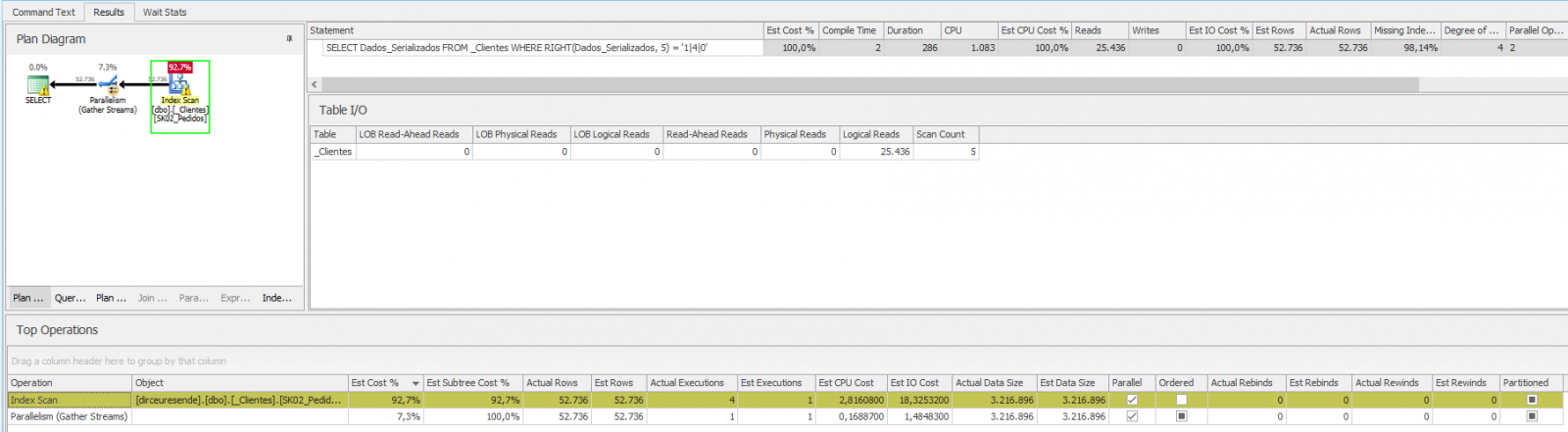
As we saw above, the query was very bad, with a high number of logical reads, execution time and CPU. To solve this problem, let's use the calculated column feature and index this calculated column:
-- Cria a nova coluna calculada
ALTER TABLE _Clientes ADD Right_5 AS (RIGHT(Dados_Serializados, 5))
GO

-- Cria um índice para a nova coluna criada
CREATE NONCLUSTERED INDEX SK03_Clientes ON dbo._Clientes(Right_5)
GO

-- Executa a consulta nova
SELECT Right_5
FROM _Clientes
WHERE Right_5 = '1|4|0'
Execution analysis:
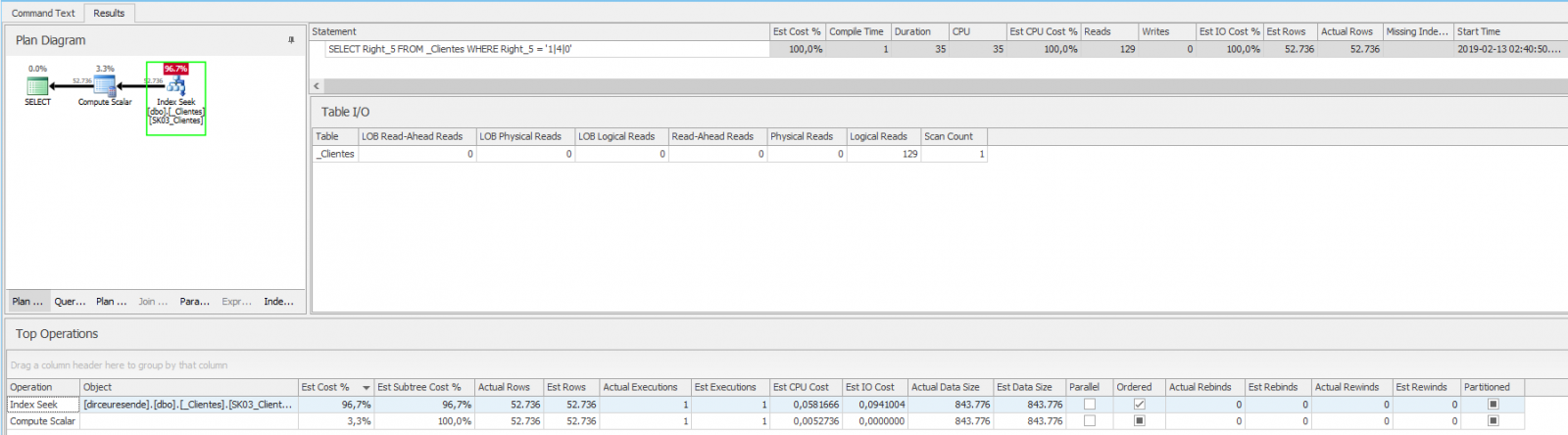
Wow! The consultation is much faster now! This happens because when creating the index, it already calculated this data for the entire column and left it sorted. This makes queries much faster than having to calculate this in real time and then compare the values.
Considerations for creating indexes and determinism of system functions
Note 1: Be aware of the fact that creating the index will consume disk space and including a column in a table, even if calculated, must be tested first to ensure that this will not generate any errors during an insert operation that is not specifying the fields, for example.
Note 2: A very important point to highlight is that creating calculated columns persisted on disk and indexing calculated columns is only possible when using deterministic function.
All functions that exist in SQL Server are either deterministic or non-deterministic. The determinism of a function is defined by the data returned by the function. The following describes the determinism of a function:
- A function is considered deterministic se always returns the same set of results when called with the same set of input values.
- A function is considered non-deterministic if it does not return the same set of results when called with the same set of input values.
This may sound a little complicated, but it really isn't. See, for example, the DATEDIFF and GETDATE functions. DATEDIFF is deterministic because it will always return the same data whenever it is run with the same input parameters. GETDATE is non-deterministic because it will never return the same date every time it is run.
Demonstration using user-defined function (UDF)
If using a native function in WHERE/JOIN already worsens the performance of our queries, using a user's custom function the scenario is even worse. For this post, I will use the function fncSplit (with schema binding):
SELECT Dados_Serializados
FROM _Clientes
WHERE dbo.fncSplit(Dados_Serializados, '|', 3) = '1'
Execution analysis:

As you can see, this simple query, on a table of 10,000 records, took around 35 seconds to execute, consuming almost 15s of CPU. Around 240 thousand logical readings were made, 610 thousand lines being processed to return the 1,040 lines of the final result. Summary: It's really bad!
To try to improve the performance of this query, we will use the same solution as in the previous example, creating a calculated column and indexing this column:
-- Cria a nova coluna calculada
ALTER TABLE _Clientes ADD Coluna_Teste AS (dbo.fncSplit(Dados_Serializados, '|', 3))
GO

-- Cria um índice para a nova coluna criada
CREATE NONCLUSTERED INDEX SK04_Clientes ON dbo._Clientes(Coluna_Teste) INCLUDE(Dados_Serializados)
GO

-- Executa a consulta nova
SELECT Dados_Serializados
FROM _Clientes
WHERE Coluna_Teste = '1'
Before analyzing the execution of this test, I need to make a warning about creating a calculated column persisted on disk using a user-defined function (UDF) and creating indexes on these calculated columns:
User-defined function (UDF) determinism
Important: When you create a user-defined function (UDF), SQL Server registers determinism. The determinism of a user-defined function is determined by how you create the function. A user-defined function is considered deterministic if all of the following criteria are met:
- The function is schema-bound for all database objects it references.
- Any function called by the user-defined function is deterministic. This includes all user-defined and system functions.
- The function does not reference any database objects that are outside its scope. This means that the function cannot reference external tables, variables or cursors.
When you create a function, SQL Server applies all of these criteria to the function to determine its determinism. If a function fails any of these checks, the function is marked as non-deterministic. Sometimes these checks can produce functions marked as non-deterministic even when you expect them to be marked as deterministic.
In the case of this example, if I do not include the WITH SCHEMABINDING parameter in the fncSplit declaration, we will encounter the following error message:
Column ‘Coluna_Teste’ in table ‘dbo._Clientes’ cannot be used in an index or statistics or as a partition key because it is non-deterministic.
Execution analysis:
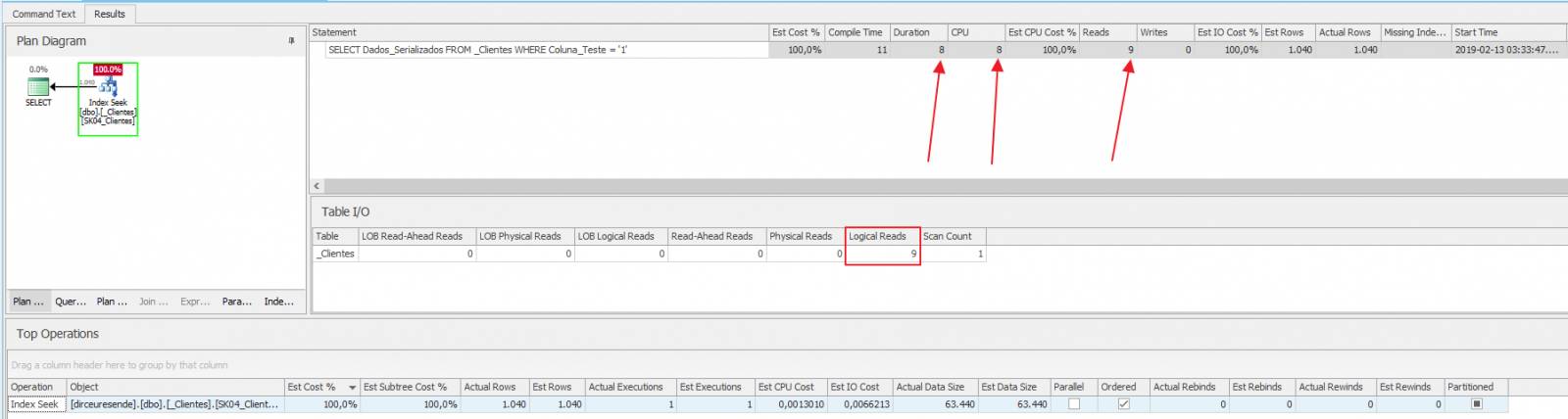
Wow!! From 32 seconds our query dropped to 8ms!! The number of CPUs fell from 14,974 to 8 and the number of logical reads fell from 240,061 to 9! This tuning was really very effective. I bet if you did something similar to a client, you'd get great compliments 🙂
Before finishing this article, I would like to leave one last message for you:
As I always say: When applying performance tuning techniques, ALWAYS TEST!
Well guys, I hope you liked this article.
A big hug and see you later!

Comentários (0)
Carregando comentários…