
Hey guys,
Good morning!
In this post I will comment on the index structure, which helps a lot to optimize queries, reducing IO and CPU and returning information more quickly. However, be very careful when creating indexes, as they take up a lot of disk space and if they are not well modeled, they may not be as effective.
Introduction
An index is an on-disk structure associated with a table or view, which speeds up row retrieval. An index contains keys created from one or more columns, and these keys are stored in a structure (B-tree) that enables SQL Server to find the row or rows associated with the key values quickly and efficiently.
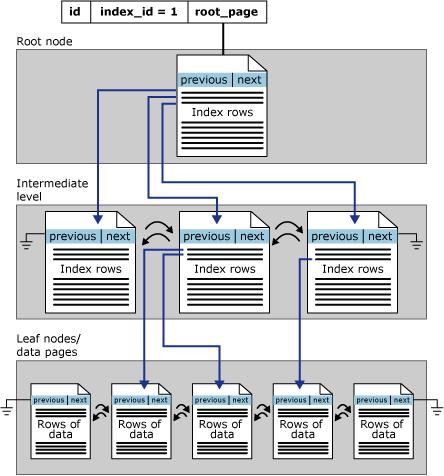
With the creation of the index, the database will create an ordered tree structure to facilitate searches, where the first level is the root, the intermediate levels contain the index trees and the last level contains the data and a doubly linked list connecting the data pages, containing a previous page pointer and next page, as shown in the image below:
Using an index will not always bring good performance, as choosing an incorrect index can cause unsatisfactory performance. Therefore, the query optimizer's job is to select an index or combination of indexes only when it improves performance and avoid indexed retrieval when it degrades performance.
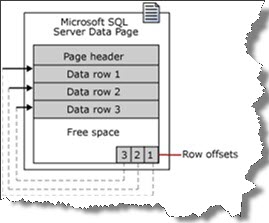
The data page contains a header with index, with a doubly linked list containing a pointer to the previous and next page, a block with records (data) and in the footer there are array slots that contain the memory addresses of the pages with the data.
Recommendations when creating an index
The following tasks make up the recommended strategy for creating indexes:
- Understand the characteristics of the most used queries. For example, knowing that a frequently used query joins two or more tables will help you determine the best type of index to use.
- Understand the characteristics of the columns used in queries. For example, an index is ideal for columns that have an integer data type and also unique or non-null columns. For columns that have well-defined subsets of data, you can use a filtered index in SQL Server 2008 and later versions.
- Determine which index options could increase performance when creating or maintaining the index. For example, creating a clustered index on an existing large table would benefit from the ONLINE index option. The ONLINE option allows simultaneous activity on the underlying data to continue while the index is being created or rebuilt.
- Determine the best storage location for the index. A nonclustered index can be stored in the same filegroup as the underlying table or in a different filegroup. Index storage location can improve query performance by increasing disk I/O performance. For example, storing a nonclustered index on a filegroup that is on a different disk than the table filegroup can improve performance because multiple disks can be read at the same time.
- Create nonclustered indexes on columns frequently used in predicates and JOIN conditions in queries. However, avoid adding unnecessary columns. Adding many index columns will increase disk space and index maintenance performance.
- Covering indexes can improve query performance because all the data needed to satisfy the requirements of the query exists within the index itself. That is, only index pages, not table or clustered index data pages, are required to retrieve the requested data, therefore reducing overall disk I/O operations. For example, a query of columns a and b on a table that has a composite index created on columns a, b, and c can retrieve the specified data from the index only.
- Write queries that insert or modify as many queues as possible in a single statement, rather than using multiple queries to update those same queues. By using just one statement, optimized index maintenance can be explored.
- Evaluate the type of the query and how the columns are used in the query. For example, a column used in an exact match query would be a good candidate for a clustered or nonclustered index.
- Keep the index key length short for clustered indexes. Additionally, clustered indexes benefit from being created on unique or non-null columns.
- Examine the uniqueness of the column. A unique index rather than a non-unique index on the same combination of columns provides additional information to the query optimizer, which makes the index more useful.
- Examine the distribution of data in the column. Often, a long query is caused by indexing a column with few unique values, or by performing a join on such a column. For example, a physical phone book sorted alphabetically by last name will not be quick to locate a person if everyone in town is named Smith or Jones.
- Consider column order if the index contains multiple columns. The column that is used in the WHERE clause in an equals (=), greater than (>), less than (>), or BETWEEN query criteria, or that participates in a join, must be positioned first. Additional columns should be ordered based on their level of distinctness, that is, from most distinct to least distinct.
For example, if the index is defined as LastName, FirstName the index is useful when the query criteria is WHERE LastName = 'Smith' or WHERE LastName = Smith AND FirstName LIKE 'J%'. However, the query optimizer would not use the index for a query that had searched only on FirstName (WHERE FirstName = 'Jane'). - Specify the Fill Factor of the index. When an index is created or recreated, the fill factor value determines the percentage of space on each leaf-level page to be filled with data, reserving the remainder on each page as free space for future growth. For example, specifying a fill factor value of 80 means that 20 percent of each leaf-level page will be empty, providing room for the index to expand as data is added to the underlying table. A correctly chosen fill factor value can reduce potential page splits by providing enough space for index expansion as data is added to the underlying table. To learn more about Fill Factor, access this link.
- Consider indexing the computed columns.
Clustered or NonClustered Index
Clustered Index
The CLUSTERED index is mounted on the table itself, creating an ORDERED tree structure to facilitate searches. For this reason, only 1 index of this type can be created per table and INCLUDE of columns cannot be used in this type of index. Each leaf of the cluster index has all the record information.
Recommendations for the column that will make up the clustered index:
- Numeric fields (smallint, tinyint, int, bigint)
- Growing Data
- Unique values
- Values that are not updated
- Data that is frequently used in searches, joins, etc.
- It will usually be created in the Primary Key
Classic example: Dictionary (You find the word and along with it you already have the definition).
Nonclustered Index
The NONCLUSTERED index is a separate ORDERED structure, which contains only the indexed column (and the INCLUDE columns, if any) and a table can have N indexes of this type. If it is necessary to consult some information that is not in the NONCLUSTERED index, the information is located using the table's clustered index (Key Lookup). If the table does not have a CLUSTERED index, the IAM (Index Allocation Map) will be used to locate the information via RID (RowID – in the RID Lookup operation).
Classic example: Index of a book (You locate the page where the chapter is in the index and then go to the page to see the information).
Composite index or with included columns
A very common question when creating an index, these 2 ways of creating an index work very differently:
- Composite index: It is an index that is made up of more than one column. In this case, the index tree structure will have information about the columns that are part of the index at all levels and searches using these columns will be filtered more quickly.
- Index with column included: It is an index formed by one or more columns and which includes other columns. In this case, the index tree structure will be assembled only with the columns that are part of the index, and only at the last level of the tree (leaf) will the included column information be available (occupying less disk space than the composite index). This type of index is recommended to avoid Key Lookup operators, including columns that are not part of the index and that are always searched, meaning that this index and also the clustered index are used to return other information.
When to use an index with included columns
When there are columns used in SELECT only for displaying data, but which are not used for filters, it is interesting to add these columns in INCLUDE, as the information will only be recorded at the leaf level of the index (last index), only for display (because of this, this type of index is generally smaller than the composite index).
If these columns are not present in the index, it will be necessary to use another index (always in the clustered index or in the ROWID, if the table is not clustered) or have to scan the entire table to find this information. See more details at this link
Example of creating an index with included column
CREATE NONCLUSTERED INDEX SK01 ON dbo.Cliente(CPF) INCLUDE(RG, Nome)
When to use the composite index
When a recurring query uses more than one column in the WHERE clause, a composite index (with more than one column) can be used. In this situation, the query plan uses the set of columns to filter, so that the most restrictive indexes (equality indexes) must come first in the definition, before the less restrictive indexes (inequalities). The other columns that make up the index are copied to all leaves of the index tree (consuming more space).
Example of creating a composite index
CREATE NONCLUSTERED INDEX SK01 ON dbo.Cliente(CPF, RG)
What is and how to avoid Key Lookup and RID Lookup
When a query is performed on a table, the SQL Server query optimizer will determine the best data access method according to the statistics collected and choose the one that has the lowest cost.
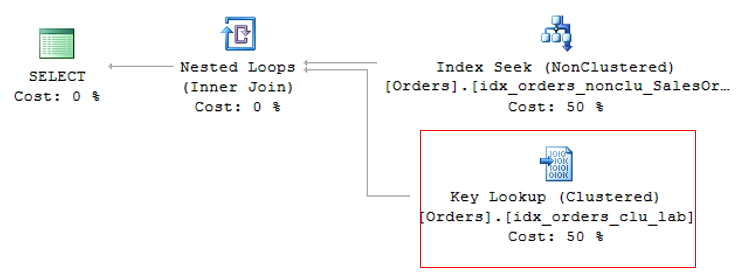
As the clustered index is the table itself, generating a large volume of data, the lowest cost non-clustered index is generally used for the query. This can create a problem, as the query is often selecting columns where not all are indexed, causing a non-clustered index to be used to search for the indexed information (Index Seek NonClustered) and the clustered index to return the remaining information, where the non-clustered index has a pointer to the exact position of the information in the clustered index (or the ROWID, if the table does not have a clustered index).
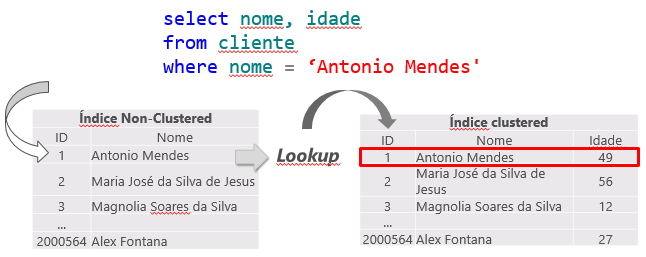
This operation is called Key Lookup, in the case of tables with a clustered index or RID Lookup (RID = Row ID) for tables that do not have a clustered index (called HEAP tables) and because it generates 2 read operations for a single query, it should be avoided whenever possible.
Key Lookup
RID Lookup
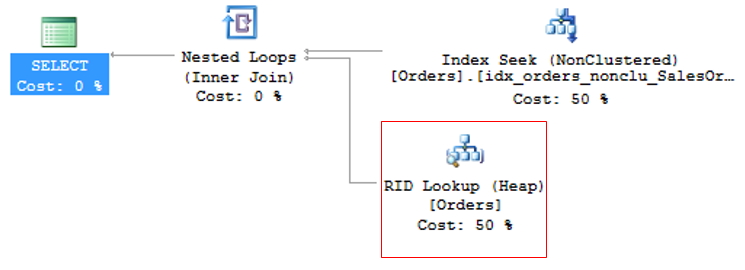
To avoid KeyLookup, simply use the Covering index technique, which consists of adding the main columns that are used in table queries to the NonClustered (INCLUDE) index. This means that the query optimizer can obtain all the information by reading only the chosen index, without having to also read the clustered index.
However, great attention must be paid to modeling the indices. It is not recommended to add all table columns to the non-clustered index, as it will become so large that it will no longer be effective and the query optimizer may even decide not to use it and prefer the Index Scan operator, which reads the entire index sequentially, damaging query performance.
To avoid RID Lookup, simply create the clustered index on the table and pay attention to Key Lookup events that may arise.
Unique (Exclusive) Indexes
A unique index ensures that the index key does not contain any duplicate values, and therefore each row in the table is unique in some way.
Unique multicolumn indexes ensure that each combination of values in the index key is unique. For example, if a unique index is created on a combination of LastName, FirstName, and MiddleName columns, no two rows in the table can have the same combination of values as those columns.
You cannot create a unique index on a single column if it has NULL in more than one row. Similarly, you cannot create a unique index on multiple columns if the combination of columns has NULL in more than one row, as these are treated as duplicate values for indexing purposes.
Internally, when you create a PRIMARY KEY constraint, a unique clustered index is automatically created on the column. The big difference between PRIMARY KEY and a single index is that a table can only have 1 PRIMARY KEY, but several unique indexes.
Example of creating a unique index:
CREATE UNIQUE NONCLUSTERED INDEX SK01 ON dbo.Clientes(CPF)
When trying to insert a CPF into a customer table that already exists, an error will be displayed on the SQL Server screen and the execution will be aborted:
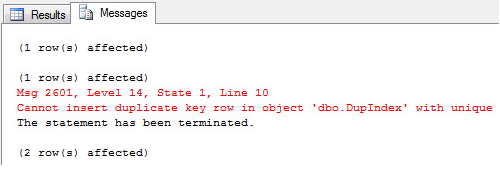
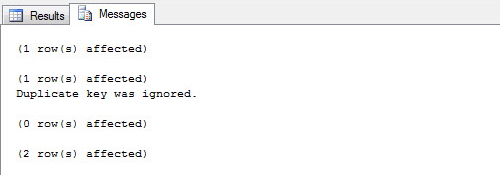
Using the IGNORE_DUP_KEY = ON parameter, you can allow the bank to just ignore the duplicate record and just display a warning on the screen:
CREATE UNIQUE NONCLUSTERED INDEX SK01 ON dbo.Clientes(CPF)
WITH(IGNORE_DUP_KEY = ON)
Rebuild / Reorganize indexes when necessary
The SQL Server Database Engine automatically maintains indexes whenever input, update, or delete operations are performed on the underlying data. Over time, these modifications can cause the index information to be scattered throughout the database (fragmented). Fragmentation occurs when indexes have pages where the logical order, based on the key value, does not match the physical order of the data file. Indexes with heavy fragmentation can degrade query performance and cause slow application response.
Identifying index fragmentation
The first step in choosing which fragmentation method to use is analyzing the index to determine the degree of fragmentation. Using the sys.dm_db_index_physical_stats system function, you can detect fragmentation in a specific index, in all indexes of a table or indexed view, in all indexes of a database, or in all indexes of all databases. For partitioned indexes, sys.dm_db_index_physical_stats also provides fragmentation information per partition.
SELECT
    OBJECT_NAME(B.object_id) AS TableName,
    B.name AS IndexName,
    A.index_type_desc AS IndexType,
    A.avg_fragmentation_in_percent
FROM
    sys.dm_db_index_physical_stats(DB_ID(), NULL, NULL, NULL, 'LIMITED')	A
    INNER JOIN sys.indexes							B	WITH(NOLOCK) ON B.object_id = A.object_id AND B.index_id = A.index_id
WHERE
    A.avg_fragmentation_in_percent > 30
    AND OBJECT_NAME(B.object_id) NOT LIKE '[_]%'
    AND A.index_type_desc != 'HEAP'
ORDER BY
    A.avg_fragmentation_in_percent DESC
Once the index fragmentation level has been identified, you can choose which method will be used to defragment it:
– REORGANIZE: Used when the fragmentation level is between 5% and 30%. This method does not cause the index to be unavailable, as the index is not deleted, just reorganized.
– REBUILD: Used when the fragmentation level is greater than 30%. This method by default causes the index to be unavailable, as it deletes and recreates the index again. To avoid unavailability, you can use the ONLINE parameter when executing REBUILD.
Defragmenting the index
Defragmenting a fragmented index (REORGANIZE)
ALTER INDEX SK01 ON dbo.Logins
REORGANIZE
Defragmenting all table indexes (REORGANIZE)
ALTER INDEX ALL ON dbo.Logins
REORGANIZE
Defragmenting all table indexes (REBUILD)
ALTER INDEX ALL ON dbo.Logins
REBUILD
Defragmenting all table indexes (REBUILD – COMPLETE)
ALTER INDEX ALL ON dbo.Logins
REBUILD WITH (FILLFACTOR = 80, SORT_IN_TEMPDB = ON, STATISTICS_NORECOMPUTE = ON, ONLINE = ON)
To learn more about Rebuild and Reorganize, access this link.
DMV’s and index catalog views
Below is a list of DMVs and index catalog views that can be used to obtain usage information and index statistics:
DMV’s
- sys.dm_db_column_store_row_group_physical_stats
- sys.dm_db_missing_index_groups
- sys.dm_db_index_operational_stats
- sys.dm_db_index_physical_stats
- sys.dm_db_index_usage_stats
- sys.dm_db_missing_index_columns
- sys.dm_db_missing_index_details
- sys.dm_db_missing_index_group_stats
Catalog Views
- sys.index_columns
- sys.indexes
- sys.sysindexes
- sys.sysindexkeys
- sys.xml_indexes
Check index usage
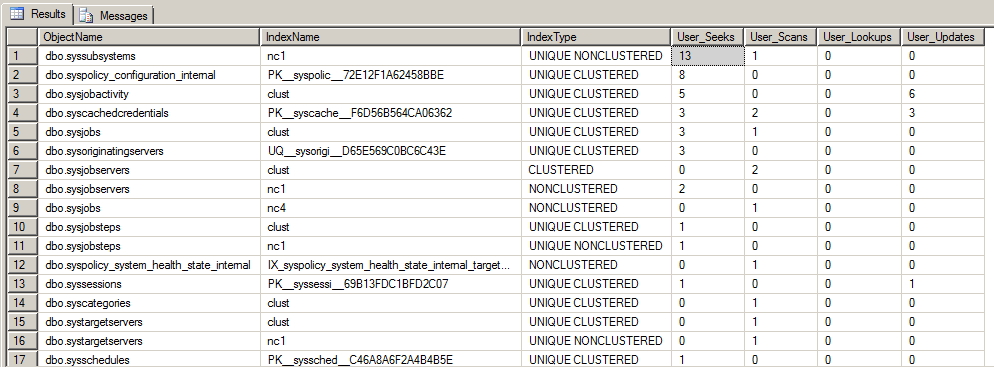
With the query below, it is possible to identify the use of indexes in the database, displaying readings with Index Seek (well-used index), Index Scan (Possible problem in index modeling), Lookups and Updates (number of times the index was updated with new records)
SELECT
    ObjectName = OBJECT_SCHEMA_NAME(idx.object_id) + '.' + OBJECT_NAME(idx.object_id),
    IndexName = idx.name,
    IndexType = CASE WHEN is_unique = 1 THEN 'UNIQUE ' ELSE '' END + idx.type_desc,
    User_Seeks = us.user_seeks,
    User_Scans = us.user_scans,
    User_Lookups = us.user_lookups,
    User_Updates = us.user_updates
FROM
    sys.indexes idx
    LEFT JOIN sys.dm_db_index_usage_stats us ON idx.object_id = us.object_id AND idx.index_id = us.index_id AND us.database_id = DB_ID()
WHERE
    OBJECT_SCHEMA_NAME(idx.object_id) != 'sys'
ORDER BY
    us.user_seeks + us.user_scans + us.user_lookups DESC
Helping you identify the best clustered index candidate
With the query below, it is possible to let SQL help us define the best candidate index to be clustered on the table. Analyzing the DMV dm_db_index_usage_stats, the query identifies the non-clustered index that has more Seek reads than the clustered one (in the query, I defined a percentage of 150%) and the number of Seeks is smaller than the Lookups of the clustered index.
It is not recommended to use only the result of this query for this definition. It should serve to indicate a possible improvement in the exchange of indices and the DBA must carry out detailed analysis to confirm this indication.
SELECT
    TableName = OBJECT_NAME(idx.object_id),
    NonUsefulClusteredIndex = idx.name,
    ShouldBeClustered = nc.nonclusteredname,
    Clustered_User_Seeks = c.user_seeks,
    NonClustered_User_Seeks = nc.user_seeks,
    Clustered_User_Lookups = c.user_lookups,
    DatabaseName = DB_NAME(c.database_id)
FROM
    sys.indexes idx
    LEFT JOIN sys.dm_db_index_usage_stats c ON idx.object_id = c.object_id AND idx.index_id = c.index_id
    JOIN (
           SELECT
                idx.object_id,
                nonclusteredname = idx.name,
                ius.user_seeks
           FROM
                sys.indexes idx
                JOIN sys.dm_db_index_usage_stats ius ON idx.object_id = ius.object_id AND idx.index_id = ius.index_id
           WHERE
                idx.type_desc = 'nonclustered' AND ius.user_seeks = (
                                                                  SELECT
                                                                    MAX(user_seeks)
                                                                  FROM
                                                                    sys.dm_db_index_usage_stats
                                                                  WHERE
                                                                    object_id = ius.object_id AND type_desc = 'nonclustered'
                                                                )
           GROUP BY
                idx.object_id,
                idx.name,
                ius.user_seeks
         ) nc ON nc.object_id = idx.object_id
WHERE
    idx.type_desc IN ( 'clustered', 'heap' )
    AND nc.user_seeks > ( c.user_seeks * 1.50 ) -- 150%
    AND nc.user_seeks >= ( c.user_lookups * 0.75 ) -- 75%
ORDER BY
    nc.user_seeks DESC

Identifying missing indexes
One of the day-to-day tasks of a DBA is to identify missing indexes in the database, which may suggest a performance gain for queries that are frequently executed. With the query below, we can make this task a little easier, because by consulting the missing index DMVs, we can identify this data quickly.
SELECT
    mid.statement,
    migs.avg_total_user_cost * ( migs.avg_user_impact / 100.0 ) * ( migs.user_seeks + migs.user_scans ) AS improvement_measure,
    OBJECT_NAME(mid.object_id),
    'CREATE INDEX [missing_index_' + CONVERT (VARCHAR, mig.index_group_handle) + '_' + CONVERT (VARCHAR, mid.index_handle) + '_' + LEFT(PARSENAME(mid.statement, 1), 32) + ']' + ' ON ' + mid.statement + ' (' + ISNULL(mid.equality_columns, '') + CASE WHEN mid.equality_columns IS NOT NULL AND mid.inequality_columns IS NOT NULL THEN ',' ELSE '' END + ISNULL(mid.inequality_columns, '') + ')' + ISNULL(' INCLUDE (' + mid.included_columns + ')', '') AS create_index_statement,
    migs.*,
    mid.database_id,
    mid.[object_id]
FROM
    sys.dm_db_missing_index_groups mig
    INNER JOIN sys.dm_db_missing_index_group_stats migs ON migs.group_handle = mig.index_group_handle
    INNER JOIN sys.dm_db_missing_index_details mid ON mig.index_handle = mid.index_handle
WHERE
    migs.avg_total_user_cost * ( migs.avg_user_impact / 100.0 ) * ( migs.user_seeks + migs.user_scans ) > 10
ORDER BY
    migs.avg_total_user_cost * migs.avg_user_impact * ( migs.user_seeks + migs.user_scans ) DESC
Analyzing the index histogram
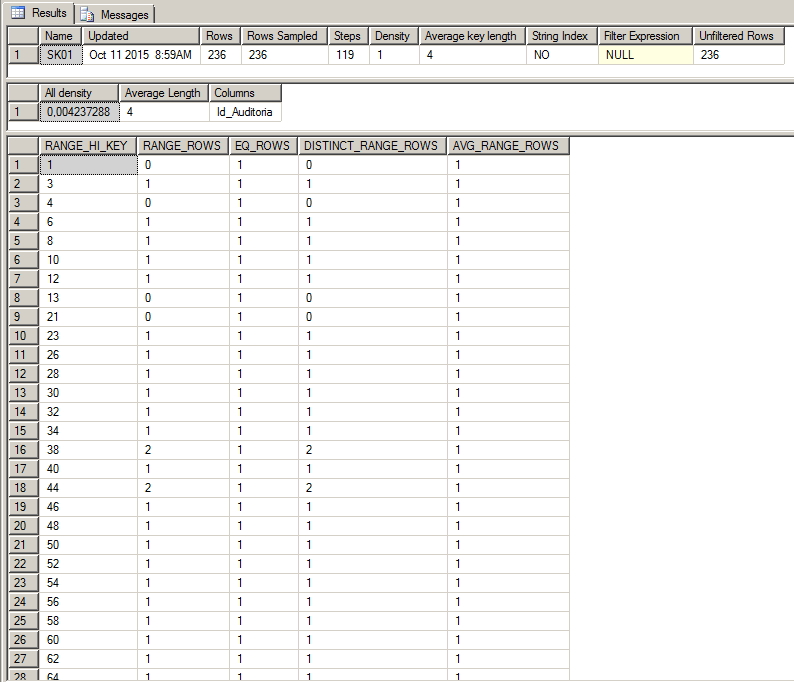
A very important point to consider after the index is created is to analyze its histogram. Using this feature, it is possible to identify how granular the data in the table is and how selective our index is, so the more selective it is, the better it will be used.
An example of this is creating an index on the Sex Column in a customer table and the data distribution is 50% for each of the values. In this situation, the index is not being very selective and the bank will have to do many readings to return the information. To observe the number of records for each value, look at the EQ_ROWS column.
To visualize the index histogram, you can use the DBCC procedure:
-- DBCC SHOW_STATISTICS(Nome_da_Tabela, Nome_do_Indice)
DBCC SHOW_STATISTICS(Logins, SK01)
In the example below, we can observe a case of a very selective index, which has a density of 0.4% and has several different pieces of information. When this index is used, it will return a very small volume of data.
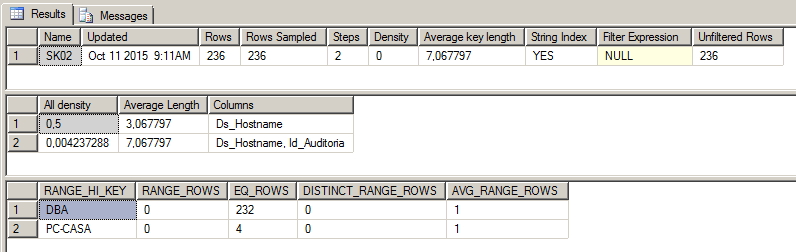
In the example below, we can identify a non-selective index, with a density of 50% (only 2 distinct values), with one of these values (‘DBA’) representing 98% (232 records out of a total of 236) of the data collected. In other words, if this index is used and the query is performed looking for the word 'DBA', the index would need to return 98% of the index data and the SQL optimizer would prefer to perform an Index Scan operation instead of Index Seek.
That's it folks!
Until next time!
sql, sql server, index, index, create index, nonclustered, clustered, include, multiple columns, composite index, how to create, how it works, creating indexes, how to do it, key lookup, heap, iam, rid lookup

Comentários (0)
Carregando comentários…