
Hey guys!
Is everything ok with you?
In this post, I would like to demonstrate to you an innovative feature of SQL Server 2017 (Enterprise, Trial and Developer editions only), which is Resumable Online Index Rebuilds, which allows you to start an index rebuild process and be able to pause this operation in the middle of processing and then continue where you left off, whenever you want.
This new feature is very useful, especially when working with critical environments that have a short maintenance window. In many cases, it is not possible to rebuild certain indexes in this window and the maintenance process ends up becoming very complex to reconcile pending activities and available windows.
Another very common situation in a DBA's day-to-day life is starting to rebuild an index, starting to experience disk and/or CPU contention and being forced to interrupt the rebuild, losing all the work already done so far (and this is very frustrating).
Faced with these situations, Resumable Online Index Rebuilds ends up being a very important solution in the life of the SQL Server DBA, as it can drastically improve index rebuild routines, which are of great importance for good database maintenance.
It is worth noting that, due to this new feature in SQL Server 2017, the DMV sys.dm_exec_requests has been changed to include the is_resumable column, indicating whether the request in question can be summarized or not, using the Resumable Online Index Rebuilds feature.
SELECT
    session_id,
    start_time,
    [status],
    wait_type,
    wait_time,
    is_resumable
FROM
    sys.dm_exec_requests
WHERE
    session_id > 50
Result:

Creating the data mass
To start our tests, let's create a small mass of data.
IF (OBJECT_ID('dbo.Teste') IS NOT NULL) DROP TABLE dbo.Teste
CREATE TABLE dbo.Teste (
    Id INT IDENTITY(1, 1) NOT NULL PRIMARY KEY,
    Nome VARCHAR(50) NOT NULL
) WITH(DATA_COMPRESSION=PAGE)
GO

INSERT INTO dbo.Teste (Nome)
SELECT NEWID()
GO 50000

CREATE NONCLUSTERED INDEX SK01_Teste ON dbo.Teste(Nome) WITH(DATA_COMPRESSION=PAGE)
Performing index rebuild
Now that we have created our test table, we will rebuild the index in order to allow the pause command, which is by adding the parameters ONLINE=ON, RESUMABLE=ON:
ALTER INDEX SK01_Teste ON dbo.Teste
REBUILD WITH(ONLINE=ON, MAXDOP=4, MAX_DURATION=1, RESUMABLE=ON)
Where the parameters of the ALTER INDEX command are:
- ONLINE: Defines whether the rebuild will be done online (by pages) or not. Note that Resumable index rebuild only supports online rebuild, so we must always use the ONLINE=ON parameter to use this feature.
- RESUMABLE: Allows you to define whether the rebuild will be done supporting the Pause/Resume option or not.
- MAX_DURATION: Very interesting parameter, which allows you to define, in minutes, the amount of time that the rebuild will run before being automatically suspended. This value must be greater than 0 and less than or equal to 10080 (1 week).
- PAUSE: Using this parameter, the rebuild operation will be paused and will wait for a new ALTER INDEX to continue the process or the ABORT command to interrupt the rebuild.
- ABORTION: Parameter used to stop the index rebuild.
If you try to rebuild the index with the RESUMABLE=ON and ONLINE=OFF parameter, you will encounter this error message:
The RESUMABLE option cannot be set to ‘ON’ when the ONLINE option is set to ‘OFF’
If the time limit defined in the rebuild command is reached (in the example, I specified 1 min), the rebuild will be immediately interrupted, returning the error message below:
The operation elapsed time exceeded the maximum time specified for this operation. The execution has been stopped.
Msg 596, Level 21, State 1, Line 19
Cannot continue the execution because the session is in the kill state.
Msg 0, Level 20, State 0, Line 19
A severe error occurred on the current command. The results, if any, should be discarded.
Now, I'm going to start the index rebuild and quickly stop it in the middle of the process:
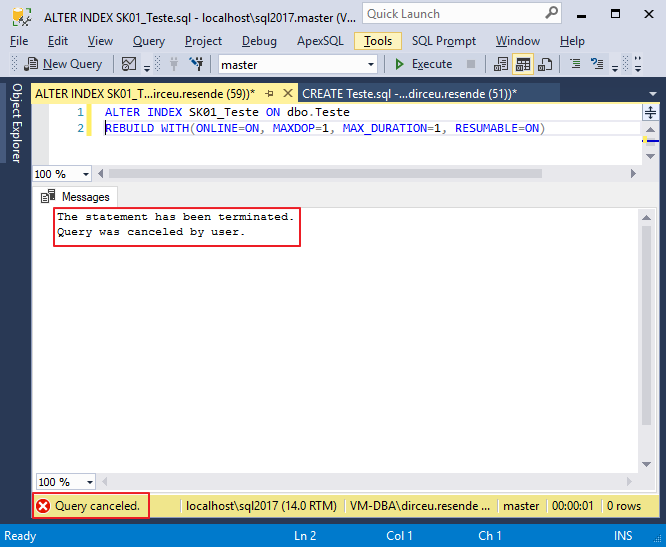
And using the view sys.index_resumable_operations, we can identify how this operation is progressing, which was not completed and ended up being pending:
SELECT *
FROM sys.index_resumable_operations
Result:

How to summarize RESUMABLE index rebuild
To continue rebuilding the index, simply use the command:
ALTER INDEX SK01_Teste ON dbo.Teste RESUME
When using the RESUME parameter, the session that is doing the rebuild will receive this warning message:
“Warning: An existing resumable operation with the same options was identified for the same index on ‘Teste’. The existing operation will be summarized instead.”
The RESUME command can be used after a previous rebuild failure, such as running out of space or if the instance restarts. It is also especially useful for rebuild routines that take hours to complete and end up consuming a lot of log space, as the rebuild routine can be paused, allowing the log backup to reduce log file usage.
You can also use the RESUME command to summarize the index rebuild and at the same time, change the parameters used initially, such as MAXDOP:
ALTER INDEX SK01_Teste ON dbo.Teste RESUME WITH(MAXDOP=6, MAX_DURATION=2)
It is still possible to use the WAIT_AT_LOW_PRIORITY parameter to handle locks and blocks that may occur during the rebuild process, as shown in the example below:
ALTER INDEX SK01_Teste ON dbo.Teste RESUME WITH(MAXDOP=4, MAX_DURATION=1, WAIT_AT_LOW_PRIORITY(MAX_DURATION=10, ABORT_AFTER_WAIT=BLOCKERS))
Where, in the example above, the WAIT_AT_LOW_PRIORITY parameter will cause the rebuild to wait for a maximum of 10 minutes, until the block/lock problem is resolved. After this time, the sessions that are blocking the rebuild will be eliminated, thanks to the ABORT_AFTER_WAIT parameter.
The available options for the ABORT_AFTER_WAIT parameter are:
– NONE: Continues waiting for lock with normal priority
– SELF: Stops the current execution of the index rebuild
– BLOCKERS: Stops the sessions that are preventing the index rebuild from continuing. This option requires that the user running it has ALTER ANY CONNECTION permission.
How to pause the rebuild of RESUMABLE indexes
To pause a rebuild in progress, use the command below:
ALTER INDEX SK01_Teste ON dbo.Teste PAUSE
Once you pause the rebuild of an index, the session that was performing the rebuild operation will receive this error message:
Your session has been disconnected because of a high priority DDL operation.
Msg 1219, Level 16, State 1, Line 17
Your session has been disconnected because of a high priority DDL operation.
Msg 596, Level 21, State 1, Line 16
Cannot continue the execution because the session is in the kill state.
Msg 0, Level 20, State 0, Line 16
A severe error occurred on the current command. The results, if any, should be discarded.
Keep in mind that when you pause a rebuild, it will have the PAUSED status:

At this stage, it is not possible to delete the index that was being updated. It must be summarized or aborted to allow it to be deleted. Otherwise, you will encounter this error message:
Cannot perform this operation on ‘object’ with ID 703341570 as one or more indexes are currently in resumable index rebuild state. Please refer to sys.index_resumable_operations for more details.
How to stop rebuilding RESUMABLE indexes
To interrupt the rebuild that is in the PAUSE state, losing all progress already made, you must use the command:
ALTER INDEX SK01_Teste ON dbo.Teste ABORT
Once you stop the rebuild of an index, the session that was performing the rebuild operation will receive the same error message as when the rebuild is paused:
Your session has been disconnected because of a high priority DDL operation.
Msg 1219, Level 16, State 1, Line 17
Your session has been disconnected because of a high priority DDL operation.
Msg 596, Level 21, State 1, Line 16
Cannot continue the execution because the session is in the kill state.
Msg 0, Level 20, State 0, Line 16
A severe error occurred on the current command. The results, if any, should be discarded.
Limitations of rebuilding RESUMABLE indexes
Below, I will list the limitations of rebuilding RESUMABLE indexes:
- This feature is only supported for indexes in rowstore format
- Does not work with the ALTER INDEX SORT_IN_TEMPDB parameter
- Does not work with TIMESTAMP columns
- Does not work with calculated (computed) columns
- This feature cannot be used on disabled indexes
- This feature cannot be used within a user transaction
That's it, guys!
A hug and see you in the next post.

Comments (0)
Loading comments...