
Introduction
Hey guys!
In this post I would like to share with you a situation that happened to me while consulting with a client, where he had a need to have a Power BI report connected to a SQL Server database, but the data source was a Stored Procedure which did several data transformations internally and returned a set of data.
The problem is that this client wanted the data to be updated in real time, that is, if they opened the report, applied a filter or interacted with the graph, the data would have to be updated by executing this Stored Procedure. And it turns out that Power BI NO This is supported 🙂
If you want to learn more about Power BI DirectQuery, see this content here.
This is the Stored Procedure code that I would like to run as DirectQuery in Power BI:
CREATE OR ALTER PROCEDURE dbo.stpPBI_DirectQuery_Procedure
AS
BEGIN


    IF (OBJECT_ID('tempdb..#Tabelas') IS NOT NULL) DROP TABLE #Tabelas
    SELECT *
    INTO #Tabelas
    FROM sys.tables
    WHERE is_ms_shipped = 0


    IF (OBJECT_ID('tempdb..#Tabelas_Internas') IS NOT NULL) DROP TABLE #Tabelas_Internas
    CREATE TABLE #Tabelas_Internas (
        [object_id] INT,
        [Descricao] VARCHAR(100)
    )

    INSERT INTO #Tabelas_Internas
    VALUES(965578478, 'Tabela de Confirmados'), (1013578649, 'Tabela de Casos Recuperados')


    SELECT
        A.[object_id],
        A.[name],
        A.create_date,
        A.lock_escalation_desc,
        A.temporal_type_desc,
        B.Descricao
    FROM
        #Tabelas A
        LEFT JOIN #Tabelas_Internas B ON B.[object_id] = A.[object_id]
    WHERE
        is_replicated = 0
    ORDER BY
        [name]


END
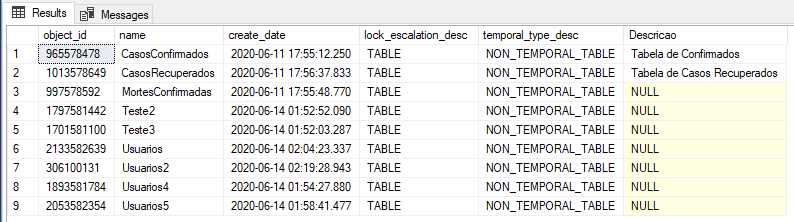
Expected execution result:
Simulating the problem
Click here to view this content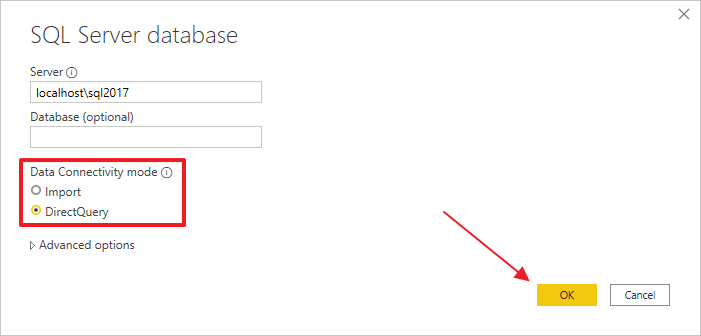
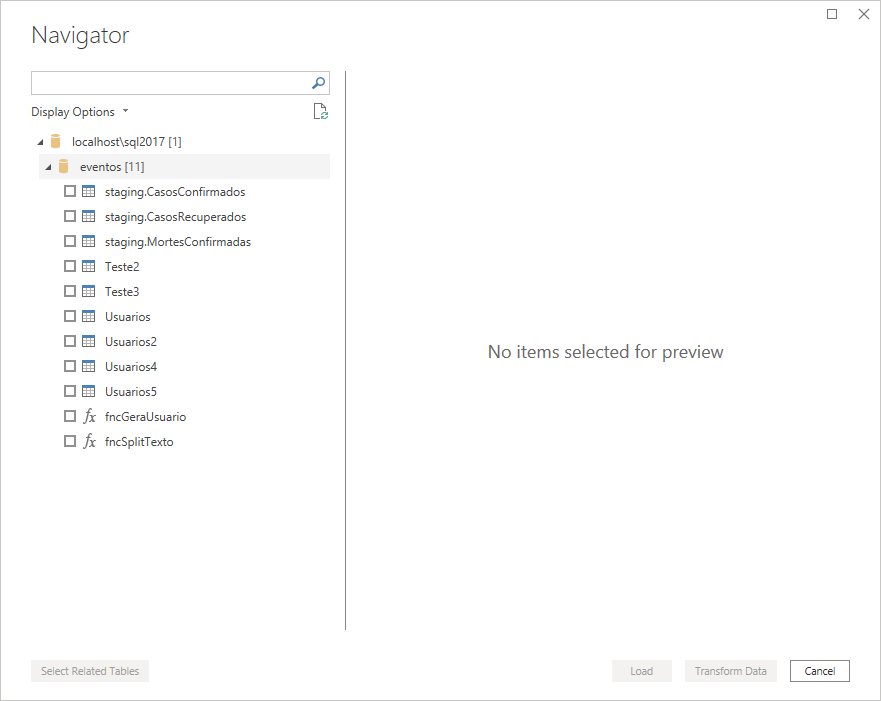
In the list of objects, we can see that it only lists tables, views and functions:
I'll go back to the connection screen and try to enter the execute command manually in the SQL statement screen:

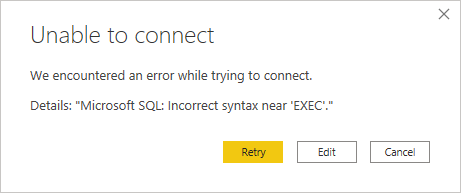
But when trying to do this, an error message is returned:
Let's try again, without adding the EXEC statement:

Oops! It looks like it loaded!

It seemed like it would work, but when trying to load the data...
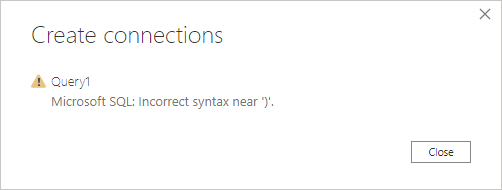
PowerQuery even shows the database data, but it doesn't let me load it into the model, showing the message from the previous print.
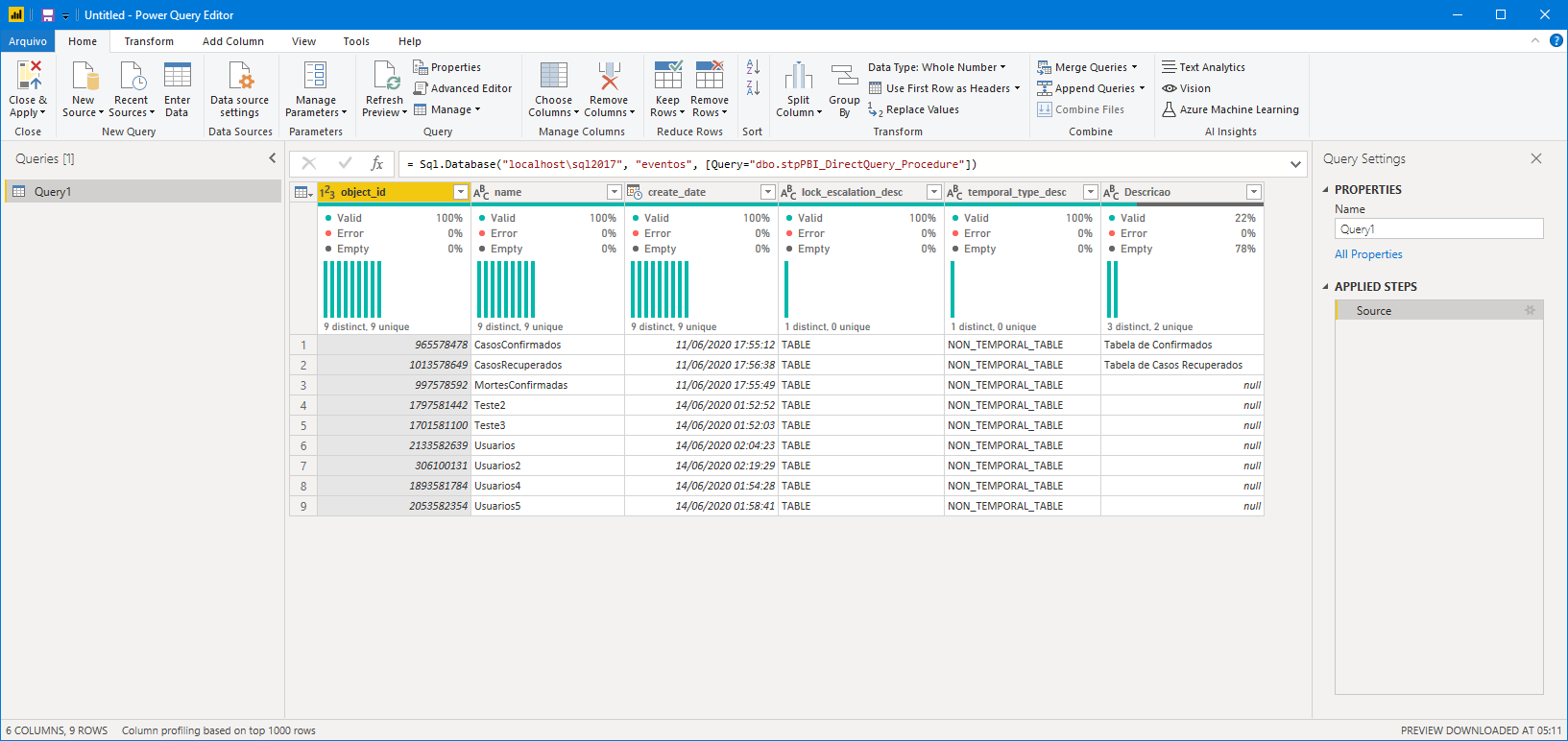
Solution #1 – OpenRowSet
Click here to view this contentSELECT * FROM OPENROWSET('SQLNCLI', 'Server=.;Trusted_Connection=yes;', 'EXEC eventos.dbo.stpPBI_DirectQuery_Procedure')The first point to consider is this error message below:
SQL Server blocked access to STATEMENT ‘OpenRowset/OpenDatasource’ of component ‘Ad Hoc Distributed Queries’ because this component is turned off as part of the security configuration for this server. A system administrator can enable the use of ‘Ad Hoc Distributed Queries’ by using sp_configure. For more information about enabling ‘Ad Hoc Distributed Queries’, search for ‘Ad Hoc Distributed Queries’ in SQL Server Books Online.
This message represents nothing more than that the OpenRowset/OpenDatasource feature is disabled on the instance (by default, this setting is disabled due to security reasons). To use Openrowset, you will need to enable this feature, and your DBA probably won't like it:
sp_configure 'show advanced options', 1
GO
RECONFIGURE
GO

sp_configure 'Ad Hoc Distributed Queries', 1
GO
RECONFIGURE
GO
Once enabled, now just execute our SELECT command. And we come across the 2nd error message:
VALUES(965578478, ‘Confirmed Table’), (1013578649, ‘Table’ in procedure ‘stpPBI_DirectQuery_Procedure’ uses a temp table.
Now SQL Server is complaining about the temporary tables used in the Stored Procedure. Let's make some changes to the procedure and replace the temporary tables (#table) with table-type variables (@table):
ALTER PROCEDURE dbo.stpPBI_DirectQuery_Procedure
AS
BEGIN


    DECLARE @Tabelas TABLE (
        [object_id] INT,
        [name] VARCHAR(100),
        create_date DATETIME,
        lock_escalation_desc VARCHAR(100),
        temporal_type_desc VARCHAR(100),
        is_replicated BIT
    )

    INSERT INTO @Tabelas
    SELECT
        A.[object_id],
        A.[name],
        A.create_date,
        A.lock_escalation_desc,
        A.temporal_type_desc,
        A.is_replicated
    FROM
        sys.tables A
    WHERE
        is_ms_shipped = 0


    DECLARE @Tabelas_Internas TABLE (
        [object_id] INT,
        [Descricao] VARCHAR(100)
    )

    INSERT INTO @Tabelas_Internas
    VALUES(965578478, 'Tabela de Confirmados'), (1013578649, 'Tabela de Casos Recuperados')


    SELECT
        A.[object_id],
        A.[name],
        A.create_date,
        A.lock_escalation_desc,
        A.temporal_type_desc,
        B.Descricao
    FROM
        @Tabelas A
        LEFT JOIN @Tabelas_Internas B ON B.[object_id] = A.[object_id]
    WHERE
        A.is_replicated = 0
    ORDER BY
        [name]


END
And let's try again. Another error message:
Cannot process the object “EXEC eventos.dbo.stpPBI_DirectQuery_Procedure”. The OLE DB provider “SQLNCLI11” for linked server “(null)” indicates that either the object has no columns or the current user does not have permissions on that object.
To solve this problem, we will include the “SET NOCOUNT ON” instruction at the beginning of the Stored Procedure, so that the OPENROWSET command can correctly identify the returned data and does not suffer interference with the return of the number of rows returned:
ALTER PROCEDURE dbo.stpPBI_DirectQuery_Procedure
AS
BEGIN


    SET NOCOUNT ON


    DECLARE @Tabelas TABLE (
        [object_id] INT,
        [name] VARCHAR(100),
        create_date DATETIME,
        lock_escalation_desc VARCHAR(100),
        temporal_type_desc VARCHAR(100),
        is_replicated BIT
    )

    INSERT INTO @Tabelas
    SELECT
        A.[object_id],
        A.[name],
        A.create_date,
        A.lock_escalation_desc,
        A.temporal_type_desc,
        A.is_replicated
    FROM
        sys.tables A
    WHERE
        is_ms_shipped = 0


    DECLARE @Tabelas_Internas TABLE (
        [object_id] INT,
        [Descricao] VARCHAR(100)
    )

    INSERT INTO @Tabelas_Internas
    VALUES(965578478, 'Tabela de Confirmados'), (1013578649, 'Tabela de Casos Recuperados')


    SELECT
        A.[object_id],
        A.[name],
        A.create_date,
        A.lock_escalation_desc,
        A.temporal_type_desc,
        B.Descricao
    FROM
        @Tabelas A
        LEFT JOIN @Tabelas_Internas B ON B.[object_id] = A.[object_id]
    WHERE
        A.is_replicated = 0
    ORDER BY
        [name]


END
With this change, our SELECT command was executed correctly:
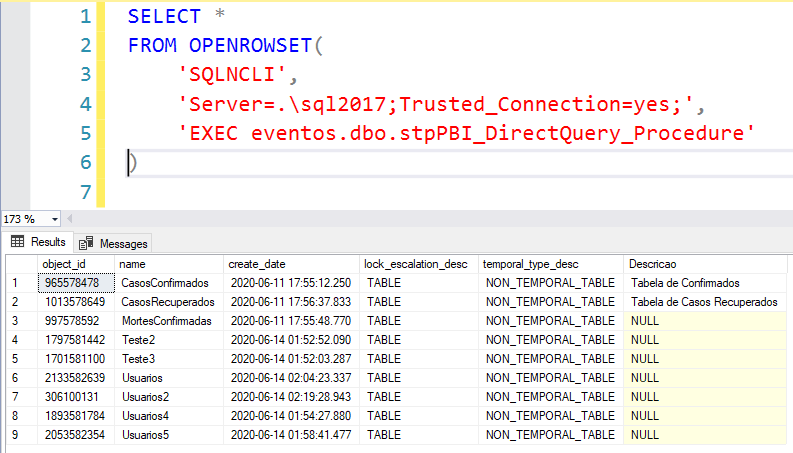
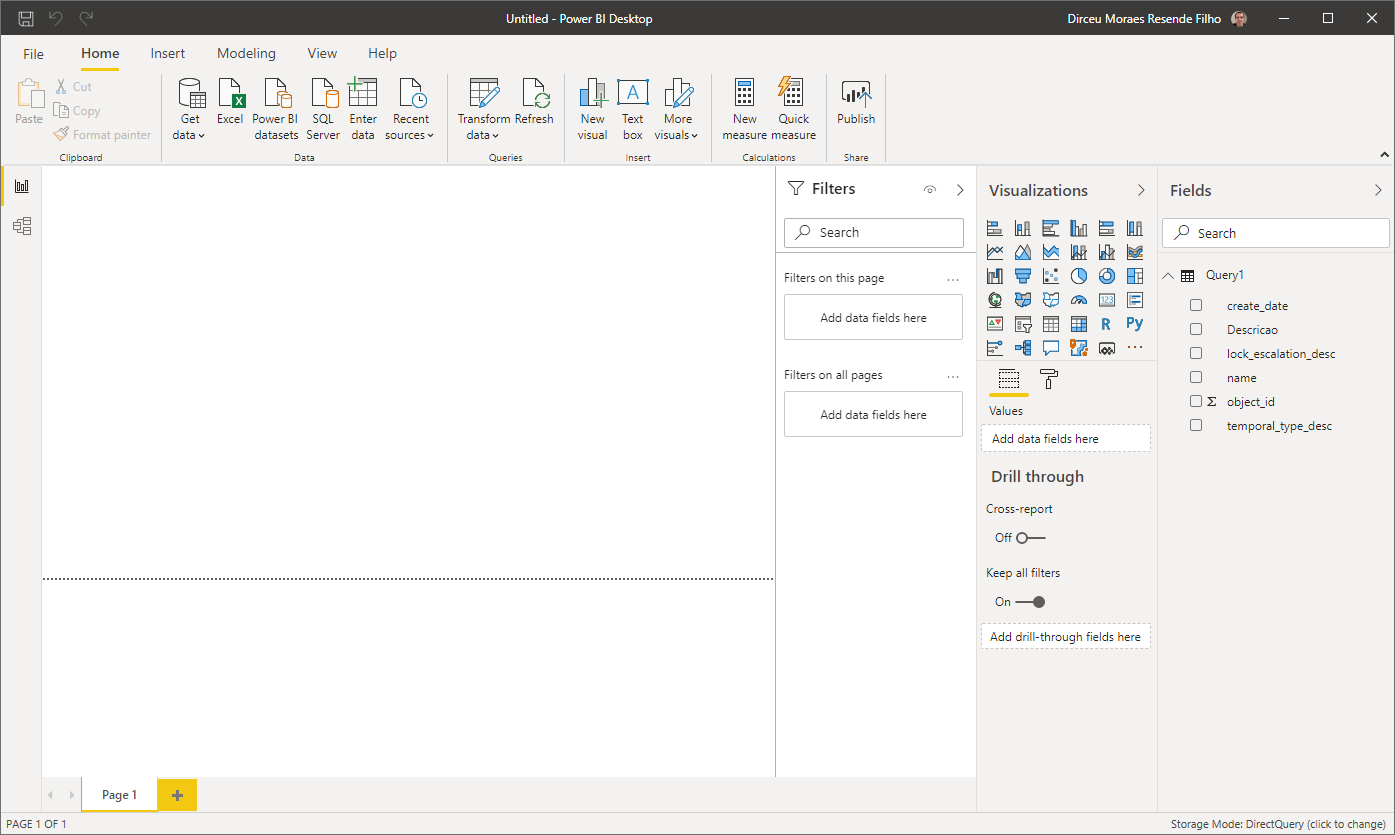
Let's go back to Power BI, repeat the entire process and now we can load the data normally into Power BI:
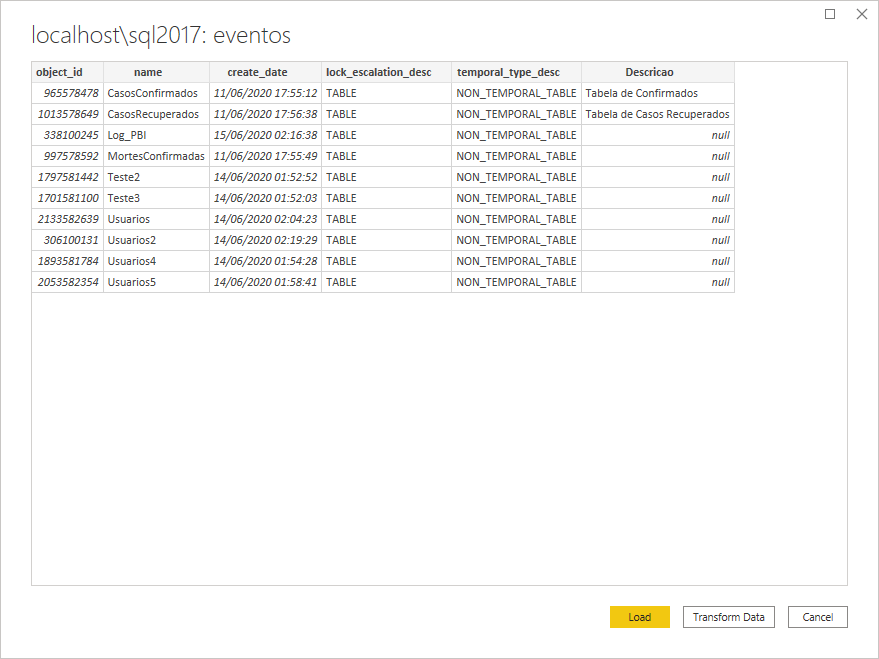
And it's there! We are consuming a Stored Procedure using DirectQuery in Power BI!
Solution #2 – Using Table-Valued Function
Click here to view this contentBelow is the function code, which does exactly the same thing as the previous Stored Procedure:
CREATE FUNCTION dbo.fncPBI_DirectQuery_Procedure()
RETURNS @Retorno TABLE (
    [object_id] INT,
    [name] VARCHAR(100),
    create_date DATETIME,
    lock_escalation_desc VARCHAR(100),
    temporal_type_desc VARCHAR(100),
    descricao varchar(200)
)
AS
BEGIN


    DECLARE @Tabelas TABLE (
        [object_id] INT,
        [name] VARCHAR(100),
        create_date DATETIME,
        lock_escalation_desc VARCHAR(100),
        temporal_type_desc VARCHAR(100),
        is_replicated BIT
    )

    INSERT INTO @Tabelas
    SELECT
        A.[object_id],
        A.[name],
        A.create_date,
        A.lock_escalation_desc,
        A.temporal_type_desc,
        A.is_replicated
    FROM
        sys.tables A
    WHERE
        is_ms_shipped = 0


    DECLARE @Tabelas_Internas TABLE (
        [object_id] INT,
        [Descricao] VARCHAR(100)
    )

    INSERT INTO @Tabelas_Internas
    VALUES(965578478, 'Tabela de Confirmados'), (1013578649, 'Tabela de Casos Recuperados'), (338100245, 'Tabela Interna de Log')


    INSERT INTO @Retorno
    SELECT
        A.[object_id],
        A.[name],
        A.create_date,
        A.lock_escalation_desc,
        A.temporal_type_desc,
        B.Descricao
    FROM
        @Tabelas A
        LEFT JOIN @Tabelas_Internas B ON B.[object_id] = A.[object_id]
    WHERE
        A.is_replicated = 0
    ORDER BY
        [name]


    RETURN


END
After creating the function, select the “Get Data” > “SQL Server” option and write the SELECT command to read the function data:
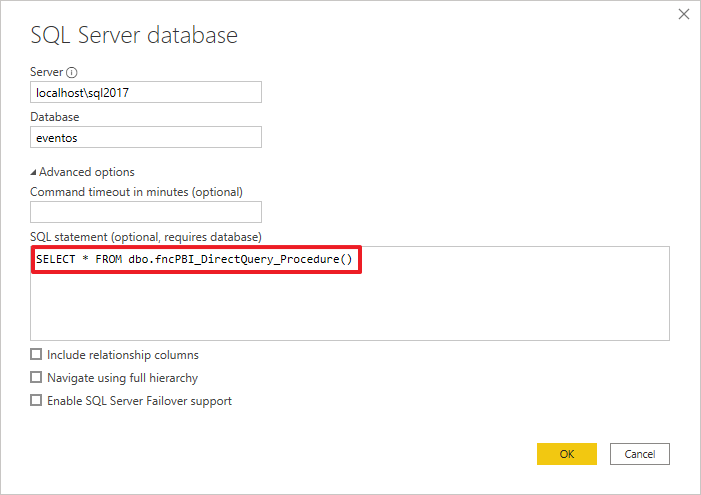
After clicking the “OK” button, your data will be loaded normally:
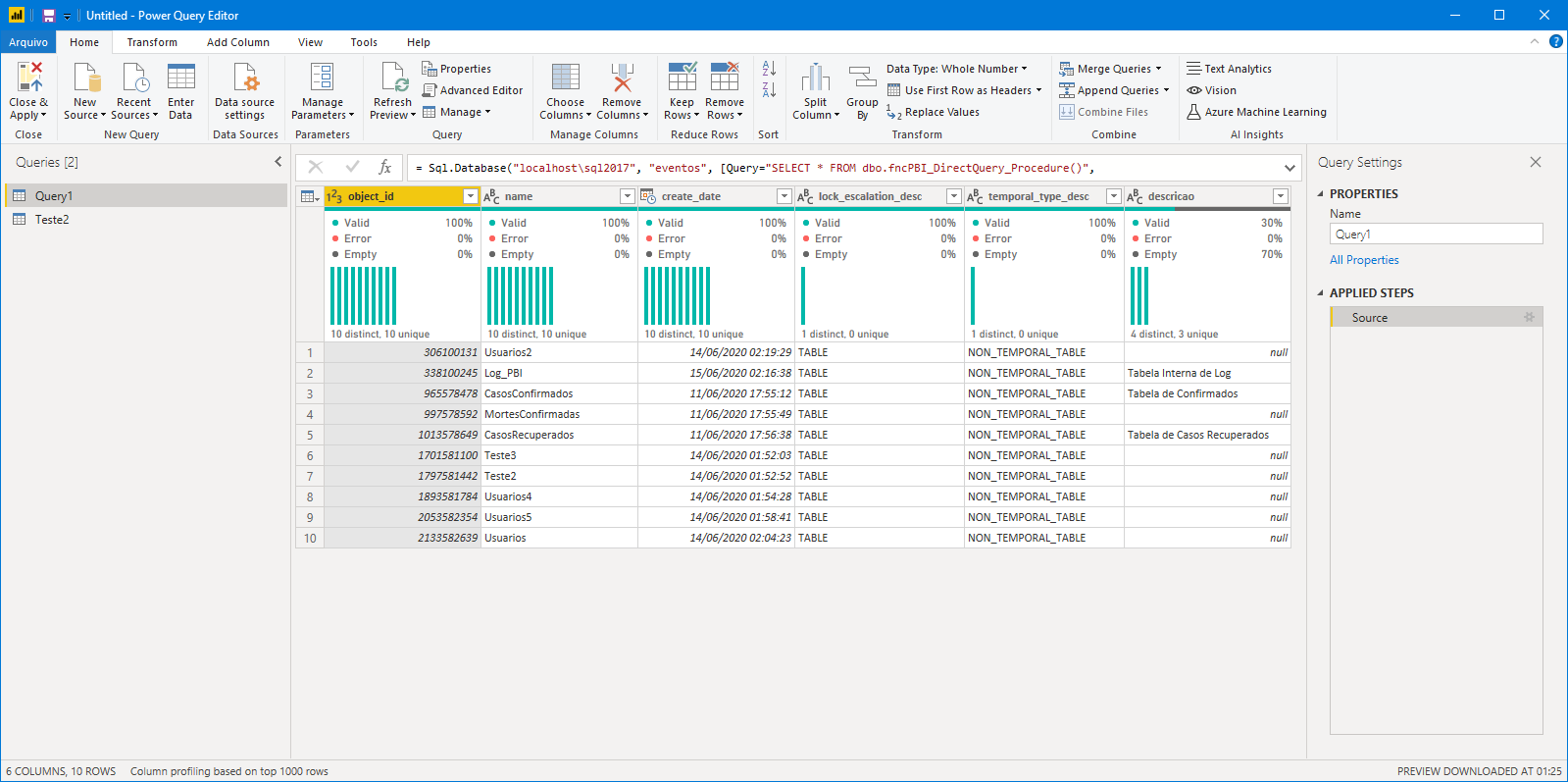
Just click on the familiar “Close and Apply” button and our task is done.
Limitations
The use of Stored Procedures or functions to connect to data with DirectQuery has some limitations that I can highlight:
- Cannot pass dynamic parameters to Stored Procedure or Table-valued function dynamically
- When using a slicer, for example, the data is executed in the database and then filtered the data returned using the slicers, therefore, this may cause performance problems in very large tables
- Unlike a paginated report, which recalculates the entire dataset after user interactions, Power BI does not update the data in the source with each applied filter or interaction in DirectQuery
- Both solutions will present performance problems in large volumes of data
- The 2 techniques presented require a certain knowledge of T-SQL and only work on SQL Server. This might be a bit complex to work with for a non-IT business user
- DirectQuery by itself already has some limitations that you can come across by accessing this link here
That's it, folks!
I hope you liked this tip, that it will be useful to you in any specific need and see you next time!

Comments (0)
Loading comments...