In today's post I'm going to bring something really cool, which is a Transact-SQL stored procedure where it is possible to query and track information about orders and objects using data from the Correios website itself in SQL Server. To do this, I will use the MSXML2.ServerXMLHTTP object and OLE Automation procedures for one solution and the CLR for another alternative.
This is very useful for e-Commerce companies that can use this SP to integrate Correios tracking into their systems and display the delivery progress of their products on the screen.
I had already shown a solution very similar to this in the article Querying Correios object tracking using SQL Server, but this solution stopped working on 10/06, when Correios decided to disable the address that was run on the link http://websro.correios.com.br…, used by several e-Commerce systems to track objects and in my previous post.
As a result, I needed to think of another solution to track objects. Through some internet searches, I found the service http://www.linkcorreios.com.br/, which allows you to track very precisely. Let's see how it will allow us to track objects.
How to track objects using OLE Automation
A very simple and quick way to make HTTP Request requests through SQL Server is by using the OLE Automation feature, which invokes external libraries and DLLs to perform various tasks in the database. Look in this link some other posts about OLE Automation.
Before we start, let’s look at some prerequisites for using this procedure.:
– Enable the OLE Automation feature on your SQL Server server (see how in this post)
– fncRemove_HTML function to remove HTML tags from a varchar string (see more in this post)
– fncSplitTexto function to break a string into substrings using a delimiter (see more in this post)
An important detail that I observed in the development of this SP is that if the number of characters in the XML returned by the sp_OAGetProperty procedure is greater than 4000 characters, the SP's return will be NULL, since the sp_OAGetProperty procedure has this limitation of 4000 characters. To get around this problem, instead of using an OUTPUT variable to capture the data, I insert it into a temporary table and then work with the data. 🙂
View SP source code
Click here to expand
CREATE PROCEDURE [dbo].[stpBusca_Rastreamento_Correios]
    @Ds_Rastreamento [varchar](13)
AS
BEGIN


    SET NOCOUNT ON


    ------------------------------------------------------------------------
    -- RECUPERAÇÃO DAS INFORMAÇÕES
    ------------------------------------------------------------------------

    DECLARE
        @obj INT,
        @Url VARCHAR(8000),
        @xml VARCHAR(MAX),
        @resposta VARCHAR(MAX)


    SET @Url = 'http://www.linkcorreios.com.br/?id=' + @Ds_Rastreamento


    EXEC sys.sp_OACreate @progid = 'MSXML2.ServerXMLHTTP', @objecttoken = @obj OUT, @context = 1
    EXEC sys.sp_OAMethod @obj, 'open', NULL, 'GET', @Url, false
    EXEC sys.sp_OAMethod @obj, 'setRequestHeader', NULL, 'Content-Type', 'application/x-www-form-urlencoded'
    EXEC sys.sp_OAMethod @obj, 'send'


    IF (OBJECT_ID('tempdb..#xml') IS NOT NULL) DROP TABLE #xml
    CREATE TABLE #xml (
        Ds_Dados VARCHAR(MAX)
    )

    INSERT INTO #xml(Ds_Dados)
    EXEC sys.sp_OAGetProperty @obj, 'responseText' --, @resposta OUT


    EXEC sys.sp_OADestroy @obj


    SELECT TOP 1 @resposta = Ds_Dados FROM #xml


    SET @xml = @resposta COLLATE SQL_Latin1_General_CP1251_CS_AS

    ------------------------------------------------------------------------
    -- TRATAMENTO DOS DADOS
    ------------------------------------------------------------------------

    SET @xml = REPLACE(@xml, '</td><td>', ' | ')

    IF (OBJECT_ID('tempdb..#Dados') IS NOT NULL) DROP TABLE #Dados
    SELECT
        ROW_NUMBER() OVER(ORDER BY Id) AS Linha,
        LTRIM(RTRIM(REPLACE(REPLACE(Palavra, CHAR(13), ''), CHAR(9), ''))) AS Palavra
    INTO
        #Dados
    FROM
        dbo.fncSplitTexto(dbo.fncRemove_HTML(@xml), CHAR(10))
    WHERE
        NULLIF(LTRIM(RTRIM(REPLACE(REPLACE(Palavra, CHAR(13), ''), CHAR(9), ''))), '') IS NOT NULL


    ------------------------------------------------------------------------
    -- RESULTADO FINAL
    ------------------------------------------------------------------------

    DECLARE
        @Linha_Inicio INT = (SELECT Linha FROM #Dados WHERE Palavra = 'Data / Hora') + 2,
        @Linha_Fim INT = (SELECT Linha FROM #Dados WHERE Palavra LIKE '%Objeto atrasado? Problema na entrega?%')

    IF (OBJECT_ID('tempdb..#Dados_Final') IS NOT NULL) DROP TABLE #Dados_Final
    SELECT
        ROW_NUMBER() OVER(ORDER BY Linha) AS Linha,
        Palavra AS Rastreamento,
        (Linha % 3) AS Grupo
    INTO
        #Dados_Final
    FROM
        #Dados
    WHERE
        Linha >= @Linha_Inicio
        AND Linha < @Linha_Fim


    DECLARE @Tabela_Final TABLE (
        Dt_Rastreamento DATETIME,
        Ds_Rastreamento VARCHAR(255),
        Ds_Local VARCHAR(255)
    )

    DECLARE
        @Contador INT = 0, @Total INT = (SELECT COUNT(*) FROM #Dados_Final) / 3

    WHILE (@Contador < @Total)
    BEGIN

        INSERT INTO @Tabela_Final
        SELECT
            CONVERT(DATETIME, (SELECT Rastreamento FROM #Dados_Final WHERE Linha = (@Contador * 3) + 1), 103) AS Dt_Rastreamento,
            (SELECT Rastreamento FROM #Dados_Final WHERE Linha = (@Contador * 3) + 2) AS Ds_Rastreamento,
            REPLACE((SELECT Rastreamento FROM #Dados_Final WHERE Linha = (@Contador * 3) + 3), 'Local: ', '') AS Ds_Local

        SET @Contador += 1

    END


    SELECT * FROM @Tabela_Final


END
How to track objects using CLR
Another way to make HTTP requests through SQL Server is by using the CLR, a powerful tool that Microsoft makes available and which allows you to create programs written in C# or VB, using all the resources of the Microsoft .NET Framework and executing them through the database. If you don't already know CLR, give it a read on this link here and follow all my articles using CLR in this link.
Prerequisites for using this procedure:
– fncRemove_HTML function to remove HTML tags from a varchar string (see more in this post)
– fncSplit_Texto function to break HTML into lines (see more in this post)
– Stored Procedure stpWs_Requisicao to make HTTP requests (see more in this post)
View SP source code
Click here to expand
CREATE PROCEDURE [dbo].[stpBusca_Rastreamento_Correios]
    @Ds_Rastreamento [varchar](13)
AS
BEGIN

    ------------------------------------------------------------------------
    -- RECUPERAÇÃO DAS INFORMAÇÕES
    ------------------------------------------------------------------------

    DECLARE
        @obj INT,
        @Url VARCHAR(8000),
        @xml VARCHAR(MAX),
        @resposta VARCHAR(MAX)


    SET @Url = 'http://www.linkcorreios.com.br/?id=' + @Ds_Rastreamento


    EXEC CLR.dbo.stpWs_Requisicao
        @Ds_Url = @Url, -- nvarchar(max)
        @Ds_Metodo = N'GET', -- nvarchar(max)
        @Ds_Parametros = N'', -- nvarchar(max)
        @Ds_Codificacao = N'UTF-8', -- nvarchar(max)
        @Ds_Retorno_OUTPUT = @resposta OUTPUT -- nvarchar(max)


    SET @xml = @resposta COLLATE SQL_Latin1_General_CP1251_CS_AS


    ------------------------------------------------------------------------
    -- TRATAMENTO DOS DADOS
    ------------------------------------------------------------------------

    SET @xml = REPLACE(@xml, '</td><td>', ' | ')


    IF (OBJECT_ID('tempdb..#Dados') IS NOT NULL) DROP TABLE #Dados
    SELECT
        ROW_NUMBER() OVER(ORDER BY Id) AS Linha,
        LTRIM(RTRIM(REPLACE(Ds_Palavra, CHAR(13), ''))) AS Palavra
    INTO
        #Dados
    FROM
        CLR.dbo.fncSplit_Texto(CLR.dbo.fncRemove_HTML(@xml), CHAR(10), 1)
    WHERE
        NULLIF(REPLACE(Ds_Palavra, CHAR(13), ''), '') IS NOT NULL

    ------------------------------------------------------------------------
    -- RESULTADO FINAL
    ------------------------------------------------------------------------

    DECLARE
        @Linha_Inicio INT = (SELECT Linha FROM #Dados WHERE Palavra = 'Data / Hora') + 2,
        @Linha_Fim INT = (SELECT Linha FROM #Dados WHERE Palavra LIKE '%Objeto atrasado? Problema na entrega?%')

    IF (OBJECT_ID('tempdb..#Dados_Final') IS NOT NULL) DROP TABLE #Dados_Final
    SELECT
        ROW_NUMBER() OVER(ORDER BY Linha) AS Linha,
        Palavra AS Rastreamento,
        (Linha % 3) AS Grupo
    INTO
        #Dados_Final
    FROM
        #Dados
    WHERE
        Linha >= @Linha_Inicio
        AND Linha < @Linha_Fim


    DECLARE @Tabela_Final TABLE (
        Dt_Rastreamento DATETIME,
        Ds_Rastreamento VARCHAR(255),
        Ds_Local VARCHAR(255)
    )

    DECLARE
        @Contador INT = 0, @Total INT = (SELECT COUNT(*) FROM #Dados_Final) / 3

    WHILE (@Contador < @Total)
    BEGIN

        INSERT INTO @Tabela_Final
        SELECT
            CONVERT(DATETIME, (SELECT Rastreamento FROM #Dados_Final WHERE Linha = (@Contador * 3) + 1), 103) AS Dt_Rastreamento,
            (SELECT Rastreamento FROM #Dados_Final WHERE Linha = (@Contador * 3) + 2) AS Ds_Rastreamento,
            REPLACE((SELECT Rastreamento FROM #Dados_Final WHERE Linha = (@Contador * 3) + 3), 'Local: ', '') AS Ds_Local

        SET @Contador += 1

    END


    SELECT * FROM @Tabela_Final


END
Result of SP’s
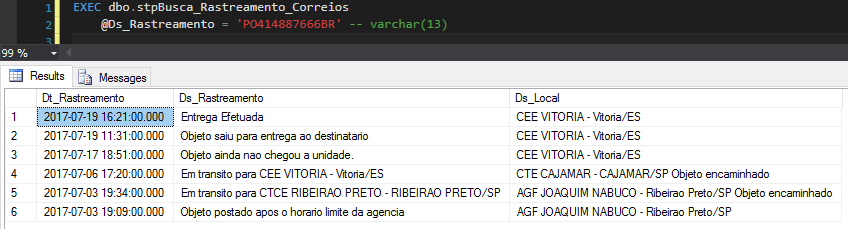
Both Stored Procedures have exactly the same return. Only the encoding of the two differs. Once you choose which of the two approaches you want to follow, the SP result will be like this:
That's it, folks!
I hope you liked this post and leave your comment.
sql server tsql transact sql query tracking orders objects mail
sql server tsql transact sql query tracking orders objects mail


Comments (0)
Loading comments...