
Hey guys,
Are you all right?
In this post today, I will share with you a Table-valued UDF function that allows you to break strings into lines, forcing the maximum length of each line to be N characters separated by a separator character defined in the function call.
This function arose from a need in a critical project where I work, in which we have VARCHAR(MAX) strings and we need to export these strings into a TXT file with a maximum size of 60 characters, maintaining an Id to identify the original record and a ranking (I used ROW_NUMBER) to identify the order of each part of the string.
Interested in learning more about splits?
- Breaking strings into sub-strings using split string
- charindexada: A different function for breaking delimited strings (split)
- How to break a string into a substring table using a delimiter in SQL Server
Usage examples
Simple example:
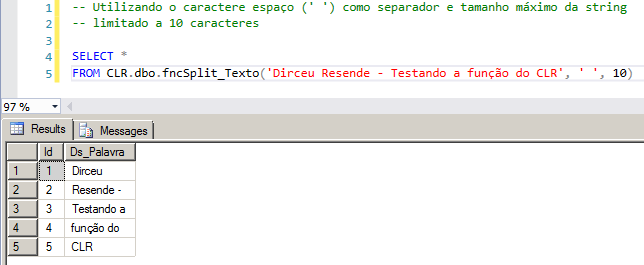
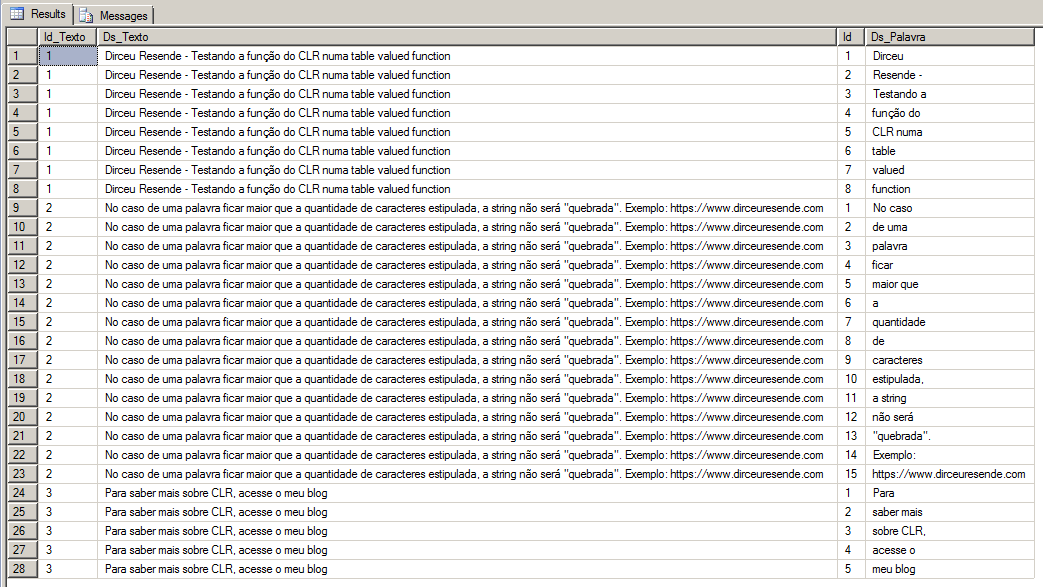
Example with CROSS APPLY:
-- Utilizando o caractere espaço (' ') como separador e tamanho máximo da string
-- limitado a 10 caracteres

IF (OBJECT_ID('tempdb..#Teste') IS NOT NULL) DROP TABLE #Teste
CREATE TABLE #Teste (
    Id_Texto INT IDENTITY(1, 1),
    Ds_Texto VARCHAR(MAX)
)

INSERT INTO #Teste
VALUES('Dirceu Resende - Testando a função do CLR numa table valued function'),
('No caso de uma palavra ficar maior que a quantidade de caracteres estipulada, a string não será "quebrada". Exemplo: https://dirceuresende.com'),
('Para saber mais sobre CLR, acesse o meu blog')

SELECT
    *
FROM
    #Teste A
    CROSS APPLY CLR.dbo.fncSplit_Texto(A.Ds_Texto, ' ', 10) B
Result:
Function source code
To use the function demonstrated above, simply create the table-valued CLR function in your instance. To better understand what the CLR is and how to create your first CLR library, see more in the post Introduction to SQL CLR (Common Language Runtime) in SQL Server.
using System;
using System.Collections;
using System.Data.SqlTypes;

public partial class UserDefinedFunctions
{

    private class SplitTexto
    {

        public SqlInt32 Id;
        public SqlString Ds_Palavra;

        public SplitTexto(SqlInt32 id, SqlString dsPalavra)
        {
            Id = id;
            Ds_Palavra = dsPalavra.IsNull ? "" : dsPalavra;
        }
    }

    [Microsoft.SqlServer.Server.SqlFunction(
            FillRowMethodName = "FillSplitTexto",
            TableDefinition = "Id INT, Ds_Palavra NVARCHAR(4000)"
        )]
    public static IEnumerable fncSplit_Texto(string Ds_Texto, string Ds_Separador, int Tamanho_Palavra)
    {

        var splitTextoCollection = new ArrayList();

        if (string.IsNullOrEmpty(Ds_Texto))
            return splitTextoCollection;

        var contador = 1;
        var palavra = "";
        Ds_Texto = Ds_Texto + Ds_Separador;

        while (Ds_Texto.Length > 0)
        {

            var substring = Ds_Texto.Substring(0, Ds_Texto.IndexOf(Ds_Separador, StringComparison.Ordinal)).Trim();

            if (palavra == " ")
                palavra = "";

            if ((palavra + " " + substring).Length > Tamanho_Palavra)
            {

                splitTextoCollection.Add(new SplitTexto(
                    contador,
                    palavra.Trim()
                ));

                palavra = substring;
                contador++;

            }
            else
            {
                palavra = palavra == " " ? substring : (palavra + " " + substring);
            }

            Ds_Texto = Ds_Texto.Substring(Ds_Texto.IndexOf(Ds_Separador, StringComparison.Ordinal) + 1);

        }


        if (palavra.Trim().Length > 0)
        {

            splitTextoCollection.Add(new SplitTexto(
                contador,
                palavra.Trim()
            ));

        }


        return splitTextoCollection;

    }

    protected static void FillSplitTexto(object objSplitTexto, out SqlInt32 id, out SqlString dsPalavra)
    {

        var splitTexto = (SplitTexto) objSplitTexto;

        id = splitTexto.Id;
        dsPalavra = splitTexto.Ds_Palavra.IsNull ? "" : splitTexto.Ds_Palavra;

    }

};
That's it, folks!
A hug and see you next time.

Comments (0)
Loading comments...