
Hey guys!
In this post I would like to share with you the operation of an operator that I rarely see anyone using, which is CROSS JOIN, and which in certain scenarios can be useful.
What is CROSS JOIN?
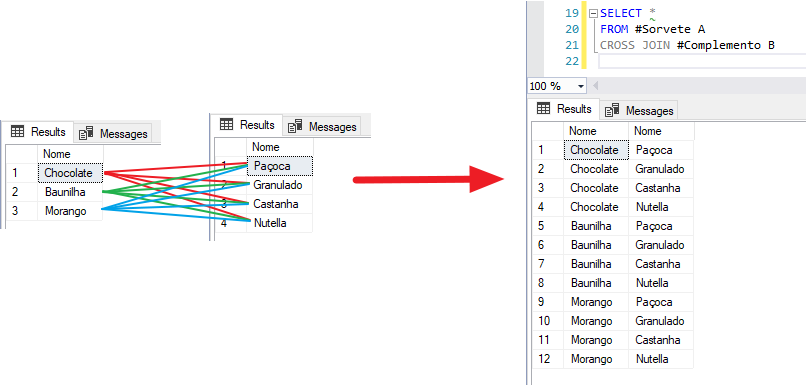
CROSS JOIN returns the combination of each of the rows between the tables involved, also known as Cartesian product, which I will demonstrate below to facilitate understanding.
Example 1
In this example, I will create 2 tables and cross the data from the two tables to create a Cartesian product combining each row from the #Ice Cream table with each row from the #Complement table (yes, I feel like eating ice cream).
Script to generate the data for this example:
IF (OBJECT_ID('tempdb..#Sorvete') IS NOT NULL) DROP TABLE #Sorvete
CREATE TABLE #Sorvete (
    Nome VARCHAR(60)
)

INSERT INTO #Sorvete VALUES ('Chocolate'), ('Baunilha'), ('Morango')
GO

IF (OBJECT_ID('tempdb..#Complemento') IS NOT NULL) DROP TABLE #Complemento
CREATE TABLE #Complemento (
    Nome VARCHAR(60)
)
GO

INSERT INTO #Complemento VALUES ('Paçoca'), ('Granulado'), ('Castanha'), ('Nutella')
GO

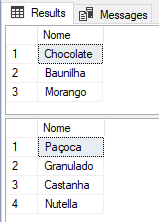
SELECT * FROM #Sorvete
SELECT * FROM #Complemento
Result:
Well, now let's create the Cartesian product between the two tables:
The only way to create a Cartesian product is using CROSS JOIN?
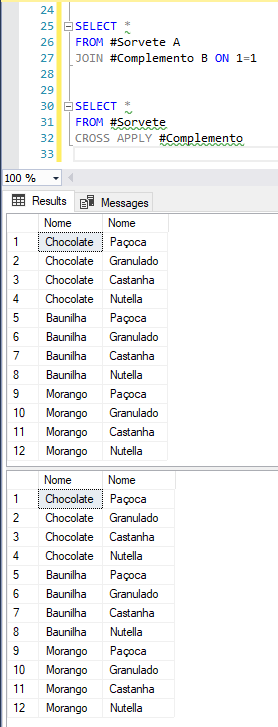
As we have seen, the Cartesian product creates all possible combinations between the data involved. As in our example there was a table with 3 records in a CROSS JOIN operation with another table with 4 records, our final result presented 12 rows (3 x 4).
If each table had 1,000 records, the final result would have 1 million records (1,000 x 1,000), so the Cartesian product is generally not desirable in a JOIN operation, and can cause performance problems if it occurs in an undesired way (like in a wrong join clause, for example)
Example 2
In this example, I will demonstrate a practical scenario where the Cartesian product justifies its use, using the organizers and speakers of the 1st SQL Day ES.
Script to generate the data for this example:
IF (OBJECT_ID('tempdb..#Pessoas') IS NOT NULL) DROP TABLE #Pessoas
CREATE TABLE #Pessoas (
    Id_Pessoa INT IDENTITY(1,1) NOT NULL PRIMARY KEY,
    Nome VARCHAR(60) NOT NULL,
    Sexo VARCHAR(1) NOT NULL,
    Estado VARCHAR(2) NOT NULL,
    Cidade VARCHAR(60) NOT NULL
)
GO

INSERT INTO #Pessoas (Nome, Sexo, Estado, Cidade)
VALUES
    ('Dirceu', 'M', 'ES', 'Vitória'),
    ('Vithor', 'M','ES', 'Vila Velha'),
    ('Fabrício', 'M','ES', 'Vila Velha'),
    ('Tiago', 'M','ES', 'Serra'),
    ('Caio', 'M','SP', 'São José dos Campos'),
    ('Cláudio', 'M','RJ', 'Rio de Janeiro'),
    ('Daniel', 'M','ES', 'Vila Velha'),
    ('Felippe', 'M','RJ', 'Rio de Janeiro'),
    ('Jéssica', 'F','SP', 'São José dos Campos'),
    ('Raiane', 'F','DF', 'Brasília'),
    ('Reginaldo', 'M','SP', 'Boituva'),
    ('Sulamita', 'F', 'MG', 'Belo Horizonte')
Now, I want to show you how to create a report that shows me gender, state, and how many people we have in this cluster:
SELECT
    Estado,
    Cidade,
    Sexo,
    COUNT(*) AS Qt_Pessoas
FROM
    #Pessoas
GROUP BY
    Estado,
    Cidade,
    Sexo
ORDER BY
    1, 2, 3
Result:
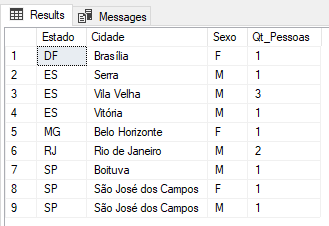
As you may have noticed, only existing records in the table are returned. For example, in the state of “DF” it only returned results with the gender “F”, because in our table, there are only people with the gender Female in the state DF.
But what if I also want to show the genres that do not have people registered in the table? How do I do it? Well, to start, let's use the CTE (Common Table Expressions) to match gender to cities and states and create all possible combinations:
;WITH cteEstados AS (
    SELECT DISTINCT Estado, Cidade
    FROM #Pessoas
),
cteSexo AS (
    SELECT DISTINCT Sexo
    FROM #Pessoas
)
SELECT
    *
FROM
    cteEstados
    CROSS JOIN cteSexo
ORDER BY
    1, 2, 3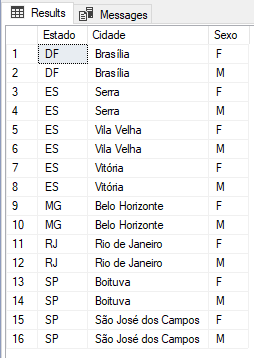
Now, let's modify this script to return the number of people in each of the combinations, which is what we want to show in the result of our query:
;WITH cteEstados AS (
    SELECT DISTINCT Estado, Cidade
    FROM #Pessoas
),
cteSexo AS (
    SELECT DISTINCT Sexo
    FROM #Pessoas
),
cteQuantidade AS (
    SELECT Cidade, Estado, Sexo, COUNT(*) AS Quantidade
    FROM #Pessoas
    GROUP BY Cidade, Estado, Sexo
)
SELECT
    cteEstados.Estado,
    cteEstados.Cidade,
    cteSexo.Sexo,
    ISNULL(cteQuantidade.Quantidade, 0) AS Quantidade
FROM
    cteEstados
    CROSS JOIN cteSexo
    LEFT JOIN cteQuantidade ON cteEstados.Cidade = cteQuantidade.Cidade AND cteEstados.Estado = cteQuantidade.Estado AND cteQuantidade.Sexo = cteSexo.Sexo
ORDER BY
    1, 2, 3
Result:
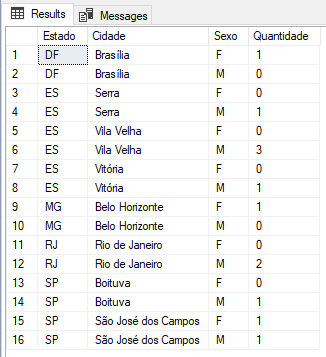
Conclusion
Well guys, I hope I was able to demonstrate that the Cartesian product can indeed be useful in developing T-SQL queries. To create example 2 without using it, we would have to create a cursor or while loop, which has terrible performance and the routine ends up being much more complex.
Although I have demonstrated good use of this feature, be very careful when using it, especially with large volumes of data, since the CROSS JOIN or Cartesian product, creates all possible combinations between 2 or more ResultSets, crossing each row of table A with each row of table B.
We often observe poorly constructed JOINs (INNER, LEFT, RIGHT) that end up creating an unintentional Cartesian product, generating many unwanted rows and causing a performance problem in the query.
That said, I close this post.
A big hug to you and see you next time.

Comments (0)
Loading comments...