Hey guys!
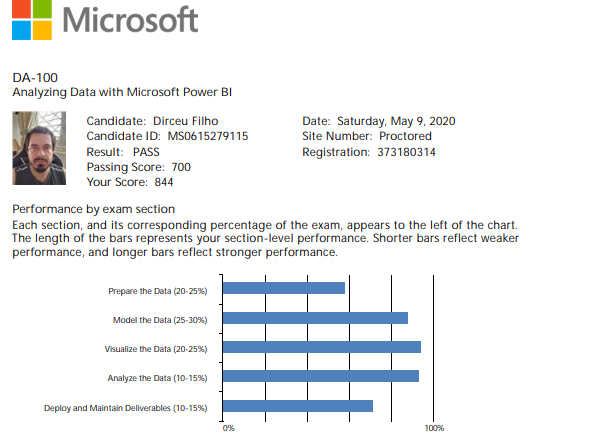
On Saturday 05/09, I took the beta test “DA-100 – Analyzing Data with Microsoft Power BI (beta)”, which is aimed at business analysts and report/dashboard creators in Power BI, replacing exams 70-778 and 70-779 (yes, now it's just 1 exam) and I wanted to share my impressions about the exam and some study materials.
First of all, if you want tips on how to take certification tests at home without having too many problems, I suggest reading my post Microsoft Certification – Tips on how to take the test at home without a headache and remembering that Beta tests can only be done in Japanese or English, so if you still can't at least do a reading in English, you need to change that to yesterday. URGENT!! Working in the IT or data field in general without knowing even the basics of English means that you will always be behind and limited in relation to other professionals. It will take a good few months to have this test in Portuguese.
And to learn more about how Microsoft certification tests work, how Beta tests work and also study material for test 70-778 (Analyzing and Visualizing Data with Microsoft Power BI), visit my post Microsoft Certifications – Tips, links and study materials for the SQL Server 2016 MCSA and MCSE exams.
In general, I found this test very easy, especially in relation to 70-778, which required more knowledge of DAX, in addition to Office 365 Administration, Integration with Sharepoint, One Drive and several other comprehensive knowledge unrelated to Power BI and which were now not required in this test (remembering that there is a question bank and that it may not have been included in my test, but in yours there may be questions about it), but the test is more up to date, already having questions about Main influencers and decomposition tree, for example.
However, there are many logic questions in this test, where you have to reason to solve some questions (technical knowledge is not enough), some basic knowledge of data types is present (integer is faster than string, for example). Knowledge of types of relationships, cardinalities, optimization of report performance (both in loading and type of data, cardinalities and other good practices) were also required.
UPDATE (01/07): The test results came out and I went APPROVED!
And if you're studying Power BI, you can't miss the pioneering Power BI channel in Brazil and the largest and most complete Power BI channel in Latin America, the Planlheiros Brazil, which has almost 400 videos with content from basic to advanced.
Study material for the DA-100 test (Analyzing Data with Microsoft Power BI)
As this test is still in beta phase, the Learning Path page for this test it is not yet available, that is, there is no official material for study (like all beta tests).
Study material according to what I remember from the test
I will highlight what I remember from the test to try to guide your study, remembering that there are several variations of the test and they will not always be the same questions:
- Permissions and roles in Workspaces
- Power BI Analytics Dashboard (pay attention to Forecasting)
- Using Row Level Security (RLS) in Power BI Desktop and the Service (and how to test the filter as if you were another user)
- M functions like Text.Split, Text.Replace
- Split Functions to Transform a Column into Multiple Rows
- PowerQuery: Merge vs Append
- PowerQuery: Pivot vs Unpivot
- Calculate last day of the month in M and in DAX
- Performance of reading large volumes of data with WHERE in the query, FILTER in DAX or Filter in Power Query (which can work with large volumes of data)
- Performance Tuning: Calculated vs Measured Column
- Understanding relationships between tables in Power BI (Cardinality, Direction) (Another very good link also about this)
- Power BI with Sharepoint: Differences between importing file, folder or list
- Understanding Data Profiling and Column Distribution
- Import multiple CSV files from one folder (also with different structures)
- DAX: FORMAT function for numbers and dates (including custom formats)
- Key Influencers: Understand what they are for and how they work
- Data segmentation: Study everything, and also synchronization between tabs
- Integration between visuals with the option to Edit interaction (Crossfilter, Hightlight or do nothing)
- Power BI filter types (Report, Page, Visual)
- Accessibility in Power BI: Tab Order
- KPI creation
- Applications in Power BI: When, why
- Isolation of environments between development and production
- Shared Datasets
- DAX Functions: KEEPFILTERS, ISFILTERED, EOMONTH, DIVIDE, ALLSELECTED, TOPN, FORMAT
- Custom visuals security
- Importing JSON files
- Use of synonyms and best practices to improve questions and answers (Q&A)
Study material according to the Microsoft page about the test
I am also making this collection of links available to help with studying for this test according to the official content of the test:
Prepare the data (20-25%)
-
Get data from different data sources
Click here to view the content -
Data profile
Click here to view the content -
Clean, transform and load data (ETL)
Click here to view the content
Model the Data (25-30%)
-
Design a data model
Click here to view the content -
Develop a data model
Click here to view the content -
Create measures using DAX
Click here to view the content -
Optimize model performance
Click here to view the content
Visualize the Data (20-25%)
-
Create reports
Click here to view the content -
Create dashboards
Click here to view the content -
Enhance the usability of reports
Click here to view the content
Analyze Data (10-15%)
-
Enhance reporting to surface ideas and insights
Click here to view the content -
Perform advanced analytics
Click here to view the content
Publish and Maintain Deliverables (10-15%)
-
Manage datasets
Click here to view the content -
Create and manage workspaces
Click here to view the content
Live on the Planilheiros channel about the test
With this, I conclude this collection of study materials for the DA-100 – Analyzing Data with Microsoft Power BI (beta) certification test, in which I believe that if you study everything in this article, in addition to passing the test, you should learn a lot about Power BI.
That's it, folks!
I hope you enjoyed this article and see you later!

Comentários (0)
Carregando comentários…