
Hola, chicos,
¿Todo está bien?
En este artículo, le demostraré cómo convertir una cadena RTF en texto (eliminar etiquetas RTF) usando CLR (C#) o Powershell, que era una necesidad que tuve la semana pasada, donde un sistema registraba la información en una tabla y los datos estaban en RTF (formato de texto enriquecido). Busqué mucho en internet para encontrar soluciones que me ayudaran a convertir RTF a texto directamente a través de la base de datos y no encontré muchas alternativas que me gustaran y que me motivaran a escribir este post para ti.
Si no conoces CLR o quieres saber más sobre él, entender cómo funciona, sus limitaciones, ventajas, desventajas y cómo crear y publicar un nuevo proyecto CLR, lee el post. Introducción a SQL CLR (Common Language Runtime) en SQL Server.
La solución trivial con C#
Si haces esta búsqueda en Google, probablemente la solución más común que encontrarás sea esta:
System.Windows.Forms.RichTextBox rtBox = new System.Windows.Forms.RichTextBox();
string rtfText = "{\rtf1\ansi\ansicpg1252\fromhtml1 \fbidis \deff0{\fonttbl {\f0\fswiss Arial;} {\f1\fmodern Courier New;} {\f2\fnil\fcharset2 Symbol;} {\f3\fmodern\fcharset0 Courier New;} {\f4\fswiss Segoe UI;}} {\colortbl\red0\green0\blue0;\red0\green0\blue255;\red0\green0\blue0;} \uc1\pard\plain\deftab360 \f0\fs24  {\*\htmltag0 \par } {\*\htmltag48 }{\*\htmltag64}\htmlrtf {\htmlrtf0  {\*\htmltag148 }\htmlrtf {\cf2 \fs20 \f4 \htmlrtf0  {\*\htmltag4 \par }\htmlrtf }\htmlrtf0 {\*\htmltag72}\htmlrtf}\htmlrtf0  {\*\htmltag96 }\htmlrtf {\ltrpar\ltrch\ql \htmlrtf0 {\*\htmltag64}\htmlrtf {\htmlrtf0 \htmlrtf {\cf2 \fs20 \f4 \htmlrtf0 Dirceu Resende\htmlrtf }\htmlrtf0 {\*\htmltag72}\htmlrtf\par}\htmlrtf0  {\*\htmltag104 }\htmlrtf }\htmlrtf0  {\*\htmltag248 } {\*\htmltag58 }}";
rtBox.Rtf = rtfText;
string plainText = rtBox.Text;
Lo cual es una solución realmente simple y realmente funciona. Sin embargo, me gustaría utilizar esta solución a través de la base de datos y por lo tanto, usar la biblioteca System.Windows.Forms no es una idea muy interesante, ya que esta biblioteca no está cargada por defecto por SQL Server y por lo tanto, tendría que importar su ensamblado y sus dependencias (que no son pocas) manualmente a la base de datos, como se muestra a continuación:
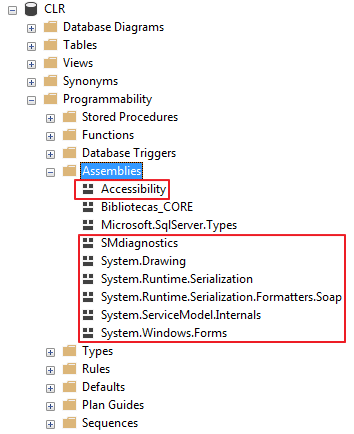
Esto aumentaría la complejidad de su CLR (y también de las publicaciones) y podría tener efectos negativos en la estabilidad de su instancia y, por lo tanto, no recomiendo esta práctica.
La solución con C# usando RichTextStripper Helper
Después de mucha investigación en Internet en busca de soluciones similares, encontré una clase llamada RichTextStripper, escrita en C# y desarrollada por Chris Benard, que hace exactamente eso. Encontró código Python que hace este trabajo y convirtió el código a C#.
Código fuente de función en CLR
Esta es la función que se generará en la base de datos y la usarás para eliminar el formato RTF de cadenas y columnas en SQL Server, luego de publicar tu CLR y usar la clase RichTextStripper.
using System.Collections.Generic;
using System.Text.RegularExpressions;

public partial class UserDefinedFunctions
{
    [Microsoft.SqlServer.Server.SqlFunction]
    public static string fncRemove_RTF_String(string Ds_String_Rtf)
    {
        return RichTextStripper.StripRichTextFormat(Ds_String_Rtf).Trim();
    }
}


/// <summary>
/// Rich Text Stripper
/// </summary>
/// <remarks>
/// Translated from Python located at:
/// http://stackoverflow.com/a/188877/448
/// https://chrisbenard.net/2014/08/20/extract-text-from-rtf-in-c-net/
/// </remarks>
public static class RichTextStripper
{

    private class StackEntry
    {
        public int NumberOfCharactersToSkip { get; set; }
        public bool Ignorable { get; set; }

        public StackEntry(int numberOfCharactersToSkip, bool ignorable)
        {
            NumberOfCharactersToSkip = numberOfCharactersToSkip;
            Ignorable = ignorable;
        }
    }

    private static readonly Regex _rtfRegex = new Regex(@"\\([a-z]{1,32})(-?\d{1,10})?[ ]?|\\'([0-9a-f]{2})|\\([^a-z])|([{}])|[\r\n]+|(.)", RegexOptions.Singleline | RegexOptions.IgnoreCase);

    private static readonly List<string> destinations = new List<string>
    {
        "aftncn","aftnsep","aftnsepc","annotation","atnauthor","atndate","atnicn","atnid",
        "atnparent","atnref","atntime","atrfend","atrfstart","author","background",
        "bkmkend","bkmkstart","blipuid","buptim","category","colorschememapping",
        "colortbl","comment","company","creatim","datafield","datastore","defchp","defpap",
        "do","doccomm","docvar","dptxbxtext","ebcend","ebcstart","factoidname","falt",
        "fchars","ffdeftext","ffentrymcr","ffexitmcr","ffformat","ffhelptext","ffl",
        "ffname","ffstattext","field","file","filetbl","fldinst","fldrslt","fldtype",
        "fname","fontemb","fontfile","fonttbl","footer","footerf","footerl","footerr",
        "footnote","formfield","ftncn","ftnsep","ftnsepc","g","generator","gridtbl",
        "header","headerf","headerl","headerr","hl","hlfr","hlinkbase","hlloc","hlsrc",
        "hsv","htmltag","info","keycode","keywords","latentstyles","lchars","levelnumbers",
        "leveltext","lfolevel","linkval","list","listlevel","listname","listoverride",
        "listoverridetable","listpicture","liststylename","listtable","listtext",
        "lsdlockedexcept","macc","maccPr","mailmerge","maln","malnScr","manager","margPr",
        "mbar","mbarPr","mbaseJc","mbegChr","mborderBox","mborderBoxPr","mbox","mboxPr",
        "mchr","mcount","mctrlPr","md","mdeg","mdegHide","mden","mdiff","mdPr","me",
        "mendChr","meqArr","meqArrPr","mf","mfName","mfPr","mfunc","mfuncPr","mgroupChr",
        "mgroupChrPr","mgrow","mhideBot","mhideLeft","mhideRight","mhideTop","mhtmltag",
        "mlim","mlimloc","mlimlow","mlimlowPr","mlimupp","mlimuppPr","mm","mmaddfieldname",
        "mmath","mmathPict","mmathPr","mmaxdist","mmc","mmcJc","mmconnectstr",
        "mmconnectstrdata","mmcPr","mmcs","mmdatasource","mmheadersource","mmmailsubject",
        "mmodso","mmodsofilter","mmodsofldmpdata","mmodsomappedname","mmodsoname",
        "mmodsorecipdata","mmodsosort","mmodsosrc","mmodsotable","mmodsoudl",
        "mmodsoudldata","mmodsouniquetag","mmPr","mmquery","mmr","mnary","mnaryPr",
        "mnoBreak","mnum","mobjDist","moMath","moMathPara","moMathParaPr","mopEmu",
        "mphant","mphantPr","mplcHide","mpos","mr","mrad","mradPr","mrPr","msepChr",
        "mshow","mshp","msPre","msPrePr","msSub","msSubPr","msSubSup","msSubSupPr","msSup",
        "msSupPr","mstrikeBLTR","mstrikeH","mstrikeTLBR","mstrikeV","msub","msubHide",
        "msup","msupHide","mtransp","mtype","mvertJc","mvfmf","mvfml","mvtof","mvtol",
        "mzeroAsc","mzeroDesc","mzeroWid","nesttableprops","nextfile","nonesttables",
        "objalias","objclass","objdata","object","objname","objsect","objtime","oldcprops",
        "oldpprops","oldsprops","oldtprops","oleclsid","operator","panose","password",
        "passwordhash","pgp","pgptbl","picprop","pict","pn","pnseclvl","pntext","pntxta",
        "pntxtb","printim","private","propname","protend","protstart","protusertbl","pxe",
        "result","revtbl","revtim","rsidtbl","rxe","shp","shpgrp","shpinst",
        "shppict","shprslt","shptxt","sn","sp","staticval","stylesheet","subject","sv",
        "svb","tc","template","themedata","title","txe","ud","upr","userprops",
        "wgrffmtfilter","windowcaption","writereservation","writereservhash","xe","xform",
        "xmlattrname","xmlattrvalue","xmlclose","xmlname","xmlnstbl",
        "xmlopen"
    };

    private static readonly Dictionary<string, string> specialCharacters = new Dictionary<string, string>
    {
        { "par", "\n" },
        { "sect", "\n\n" },
        { "page", "\n\n" },
        { "line", "\n" },
        { "tab", "\t" },
        { "emdash", "\u2014" },
        { "endash", "\u2013" },
        { "emspace", "\u2003" },
        { "enspace", "\u2002" },
        { "qmspace", "\u2005" },
        { "bullet", "\u2022" },
        { "lquote", "\u2018" },
        { "rquote", "\u2019" },
        { "ldblquote", "\u201C" },
        { "rdblquote", "\u201D" },
    };
    /// <summary>
    /// Strip RTF Tags from RTF Text
    /// </summary>
    /// <param name="inputRtf">RTF formatted text</param>
    /// <returns>Plain text from RTF</returns>
    public static string StripRichTextFormat(string inputRtf)
    {
        if (inputRtf == null)
        {
            return null;
        }

        string returnString;

        var stack = new Stack<StackEntry>();
        var ignorable = false;              // Whether this group (and all inside it) are "ignorable".
        var ucskip = 1;                      // Number of ASCII characters to skip after a unicode character.
        var curskip = 0;                     // Number of ASCII characters left to skip
        var outList = new List<string>();    // Output buffer.

        var matches = _rtfRegex.Matches(inputRtf);

        if (matches.Count > 0)
        {
            foreach (Match match in matches)
            {
                var word = match.Groups[1].Value;
                var arg = match.Groups[2].Value;
                var hex = match.Groups[3].Value;
                var character = match.Groups[4].Value;
                var brace = match.Groups[5].Value;
                var tchar = match.Groups[6].Value;

                if (!string.IsNullOrEmpty(brace))
                {
                    curskip = 0;
                    if (brace == "{")
                    {
                        // Push state
                        stack.Push(new StackEntry(ucskip, ignorable));
                    }
                    else if (brace == "}")
                    {
                        // Pop state
                        var entry = stack.Pop();
                        ucskip = entry.NumberOfCharactersToSkip;
                        ignorable = entry.Ignorable;
                    }
                }
                else if (!string.IsNullOrEmpty(character)) // \x (not a letter)
                {
                    curskip = 0;
                    if (character == "~")
                    {
                        if (!ignorable)
                        {
                            outList.Add("\xA0");
                        }
                    }
                    else if ("{}\\".Contains(character))
                    {
                        if (!ignorable)
                        {
                            outList.Add(character);
                        }
                    }
                    else if (character == "*")
                    {
                        ignorable = true;
                    }
                }
                else if (!string.IsNullOrEmpty(word)) // \foo
                {
                    curskip = 0;
                    if (destinations.Contains(word))
                    {
                        ignorable = true;
                    }
                    else if (ignorable)
                    {
                    }
                    else if (specialCharacters.ContainsKey(word))
                    {
                        outList.Add(specialCharacters[word]);
                    }
                    else if (word == "uc")
                    {
                        ucskip = int.Parse(arg);
                    }
                    else if (word == "u")
                    {
                        var c = int.Parse(arg);
                        if (c < 0)
                        {
                            c += 0x10000;
                        }
                        outList.Add(char.ConvertFromUtf32(c));
                        curskip = ucskip;
                    }
                }
                else if (!string.IsNullOrEmpty(hex)) // \'xx
                {
                    if (curskip > 0)
                    {
                        curskip -= 1;
                    }
                    else if (!ignorable)
                    {
                        var c = int.Parse(hex, System.Globalization.NumberStyles.HexNumber);
                        outList.Add(char.ConvertFromUtf32(c));
                    }
                }
                else if (!string.IsNullOrEmpty(tchar))
                {
                    if (curskip > 0)
                    {
                        curskip -= 1;
                    }
                    else if (!ignorable)
                    {
                        outList.Add(tchar);
                    }
                }
            }
        }
        else
        {
            // Didn't match the regex
            returnString = inputRtf;
        }

        returnString = string.Join(string.Empty, outList.ToArray());

        return returnString;
    }
}
Demostración del uso de la función.
Como puedes ver a continuación, el resultado de la función es el mismo que verás al abrir el documento (o cadena) en Microsoft Word.

Usando la función CLR para eliminar etiquetas RDF de la cadena y devolver el texto
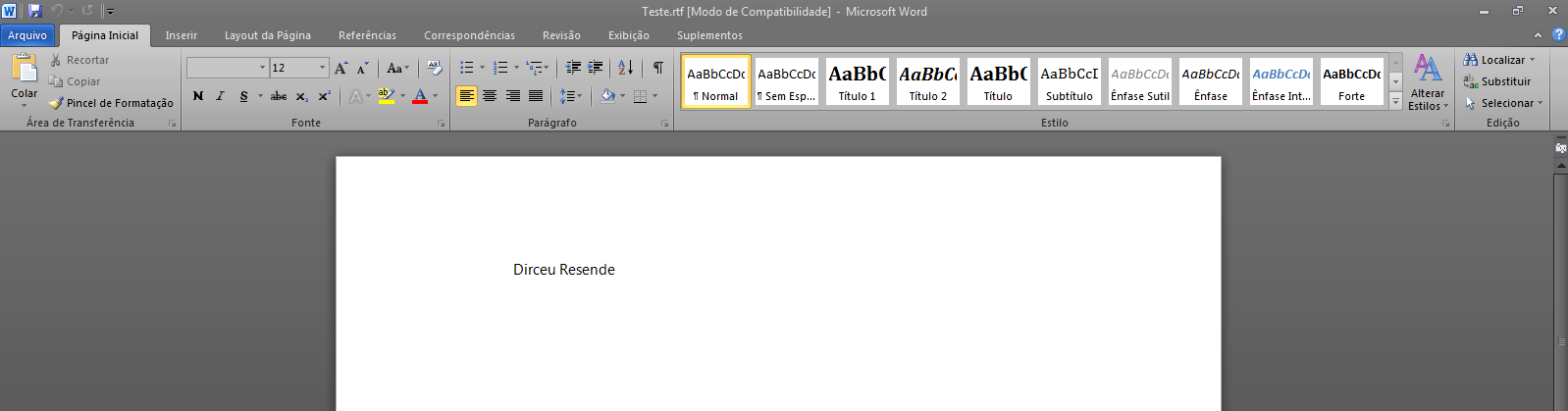
Ver contenido RTF en Word
La solución con Powershell
Si no desea utilizar CLR (C#) para realizar esta tarea, no se preocupe. También es posible hacer esto usando Powershell (Posh) y puede integrarlo con SQL Server de varias maneras usando xp_cmdshell y exportando el resultado a texto o capturando el retorno de PowerShell.
El script de Powershell es muy simple. ¿Recuerda ese sencillo script en C# que publiqué al principio de la publicación y que no quería implementar en CLR pro debido a las dependencias de Windows.Forms? Entonces... En powershell esto no es un problema... 🙂
Código fuente de Powershell:
[Reflection.Assembly]::LoadWithPartialName("System.Windows.Forms") | Out-Null
$Rtb = New-Object -TypeName System.Windows.Forms.RichTextBox

$stringRTF = "{\rtf1\ansi\ansicpg1252\fromhtml1 \fbidis \deff0{\fonttbl {\f0\fswiss Arial;} {\f1\fmodern Courier New;} {\f2\fnil\fcharset2 Symbol;} {\f3\fmodern\fcharset0 Courier New;} {\f4\fswiss Segoe UI;}} {\colortbl\red0\green0\blue0;\red0\green0\blue255;\red0\green0\blue0;} \uc1\pard\plain\deftab360 \f0\fs24  {\*\htmltag0 \par } {\*\htmltag48 }{\*\htmltag64}\htmlrtf {\htmlrtf0  {\*\htmltag148 }\htmlrtf {\cf2 \fs20 \f4 \htmlrtf0  {\*\htmltag4 \par }\htmlrtf }\htmlrtf0 {\*\htmltag72}\htmlrtf}\htmlrtf0  {\*\htmltag96 }\htmlrtf {\ltrpar\ltrch\ql \htmlrtf0 {\*\htmltag64}\htmlrtf {\htmlrtf0 \htmlrtf {\cf2 \fs20 \f4 \htmlrtf0 Dirceu Resende\htmlrtf }\htmlrtf0 {\*\htmltag72}\htmlrtf\par}\htmlrtf0  {\*\htmltag104 }\htmlrtf }\htmlrtf0  {\*\htmltag248 } {\*\htmltag58 }}"
$Rtb.Rtf = $stringRTF
$Retorno = $Rtb.Text

Write-Host($Retorno)
Resultado de la ejecución de PowerShell
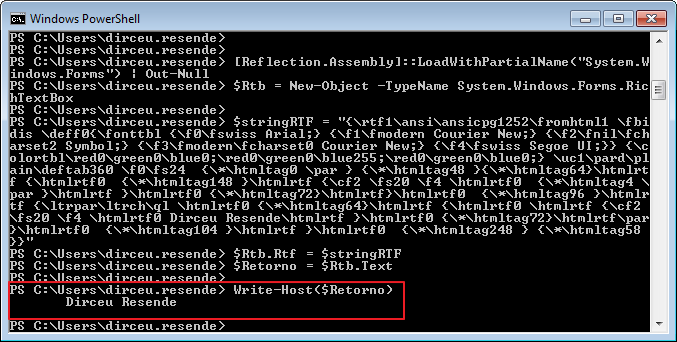
Ejemplo 1:
Con esto, puedes usar xp_cmdshell para ejecutar tu Powershell según sea necesario:
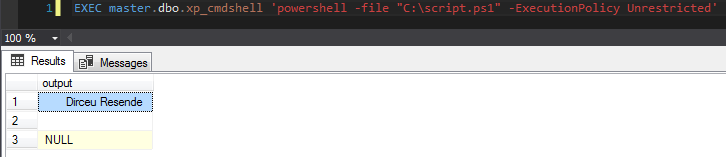
Ejemplo usando -File de PowerShell e ingresando la ruta de un archivo que creé previamente con los comandos Posh demostrados anteriormente
Ejemplo 2
DECLARE
    @StringRTF VARCHAR(MAX),
    @Posh VARCHAR(8000)

SET @StringRTF = '{\rtf1\ansi\ansicpg1252\fromhtml1 \fbidis \deff0{\fonttbl {\f0\fswiss Arial;} {\f1\fmodern Courier New;} {\f2\fnil\fcharset2 Symbol;} {\f3\fmodern\fcharset0 Courier New;} {\f4\fswiss Segoe UI;}} {\colortbl\red0\green0\blue0;\red0\green0\blue255;\red0\green0\blue0;} \uc1\pard\plain\deftab360 \f0\fs24  {\*\htmltag0 \par } {\*\htmltag48 }{\*\htmltag64}\htmlrtf {\htmlrtf0  {\*\htmltag148 }\htmlrtf {\cf2 \fs20 \f4 \htmlrtf0  {\*\htmltag4 \par }\htmlrtf }\htmlrtf0 {\*\htmltag72}\htmlrtf}\htmlrtf0  {\*\htmltag96 }\htmlrtf {\ltrpar\ltrch\ql \htmlrtf0 {\*\htmltag64}\htmlrtf {\htmlrtf0 \htmlrtf {\cf2 \fs20 \f4 \htmlrtf0 Dirceu Resende\htmlrtf }\htmlrtf0 {\*\htmltag72}\htmlrtf\par}\htmlrtf0  {\*\htmltag104 }\htmlrtf }\htmlrtf0  {\*\htmltag248 } {\*\htmltag58 }}'
SET @Posh = 'powershell.exe -ExecutionPolicy ByPass -Command "Add-Type -AssemblyName System.Windows.Forms; $Rtb = New-Object -TypeName System.Windows.Forms.RichTextBox; $stringRTF = ''' + @StringRTF + '''; $Rtb.Rtf = $stringRTF; $Retorno = $Rtb.Text; Write-Host($Retorno);"'


IF (OBJECT_ID('tempdb..#Retorno') IS NOT NULL) DROP TABLE #Retorno
CREATE TABLE #Retorno (
    Texto VARCHAR(MAX)
)

INSERT INTO #Retorno
EXEC master.dbo.xp_cmdshell @Posh

SELECT *
FROM #Retorno
Resultado:
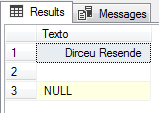
Ejemplo usando el comando - de PowerShell e ingresando los parámetros manualmente
¡Eso es todo, amigos!
Espero que hayas disfrutado del post y hasta la próxima.
servidor sql clr convertir convertir eliminar eliminar rdf formato de texto enriquecido etiquetas cadenas a texto sin formato texto sin formato c# csharp powershell elegante ps
servidor sql clr convertir convertir eliminar eliminar rdf formato de texto enriquecido etiquetas cadenas a texto sin formato texto sin formato c# csharp powershell elegante ps

Comentários (0)
Carregando comentários…