
Hey guys,
Good morning!
In today's post, I will demonstrate how to create a history of data changes, whether by INSERT, DELETE or UPDATE in a table, so that you can know who the user is and when information was changed and what the information was at the time. This is very useful for auditing or BI reports that need to obtain the current scenario, for example, the customer's salary at the time he purchased a product, 5 years ago.
For this operation, I will create a “clone” table of the original table, but with an update date, information about the user who made the change, hostname, operation performed and I will create a trigger on the table, so that each DML operation records a record in the history table.
Create history using Trigger or through the System?
Before presenting this solution, I would like to demonstrate some points of view on creating triggers in tables for this purpose. For a long time, I was totally against creating triggers in the database, because I thought this would make them less performant, a very large update or delete could generate locks in production, etc. and I thought it was the developer who should be concerned, via the system's source code, with this part of the logs and not creating triggers in the database.
This changed when I started to see the programmer's side and think about information traceability, and how much this can help other sectors of a company, such as Auditing, BI and Controllership. Nowadays, with the introduction of the DevOPS philosophy, the DBA cannot think inside the black box, focusing only on database availability. It is necessary to focus on the business and add as much value as IT can to the company, but of course, always on the basis of what is possible, without compromising the availability of IT resources.
Given this, I will list the differences between creating this data history using trigger or via system:
Generating history through trigger in the database:
- Once developed, implementing the resource only involves creating a table and a trigger in the database
- No matter which routine or user is manipulating the table, all changes will always be recorded
- UPDATE, INSERT and DELETE done manually in the database will be logged and audited by the trigger, and history will be generated for this
- Both the DBA and the Developer have visibility into the existence of the routine and its source code
- If it is necessary to temporarily disable the trigger for some operation, this can be done in a few seconds by the DBA
- Management of the audit routine is in the hands of the DBA
- If the table undergoes a large manual data change, whether via INSERT, DELETE or UPDATE, all changes will be written to the history table, which can generate a very large volume of writes to the history table and cause slowness in the environment. Isso pode ser contornado desativando a trigger enquanto essas alterações em massa são realizadas e ativando novamente ao término
- If the change is made by the system, and the system uses a fixed user, the trigger will record the system user, and not the user of the person who made the change
Generating history through the system:
- The implementation involves making changes to the source code of all application code snippets and screens that manipulate data in the table involved (in addition to dependent files), where there are generally rigid windows for any modification to the system.
- Only screens that have been changed to record history will effectively do so.
- UPDATE, INSERT and DELETE done manually in the database will NOT be logged and there will be no history for these changes
- Only the developer knows that this feature exists and how it works. The DBA generally does not have access to this type of information, much less the source code to understand how this history is being generated
- If it is necessary to temporarily disable this feature, the developer will have to change the application's source code and deploy it to production, consuming a lot of time for two teams and with the possibility of disconnecting active sessions on the application server
- Management of the audit routine is in the hands of the Developer
- If the table undergoes a major manual data change, whether via INSERT, DELETE or UPDATE, the environment will not be affected, as manual changes to the database will not be recorded
- If the change is made by the system, it is possible to identify the user logged into the application and record the login or even perform queries in the database and return a User_Id from the Users table, for example, to record in the history table
As you observed in the items mentioned above, there are advantages and disadvantages to each of the approaches. Therefore, you must decide which one best fits your business and infrastructure.
Creating the audit process
For the trigger tests, I will create a customer table and insert some data to see the log working:
IF (OBJECT_ID('Testes.dbo.Cliente') IS NOT NULL) DROP TABLE Testes.dbo.Cliente
CREATE TABLE Testes.dbo.Cliente (
    Id_Cliente INT IDENTITY(1, 1),
    Nome VARCHAR(100),
    Data_Nascimento DATETIME,
    Salario FLOAT
)

INSERT INTO Testes.dbo.Cliente
VALUES
    ('João', '1981-05-14', 4521),
    ('Marcos', '1975-01-07', 1478.58),
    ('André', '1962-11-11', 7151.45),
    ('Simão', '1991-12-18', 2584.97),
    ('Pedro', '1986-11-20', 987.52),
    ('Paulo', '1974-08-04', 6259.14),
    ('José', '1979-09-01', 5272.13)


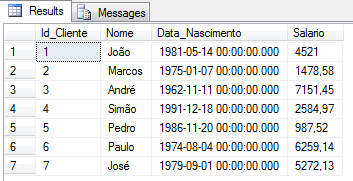
SELECT * FROM Testes.dbo.Cliente
Finally, it’s time to create our audit:
-- Criando a tabela com a mesma estrutura da original, mas adicionando colunas de controle
IF (OBJECT_ID('Testes.dbo.Cliente_Log') IS NOT NULL) DROP TABLE Testes.dbo.Cliente_Log
CREATE TABLE Testes.dbo.Cliente_Log (
    Id INT IDENTITY(1, 1),
    Dt_Atualizacao DATETIME DEFAULT GETDATE(),
    [Login] VARCHAR(100),
    Hostname VARCHAR(100),
    Operacao VARCHAR(20),

    -- Dados da tabela original
    Id_Cliente INT,
    Nome VARCHAR(100),
    Data_Nascimento DATETIME,
    Salario FLOAT
)
GO

IF ((SELECT COUNT(*) FROM sys.triggers WHERE name = 'trgHistorico_Cliente' AND parent_id = OBJECT_ID('Testes.dbo.Cliente')) > 0) DROP TRIGGER trgHistorico_Cliente
GO

CREATE TRIGGER trgHistorico_Cliente ON Testes.dbo.Cliente -- Tabela que a trigger será associada
AFTER INSERT, UPDATE, DELETE AS
BEGIN

    SET NOCOUNT ON

    DECLARE
        @Login VARCHAR(100) = SYSTEM_USER,
        @HostName VARCHAR(100) = HOST_NAME(),
        @Data DATETIME = GETDATE()


    IF (EXISTS(SELECT * FROM Inserted) AND EXISTS (SELECT * FROM Deleted))
    BEGIN

        INSERT INTO Testes.dbo.Cliente_Log
        SELECT @Data, @Login, @HostName, 'UPDATE', *
        FROM Inserted

    END
    ELSE BEGIN

        IF (EXISTS(SELECT * FROM Inserted))
        BEGIN

            INSERT INTO Testes.dbo.Cliente_Log
            SELECT @Data, @Login, @HostName, 'INSERT', *
            FROM Inserted

        END
        ELSE BEGIN

            INSERT INTO Testes.dbo.Cliente_Log
            SELECT @Data, @Login, @HostName, 'DELETE', *
            FROM Deleted

        END

    END

END
GO
And now let's simulate some changes to the base:
INSERT INTO Testes.dbo.Cliente
VALUES ('Bartolomeu', '1975-05-28', 6158.74)

UPDATE Testes.dbo.Cliente
SET Salario = Salario * 1.5
WHERE Nome = 'Bartolomeu'

DELETE FROM Testes.dbo.Cliente
WHERE Nome = 'André'

UPDATE Testes.dbo.Cliente
SET Salario = Salario * 1.1
WHERE Id_Cliente = 2

UPDATE Testes.dbo.Cliente
SET Salario = 10, Nome = 'Judas Iscariodes', Data_Nascimento = '06/06/2066'
WHERE Id_Cliente = 1
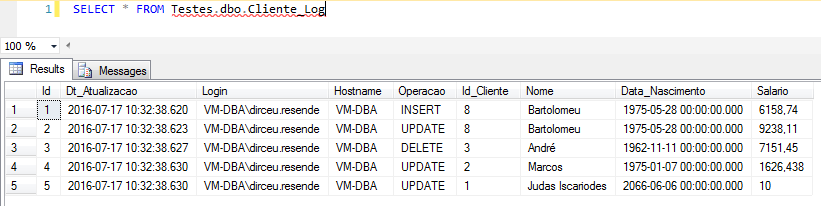
As you can see, I am using the Inserted object in the part that handles the UPDATE. With this, I record the new information in the history table, which is being updated by the UPDATE command. If you want to record the old values, which are being replaced, simply change the trigger to use the Deleted object.
Changes to the original table
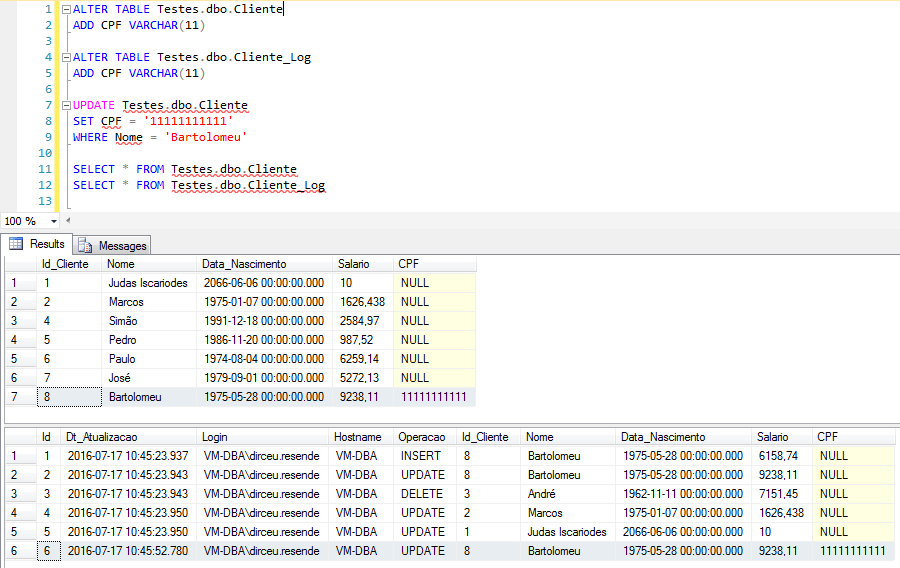
If you need to include more columns in your original table, remember to also change the history table of your trigger, as I used * when inserting the data just so you don't have to type the name of the columns. An alternative to this is to remove the * from the trigger and manually specify the name of all columns, which is no problem.
Simulating that you change your original table, without changing the history table, we have this situation:

Where the error message was generated:
Msg 8101, Level 16, State 1, Procedure trgHistorico_Cliente, Line 17
An explicit value for the identity column in table ‘Testes.dbo.Cliente_Log’ can only be specified when a column list is used and IDENTITY_INSERT is ON.
To fix this, simply add the same structure change you made to the log table:
If you want to identify the query that triggered the trigger, read the article SQL Server – How to identify the query that triggered a DML trigger on a table.
And that's it folks!
Thank you for visiting and if you have any questions, leave them here in the comments.
Hug!

Comentários (0)
Carregando comentários…