Warning: preg_match(): Unknown modifier 'b' in /mnt/datadisk/www/src/Controllers/PostController.php on line 206 SQL Server - How to Implement Login Audit and Control (Logon Trigger) — Dirceu ResendeSkip to content
In this post I will demonstrate to you some cool features of logon triggers such as creating an audit log for each user that connects to your database, blocking connections coming from a user/IP/Hostname and blocking connections at a certain time.
NOTICE
First of all, I would like to warn you about the DANGER when using a logon trigger. Keep in mind that this trigger will be executed every time a new connection is opened in the database. In addition to the possibility of slowing down the login process, according to your trigger code, if the user does not have permission to perform any trigger operation or even if the trigger has an error, you can prevent ALL users of the instance from connecting to SQL Server.
In other words, BE VERY CAREFUL, as you can stop the instance if you activate a trigger without first testing it very well. Before enabling a login trigger, I always recommend activating the DAC connection, to ensure that you can connect to the instance if the trigger has problems. Another tip is to always leave a user in the exceptions list (like “sa” in the example) in case the trigger has an error, it will be easier to connect to the instance to drop the trigger.
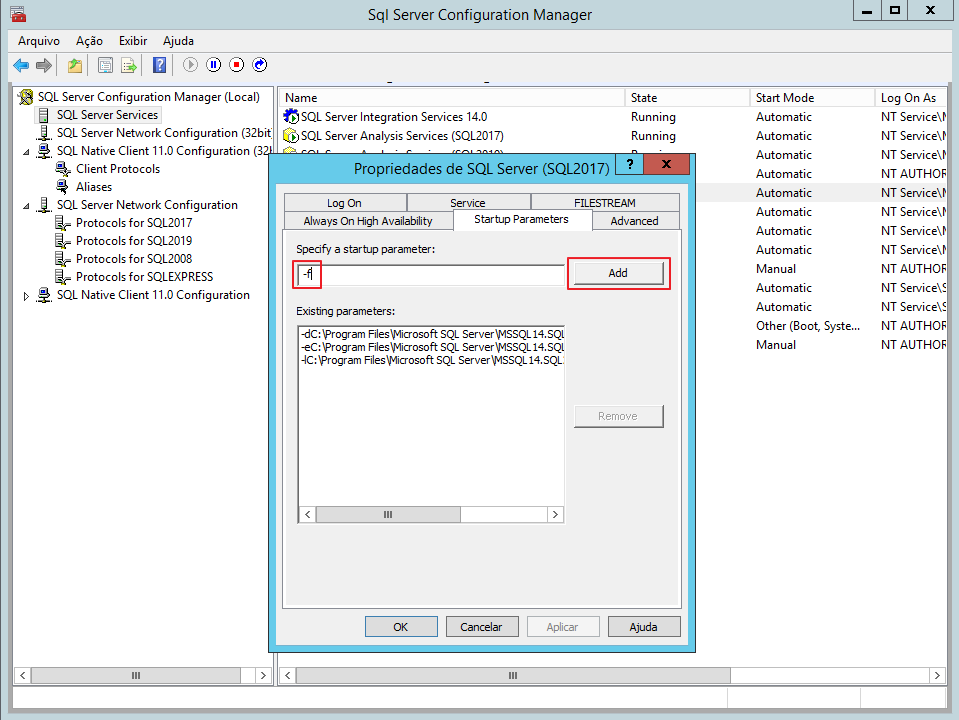
If you have already created the trigger, it is preventing users from connecting, you have not activated the DAC connection and you are already having problems logging into the instance, an alternative is to add the -f parameter when starting the SQL Server service to start SQL Server with minimal configuration, drop the trigger and restart the service without -f.
Auditing and recording Logins performed
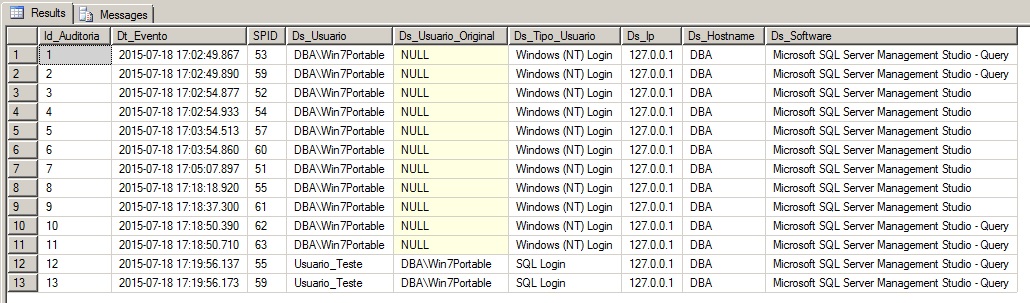
In this code snippet I will demonstrate how to create a connection log to audit users who connect to your database.
I added some filters to avoid logging in system users (Ex: SA), connections coming from software that are constantly connecting to the database (Ex: RedGate SQL Prompt and Intellisense from Managment Studio).
I also added a feature to try to identify the name of the AD user who is logging into the database using a SQL user. I don't know a way to do this 100%, so I retrieve the last AD user who connected to that hostname where the SQL user is.
Finally, I added another filter to avoid recording multiple repeated lines, checking if a connection with the same user, hostname and SPID has already been recorded within an interval of 1h.
Implementation: View source code
USE [master]
GO

IF ((SELECT COUNT(*) FROM sys.server_triggers WHERE name = 'trgAudit_Login') > 0) DROP TRIGGER [trgAudit_Login] ON ALL SERVER
GO

CREATE TRIGGER [trgAudit_Login] ON ALL SERVER
FOR LOGON
AS
BEGIN


    SET NOCOUNT ON


    -- Não loga conexões de usuários de sistema
    IF (ORIGINAL_LOGIN() IN ('sa', 'AUTORIDADE NT\SISTEMA', 'NT AUTHORITY\SYSTEM') OR ORIGINAL_LOGIN() LIKE '%SQLServerAgent')
        RETURN


    -- Não loga conexões de softwares que ficam se conectando constantemente
    IF (PROGRAM_NAME() LIKE 'Red Gate%' OR PROGRAM_NAME() LIKE '%IntelliSense%' OR PROGRAM_NAME() = 'Microsoft SQL Server')
        RETURN


    IF (OBJECT_ID('Auditoria.dbo.Logins') IS NULL)
    BEGIN

        -- DROP TABLE Auditoria.dbo.Logins
        CREATE TABLE Auditoria.dbo.Logins (
            Id_Auditoria INT IDENTITY(1,1),
            Dt_Evento DATETIME,
            SPID SMALLINT,
            Ds_Usuario VARCHAR(100) NULL,
            Ds_Usuario_Original VARCHAR(100) NULL,
            Ds_Tipo_Usuario VARCHAR(30) NULL,
            Ds_Ip VARCHAR(30) NULL,
            Ds_Hostname VARCHAR(100) NULL,
            Ds_Software VARCHAR(500) NULL
        )

        CREATE CLUSTERED INDEX SK01 ON Auditoria.dbo.Logins(Id_Auditoria)

    END


    DECLARE
        @Evento XML,
        @Dt_Evento DATETIME,
        @Ds_Usuario VARCHAR(100),
        @Ds_Usuario_Original VARCHAR(100),
        @Ds_Tipo_Usuario VARCHAR(30),
        @Ds_Ip VARCHAR(30),
        @SPID SMALLINT,
        @Ds_Hostname VARCHAR(100),
        @Ds_Software VARCHAR(100)


    SET @Evento = EVENTDATA()


    SELECT
        @Dt_Evento = @Evento.value('(/EVENT_INSTANCE/PostTime/text())[1]','datetime'),
        @Ds_Usuario = @Evento.value('(/EVENT_INSTANCE/LoginName/text())[1]','varchar(100)'),
        @Ds_Tipo_Usuario = @Evento.value('(/EVENT_INSTANCE/LoginType/text())[1]','varchar(30)'),
        @Ds_Hostname = HOST_NAME(),
        @Ds_Ip = @Evento.value('(/EVENT_INSTANCE/ClientHost/text())[1]','varchar(100)'),
        @SPID = @Evento.value('(/EVENT_INSTANCE/SPID/text())[1]','smallint'),
        @Ds_Software = PROGRAM_NAME()


    -- Identifica o usuário original caso seja um usuário SQL
    IF (LEFT(@Ds_Tipo_Usuario, 7) != 'Windows')
    BEGIN

        SELECT @Ds_Usuario_Original = (
            SELECT
                A.Ds_Usuario
            FROM
                Auditoria.dbo.Logins A
                JOIN (
                    SELECT Ds_Hostname, MAX(Id_Auditoria) AS Id_MAX
                    FROM Auditoria.dbo.Logins	WITH(NOLOCK)
                    WHERE Ds_Tipo_Usuario LIKE 'Windows%'
                    GROUP BY Ds_Hostname
                ) B ON A.Ds_Hostname = B.Ds_Hostname AND A.Id_Auditoria = B.Id_MAX
        )

    END


    -- Evita gravar várias vezes um mesmo login
    DECLARE @Dt_Ultima_Data DATETIME
    SELECT @Dt_Ultima_Data = MAX(Dt_Evento)
    FROM Auditoria.dbo.Logins
    WHERE Ds_Usuario = @Ds_Usuario
    AND SPID = @SPID


    IF (DATEDIFF(SECOND, ISNULL(@Dt_Ultima_Data, '1990-01-01'), @Dt_Evento) > 1)
    BEGIN

        INSERT INTO Auditoria.dbo.Logins
        SELECT
            GETDATE(),
            @SPID,
            @Ds_Usuario,
            @Ds_Usuario_Original,
            @Ds_Tipo_Usuario,
            @Ds_Ip,
            @Ds_Hostname,
            @Ds_Software

    END


END
GO

ENABLE TRIGGER [trgAudit_Login] ON ALL SERVER
GO

USE [Auditoria]
GO

GRANT SELECT, INSERT ON dbo.Logins TO [public]
GO
Results: trgAudit_Login
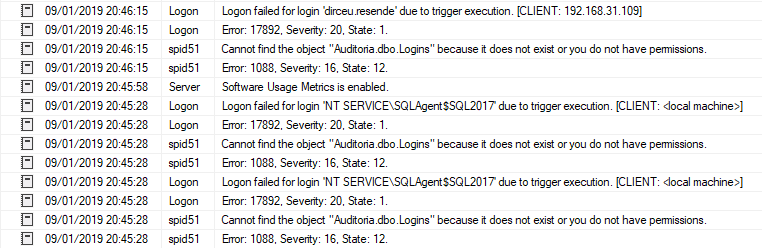
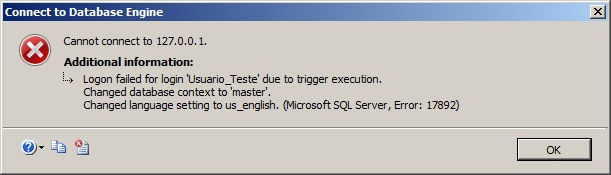
Remember to carefully review the name of the tables in this trigger when implementing it in your environment. Otherwise, you will probably create a “bugged” trigger and prevent users from logging into your instance, as seen in the error message below:
Another observation in this code is that this trigger writes data to some tables in the database, that is, the user connecting to the database will need permissions to write data to this table, in addition to having the user created in the database of that table. For this reason, I added the grant command to the table for the public role.
Another way to get around this is to use the EXECUTE AS clause ‘login_com_permissao’, so that the trigger will be executed with the permission of that EXECUTE AS user, but it will record the data of the real user who is counting, avoiding the need to create all users in the database and release the permissions, looking like this:
CREATE TRIGGER [trgAudit_Login] ON ALL SERVER
WITH EXECUTE AS 'dirceu.resende'
FOR LOGON
[...]
PS: If you are going to follow this approach, remember to choose a user with all the permissions necessary for the operations of this trigger (e.g. user member of the sysadmin role). Otherwise, your trigger will present errors and prevent new connections to the database (read CAOS)
Preventing certain users from logging in
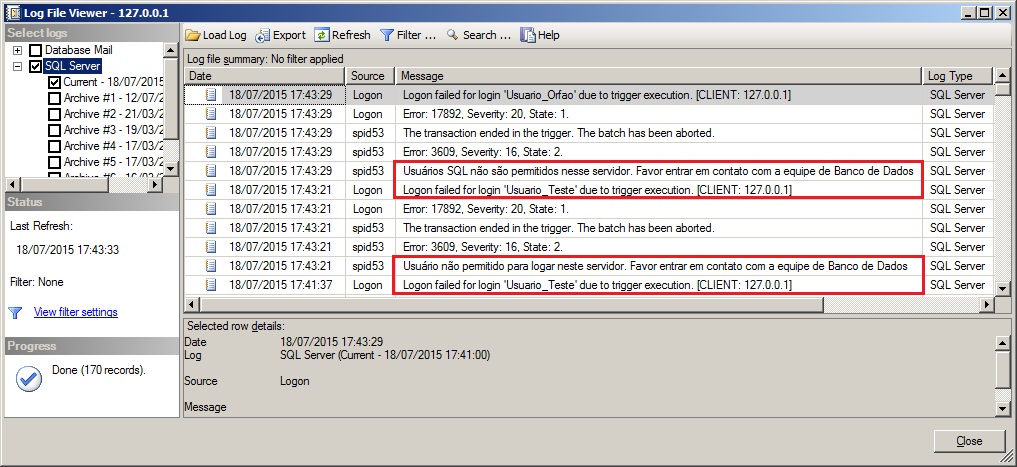
Now I will demonstrate to you how to limit the access of some specific users to the database. This can also be applied to specific IPs or Hostnames, creating an allowed or denied list.
Implementation: View source code
USE [master]
GO

IF ((SELECT COUNT(*) FROM sys.server_triggers WHERE name = 'trgBloquear_Login') > 0) DROP TRIGGER [trgBloquear_Login] ON ALL SERVER
GO

CREATE TRIGGER [trgBloquear_Login] ON ALL SERVER
FOR LOGON
AS
BEGIN


    -- Não elimina conexões de usuários de sistema
    IF (ORIGINAL_LOGIN() IN ('sa', 'AUTORIDADE NT\SISTEMA', 'NT AUTHORITY\SYSTEM'))
        RETURN


    DECLARE
        @Evento XML,
        @Dt_Evento DATETIME,
        @Ds_Usuario VARCHAR(100),
        @Ds_Usuario_Original VARCHAR(100),
        @Ds_Tipo_Usuario VARCHAR(30),
        @Ds_Ip VARCHAR(30),
        @SPID SMALLINT,
        @Ds_Hostname VARCHAR(100),
        @Ds_Software VARCHAR(100)


    SET @Evento = EVENTDATA()


    SELECT
        @Dt_Evento = @Evento.value('(/EVENT_INSTANCE/PostTime/text())[1]','datetime'),
        @Ds_Usuario = @Evento.value('(/EVENT_INSTANCE/LoginName/text())[1]','varchar(100)'),
        @Ds_Tipo_Usuario = @Evento.value('(/EVENT_INSTANCE/LoginType/text())[1]','varchar(30)'),
        @Ds_Hostname = HOST_NAME(),
        @Ds_Ip = @Evento.value('(/EVENT_INSTANCE/ClientHost/text())[1]','varchar(100)'),
        @SPID = @Evento.value('(/EVENT_INSTANCE/SPID/text())[1]','smallint'),
        @Ds_Software = PROGRAM_NAME()


    IF (@Ds_Usuario IN ('Usuario_Teste'))
    BEGIN
        PRINT 'Usuário não permitido para logar neste servidor. Favor entrar em contato com a equipe de Banco de Dados'
        ROLLBACK
    END


    IF (@Ds_Tipo_Usuario = 'SQL Login')
    BEGIN
        PRINT 'Usuários SQL não são permitidos nesse servidor. Favor entrar em contato com a equipe de Banco de Dados'
        ROLLBACK
    END


END
GO

ENABLE TRIGGER [trgBloquear_Login] ON ALL SERVER
GO
Results: trgAudit_Login5
trgAudit_Login2
Preventing login at a certain time
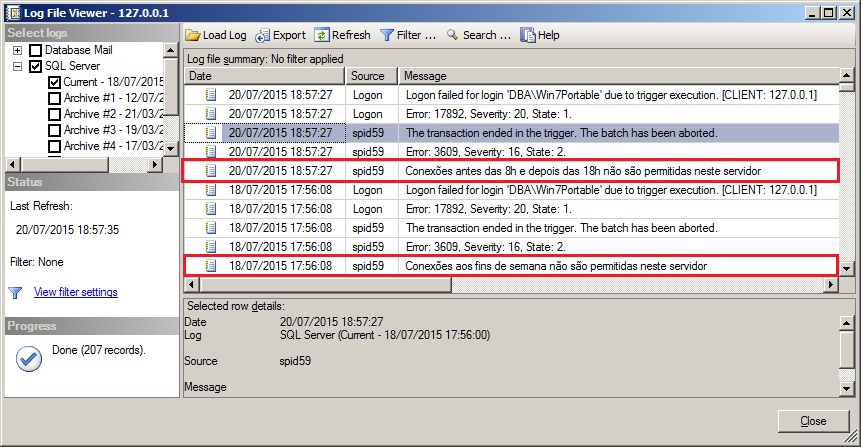
In this excerpt below, I will demonstrate how to block connections outside business hours.
Implementation: View source code
USE [master]
GO

IF ((SELECT COUNT(*) FROM sys.server_triggers WHERE name = 'trgBloquear_Login_Horario') > 0) DROP TRIGGER [trgBloquear_Login_Horario] ON ALL SERVER
GO

CREATE TRIGGER [trgBloquear_Login_Horario] ON ALL SERVER
FOR LOGON
AS
BEGIN


    -- Não elimina conexões de usuários de sistema
    IF (ORIGINAL_LOGIN() IN ('sa', 'AUTORIDADE NT\SISTEMA', 'NT AUTHORITY\SYSTEM'))
        RETURN


    IF (DATEPART(WEEKDAY, GETDATE()) IN (0, 7))
    BEGIN
        PRINT 'Conexões aos fins de semana não são permitidas neste servidor'
        ROLLBACK
        RETURN
    END


    IF (DATEPART(HOUR, GETDATE()) >= 18 OR DATEPART(HOUR, GETDATE()) < 8)
    BEGIN
        PRINT 'Conexões antes das 8h e depois das 18h não são permitidas neste servidor'
        ROLLBACK
        RETURN
    END


END
GO

ENABLE TRIGGER [trgBloquear_Login_Horario] ON ALL SERVER
GO
Results: trgAudit_Login5
trgAudit_Login3
Limiting the number of maximum user connections
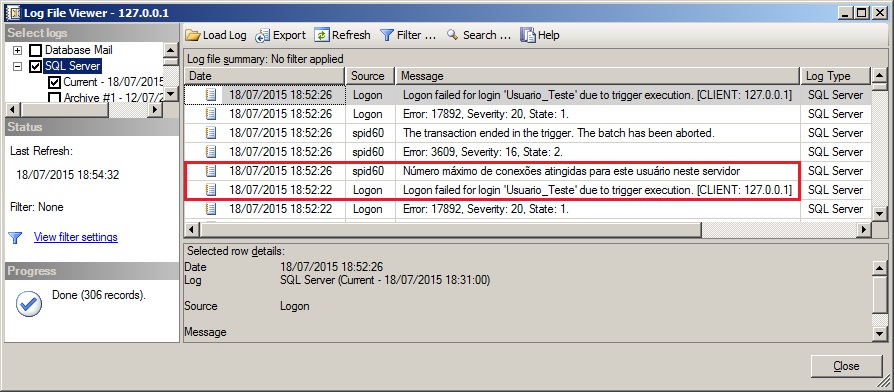
In the code snippet below, I will demonstrate how to limit the number of simultaneous connections from users. You can change the code to limit it to only certain users depending on your need.
Note that in this trigger, I added an exception to not limit connections from users who are sysadmin, which is the case with DBA's. This can be used in other triggers too, if you find it interesting.
Implementation: View source code
USE [master]
GO

IF ((SELECT COUNT(*) FROM sys.server_triggers WHERE name = 'trgBloquear_Login_Sessoes') > 0) DROP TRIGGER [trgBloquear_Login_Sessoes] ON ALL SERVER
GO

CREATE TRIGGER [trgBloquear_Login_Sessoes] ON ALL SERVER
WITH EXECUTE AS SELF
FOR LOGON
AS
BEGIN


    -- Não elimina conexões de usuários de sistema
    IF (ORIGINAL_LOGIN() IN ('sa', 'AUTORIDADE NT\SISTEMA', 'NT AUTHORITY\SYSTEM'))
        RETURN


    -- Verifica se o usuário é sysadmin
    DECLARE @IsSysAdmin int
    EXECUTE AS CALLER
    SET @IsSysAdmin = ISNULL(IS_SRVROLEMEMBER('sysadmin'), 0)
    REVERT


    IF (@IsSysAdmin = 0)
    BEGIN

        IF ((
            SELECT COUNT(*)
            FROM sys.dm_exec_sessions
            WHERE is_user_process = 1
            AND login_name = ORIGINAL_LOGIN()
            AND [program_name] NOT LIKE 'Red Gate%'
            AND [program_name] NOT LIKE '%IntelliSense%'
        ) > 2)
        BEGIN
            PRINT 'Número máximo de conexões atingidas para este usuário neste servidor'
            ROLLBACK
            RETURN
        END

    END


END
GO

ENABLE TRIGGER [trgBloquear_Login_Sessoes] ON ALL SERVER
GO
Results: trgAudit_Login5
trgAudit_Login6
Preventing SQL Users from Login with SSMS
Now I will demonstrate to you how to prevent users with SQL Server authentication from connecting to the environment using SQL Server Management Studio or SQLCMD. This is very useful in environments where developers and DBA's access the database using users with Windows authentication and applications use users with SQL Server authentication.
In this scenario, it is very common for developers to use the application user to apply commands in production environments, where their user does not have write permissions. This trigger could be a good choice to prevent them from trying to use these changes using the application user instead of asking the DBA.
Implementation: View source code
USE [master]
GO

IF ((SELECT COUNT(*) FROM sys.server_triggers WHERE name = 'trgEvita_Conexao_SQL') > 0) DROP TRIGGER [trgEvita_Conexao_SQL] ON ALL SERVER
GO

CREATE TRIGGER [trgEvita_Conexao_SQL] ON ALL SERVER
WITH EXECUTE AS 'dirceu.resende'
FOR LOGON
AS
BEGIN


    SET NOCOUNT ON


    -- Não loga conexões de usuários de sistema
    IF (ORIGINAL_LOGIN() IN ('dirceu.resende', 'sa', 'AUTORIDADE NT\SISTEMA', 'NT AUTHORITY\SYSTEM') OR ORIGINAL_LOGIN() LIKE '%SQLServerAgent')
        RETURN


    -- Não loga conexões de softwares que ficam se conectando constantemente
    IF (PROGRAM_NAME() LIKE 'Red Gate%' OR PROGRAM_NAME() LIKE '%IntelliSense%' OR PROGRAM_NAME() = 'Microsoft SQL Server')
        RETURN


    DECLARE
        @Evento XML,
        @Ds_Tipo_Usuario VARCHAR(30)

    SET @Evento = EVENTDATA()
    SET @Ds_Tipo_Usuario = @Evento.value('(/EVENT_INSTANCE/LoginType/text())[1]','varchar(30)')


    -- Identifica o usuário original caso seja um usuário SQL
    IF (LEFT(@Ds_Tipo_Usuario, 7) != 'Windows' AND (PROGRAM_NAME() LIKE 'Microsoft SQL Server Management Studio%' OR program_name() LIKE 'sqlcmd%'))
    BEGIN

        SELECT 1/0

    END


END
GO

ENABLE TRIGGER [trgEvita_Conexao_SQL] ON ALL SERVER
GO
That's it, folks!
Until the next post!
Dirceu Resende
Database & BI Architect · Microsoft MVP · MCSE, MCSA, MCT, MTA, MCP.


Comentários (0)
Carregando comentários…