
Hey guys!
In this blog's 350th article, I would like to share with you my experience during several tests that I carried out on Ransomware on SQL Server database servers, such as WannaCry, which I downloaded and “infected” my VM just to carry out these tests, understand how it acts and how we can protect ourselves against this type of attack, which, incredible as it may seem, is still common in the daily lives of DBA's who work in consulting companies.

Let's run the Ransomware to start the analysis
To create this article, I relied on valuable tips from MVP André Ruschel which helped me to better understand how this Ransomware operates in general, remembering that WannaCry itself has several variations, so there is the possibility of another variant of it acting in ways slightly different from the ones I will explain here.
What is Ransomware?
Click to view contentHow does WannaCry work on my computer?
Click to view content
WannaCry – Example of an attacked environment
Speaking specifically about WannaCry, we can make some interesting observations about it:
- This Ransomware exploits a Windows vulnerability that was fixed 2 months before (March 2017 – MS-17-010) the mass attack carried out, that is, if everyone kept the operating system updated, this attack would not have occurred
- It determines which files it will encrypt according to the extension of those files. Although it is technically completely possible to analyze the files according to their Mimetype, this check on the files would take much longer and consume a lot of machine resources, making it easier to identify that an attack is taking place and making it easier for the user to stop the cracker's action.
- Despite showing the payment window all the time, the operating system is fully functional, since if it wasn't there, it wouldn't be possible to make the payment.
- If this virtual pest is removed, either manually or using protection tools (such as anti-virus), the token generated by WannaCry during startup will be changed, not allowing payment to be made any longer.
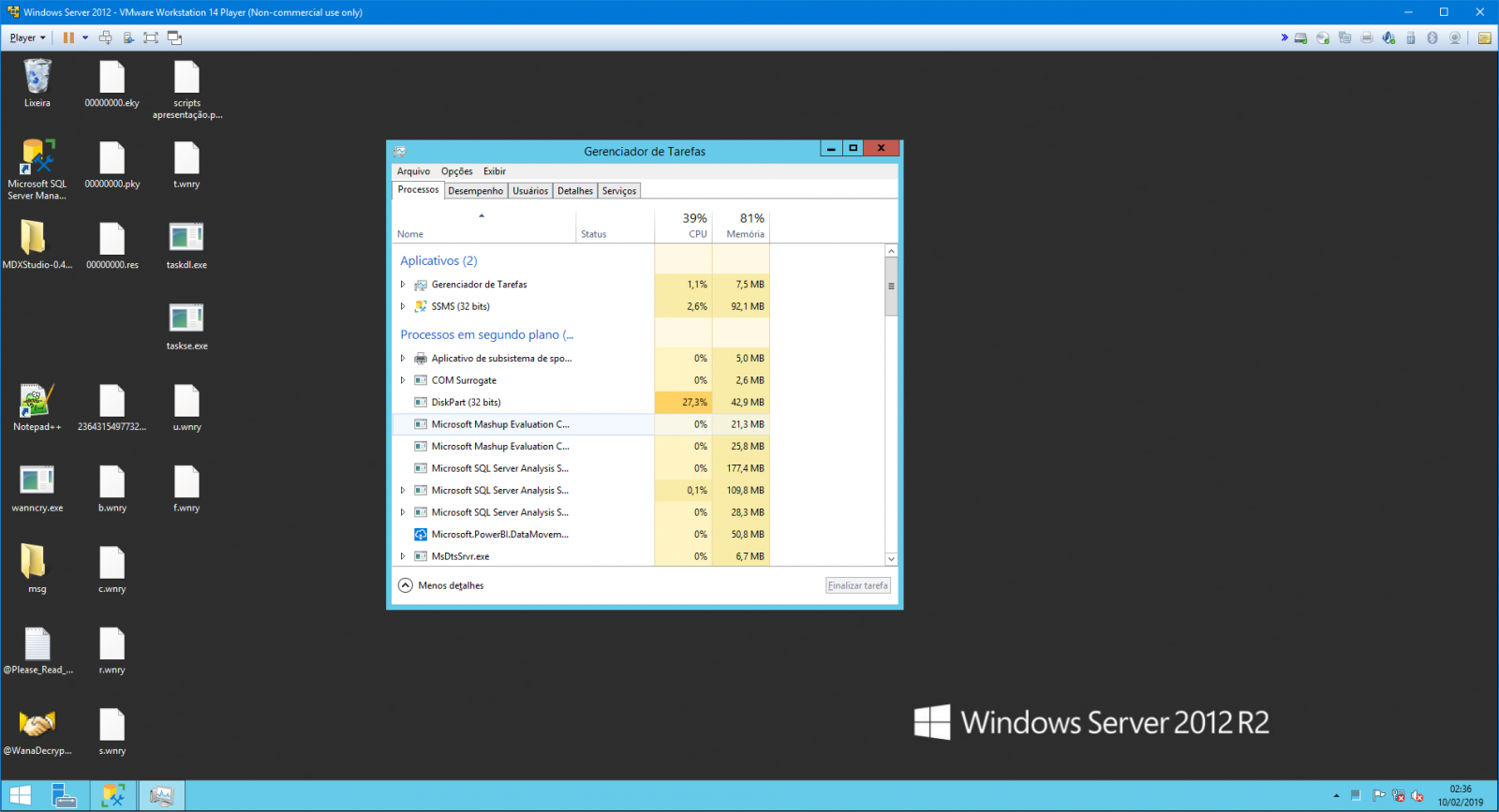
- Analyzing the running processes, the one that consumes the most CPU during encryption is diskpart.exe
- If the file is locked from reading, the Ransomware cannot encrypt it. Ex: SQL Server database file, where you can't even copy the MDF file with the online bank. But if you have a photo open in Paint, for example, as it does not apply a lock to the file, WannaCry can encrypt the photo normally
- Wannacry performs elevation of privileges and runs the virus with every RDP session it finds on the operating system
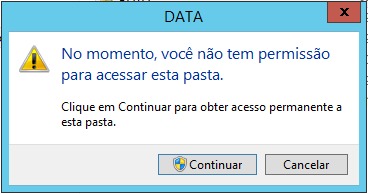
- During my tests, even with the SQL Server service stopped, WannaCry was unable to encrypt the MDF files, since to access the SQL Server DATA folder (default directory), Windows asks me for confirmation (even though my user is Administrator). It was only able to encrypt the files when I moved them to another directory without NTFS security policies (C:\Data). I later discovered that this occurs because it ignores the files in the “C:\Program Files\” directory.
- WannaCry corrupts the Volume Shadow Copy Service (VSS) to make it difficult to recover encrypted files
- The massive attack was only stopped when a security expert analyzed the ransomware code and discovered that if it registered the domain www.iuqerfsodp9ifjaposdfjhgosurijfaewrwergwea.com, the virus aborted new infections on the machines it ran on.


Some time after the WannaCry Boom, it was made available a possible solution which promises to decrypt files encrypted by WannaCry on some operating systems, as long as the machine cannot have been shut down/rebooted since the infection and the memory segment of a specific information cannot have been reallocated to another process on the machine.
Who remembers that time, it was truly CHAOS in companies. In Whatsapp groups, several images and prints were circulating of large companies being attacked by this virtual plague and causing devastating attacks. Many even ended up paying the ransom to avoid losing important data.
The extensions that WannaCry sought to encrypt were:
.doc, .docx, .xls, .xlsx, .ppt, .pptx, .pst, .ost, .msg, .eml, .vsd, .vsdx, .txt, .csv, .rtf, .123, .wks, .wk1, .pdf, .dwg, .onetoc2, .snt, .jpeg, .jpg, .docb, .docm, .dot, .dotm, .dotx, .xlsm, .xlsb, .xlw, .xlt, .xlm, .xlc, .xltx, .xltm, .pptm, .pot, .pps, .ppsm, .ppsx, .ppam, .potx, .potm, .edb, .hwp, .602, .sxi, .sti, .sldx, .sldm, .sldm, .vdi, .vmdk, .vmx, .gpg, .aes, .ARC, .PAQ, .bz2, .tbk, .bak, .tar, .tgz, .gz, .7z, .rar, .zip, .backup, .iso, .vcd, .bmp, .png, .gif, .raw, .cgm, .tif, .tiff, .nef, .psd, .ai, .svg, .djvu, .m4u, .m3u, .mid, .wma, .flv, .3g2, .mkv, .3gp, .mp4, .mov, .avi, .asf, .mpeg, .vob, .mpg, .wmv, .fla, .swf, .wav, .mp3, .sh, .class, .jar, .java, .rb, .asp, .php, .jsp, .brd, .sch, .dch, .dip, .pl, .vb, .vbs, .ps1, .bat, .cmd, .js, .asm, .h, .pas, .cpp, .c, .cs, .suo, .sln, .ldf, .mdf, .ibd, .myi, .myd, .frm, .odb, .dbf, .db, .mdb, .accdb, .sql, .sqlitedb, .sqlite3, .asc, .lay6, .lay, .mml, .sxm, .otg, .odg, .uop, .std, .sxd, .otp, .odp, .wb2, .slk, .dif, .stc, .sxc, .ots, .ods, .3dm, .max, .3ds, .uot, .stw, .sxw, .ott, .odt, .pem, .p12, .csr, .crt, .key, .pfx, .der
And it had a mechanism to NOT encrypt the following directories (thus keeping the operating system running):
- “Content.IE5”
- “Temporary Internet Files”
- "This folder protects against ransomware. Modifying it will reduce protection"
- “\Local Settings\Temp”
- “\AppData\Local\Temp”
- “\Program Files (x86)”
- “\Program Files”
- "\WINDOWS"
- “\ProgramData”
- “\Intel”
- “$”

MDF and LDF files in C:\Program Files\ are not affected by WannaCry
Examples of directories attacked by WannaCry:
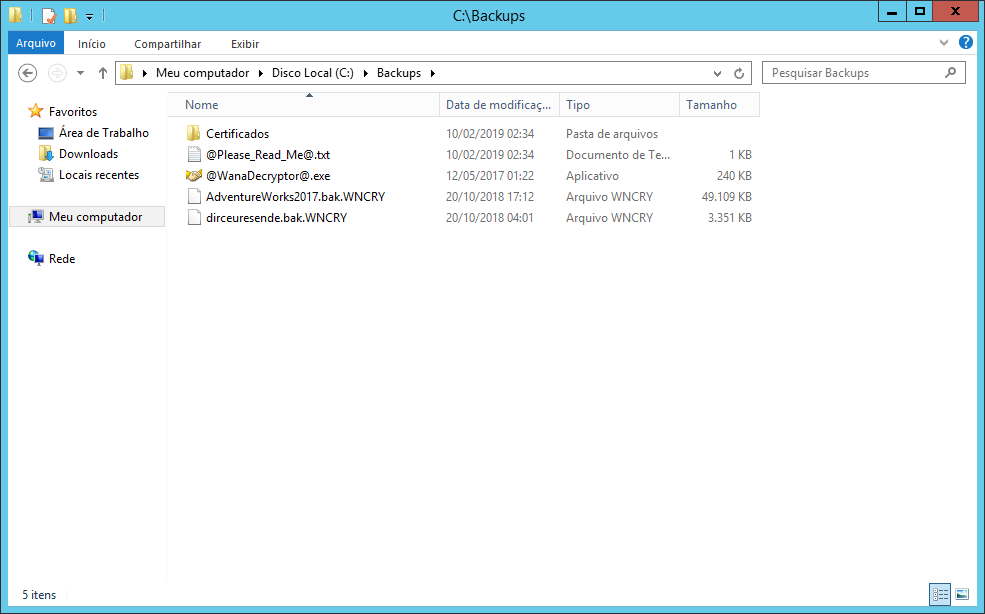
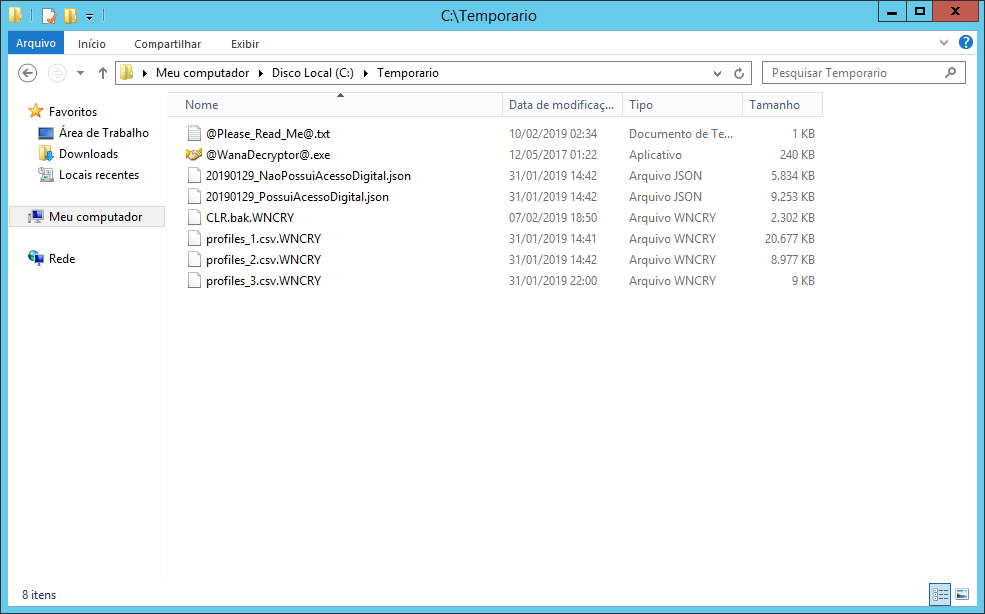
WannaCry performance diagram:

If you want to specialize in how this Ransomware operates, understand technically how it operates, what calls it makes in the OS, see the files I included as a reference, as they are very rich in these more technical details that are not the focus of this article.
How can DBA protect itself against Ransomware attacks?
Click to view content- Prevent servers from being exposed and published to the Internet. In cases where the application server must be available for access from any IP, ensure that at least the database is on another server, isolated, inaccessible via the Internet, only accessed via the internal network or VPN.
- Manages database server Firewall rules well. Ensure that only application servers and specific machines have access to these servers
- Keep Windows and SQL Server up to date with the latest available updates, especially when the update says it is fixing a security hole. The WannaCry case itself could have been avoided if the operating system on these machines had been up to date.
- Windows Server must use Windows Server. Never consider the possibility of using versions of Windows other than the Server version, such as Windows Starter, Professional, Home Premium, etc.
- Always keep the operating system and SQL Server with the most current versions possible. SQL Server 2008, for example, will lose support in June/2019 and will no longer receive updates or security updates. The same thing happens with Windows Server.
- Protect your database against brute force attacks. As I already mentioned, WannaCry cannot encrypt files in use by the database, but if the attacker manages to access your database, he can stop the SQL service or take the databases offline and then start the attack, thus encrypting your data
- As I said above, Ransomware usually targets specific extensions instead of analyzing all files by MIMETYPE. It does this to optimize file search and encryption time. Because of this, It is good practice to use non-traditional extensions in data, log and backup files. Avoid MDF, LDF and BAK. Use your imagination.
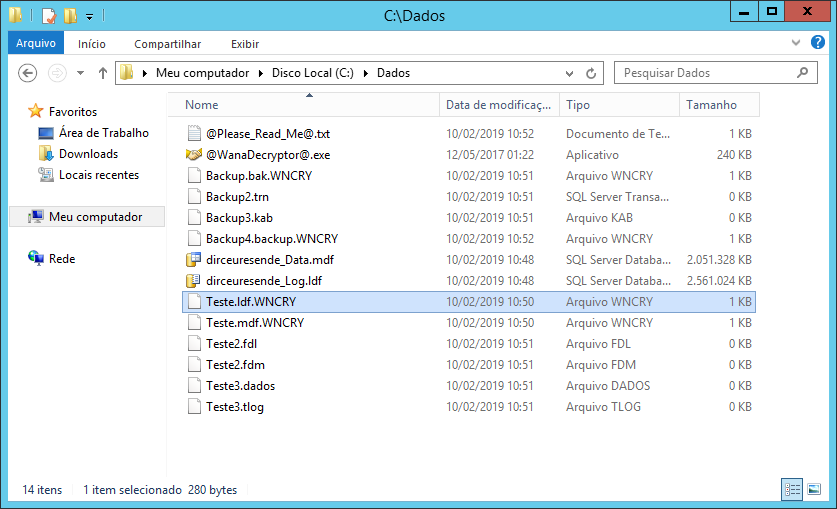
MDF and LDF file in USE were not encrypted. MDF and LDF files that were NOT in use were encrypted. Files with extensions that I invented on the spot, WannaCry did not encrypt
- Speaking of backups, where do you save your company's backups? It's not on the network or on the same server, right? A VERY important step to ensure that you can safely recover the original data, even if this attack arrives at your company and encrypts your data, BACKUP in the cloud is essential for this.
It doesn't necessarily have to be for the cloud, although it is a very practical, safe and very cheap option. Your backup can be backed up on tape, Blu-ray disc, etc. But the backup needs to be physically stored outside the same source server. This is very important to ensure that in a total network invasion scenario, your backups are not compromised as well.
Remember: If you lose your company's data and the backup, the company is over.
- Ensure that there is a regular backup testing policy in your company. If you don't know how to do this, read the articles Automating Restore Testing – Implementation, SQL Server: Automating backup restore and in the article Automating Database Restoration.
There is nothing worse than the DBA being confident that he can recover from any data corruption problem in his environment, and, when he tries to restore a backup prior to the problem, he discovers that the backups are corrupt.
Backup without test restore is no guarantee of anything!
- Disable login and rename users that are standard in all instances of SQL Server, such as sa (which is also sysadmin), sysdba and others. These are the users most used by brute force attacks, as the attacker already knows the user name, all they need is the password.
- Ensure that no user with local server administrator permissions has access to the database, not even read. And also ensure that the local user who has access to the bank has the minimum permissions available on the server.
If you have two users on the server because of this (1 to administer the server and another for the bank), use different passwords!! This will make successful attacks using your user in attacks very difficult.
- Always maintain a strict policy to control and audit local administrator users. Keep these users as restricted as possible.
- Just like I did in the article SQL Server – How to avoid brute force attacks on your database, where I monitor the SQL Server log for connection failures, implement this same control in the Windows security and application log for connection attempts using RDP, SSH and other protocols
- Block or disable the SMB protocol where possible – UDP Ports 137 and 138 and TCP 139 and 445.

References:
- Technically everything about the biggest ransomware attack
- WannaCry Malware Sample Analysis
- Wannacrypt0r-FACTSHEET
- Protecting Your Database from Ransomware like WannaCry
- WannaCry / Wcry / WannaCrypt ransomware : help / advice
And you? Have you ever experienced a Ransomware attack in your company? Share your experience with me in the comments and give feedback if you liked the article. I accept questions, suggestions and criticisms too 🙂
I really hope you liked it, a big hug and see you in the next article.

Comentários (0)
Carregando comentários…