Warning: preg_match(): Unknown modifier 'b' in /mnt/datadisk/www/src/Controllers/PostController.php on line 206 How to create an audit trigger to log object manipulation in SQL Server — Dirceu ResendeSkip to content
Today I come to bring you a very useful resource in the lives of SQL Server DBAs, both for auditing changes/creation/deletion of objects and for “versioning” SP’s, Functions, etc., which is the use of triggers to log all changes at the DDL level in objects, including being able to record the query used for this. This is especially useful in the case of programming objects, such as Stored Procedures and Functions, where you can view each change made to these objects.
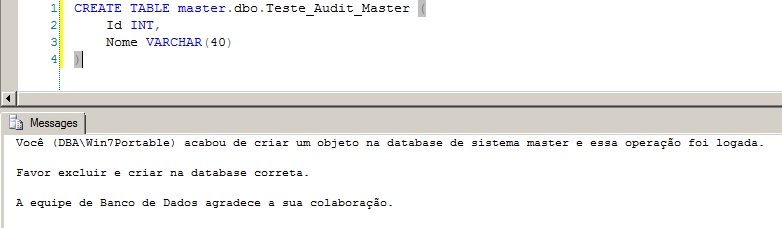
As an additional point, I added an alert message for when someone creates an object in a system database (model, master and msdb). This alert can be increased to send an email to the database team in addition to visually notifying the user who created the object, among others.
Implementation for a specific database
View source code
IF ((SELECT COUNT(*) FROM sys.triggers WHERE name = 'trgAlteracao_Objetos') > 0) DROP TRIGGER [trgAlteracao_Objetos] ON DATABASE
GO

CREATE TRIGGER [trgAlteracao_Objetos]
ON DATABASE
FOR DDL_DATABASE_LEVEL_EVENTS
AS
BEGIN


    SET NOCOUNT ON


    DECLARE
        @Evento XML,
        @Mensagem VARCHAR(MAX),

        @Dt_Evento DATETIME,
        @Ds_Tipo_Evento VARCHAR(30),
        @Ds_Database VARCHAR(50),
        @Ds_Usuario VARCHAR(100),
        @Ds_Schema VARCHAR(20),
        @Ds_Objeto VARCHAR(100),
        @Ds_Tipo_Objeto VARCHAR(20),
        @Ds_Query VARCHAR(MAX)


    SET @Evento = EVENTDATA()

    SELECT
        @Dt_Evento = @Evento.value('(/EVENT_INSTANCE/PostTime/text())[1]','datetime'),
        @Ds_Tipo_Evento = @Evento.value('(/EVENT_INSTANCE/EventType/text())[1]','varchar(30)'),
        @Ds_Database = @Evento.value('(/EVENT_INSTANCE/DatabaseName/text())[1]','varchar(50)'),
        @Ds_Usuario = @Evento.value('(/EVENT_INSTANCE/LoginName/text())[1]','varchar(100)'),
        @Ds_Schema = @Evento.value('(/EVENT_INSTANCE/SchemaName/text())[1]','varchar(20)'),
        @Ds_Objeto = @Evento.value('(/EVENT_INSTANCE/ObjectName/text())[1]','varchar(100)'),
        @Ds_Tipo_Objeto = @Evento.value('(/EVENT_INSTANCE/ObjectType/text())[1]','varchar(20)'),
        @Ds_Query = @Evento.value('(/EVENT_INSTANCE/TSQLCommand/CommandText/text())[1]','varchar(max)')


    IF (@Ds_Database IN ('master', 'model', 'msdb'))
    BEGIN

        IF (LEFT(@Ds_Tipo_Evento, 6) = 'CREATE')
        BEGIN

            SET @Mensagem = 'Você (' + @Ds_Usuario + ') acabou de criar um objeto na database de sistema ' + @Ds_Database + ' e essa operação foi logada.

Favor excluir e criar na database correta.

A equipe de Banco de Dados agradece a sua colaboração.'


            PRINT @Mensagem


        END
        ELSE BEGIN

            IF (LEFT(@Ds_Tipo_Evento, 5) = 'ALTER')
            BEGIN

                SET @Mensagem = 'Você (' + @Ds_Usuario + ') acabou de modificar um objeto na database de sistema ' + @Ds_Database + ' e essa operação foi logada.

Favor criar o objeto na database correta.

A equipe de Banco de Dados agradece a sua colaboração.'


                PRINT @Mensagem

            END

        END

    END


    IF (OBJECT_ID('Auditoria.dbo.Alteracao_Objetos') IS NULL)
    BEGIN

        -- DROP TABLE Auditoria.dbo.Alteracao_Objetos
        CREATE TABLE Auditoria.dbo.Alteracao_Objetos (
            Id_Auditoria INT IDENTITY(1,1),
            Dt_Evento DATETIME,
            Ds_Tipo_Evento VARCHAR(30),
            Ds_Database VARCHAR(50),
            Ds_Usuario VARCHAR(100),
            Ds_Schema VARCHAR(20),
            Ds_Objeto VARCHAR(100),
            Ds_Tipo_Objeto VARCHAR(20),
            Ds_Query XML
        )

        CREATE CLUSTERED INDEX SK01 ON Auditoria.dbo.Alteracao_Objetos(Id_Auditoria)

    END


    INSERT INTO Auditoria.dbo.Alteracao_Objetos
    SELECT
        @Dt_Evento,
        @Ds_Tipo_Evento,
        @Ds_Database,
        @Ds_Usuario,
        @Ds_Schema,
        @Ds_Objeto,
        @Ds_Tipo_Objeto,
        @Evento


END
GO

ENABLE TRIGGER [trgAlteracao_Objetos] ON DATABASE
GO
For all users to have access to write to this table, it will be necessary to execute the commands below:
USE [Auditoria]
GO
GRANT CONNECT TO [guest]
GRANT INSERT ON dbo.Alteracao_Objetos TO PUBLIC
Another observation in this code is that this trigger writes data to some tables in the database, that is, the user who is going to change any object in the database will need permissions to write the data to this table. For this reason, I added the grant command to the table for the public role.
Another way to get around this is to use the EXECUTE AS clause ‘login_com_permissao’, so that the trigger will be executed with the permission of that EXECUTE AS user, but it will record the data of the real user who is counting, avoiding the need to create all users in the database and release the permissions, looking like this:
CREATE TRIGGER [trgAlteracao_Objetos]
ON DATABASE
WITH EXECUTE AS 'dirceu.resende'
FOR DDL_DATABASE_LEVEL_EVENTS
[...]
Implementation for all databases
The solution presented above must be applied to each database on your server in which you want to log DDL operations. In the code snippet below, I will demonstrate how to apply this trigger to all server databases (Server trigger).
View source code
IF ((SELECT COUNT(*) FROM sys.server_triggers WHERE name = 'trgAlteracao_Objetos') > 0) DROP TRIGGER [trgAlteracao_Objetos] ON ALL SERVER
GO

CREATE TRIGGER [trgAlteracao_Objetos]
ON ALL SERVER
FOR DDL_DATABASE_LEVEL_EVENTS
AS
BEGIN


    SET NOCOUNT ON


    DECLARE
        @Evento XML,
        @Mensagem VARCHAR(MAX),

        @Dt_Evento DATETIME,
        @Ds_Tipo_Evento VARCHAR(30),
        @Ds_Database VARCHAR(50),
        @Ds_Usuario VARCHAR(100),
        @Ds_Schema VARCHAR(20),
        @Ds_Objeto VARCHAR(100),
        @Ds_Tipo_Objeto VARCHAR(20),
        @Ds_Query VARCHAR(MAX)


    SET @Evento = EVENTDATA()

    SELECT
        @Dt_Evento = @Evento.value('(/EVENT_INSTANCE/PostTime/text())[1]','datetime'),
        @Ds_Tipo_Evento = @Evento.value('(/EVENT_INSTANCE/EventType/text())[1]','varchar(30)'),
        @Ds_Database = @Evento.value('(/EVENT_INSTANCE/DatabaseName/text())[1]','varchar(50)'),
        @Ds_Usuario = @Evento.value('(/EVENT_INSTANCE/LoginName/text())[1]','varchar(100)'),
        @Ds_Schema = @Evento.value('(/EVENT_INSTANCE/SchemaName/text())[1]','varchar(20)'),
        @Ds_Objeto = @Evento.value('(/EVENT_INSTANCE/ObjectName/text())[1]','varchar(100)'),
        @Ds_Tipo_Objeto = @Evento.value('(/EVENT_INSTANCE/ObjectType/text())[1]','varchar(20)'),
        @Ds_Query = @Evento.value('(/EVENT_INSTANCE/TSQLCommand/CommandText/text())[1]','varchar(max)')


    IF (@Ds_Database IN ('master', 'model', 'msdb'))
    BEGIN

        IF (LEFT(@Ds_Tipo_Evento, 6) = 'CREATE')
        BEGIN

            SET @Mensagem = 'Você (' + @Ds_Usuario + ') acabou de criar um objeto na database de sistema ' + @Ds_Database + ' e essa operação foi logada.

Favor excluir e criar na database correta.

A equipe de Banco de Dados agradece a sua colaboração.'


            PRINT @Mensagem


        END
        ELSE BEGIN

            IF (LEFT(@Ds_Tipo_Evento, 5) = 'ALTER')
            BEGIN

                SET @Mensagem = 'Você (' + @Ds_Usuario + ') acabou de modificar um objeto na database de sistema ' + @Ds_Database + ' e essa operação foi logada.

Favor criar o objeto na database correta.

A equipe de Banco de Dados agradece a sua colaboração.'


                PRINT @Mensagem

            END

        END

    END


    IF (OBJECT_ID('Auditoria.dbo.Alteracao_Objetos') IS NULL)
    BEGIN

        -- DROP TABLE Auditoria.dbo.Alteracao_Objetos
        CREATE TABLE Auditoria.dbo.Alteracao_Objetos (
            Id_Auditoria INT IDENTITY(1,1),
            Dt_Evento DATETIME,
            Ds_Tipo_Evento VARCHAR(30),
            Ds_Database VARCHAR(50),
            Ds_Usuario VARCHAR(100),
            Ds_Schema VARCHAR(20),
            Ds_Objeto VARCHAR(100),
            Ds_Tipo_Objeto VARCHAR(20),
            Ds_Query XML
        )

        CREATE CLUSTERED INDEX SK01 ON Auditoria.dbo.Alteracao_Objetos(Id_Auditoria)

    END


    IF (@Ds_Database NOT IN ('tempdb'))
    BEGIN

        INSERT INTO Auditoria.dbo.Alteracao_Objetos
        SELECT
            @Dt_Evento,
            @Ds_Tipo_Evento,
            @Ds_Database,
            @Ds_Usuario,
            @Ds_Schema,
            @Ds_Objeto,
            @Ds_Tipo_Objeto,
            @Evento

    END


END
GO

ENABLE TRIGGER [trgAlteracao_Objetos] ON ALL SERVER
GO
As with the Trigger database, for all users to have access to write to this table, it will be necessary to execute the commands below:
USE [Auditoria]
GO
GRANT CONNECT TO [guest]
GRANT INSERT ON dbo.Alteracao_Objetos TO PUBLIC
Another observation in this code is that this trigger writes data to some tables in the database, that is, the user who is going to change objects in the database will need permissions to write data to this table, in addition to having the user created in the database of that table. For this reason, I added the grant command to the table for the public role.
Another way to get around this is to use the EXECUTE AS clause ‘login_com_permissao’, so that the trigger will be executed with the permission of that EXECUTE AS user, but it will record the data of the real user who is counting, avoiding the need to create all users in the database and release the permissions, looking like this:
CREATE TRIGGER [trgAlteracao_Objetos]
ON ALL SERVER
WITH EXECUTE AS 'dirceu.resende'
FOR DDL_DATABASE_LEVEL_EVENTS
[...]
Results
Audit table created trgAlteracao_Objetos_Final
Alert message when creating objects in system databases trgAlteracao_Objeto2
Dirceu Resende
Database & BI Architect · Microsoft MVP · MCSE, MCSA, MCT, MTA, MCP.



Comentários (0)
Carregando comentários…