
Hey guys!
In today's article I will demonstrate how brute force attacks occur on SQL Server and how to try to defend against this type of attack.
What is a brute force attack?
Click to view this contentBrute force attack on SQL Server
Click to view this contentTo be able to identify whether your SQL Server instance is being attacked, the first thing you should do is activate connection failure auditing (it is already activated by default), as shown in the screenshot below:
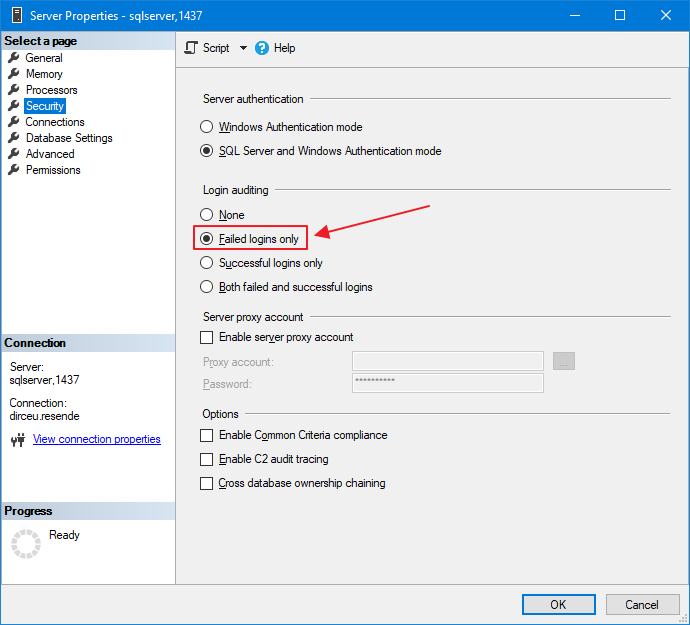
This can also be changed using T-SQL commands:
EXEC sys.xp_instance_regwrite
    @rootkey = 'HKEY_LOCAL_MACHINE',
    @key = 'SOFTWARE\Microsoft\MSSQLServer\MSSQLServer',
    @value_name = 'AuditLevel',
    @type = 'REG_DWORD',
    @value = 2 -- 0 = Nenhum / 1 = Apenas sucesso / 2 = Apenas falha / 3 = Sucesso e Falha
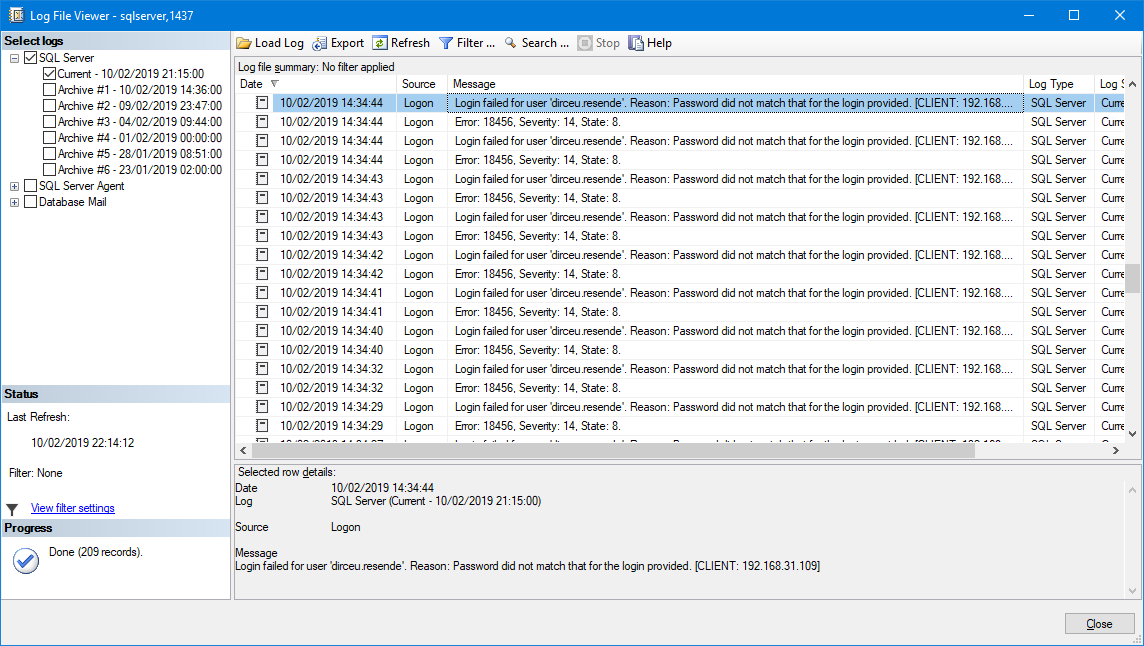
Once you have made sure that failed logins are already being audited, any connection attempt that is unsuccessful, due to an incorrect password or user that does not exist, will be logged in the SQL Server ERRORLOG, which you can access like this:
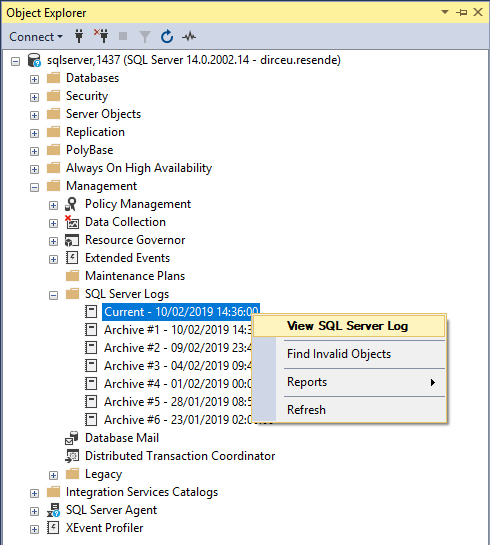
And then view the records:
Additionally, you can also use the Extended Procedures sp_readerrorlog and xp_readerrorlog to be able to view the contents of the SQL Server log using the command line.
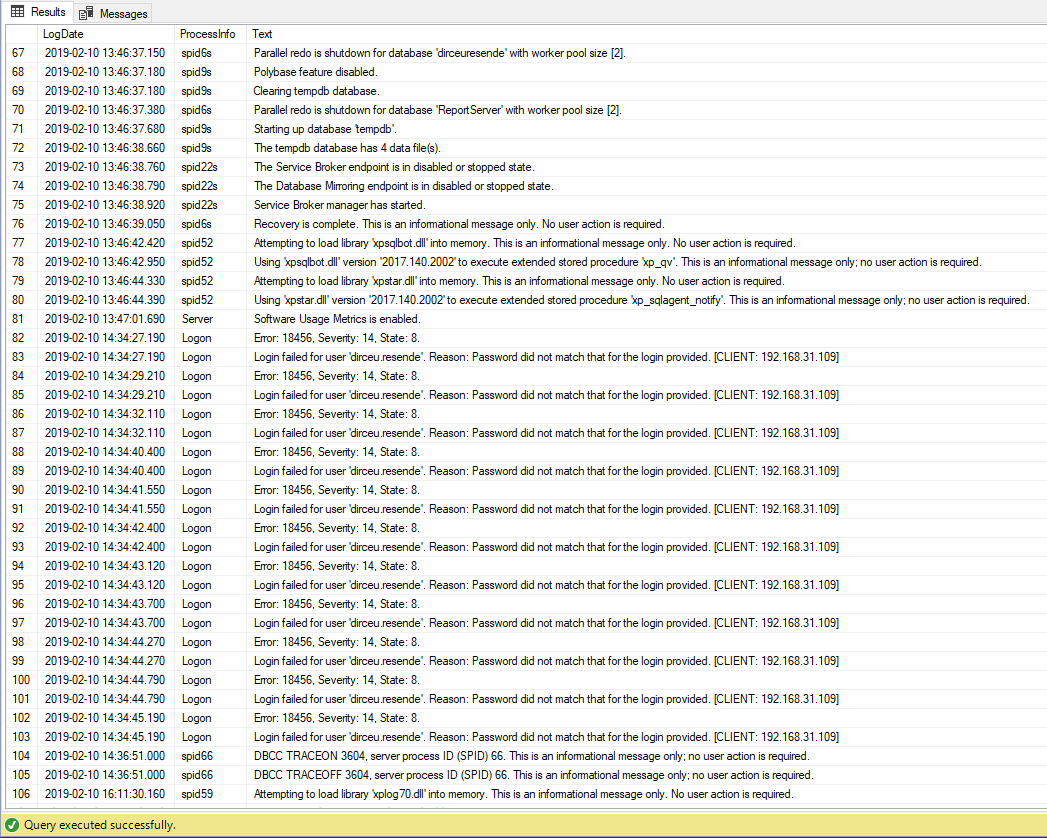
To learn more about how these two procedures work, I suggest you study the code that I will show in this article and also read the excellent article ERRORLOG – The basics, which explains everything about the SQL Server ERRORLOG.
How to identify brute force attack in SQL Server
Click to view this contentIn basic usage, we will use xp_readerrorlog to read the current log file (0) and filter login failures in the log:
EXEC master.dbo.xp_readerrorlog 0, 1, N'Login failed'
Result:
Let's now run this command again, but storing the SP return in a temporary table and identifying the IP and user of this message:
IF (OBJECT_ID('tempdb..#Login_Failed') IS NOT NULL) DROP TABLE #Login_Failed
CREATE TABLE #Login_Failed (
    [LogDate] DATETIME,
    [ProcessInfo] NVARCHAR(50) COLLATE SQL_Latin1_General_CP1_CI_AI,
    [Text] NVARCHAR(MAX) COLLATE SQL_Latin1_General_CP1_CI_AI,
    [Username] AS LTRIM(RTRIM(REPLACE(REPLACE(SUBSTRING(REPLACE([Text], 'Login failed for user ''', ''), 1, CHARINDEX('. Reason:', REPLACE([Text], 'Login failed for user ''', '')) - 2), CHAR(10), ''), CHAR(13), ''))),
    [IP] AS LTRIM(RTRIM(REPLACE(REPLACE(REPLACE((SUBSTRING([Text], CHARINDEX('[CLIENT: ', [Text]) + 9, LEN([Text]))), ']', ''), CHAR(10), ''), CHAR(13), '')))
)

INSERT INTO #Login_Failed (LogDate, ProcessInfo, [Text])
EXEC master.dbo.xp_readerrorlog 0, 1, N'Login failed'

SELECT * FROM #Login_Failed
Result:
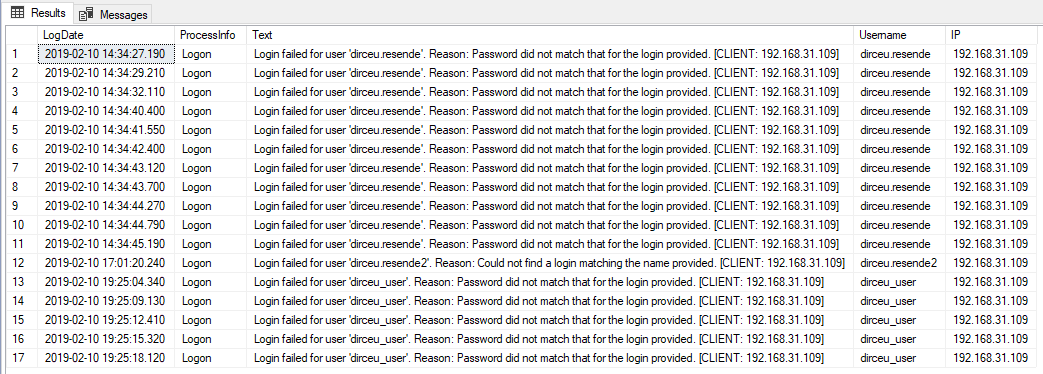
If you want to analyze not just the last log file, but all of them, you will need sp_enumerrorlogs, to list the existing logs and thus set up your loop between the files. I took the opportunity to further refine the search and bring only failed attempts due to incorrect password and non-existent login (there are other types, such as user without permission in the default database):
--------------------------------------------------------------
-- Cria as tabelas temporárias
--------------------------------------------------------------

IF (OBJECT_ID('tempdb..#Arquivos_Log') IS NOT NULL) DROP TABLE #Arquivos_Log
CREATE TABLE #Arquivos_Log (
    [idLog] INT,
    [dtLog] NVARCHAR(30) COLLATE SQL_Latin1_General_CP1_CI_AI,
    [tamanhoLog] INT
)

IF (OBJECT_ID('tempdb..#Login_Failed') IS NOT NULL) DROP TABLE #Login_Failed
CREATE TABLE #Login_Failed (
    [LogNumber] TINYINT,
    [LogDate] DATETIME,
    [ProcessInfo] NVARCHAR(50) COLLATE SQL_Latin1_General_CP1_CI_AI,
    [Text] NVARCHAR(MAX) COLLATE SQL_Latin1_General_CP1_CI_AI,
    [Username] AS LTRIM(RTRIM(REPLACE(REPLACE(SUBSTRING(REPLACE([Text], 'Login failed for user ''', ''), 1, CHARINDEX('. Reason:', REPLACE([Text], 'Login failed for user ''', '')) - 2), CHAR(10), ''), CHAR(13), ''))),
    [IP] AS LTRIM(RTRIM(REPLACE(REPLACE(REPLACE((SUBSTRING([Text], CHARINDEX('[CLIENT: ', [Text]) + 9, LEN([Text]))), ']', ''), CHAR(10), ''), CHAR(13), '')))
)

--------------------------------------------------------------
-- Importa os arquivos do ERRORLOG
--------------------------------------------------------------

INSERT INTO #Arquivos_Log
EXEC sys.sp_enumerrorlogs


--------------------------------------------------------------
-- Loop para procurar por falhas de login nos arquivos
--------------------------------------------------------------

DECLARE
    @Contador INT = 0,
    @Total INT = (SELECT COUNT(*) FROM #Arquivos_Log)


WHILE(@Contador < @Total)
BEGIN

    -- Pesquisa por senha incorreta
    INSERT INTO #Login_Failed (LogDate, ProcessInfo, [Text])
    EXEC master.dbo.sp_readerrorlog @Contador, 1, N'Password did not match that for the login provided'

    -- Pesquisa por tentar conectar com usuário que não existe
    INSERT INTO #Login_Failed (LogDate, ProcessInfo, [Text])
    EXEC master.dbo.sp_readerrorlog @Contador, 1, N'Could not find a login matching the name provided.'

    -- Atualiza o número do arquivo de log
    UPDATE #Login_Failed
    SET LogNumber = @Contador
    WHERE LogNumber IS NULL

    SET @Contador += 1

END


SELECT * FROM #Login_Failed
Result:
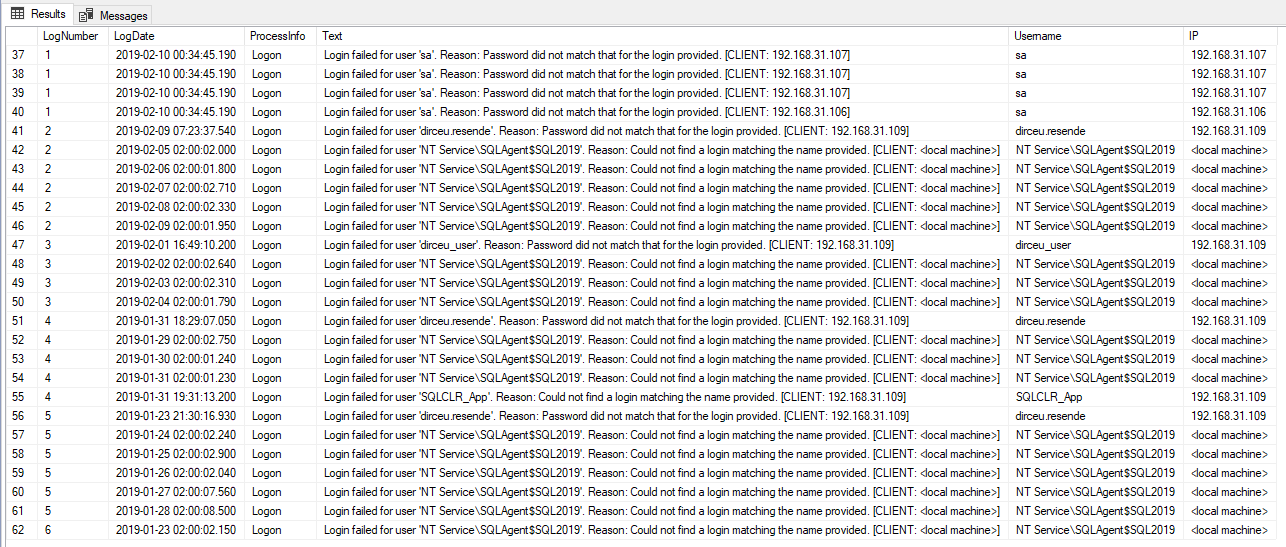
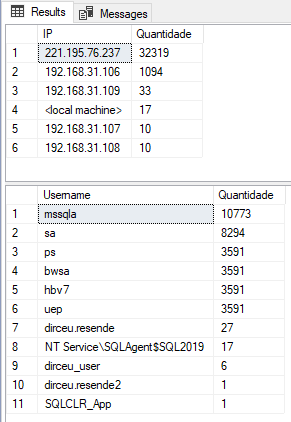
With this data, we can now begin to identify which users and the origins of attacks on users:
SELECT [IP], COUNT(*) AS Quantidade
FROM #Login_Failed
GROUP BY [IP]
ORDER BY 2 DESC

SELECT [Username], COUNT(*) AS Quantidade
FROM #Login_Failed
GROUP BY [Username]
ORDER BY 2 DESC
Result:
How to monitor possible brute force intrusions
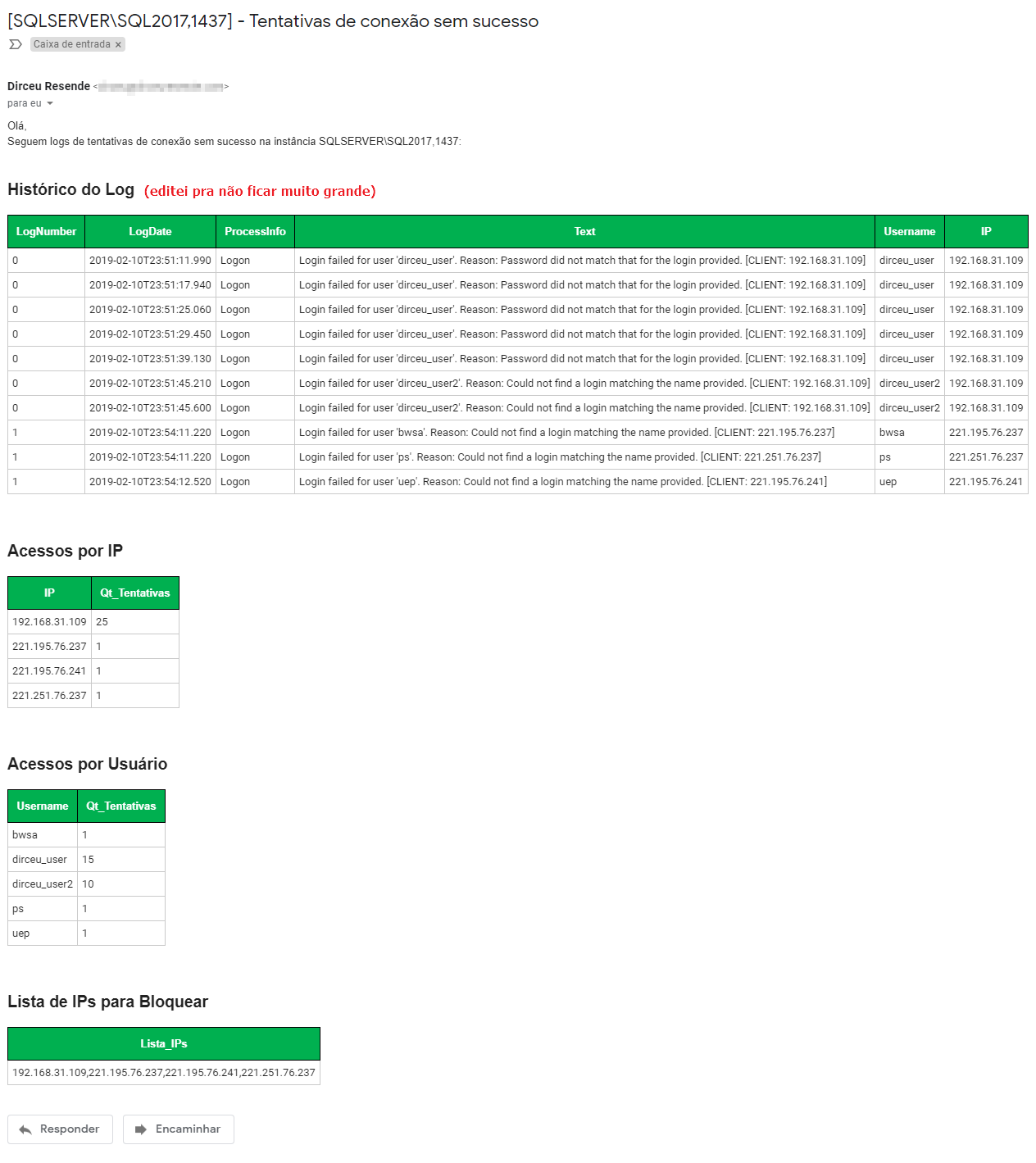
Click to view this contentTo achieve this goal, I will use SQL Server Database Mail, which will allow us to send emails through the database when there are a certain number of connection failures and the Stored Procedure stpExporta_Table_HTML_Output, which allows you to store the contents of a table in the database in a variable in the format of an HTML table, ideal for sending by email.
The script below will look for login failure events from the last hour and send these records by email (if they exceed the limit defined to avoid sending too many emails and turning into SPAM).
Monitoring code:
-- Configurações
DECLARE
    @Qt_Tentativas_Para_Alertar INT = 10,
    @Fl_Envia_Email BIT = 1

--------------------------------------------------------------
-- Cria as tabelas temporárias
--------------------------------------------------------------

IF (OBJECT_ID('tempdb..#Arquivos_Log') IS NOT NULL) DROP TABLE #Arquivos_Log
CREATE TABLE #Arquivos_Log (
    [idLog] INT,
    [dtLog] NVARCHAR(30) COLLATE SQL_Latin1_General_CP1_CI_AI,
    [tamanhoLog] INT
)

IF (OBJECT_ID('tempdb..#Login_Failed') IS NOT NULL) DROP TABLE #Login_Failed
CREATE TABLE #Login_Failed (
    [LogNumber] TINYINT,
    [LogDate] DATETIME,
    [ProcessInfo] NVARCHAR(50) COLLATE SQL_Latin1_General_CP1_CI_AI,
    [Text] NVARCHAR(MAX) COLLATE SQL_Latin1_General_CP1_CI_AI,
    [Username] AS LTRIM(RTRIM(REPLACE(REPLACE(SUBSTRING(REPLACE([Text], 'Login failed for user ''', ''), 1, CHARINDEX('. Reason:', REPLACE([Text], 'Login failed for user ''', '')) - 2), CHAR(10), ''), CHAR(13), ''))),
    [IP] AS LTRIM(RTRIM(REPLACE(REPLACE(REPLACE((SUBSTRING([Text], CHARINDEX('[CLIENT: ', [Text]) + 9, LEN([Text]))), ']', ''), CHAR(10), ''), CHAR(13), '')))
)

IF (OBJECT_ID('tempdb..##Tentativas_Conexao') IS NOT NULL) DROP TABLE ##Tentativas_Conexao
CREATE TABLE ##Tentativas_Conexao (
    [LogNumber] TINYINT,
    [LogDate] DATETIME,
    [ProcessInfo] NVARCHAR(50),
    [Text] NVARCHAR(MAX),
    [Username] NVARCHAR(256),
    [IP] NVARCHAR(50)
)

IF (OBJECT_ID('tempdb..##Tentativas_Conexao_Por_IP') IS NOT NULL) DROP TABLE ##Tentativas_Conexao_Por_IP
CREATE TABLE ##Tentativas_Conexao_Por_IP (
    [IP] NVARCHAR(256),
    Qt_Tentativas INT
)

IF (OBJECT_ID('tempdb..##Tentativas_Conexao_Por_Usuario') IS NOT NULL) DROP TABLE ##Tentativas_Conexao_Por_Usuario
CREATE TABLE ##Tentativas_Conexao_Por_Usuario (
    [Username] NVARCHAR(256),
    Qt_Tentativas INT
)

IF (OBJECT_ID('tempdb..##Lista_IPs_Bloquear') IS NOT NULL) DROP TABLE ##Lista_IPs_Bloquear
CREATE TABLE ##Lista_IPs_Bloquear (
    [Lista_IPs] VARCHAR(MAX)
)


--------------------------------------------------------------
-- Importa os arquivos do ERRORLOG
--------------------------------------------------------------

INSERT INTO #Arquivos_Log
EXEC sys.sp_enumerrorlogs


--------------------------------------------------------------
-- Loop para procurar por falhas de login nos arquivos
--------------------------------------------------------------

DECLARE
    @Contador INT = 0,
    @Total INT = (SELECT COUNT(*) FROM #Arquivos_Log),
    @Ultima_Hora VARCHAR(19) = FORMAT(DATEADD(HOUR, -1, GETDATE()), 'yyyy-MM-dd HH:mm:00'),
    @Agora VARCHAR(19) = CONVERT(VARCHAR(19), GETDATE(), 121)


WHILE(@Contador < @Total)
BEGIN

    -- Pesquisa por senha incorreta
    INSERT INTO #Login_Failed (LogDate, ProcessInfo, [Text])
    EXEC master.dbo.xp_readerrorlog @Contador, 1, N'Password did not match that for the login provided', NULL, @Ultima_Hora, @Agora

    -- Pesquisa por tentar conectar com usuário que não existe
    INSERT INTO #Login_Failed (LogDate, ProcessInfo, [Text])
    EXEC master.dbo.xp_readerrorlog @Contador, 1, N'Could not find a login matching the name provided.', NULL, @Ultima_Hora, @Agora

    -- Atualiza o número do arquivo de log
    UPDATE #Login_Failed
    SET LogNumber = @Contador
    WHERE LogNumber IS NULL

    SET @Contador += 1

END


--------------------------------------------------------------
-- Salva as tentativas realizadas, já excluindo a lista de exceções
--------------------------------------------------------------

INSERT INTO ##Tentativas_Conexao
SELECT
    A.*
FROM
    #Login_Failed A
WHERE
    A.[IP] NOT LIKE '%local machine%'
ORDER BY
    A.LogDate


INSERT INTO ##Tentativas_Conexao_Por_IP
SELECT
    [IP],
    COUNT(*) AS Quantidade
FROM
    ##Tentativas_Conexao
GROUP BY
    [IP]
ORDER BY
    2 DESC


INSERT INTO ##Tentativas_Conexao_Por_Usuario
SELECT
    [Username],
    COUNT(*) AS Quantidade
FROM
    ##Tentativas_Conexao
GROUP BY
    [Username]
ORDER BY
    2 DESC


INSERT INTO ##Lista_IPs_Bloquear
SELECT
    STUFF((
        SELECT
            ',' + [IP]
        FROM
            ##Tentativas_Conexao_Por_IP
        ORDER BY
            [IP]
        FOR XML PATH('')
    ), 1, 1, '') AS listaIps


IF ((SELECT COUNT(*) FROM ##Tentativas_Conexao) > 0)
BEGIN


    IF (@Fl_Envia_Email = 1 AND (SELECT COUNT(*) FROM ##Tentativas_Conexao) > @Qt_Tentativas_Para_Alertar)
    BEGIN


        DECLARE
            @Assunto VARCHAR(200) = '[' + @@SERVERNAME + '] - Tentativas de conexão sem sucesso',
            @Mensagem VARCHAR(MAX) = 'Olá,<br/>Seguem logs de tentativas de conexão sem sucesso na instância ' + @@SERVERNAME + ':',
            @HTML VARCHAR(MAX)

        --------------------------------------------------------------
        -- Gera o código HTML para enviar por e-mail
        -- https://dirceuresende.com/blog/como-exportar-dados-de-uma-tabela-do-sql-server-para-html/
        --------------------------------------------------------------

        EXEC dbo.stpExporta_Tabela_HTML_Output
            @Ds_Tabela = '##Tentativas_Conexao', -- varchar(max)
            @Ds_Saida = @HTML OUT -- varchar(max)

        SET @Mensagem += '<br/><br/><h2>Histórico do Log</h2>' + @HTML


        EXEC dbo.stpExporta_Tabela_HTML_Output
            @Ds_Tabela = '##Tentativas_Conexao_Por_IP', -- varchar(max)
            @Ds_Saida = @HTML OUT -- varchar(max)

        SET @Mensagem += '<br/><br/><h2>Acessos por IP</h2>' + @HTML


        EXEC dbo.stpExporta_Tabela_HTML_Output
            @Ds_Tabela = '##Tentativas_Conexao_Por_Usuario', -- varchar(max)
            @Ds_Saida = @HTML OUT -- varchar(max)

        SET @Mensagem += '<br/><br/><h2>Acessos por Usuário</h2>' + @HTML


        EXEC dbo.stpExporta_Tabela_HTML_Output
            @Ds_Tabela = '##Lista_IPs_Bloquear', -- varchar(max)
            @Ds_Saida = @HTML OUT -- varchar(max)

        SET @Mensagem += '<br/><br/><h2>Lista de IPs para Bloquear</h2>' + @HTML


        --------------------------------------------------------------
        -- Envia o e-mail
        -- https://dirceuresende.com/blog/como-habilitar-enviar-monitorar-emails-pelo-sql-server-sp_send_dbmail/
        --------------------------------------------------------------

        EXEC msdb.dbo.sp_send_dbmail
            @profile_name = 'Profile DirceuResende',
            @recipients = 'email@gmail.com',
            @subject = @Assunto,
            @body = @Mensagem,
            @body_format = 'html'


    END


END
Result:
How to avoid possible brute force intrusions
Click to view this contentTo export the list of IPs to a file on the server, we can use different methods such as xp_cmdshell, OLE Automation or SQLCLR, but I will choose xp_cmdshell in this example, as it is the simplest to implement. Once the file has been exported in bat format with the commands to be executed, simply schedule the execution of this script in the Windows task scheduler and configure the execution to use a user with Administrator permission.
Another viable alternative is to let SQL Server itself execute the commands to add IPs to the Firewall instead of exporting a bat file with these commands. For this to be possible, the user who starts the SQL Server service must be a local Administrator of the machine, which ends up not being so recommended from a security point of view.
An important point to be demonstrated again is the list of exceptions, to prevent important IPs from being blocked during any test or temporary error.
To finish this topic, I will make the complete script available, which:
- identifies the logs
- Categorize by IP and user
- stores a history of attempts
- searches for connection failure occurrences since the last Procedure execution
- implemented exception list
- send alert email
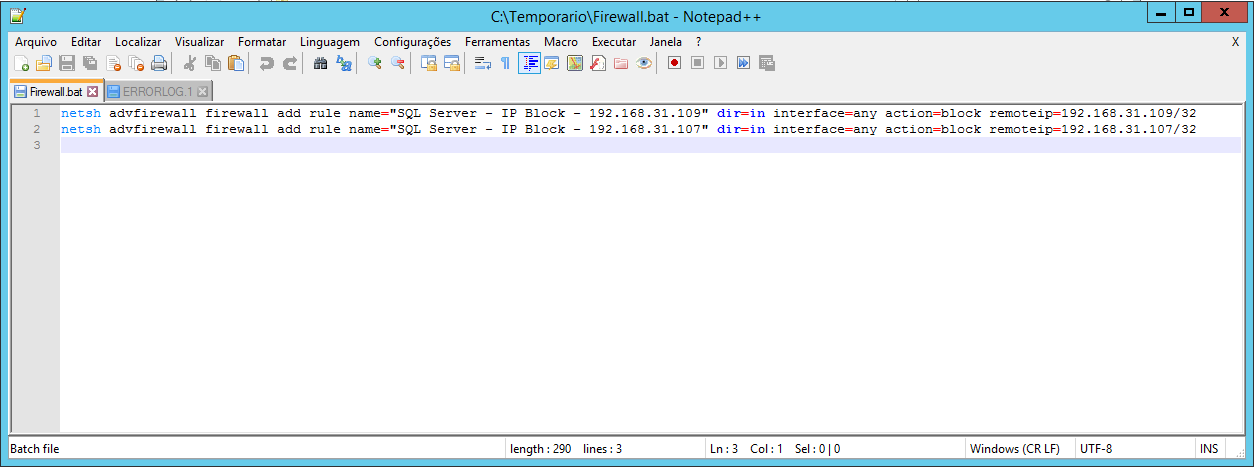
- generates a .bat file on the disk with commands to block IPs with more than N connection failures in Windows Firewall
Script source code:
USE [dirceuresende]
GO

IF (OBJECT_ID('dbo.stpVerifica_Falha_Conexao') IS NULL) EXEC('CREATE PROCEDURE dbo.stpVerifica_Falha_Conexao AS SELECT 1')
GO

ALTER PROCEDURE dbo.stpVerifica_Falha_Conexao (
    @Fl_Envia_Email BIT = 1,
    @Qt_Tentativas_Para_Alertar INT = 100,
    @Fl_Gera_Arquivo_Firewall BIT = 1,
    @Qt_Tentativas_para_Bloquear INT = 5
)
AS
BEGIN


    SET NOCOUNT ON


    -- DECLARE @Qt_Tentativas_Para_Alertar INT = 100, @Fl_Envia_Email BIT = 1, @Fl_Gera_Arquivo_Firewall BIT = 1, @Qt_Tentativas_para_Bloquear INT = 5

    --------------------------------------------------------------
    -- Cria as tabelas temporárias
    --------------------------------------------------------------

    IF (OBJECT_ID('tempdb..#Arquivos_Log') IS NOT NULL) DROP TABLE #Arquivos_Log
    CREATE TABLE #Arquivos_Log (
        [idLog] INT,
        [dtLog] NVARCHAR(30) COLLATE SQL_Latin1_General_CP1_CI_AI,
        [tamanhoLog] INT
    )

    IF (OBJECT_ID('tempdb..#Login_Failed') IS NOT NULL) DROP TABLE #Login_Failed
    CREATE TABLE #Login_Failed (
        [LogNumber] TINYINT,
        [LogDate] DATETIME,
        [ProcessInfo] NVARCHAR(50) COLLATE SQL_Latin1_General_CP1_CI_AI,
        [Text] NVARCHAR(MAX) COLLATE SQL_Latin1_General_CP1_CI_AI,
        [Username] AS LTRIM(RTRIM(REPLACE(REPLACE(SUBSTRING(REPLACE([Text], 'Login failed for user ''', ''), 1, CHARINDEX('. Reason:', REPLACE([Text], 'Login failed for user ''', '')) - 2), CHAR(10), ''), CHAR(13), ''))),
        [IP] AS LTRIM(RTRIM(REPLACE(REPLACE(REPLACE((SUBSTRING([Text], CHARINDEX('[CLIENT: ', [Text]) + 9, LEN([Text]))), ']', ''), CHAR(10), ''), CHAR(13), '')))
    )

    IF (OBJECT_ID('tempdb..##Tentativas_Conexao') IS NOT NULL) DROP TABLE ##Tentativas_Conexao
    CREATE TABLE ##Tentativas_Conexao (
        [LogNumber] TINYINT,
        [LogDate] DATETIME,
        [ProcessInfo] NVARCHAR(50),
        [Text] NVARCHAR(MAX),
        [Username] NVARCHAR(256),
        [IP] NVARCHAR(50)
    )

    IF (OBJECT_ID('tempdb..##Tentativas_Conexao_Por_IP') IS NOT NULL) DROP TABLE ##Tentativas_Conexao_Por_IP
    CREATE TABLE ##Tentativas_Conexao_Por_IP (
        [IP] NVARCHAR(256),
        Qt_Tentativas INT
    )

    IF (OBJECT_ID('tempdb..##Tentativas_Conexao_Por_Usuario') IS NOT NULL) DROP TABLE ##Tentativas_Conexao_Por_Usuario
    CREATE TABLE ##Tentativas_Conexao_Por_Usuario (
        [Username] NVARCHAR(256),
        Qt_Tentativas INT
    )

    IF (OBJECT_ID('tempdb..##Lista_IPs_Bloquear') IS NOT NULL) DROP TABLE ##Lista_IPs_Bloquear
    CREATE TABLE ##Lista_IPs_Bloquear (
        [Lista_IPs] VARCHAR(MAX)
    )

    IF (OBJECT_ID('tempdb..#Bloquear_IP') IS NOT NULL) DROP TABLE #Bloquear_IP
    CREATE TABLE #Bloquear_IP (
        Contador INT IDENTITY(1,1) NOT NULL,
        [IP] NVARCHAR(256),
        Qt_Tentativas INT
    )


    --------------------------------------------------------------
    -- Lista com IP's permitidos que não podem ser bloqueados
    --------------------------------------------------------------

    IF (OBJECT_ID('dbo.Excecoes') IS NULL)
    BEGIN

        -- DROP TABLE dbo.Excecoes
        CREATE TABLE dbo.Excecoes (
            [IP] VARCHAR(15) COLLATE SQL_Latin1_General_CP1_CI_AI NOT NULL UNIQUE
        ) WITH(DATA_COMPRESSION=PAGE)


        INSERT INTO dbo.Excecoes
        VALUES
            ('192.168.31.108'),
            ('127.0.0.1')


    END


    --------------------------------------------------------------
    -- Histórico das tentativas de conexão
    --------------------------------------------------------------

    IF (OBJECT_ID('dbo.Tentativas_Conexao') IS NULL)
    BEGIN

        -- TRUNCATE TABLE dbo.Tentativas_Conexao
        CREATE TABLE dbo.Tentativas_Conexao (
            [LogDate] DATETIME,
            [ProcessInfo] NVARCHAR(50) COLLATE SQL_Latin1_General_CP1_CI_AI,
            [Username] NVARCHAR(256) COLLATE SQL_Latin1_General_CP1_CI_AI,
            [IP] NVARCHAR(50) COLLATE SQL_Latin1_General_CP1_CI_AI
        ) WITH(DATA_COMPRESSION=PAGE)

        CREATE CLUSTERED INDEX SK01_Tentativas_Conexao ON dbo.Tentativas_Conexao(LogDate) WITH(DATA_COMPRESSION=PAGE, FILLFACTOR=100)

    END


    --------------------------------------------------------------
    -- Importa os arquivos do ERRORLOG
    --------------------------------------------------------------

    INSERT INTO #Arquivos_Log
    EXEC sys.sp_enumerrorlogs


    --------------------------------------------------------------
    -- Loop para procurar por falhas de login nos arquivos
    --------------------------------------------------------------

    DECLARE
        @Contador INT = 0,
        @Total INT = (SELECT COUNT(*) FROM #Arquivos_Log),
        @Ultima_Coleta VARCHAR(19) = CONVERT(VARCHAR(19), ISNULL(DATEADD(SECOND, 1, (SELECT MAX(LogDate) FROM dbo.Tentativas_Conexao)), '1900-01-01'), 121),
        @Agora VARCHAR(19) = CONVERT(VARCHAR(19), GETDATE(), 121),
        @IP VARCHAR(20),
        @Query VARCHAR(4000)


    WHILE(@Contador < @Total)
    BEGIN

        -- Pesquisa por senha incorreta
        INSERT INTO #Login_Failed (LogDate, ProcessInfo, [Text])
        EXEC master.dbo.xp_readerrorlog @Contador, 1, N'Password did not match that for the login provided', NULL, @Ultima_Coleta, @Agora

        -- Pesquisa por tentar conectar com usuário que não existe
        INSERT INTO #Login_Failed (LogDate, ProcessInfo, [Text])
        EXEC master.dbo.xp_readerrorlog @Contador, 1, N'Could not find a login matching the name provided.', NULL, @Ultima_Coleta, @Agora

        -- Atualiza o número do arquivo de log
        UPDATE #Login_Failed
        SET LogNumber = @Contador
        WHERE LogNumber IS NULL

        SET @Contador += 1

    END


    --------------------------------------------------------------
    -- Salva as tentativas realizadas, já excluindo a lista de exceções
    --------------------------------------------------------------

    INSERT INTO ##Tentativas_Conexao
    SELECT
        A.*
    FROM
        #Login_Failed A
        LEFT JOIN dbo.Excecoes B ON B.[IP] = A.[IP] COLLATE SQL_Latin1_General_CP1_CI_AI
    WHERE
        (B.[IP] IS NULL AND A.[IP] NOT LIKE '%local machine%')
    ORDER BY
        A.LogDate


    INSERT INTO ##Tentativas_Conexao_Por_IP
    SELECT
        [IP],
        COUNT(*) AS Quantidade
    FROM
        ##Tentativas_Conexao
    GROUP BY
        [IP]
    ORDER BY
        2 DESC


    INSERT INTO ##Tentativas_Conexao_Por_Usuario
    SELECT
        [Username],
        COUNT(*) AS Quantidade
    FROM
        ##Tentativas_Conexao
    GROUP BY
        [Username]
    ORDER BY
        2 DESC


    INSERT INTO #Bloquear_IP
    SELECT
        A.[IP],
        COUNT(*) AS Quantidade
    FROM
        ##Tentativas_Conexao A
        LEFT JOIN dbo.Tentativas_Conexao B ON B.[IP] = A.[IP] COLLATE SQL_Latin1_General_CP1_CI_AI
    WHERE
        B.[IP] IS NULL
    GROUP BY
        A.[IP]
    HAVING
        COUNT(*) >= @Qt_Tentativas_para_Bloquear
    ORDER BY
        2 DESC


    INSERT INTO ##Lista_IPs_Bloquear
    SELECT
        STUFF((
            SELECT
                ',' + [IP]
            FROM
                #Bloquear_IP
            ORDER BY
                [IP]
            FOR XML PATH('')
        ), 1, 1, '') AS listaIps


    --------------------------------------------------------------
    -- Armazena o histórico
    --------------------------------------------------------------

    INSERT INTO dbo.Tentativas_Conexao
    (
        LogDate,
        ProcessInfo,
        Username,
        [IP]
    )
    SELECT
        LogDate,
        (CASE
            WHEN [Text] LIKE '%password%' THEN 'Password failed'
            WHEN [Text] LIKE '%Could not find a login matching the name provided%' THEN 'Login does not exists'
        END) AS ProcessInfo,
        Username,
        [IP]
    FROM
        ##Tentativas_Conexao


    IF ((SELECT COUNT(*) FROM ##Tentativas_Conexao) > 0)
    BEGIN


        IF (@Fl_Envia_Email = 1 AND (SELECT COUNT(*) FROM ##Tentativas_Conexao) > @Qt_Tentativas_Para_Alertar)
        BEGIN


            DECLARE
                @Assunto VARCHAR(200) = '[' + @@SERVERNAME + '] - Tentativas de conexão sem sucesso',
                @Mensagem VARCHAR(MAX) = 'Olá,<br/>Seguem logs de tentativas de conexão sem sucesso na instância ' + @@SERVERNAME + ':',
                @HTML VARCHAR(MAX)

            --------------------------------------------------------------
            -- Gera o código HTML para enviar por e-mail
            -- https://dirceuresende.com/blog/como-exportar-dados-de-uma-tabela-do-sql-server-para-html/
            --------------------------------------------------------------

            EXEC dbo.stpExporta_Tabela_HTML_Output
                @Ds_Tabela = '##Tentativas_Conexao', -- varchar(max)
                @Ds_Saida = @HTML OUT -- varchar(max)

            SET @Mensagem += '<br/><br/><h2>Histórico do Log</h2>' + @HTML


            EXEC dbo.stpExporta_Tabela_HTML_Output
                @Ds_Tabela = '##Tentativas_Conexao_Por_IP', -- varchar(max)
                @Ds_Saida = @HTML OUT -- varchar(max)

            SET @Mensagem += '<br/><br/><h2>Acessos por IP</h2>' + @HTML


            EXEC dbo.stpExporta_Tabela_HTML_Output
                @Ds_Tabela = '##Tentativas_Conexao_Por_Usuario', -- varchar(max)
                @Ds_Saida = @HTML OUT -- varchar(max)

            SET @Mensagem += '<br/><br/><h2>Acessos por Usuário</h2>' + @HTML


            EXEC dbo.stpExporta_Tabela_HTML_Output
                @Ds_Tabela = '##Lista_IPs_Bloquear', -- varchar(max)
                @Ds_Saida = @HTML OUT -- varchar(max)

            SET @Mensagem += '<br/><br/><h2>Lista de IPs para Bloquear</h2>' + @HTML


            --------------------------------------------------------------
            -- Envia o e-mail
            -- https://dirceuresende.com/blog/como-habilitar-enviar-monitorar-emails-pelo-sql-server-sp_send_dbmail/
            --------------------------------------------------------------

            EXEC msdb.dbo.sp_send_dbmail
                @profile_name = 'Profile DirceuResende',
                @recipients = 'email@gmail.com',
                @subject = @Assunto,
                @body = @Mensagem,
                @body_format = 'html'


        END


        --------------------------------------------------------------
        -- Bloqueia os IP's no Firewall do Windows
        -- https://dirceuresende.com/blog/como-instalar-e-configurar-o-microsoft-sql-server-2016-no-windows-server-2016/
        --------------------------------------------------------------

        IF (@Fl_Gera_Arquivo_Firewall = 1)
        BEGIN

            DECLARE @Fl_Xp_CmdShell_Ativado BIT = (SELECT (CASE WHEN CAST([value] AS VARCHAR(MAX)) = '1' THEN 1 ELSE 0 END) FROM sys.configurations WHERE [name] = 'xp_cmdshell')

            IF (@Fl_Xp_CmdShell_Ativado = 0)
            BEGIN

                EXEC sp_configure 'show advanced options', 1;
                RECONFIGURE WITH OVERRIDE;

                EXEC sp_configure 'xp_cmdshell', 1;
                RECONFIGURE WITH OVERRIDE;

            END


            SET @Contador = 1
            SET @Total = (SELECT COUNT(*) FROM #Bloquear_IP)

            -- Apaga o arquivo
            EXEC master.dbo.xp_cmdshell 'type nul > "C:\Temporario\Firewall.bat"'

            WHILE(@Contador <= @Total)
            BEGIN

                SELECT TOP(1) @IP = [IP]
                FROM #Bloquear_IP
                WHERE Contador = @Contador

                SET @Query = 'ECHO netsh advfirewall firewall add rule name="SQL Server - IP Block - ' + @IP + '" dir=in interface=any action=block remoteip=' + @IP + '/32 >> "C:\Temporario\Firewall.bat'
                EXEC master.dbo.xp_cmdshell @Query
                --PRINT @Query

                SET @Contador += 1

            END


            IF (@Fl_Xp_CmdShell_Ativado = 0)
            BEGIN

                EXEC sp_configure 'xp_cmdshell', 0;
                RECONFIGURE WITH OVERRIDE;

                EXECUTE sp_configure 'show advanced options', 0;
                RECONFIGURE WITH OVERRIDE;

            END


        END


    END


END
Generated IP blocking script (Run as Administrator):
Security in SQL Server – SERIOUS Subject!
After demonstrating some ways to mitigate the problem of brute force invasion by identifying and blocking the IPs that are trying to invade the environment in Windows Firewall, We need to talk seriously about Security. Unfortunately, it is very common to see environments that are completely sloppy in terms of database security, where application users have sysadmin permission, users who access the database also as sysadmin, users with elevated privileges and weak passwords, xp_cmdshell and dynamic query being common practices in environments and many other very worrying scenarios.
Regarding the scenario in this post, which is the brute force attack, the vast majority of cases occur due to the fact that the database is published for the Internet, making it much easier for potential attackers to enter and the possibility of someone trying to attack your instance. In many cases, this occurs when the bank's server is the same as the application's, which is not a good practice for either the bank or the application.
The bank ends up competing for server resources (CPU, Memory, Disk, Network) with the application and still has to be visible and exposed to the Internet, without the possibility of creating a Whitelist (only addresses on the list have access to the server), as this would prevent users from accessing the application. Not to mention that if the application server is compromised, the bank's data can also be accessed, which is a catastrophic scenario.
Another point that must also be raised is that even when the brute force attack is carried out in the environment, even if it is unsuccessful it still manages to harm the company, because while it keeps trying thousands of passwords to break into the bank, this process ends up consuming a lot of server resources unnecessarily.
Furthermore, many ransomware, such as WannaCry (which devastated the internet last year) are usually preceded by brute force attacks to gain access to the database so that the attacker can take the databases offline so that the Ransonware can later encrypt the data (mdf) and log (ldf) files.
So what to do to resolve this?
Well, the FIRST step towards this is to make the bank invisible to the Internet. If you have to separate the database from the application and set up 1 server for each, then do so, creating a VPN to carry out communication between the 2 servers (if they are on different networks, such as Azure). If the company is unable to afford a server for each person and the application is accessed via the Internet, via several IPs and there is no possibility of creating a whitelist to limit the IPs that will access the server, the solution is to implement the solution I provided above and hope the worst doesn't happen, as the script in this article will only block attempts to access the database, but there are N other types of attacks to access the server, such as RDP attacks, SSH, etc..
The SECOND step is disable and rename SA user and any other standard SQL Server user, as these users are the main targets of brute force attacks, since the attacker already knows the login and only needs the password.
The THIRD step is to avoid using logins with SQL Server authentication as much as possible, as the bank has to control and manage these passwords. Furthermore, the hash of these passwords is stored in the database and can be easily cracked and validated without generating even an exception in the SQL Server log, as I demonstrated in the article SQL Server – How to identify weak, empty passwords or those that are the same as the user name. Whenever possible, use Windows AD authentication, eliminating the need to enter passwords and SQL Server does not have hash or password information.
The FOURTH step is to implement the monitoring of this article and always keep an eye on this report, blocking IPs that have many connection failures in the Windows (or Azure) Firewall. This work must be CONSTANT and not just punctual. It left the database available for the internet, so now it can handle it. If possible, use this list of IPs to block these addresses at the organizational level, in the general firewall of the network and not just on the bank server. You can also get lists of IP Ranges by Country and try to release only IPs from Brazil (more comprehensive Whitelist).
The FIFTH step is to periodically review the password for your environment's SQL Server logins. It is very important that these users' passwords are changed AT LEAST 1X PER YEAR. Furthermore, these users' passwords must be long and complex (I always use passwords with 50 characters or more, including letters, numbers and symbols). Furthermore, it is important to have an annual (at least) access review policy. sysadmin is only for DBA and db_owner shouldn't even be used (save very rare exceptions).
Well guys, this was the article about Brute Force Attack on SQL Server. I hope you enjoyed this Security line, which is an area that I must invest a lot of time studying and writing articles this year and it is the theme of my talk at MVPConf Latam 2019.
A big hug and see you in the next post.

Comentários (0)
Carregando comentários…